


Want to add a touch of visual interest to your WordPress blog posts? Adding odd and even classes can make your layout more engaging, breaking up long lists of posts with subtle design changes that catch the eye.
We frequently receive questions from our readers about how to apply this technique. While many WordPress themes don’t offer a built-in option for odd and even post classes, we found a quick and easy way to add them yourself using the free WPCode plugin.
In this article, we’ll show you how to add odd/even class to your post in WordPress themes.

Why Add Odd/Even Class to Your Posts in WordPress Themes?
Many WordPress themes use an odd or even class for WordPress comments. It helps users visualize where one comment ends and the next one begins.
Similarly, you can use this technique for your WordPress posts. It looks aesthetically pleasing and helps users quickly scan pages with lots of content. It is particularly helpful for the homepage of magazine or news websites.
Having said that, let’s see how to add an odd and even class to your posts in WordPress theme.
Adding Odd/Even Class to Posts in WordPress Theme
WordPress generates default CSS classes and adds them to different items on your website on the fly. These CSS classes help plugin and theme developers add their own styles for different items.
WordPress also comes with a function called post_class, which is used by theme developers to add classes to the post item. See our guide on how to style each WordPress post differently.
The post_class is also a filter, which means you can hook your own functions to it. This is exactly what we will be doing here.
Simply add this code to your theme’s functions.php file, in a site-specific plugin, or in a code snippets plugin like WPCode.
function oddeven_post_class ( $classes ) {
   global $current_class;
   $classes[] = $current_class;
   $current_class = ($current_class == 'odd') ? 'even' : 'odd';
   return $classes;
}
add_filter ( 'post_class' , 'oddeven_post_class' );
global $current_class;
$current_class = 'odd';
We recommend using the WPCode plugin to add this code. It’s the safest and easiest way to manage custom code on your site without having to edit your theme’s functions.php file directly.
We use WPCode to handle all the custom snippets across our portfolio of websites. It keeps everything organized and prevents code from being erased during theme updates.
To learn more about this code snippets plugin, see our complete WPCode review.

To begin, you need to install and activate the free WPCode plugin. For instructions, see this guide on how to install a WordPress plugin.
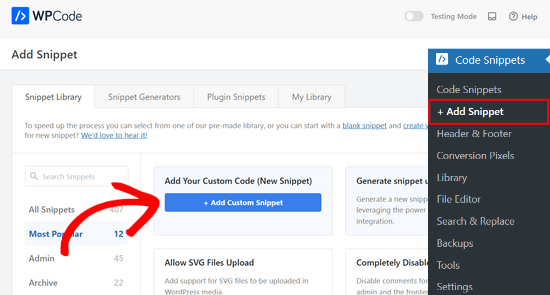
Upon activation, go to the Code Snippets » + Add Snippet page from the WordPress dashboard.
Then, click the ‘+ Add Custom Snippet’ button under the ‘Add Your Custom Code (New Snippet)’ option.
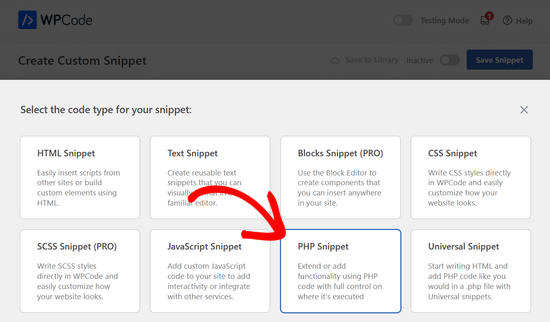
Next, you need to select a code type from the list of options that appear on the screen.
For this tutorial, choose ‘PHP Snippet’ as the code type.
You’ll now be directed to the Create Custom Snippet page.
From here, add a title for your code snippet, which can be anything to help you remember what the code is for.
After that, paste the code from above into the ‘Code Preview’ box.
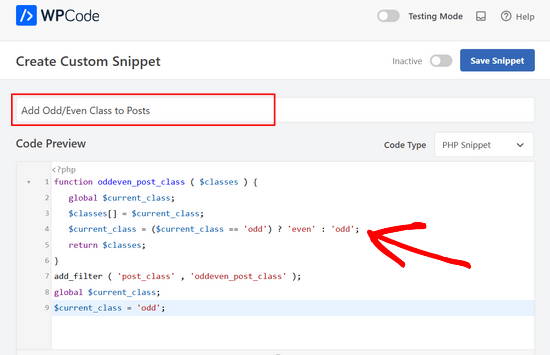
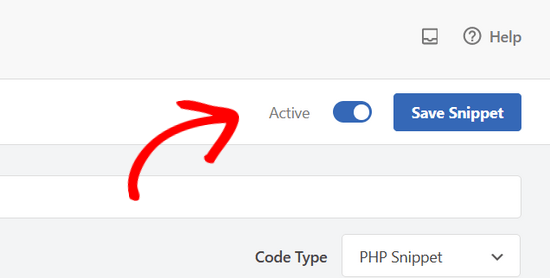
Once that’s done, simply switch the toggle from ‘Inactive’ to ‘Active’ and click the ‘Save Snippet’ button.
This function simply adds odd to the first post, then even, and so on.
You can find the odd and even classes in your site’s source code. Simply take the mouse to a post title and then right click to select Inspect or Inspect Element.
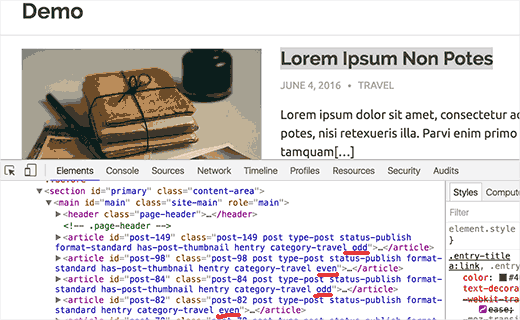
Now that you have added even and odd classes to your posts. The next step is to style them using CSS. You can add your custom CSS to your child theme’s stylesheet, the theme customizer, or by using the WPCode plugin.
Here is a sample CSS that you can use as a starting point:
.even {
background:#f0f8ff;
}
.odd {
 background:#f4f4fb;
}
This is how it looked on our test site:
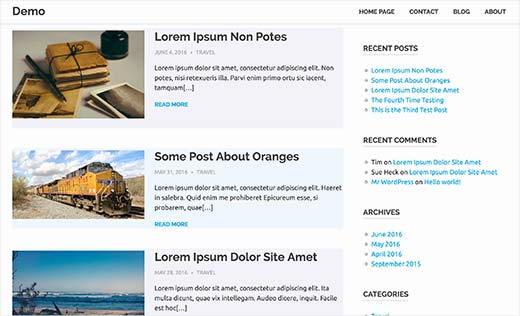
If you don’t know how to use CSS, then you may want to check out our guide on how to easily add custom CSS to your WordPress site.
Additional Resources for Customizing WordPress Pages and Posts
We hope this article helped you learn how to add odd/even class to your posts in WordPress themes. You may also want to check out these other articles to further customize your site’s design:
- How to Add Custom Post Status for Blog Posts in WordPress
- How to Change the Number of Posts Displayed On Your WordPress Blog Page
- How to Show or Hide Widgets on Specific WordPress Pages
- 15 Best Drag & Drop WordPress Page Builders Compared
- How To Switch/Convert Custom Post Types in WordPress
- How to Add Excerpts to Your Pages in WordPress (Step by Step)
If you liked this article, then please subscribe to our YouTube Channel for WordPress video tutorials. You can also find us on Twitter and Facebook.





Sarmad Gardezi
I want to use it with CPT then how i can use it ?
WPBeginner Support
It should automatically affect custom post types
Admin
Vera
Hello,
I was trying to make this work on my test site, where I work with Elementor and Astra. For some reason, once I add the code – everything colors with the “odd” color, and I don’t understand why.
Can you help me sort it out, please?
Vera
WPBeginner Support
For that question, you would want to check with Elementor to ensure their page builder is not overriding the function and they should be able to assist
Admin
Oliur
My Blog Name WayTrick. It a Blogger Blog. Now I want to my blog Tansfer to wordpress. How do it?
WPBeginner Support
Please see our guide on how to switch from Blogger to WordPress.
Admin
kaluan
This seems not working in Genesis framework? Any additional code needed to add?
onkar
how to add odd even class in posts for particular page
Bucur
Ok good function, but css style?
. post {
/ / Rest of the css
}
.odd { } ???
Simon
Thanks for this. Just what I needed.
Samuel
How could I take this a step further and target a specific post category?
I have a custom post type – testimonial, and I only want odd/even styling in that section.
Thanks!
Editorial Staff
You would have to use WordPress conditionals:
http://codex.wordpress.org/Conditional_Tags
Admin
Eric
This is by far the easiest method of creating odd and even posts for wordpress!! Thanks so much for sharing!
Christine
As, sadly, css3 selectors are not well supported by all browsers…
I just tried your code for a new twenty eleven child theme i’m customizing, it works so fine,
Thanks a Lot for sharing this ! !
Daniele Zamboni
What is odd/even class ? Sorry but i’m newbie
wpbeginner
@Daniele Zamboni These are CSS classes that you can add for styling purposes.