


Have you ever wanted to allow someone exclusive access to preview one of your unpublished WordPress posts?
By default, you cannot do this without creating a user account for each individual viewer that has at least Editor level or higher permissions.
In this article, we will show you how to easily allow public post previews of unpublished posts in WordPress.
When Do You Need Public Post Preview of Unpublished Posts in WordPress?
When writing a post on your WordPress blog, sometimes you may want to share a preview of an unpublished post with someone outside your team.
Maybe this is a friend whose opinion you really value. Or it can be an industry expert whom you’re featuring in your article, and you want to get their final approval.
Typically, you have two options:
- Create an account for this user on your WordPress site (with Editor level permissions)
- Copy and paste the article into Google Docs and share it there
Wouldn’t it be nice if you could simply share a private preview link, so the user can view your unpublished post and give you feedback?
Yes, it’s possible.
Let’s take a look at how to easily allow public post previews of unpublished posts in WordPress.
How to Add Public Post Previews of Unpublished Posts in WordPress
The first thing you need to do is install and activate the Public Post Preview plugin. For more details, see our step-by-step guide on how to install a WordPress plugin.
Upon activation, you need to edit the post or page that you want to share. In the post settings, you will notice the new checkbox to enable public preview of the post or page.
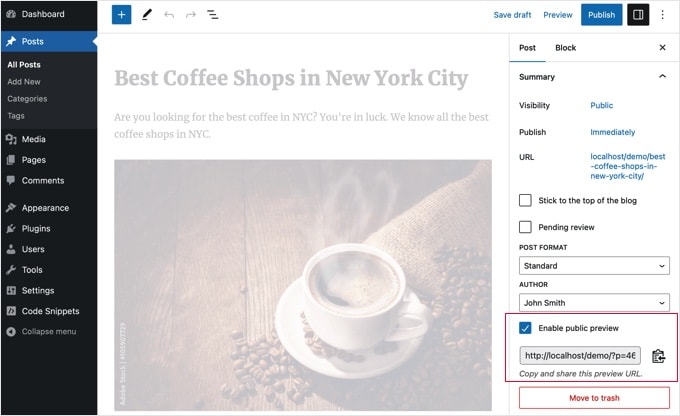
After enabling the public preview, you need to click on the save draft button to save your changes. Next, you can copy the public preview URL and share it with your friend or industry expert.
The URL contains a special key that allows anyone with the link to see the preview of the draft post. However, they cannot make any edits or changes to the article.
To disable the public preview, you need to edit the post or page and uncheck the public preview checkbox. This will disable the public preview, and the previously shared URL will stop working.
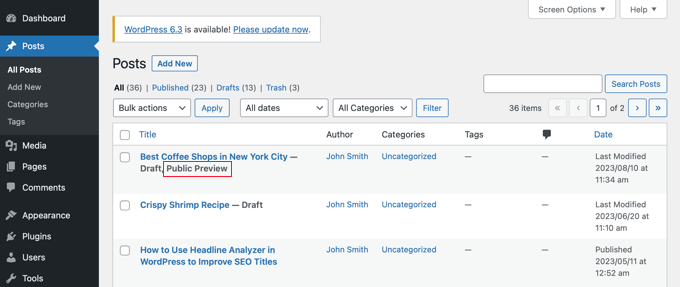
You can also quickly see the posts you have shared with a public preview on your Posts edit screen in the WordPress admin area.
We hope this article helped you learn how to easily share public previews of unpublished posts in WordPress. You may also want to see our guide on how to choose the best WordPress hosting and our expert pick of the best WordPress plugins for business websites.
If you liked this article, then please subscribe to our YouTube Channel for WordPress video tutorials. You can also find us on Twitter and Facebook.





Syed Balkhi says
Hey WPBeginner readers,
Did you know you can win exciting prizes by commenting on WPBeginner?
Every month, our top blog commenters will win HUGE rewards, including premium WordPress plugin licenses and cash prizes.
You can get more details about the contest from here.
Start sharing your thoughts below to stand a chance to win!
Jamilla says
Hello, thanks for sharing this info! Is there another plugin I can use that will make links for scheduled posts public? I need the link to stay live & the same after the post goes live.
WPBeginner Support says
For what it sounds like you’re wanting, you would want to take a look at our article below:
https://www.wpbeginner.com/beginners-guide/how-to-automatically-post-to-facebook-from-wordpress/
Admin
John says
Does the link remain active after the article has been published? I am a social media manager and need to keep my link active before it is published and afterwards as well.
WPBeginner Support says
Not without customizations, the link by default lasts 48 hours
Admin
Karolyn says
Hi,
Thanks for this information. However, I’m having a problem. Because my site is not yet live and shows a Coming Soon page the preview link goes to that page instead of the intended draft page. How do I correct that?
Any help you can provide is most appreciated!
WPBeginner Support says
It sounds like you may have a coming soon page plugin active that is redirecting your users. To start you would want to go through your plugins to ensure you don’t have one active.
Admin
Rareisbeautiful says
Thank you so much
WPBeginner Support says
You’re welcome
Admin
Alkin says
My free tier account does not allow me to install that plugin. Are there any other alternatives like publish password protected and get it reviewed?
Thanks
David G. says
Will this work if I give the public preview url to my list of 4000, I want to give them “advance” notice of a product before I make it public? Or will a large number of previews possible cause problems like crashing the plugin/site?
Juliet says
Thank you, that was very helpful!!
Ann says
Thanks for the useful article. I am writing a post for an affiliate and want to send them the preview link before publishing it.
D-cal says
Thanks for this! Was really going around in circles until you shared the plug-in
Eric Marin says
I installed this plugin and it works perfectly. Someone who isnt too good with computer needed to see my post before publishing. instead of having that person navigate through the whole dashboard of wordpress (It seems like its scary for some people) I just send him this link via email and everything is perfect.
Thanks!
Alex Kirby says
This is exactly what I’ve been looking for. I like to write a lot of my posts early, as well as my weekly emails, but I had no way to link to the posts in the emails until the post was already published. This is awesome!
Jimmy says
Thank you for the information about this plugin, it’s exactly what I need.
An advertiser paid me to write a review of his product, and before I publish the review article, I would like to let him see what the review article would look exactly like on my blog, instead of giving him a text file.
This plugin does that.
Thomas says
This was exactly what I was searching for to give a guest author a way to preview his article. Thanks!
Zulbiadi Latief says
many tricks in wordpress to know…and this blog help me more about that…thanks
Jonathan Dingman says
Thanks for the review of the plugin I was the one that originally came up with the idea of the plugin, and I actually still use it pretty regularly. Hopefully others find it useful as well.