FullText Search is an advanced WordPress search plugin. Once installed, it improves your website’s search capability. It supports PDF, Docs, and other file formats to display them in the search results. FullText Search compliments the built-in WP search rather than completely redefining it which means it works great with third-party plugins. The best part is that WPBeginner users can get 15% OFF on the purchase of FullText Search using our exclusive FullText Search coupon code.
WPBeginner’s exclusive FullText Search coupon code helps you get 15% off on the WordPress search plugin. All you have to do is follow our instructions below to properly redeem FullText Search coupon code, so you can get the best discount on FullText Search.
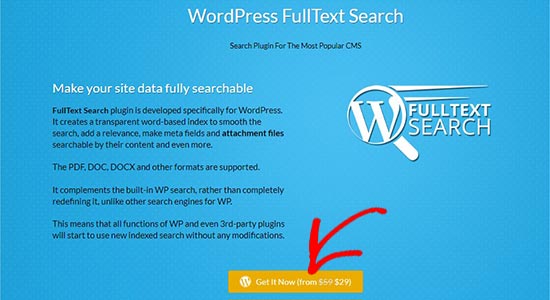
First you need to visit the FullText Search website using our link on WPBeginner and click on the ‘Get It Now’ button.
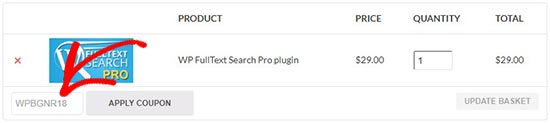
You’ll now see your cart page. In the ‘Coupon Code’ field, you can enter our FullText Search Coupon code: WPBGNR18
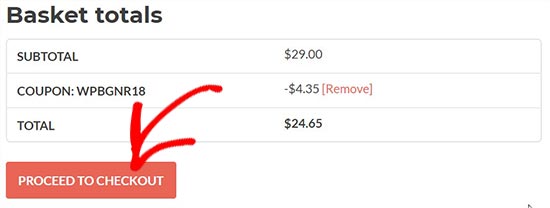
Click on the ‘Apply Coupon’ button and then click on the ‘Proceed to Checkout’ button below.
On the next page, you can enter your billing details and account information to complete the purchase.
We hope you found our FullText Search coupon code to be helpful. At WPBeginner, we work hard to negotiate exclusive discounts for our users.
Get 30% OFF on Media Maestro WordPress media content management plugin. View this Deal »
Disclosure: Our content is reader-supported. This means if you click on some of our links, then we may earn a commission. See how WPBeginner is funded, why it matters, and how you can support us. Here's our editorial process.
The Ultimate WordPress Toolkit
Get FREE access to our toolkit - a collection of WordPress related products and resources that every professional should have!
WPBeginner’s exclusive FullText Search coupon code helps you get 15% off on the WordPress search plugin. All you have to do is follow our instructions below to properly redeem FullText Search coupon code, so you can get the best discount on FullText Search. (more…)
Get 40% off CSS Hero, the most powerful WordPress plugin that makes design customization easy for beginners. View this Deal »
Disclosure: Our content is reader-supported. This means if you click on some of our links, then we may earn a commission. See how WPBeginner is funded, why it matters, and how you can support us. Here's our editorial process.
The Ultimate WordPress Toolkit
Get FREE access to our toolkit - a collection of WordPress related products and resources that every professional should have!
Used to store interaction and conversion data for campaigns in conjunction with Revenue Attribution.
1 year
_gat_omTracker*
Set, controlled and used by Google Analytics to collect and store data and then send that data to Google Analytics. OptinMonster provides the name if there is no existing tracker found on that page.
-
omCountdown-{id}-{elementId}
Used for countdown elements {elementId} in campaigns {id} to determine when it should complete.
-
om-{id}-closed / omSlideClosed-{id}
Used specifically with slide-in campaigns {id} to determine if it has been closed or not by a visitor.
30 days
om-success-cookie / omSuccessCookie
Used to determine if a visitor has successfully opted in to any campaign on your site to unlock content when using our Content Locking feature.
365 days
om-success-{id} / omSuccess-{id}
Used to determine if a visitor has successfully opted in to a campaign with the ID of {id} on your site.
365 days
omSeen-{id}
Used to determine if a visitor has been shown a campaign by the slug.
30 days
om-{id}
Used to determine if a visitor has interacted with a campaign ID of {id} on your site.
30 days
_omappvs
Used to determine when a new visitor becomes a returning visitor.