


Nothing’s more frustrating than getting logged out of your WordPress dashboard right in the middle of editing a post or updating a plugin. One minute you’re working – the next, you’re staring at the login screen again.
By default, the ‘Remember Me’ feature only keeps you logged in for two weeks.
That sounds reasonable, until you realize how often you jump into your site. And for busy site owners, getting kicked out every other week is a real productivity killer.
The fix is simple. You can extend your WordPress login sessions, so WordPress actually remembers you for longer.
In this guide, we’ll show you how to use WPCode’s built-in snippet library to extend the ‘Remember Me’ session limit. You can easily set your login time from 2 weeks to 30 days or even longer, with no coding needed. 🙌
What Is the ‘Remember Me’ Functionality in WordPress?
In WordPress, the ‘Remember Me’ login feature lets users stay logged into the content management system (CMS) for around 2 weeks.
So, if a user closes WordPress and has this feature turned on, they will automatically be signed in the next time they open WordPress within those 2 weeks.
Here’s what the ‘Remember Me’ checkbox looks like on the WordPress login page:
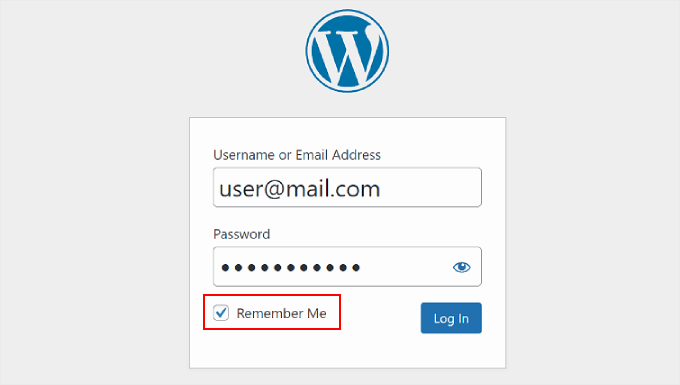
If WordPress users forget their login credentials, then they won’t need to worry about resetting their passwords, as they’ll be automatically signed in. Then, they can start working on their WordPress websites right away.
That said, 2 weeks may not be enough for people who frequently work on their websites, like bloggers or WooCommerce store owners. That’s why many users look for solutions to stay logged in for much longer.
In this article, we will share how to prevent your WordPress website from forgetting your user login by enabling the ‘Always Remember Me’ functionality. Here’s a quick overview of all the things we’ll cover in this guide:
Let’s get started.
Extend the ‘Remember Me’ Duration With Custom Code
This custom code method offers a straightforward way to stay logged into your WordPress website.
If you are new to adding code in WordPress, then the process may seem intimidating.
Many WordPress bloggers will suggest that you modify your code file, called functions.php, via your WordPress hosting provider’s file manager or an FTP client.
But in this step-by-step guide, we will use the WPCode plugin instead. It’s the best WordPress code snippets plugin and provides a much easier approach without the risk of breaking your website.
Some of our business websites use WPCode to add and manage their custom code snippets. It’s been working exceptionally well; that’s why we highly recommend it. Check out our detailed WPCode review for insights into the plugin.
To get started, you can install and activate the free WPCode plugin on your site.
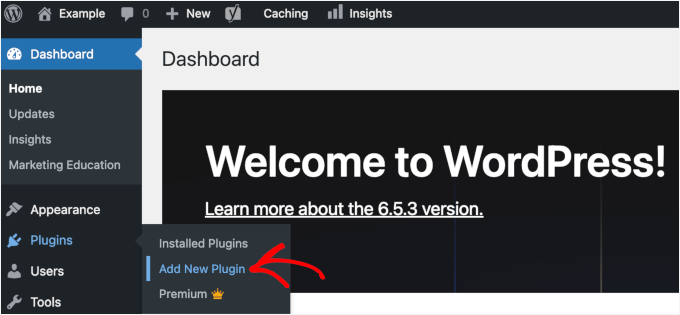
Go to Plugins » Add New Plugin in your WordPress dashboard.
📝 Note: This guide will use the free version of WPCode. That said, if you are looking for more advanced features like a testing mode and conditional logic, then you can upgrade to the WPCode Pro version.
On the next screen, go ahead and use the search box to quickly find the WPCode plugin.
When you see it in the results, click the ‘Install Now’ button and then ‘Activate.’
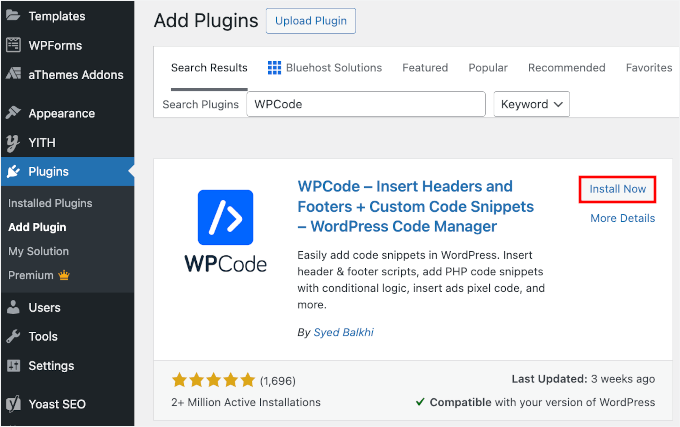
If you need some help, check out our guide on how to install a WordPress plugin.
Upon activation, you’ll want to head to Code Snippets » Library and search for the ‘Extend Login Expiration Time’ snippet.
Once you find the snippet, hover over it and click the ‘Use snippet’ button.
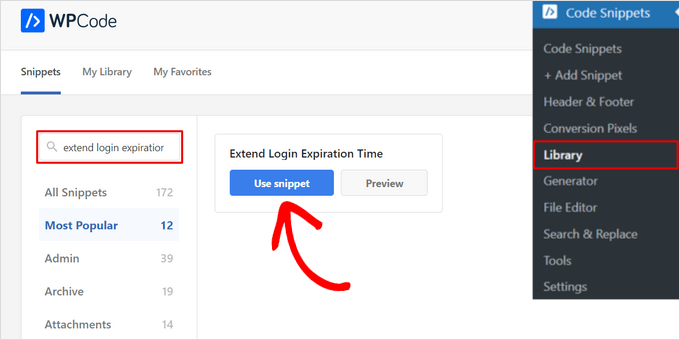
On the next page, you’ll see that WPCode has automatically added the code.
This code will extend the ‘Remember Me’ functionality to 30 days rather than 2 weeks.
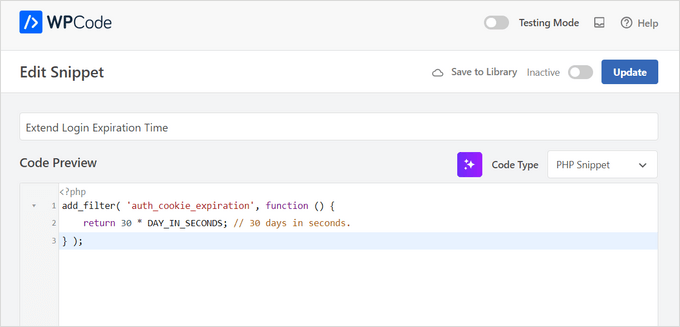
It has set the proper insertion method and added a title and tags to help you remember what the code is for.
Now, you can toggle the ‘Active’ button at the top menu to make the code work right away, and then click the ‘Update’ button.
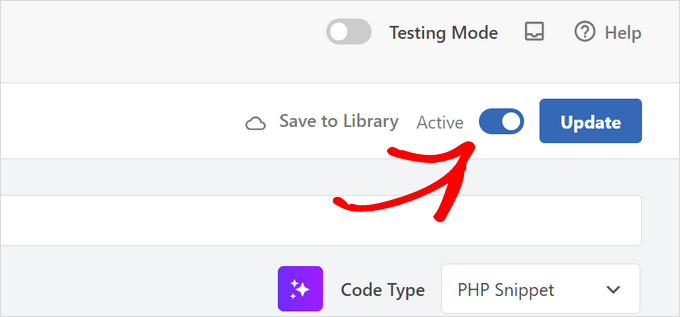
And that’s all you need to do to extend the ‘Remember Me’ feature for your WordPress user login screen.
🧑💻 Expert Tip: If you’re an advanced user, you can copy and paste this code into your functions.php file instead of using WPCode:
function wpbeginner_remember_me($expires) {
return 2592000; // Set the time in seconds (2592000 = 30 days, 31556926 = 1 year)
}
add_filter('auth_cookie_expiration', 'wpbeginner_remember_me');</pre>
You can make the duration longer than 30 days, but make sure to set the time in seconds.
You can also add the following code right below the code above to make the ‘Remember Me’ checkbox ticked by default:
function wpbeginner_login_checkbox() {

?>

<script>

document.getElementById('rememberme').checked = true;

document.getElementById('user_login').focus();

</script>

<?php

}

add_filter('login_footer', 'wpbeginner_login_checkbox');
What to Keep in Mind When Extending ‘Remember Me’ in WordPress
At WPBeginner, we understand how frustrating it is to be unexpectedly logged out of WordPress, especially when you are in the middle of something important. But there’s a good reason WordPress usually keeps you logged in for only 14 days.
It’s all about protecting your site from cybercriminals. These folks often try to break into your WordPress through password guessing or brute-force attacks.
If they manage to get hold of your computer or gain remote access, then they could easily hack into your WordPress site. In turn, they could cause real trouble for your website’s security.
In other words, the 14-day limit acts as a session timeout, ensuring that if you leave your computer unattended or lose your device, access to your site is automatically cut off after a set period.
In fact, some people remove the ‘Remember Me’ functionality entirely for security reasons.
The good news is that you can still prolong the ‘Remember Me’ feature without compromising your website security. Here are some tips:
- Enable password protection on your WordPress login screen. Then, users must enter an additional username and password before they even reach the login page.
- Limit the login attempts on your WordPress website. When hackers fail to access the admin page after a few attempts, WordPress will automatically lock them out.
- Add two-factor authentication to WordPress. This feature will require new users to use an additional code on their login screen after entering their login credentials. If they don’t have the right code, then they won’t be signed in.
For more information about WordPress site protection, you can check out our ultimate WordPress security guide.
FAQ: Extending The ‘Remember Me’ Feature in WordPress Login
Before we wrap up, here are quick answers to some common questions about how the ‘Remember Me’ option works and when it’s safe to use.
How does ‘Remember Me’ work in login?
When you check ‘Remember Me,’ WordPress saves a login cookie in your browser. This keeps you logged in even after you close the browser window. But keep in mind that if you manually clear your browser’s cookies or cache, you will be logged out immediately, regardless of this setting.
Is it safe to use ‘Remember Me’?
Yes, as long as you’re on your own device and it’s protected with a strong password, PIN, or biometric lock. You should avoid using ‘Remember Me’ on public or shared computers, since anyone who opens the browser could access your account.
What is the default session timeout for WordPress?
By default, WordPress logs you out after:
- About 2 days if ‘Remember Me’ is not checked
- About 14 days if ‘Remember Me’ is checked
After that, you’ll need to log in again.
What is the safest password manager to use?
A good password manager should use strong encryption, offer zero-knowledge security (the company can’t see your passwords), and support two-factor authentication.
A well-known and trusted options include 1Password. Any of these is much safer than reusing passwords or saving them in plain text.
Why shouldn’t you use your browser’s built-in password saver?
Browser autofill is convenient, but it’s easier for malicious scripts or extensions to access. A dedicated password manager offers stronger protection, better control, and alerts you if a site is unsafe or if your password has been exposed.
🚨 Note: Suspicious that your WordPress site’s security has been breached? See our guides on Signs Your WordPress Site Is Hacked and Beginner’s Guide to Fixing Your Hacked WordPress Site.
Bonus Resources: More Guides for WordPress User Management
We hope this article has helped you learn how to keep WordPress from forgetting you by extending the ‘Remember Me’ feature. You may also want to bookmark our guides on:
- How to Force Strong Passwords on Users in WordPress
- How to Moderate New User Registrations in WordPress
- How to Find Pending Unconfirmed Users in WordPress
- How to Display Recently Registered Users in WordPress
- How to Show Real-Time Online Users in WordPress
If you liked this article, then please subscribe to our YouTube Channel for WordPress video tutorials. You can also find us on Twitter and Facebook.





Dennis Muthomi
The WPCode plugin method you shared is perfect – way better than messing with functions.php directly. Here’s what I’ve learned from doing this myself: I always set different login times for different users. It works great! Admins get 30 days, while editors stay at the regular 14 days. It’s a nice balance of security and convenience.
Coral Henderson
This plugin did not work for me. Anyone know why? I’m also having other issues with my site such as things changing by themselves. I don’t know if this is to do with the theme or wordpress or what..
Coral Henderson
Thanks for this. I always checked the remember me button but it was always unchecked when I went back to the site. I wonder if this is due to my site not being live yet? Dunno.
David chriss
Hello, WP Beginner…
Does this will fix my site because in my site if user click on remember me button. it doesn,t remember them even if they checked remember me.
Also i using user ultra word press plugin. Does this compatible with that plugin
Please reply…
Alex Colburn
Yes, this is a quick fix that saves a lot of time! Thank you.
Jayne Bodell
Again, you seem to know our pain points. This has really been bothering me lately. Thanks much.