


This is one of the cool little secrets that you should know about. WordPress has a Master Options Panel in the admin panel which is hidden. This page shows a combination of all settings for your blog, and it is something that you should not mess with. Nevertheless you should still know about it because it is cool.
In your blog URL add the following:
http://yourblog.com/wp-admin/options.php
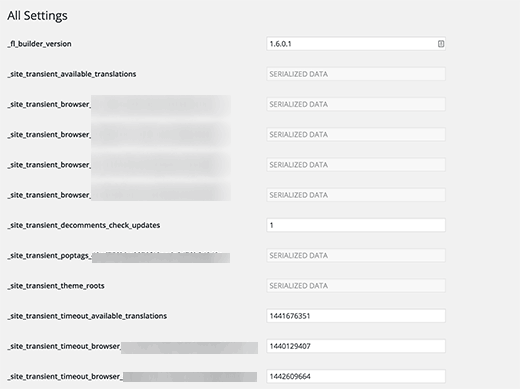
This page contains all the options for your WordPress site. Some of these options can be edited using the Settings menu in the admin bar. But most of these options are not supposed to be edited or changed by users.
Important: We do not recommend you to use this hidden page to make any changes to your WordPress site.
However, you can use this page to look for options stored in your WordPress database, settings stored by plugins, and so on. Knowing that this panel is there and you can look at it may come in handy some day.
We hope this article helped you discover the hidden secret options panel in your WordPress site. You may also want to see our guide on how to hide unnecessary items from WordPress admin with Adminimize
If you liked this article, then please subscribe to our YouTube Channel for WordPress video tutorials. You can also find us on Twitter and Facebook.





Syed Balkhi says
Hey WPBeginner readers,
Did you know you can win exciting prizes by commenting on WPBeginner?
Every month, our top blog commenters will win HUGE rewards, including premium WordPress plugin licenses and cash prizes.
You can get more details about the contest from here.
Start sharing your thoughts below to stand a chance to win!
chris edozie says
hello, please i have this issue with my wordpress site,on my dashboard icon there is no settings, plugins and tools to edit my site, just blank please help
Adrian says
I tried that and got an error with this msg “Cheatin’ uh?”
What could be the problem in this case ?
Editorial Staff says
It means that you don’t have enough permission to access that page.
Admin
Rick Thatcher says
So, as the only admin of my site, I don’t have “enough permissions to access that page” when, for example, editing a category, and moving it out from under a parent to another or even to ‘none’?
Victor Teixeira says
Actually if you enable the multisite capability on wordpress you’ll have normal access to this screen.
All WP MU users are familiar with it. That’s where you manage each blog specific options.
a says
That is cool. Everytime I move a WP site (for example from my testserver to client’s server) i need to change some of these values like “home”, “siteurl” and “upload_path”. Just slightly more comfy (maybe) than doing it via PhpMyAdmin. Cheers
Igor Kheifets-IgorHelpsYouSucceed says
I don’t know if it was the right thing to reveal this to the public… you might as well publish another article titled:
“What to do if you screwed up the WordPress Secret Admin Panel”
LMAO
Thanks.
Igor
Editorial Staff says
Igor, it is better to let people know that it exist rather than have them found out and then mess it up.
Admin
Kennedy says
Thanks for sharing, I find it very interesting that this is the first time seeing this.
Melvin says
Hey man, thanks for sharing this. This so cool.
McBonio says
I didn’t even know that existed! I suppose it would be useful if you were using Shopperpress or WP e-Commerce plugins for the secure shopping and payment.
Wayne Smallman says
I’ve been trying to get a Plugin of mine to work with 2.7+, but it keeps jamming up when the update button is pressed and sending me to this Options page, so this isn’t a new sight for me, sadly.