


Do you want to add a navigation menu to your WordPress site?
WordPress comes with a drag and drop menu interface that you can use to create header menus, menus with dropdown options, and more.
In this step-by-step guide, we will show you how to easily add a navigation menu in WordPress.
What is a Navigation Menu?
A navigation menu is a list of links pointing to important areas of a website. They are usually presented as a horizontal bar of links at the top of every page on a WordPress site.
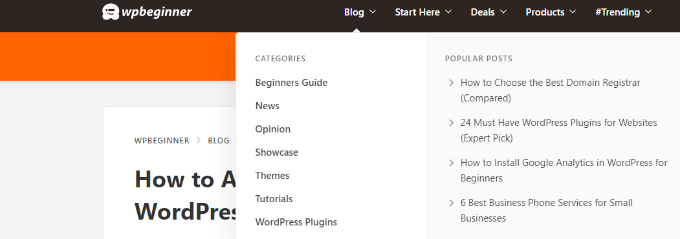
These menus give your site structure and help visitors find what they’re looking for. Here’s how the navigation menu looks on WPBeginner:

WordPress makes it really easy to add menus and sub-menus. You can add links to your most important pages, categories or topics, blog posts, and even custom links such as your social media profile.
The exact location of your menu will depend on your WordPress theme. Most themes will have several options, so you can create different menus that can be displayed in different places.
For instance, most WordPress themes come with a primary menu that appears on the top. Some themes may include a secondary menu, a footer menu, or a mobile navigation menu as well.
That said, let’s see how you can create a custom navigation menu in WordPress.
- Creating Your First Custom Navigation Menu
- Creating Drop-Down Menus in WordPress
- Adding Categories to WordPress Menus
- Adding Custom Links to Your WordPress Navigation Menus
- Editing or Removing a Menu Item in WordPress Navigation Menus
- Adding Navigational Menus in Full Site Editor (FSE)
- Adding WordPress Menus in Sidebars and Footers
- Going Further with Navigation Menus
- FAQs About WordPress Menus
Video Tutorial
If you’d prefer written instructions, just keep reading
Creating Your First Custom Navigation Menu
To create a navigation menu, you need to visit the Appearance » Menus page in your WordPress admin dashboard.
Note: If you don’t see the ‘Appearance » Menus‘ option on your site and see only ‘Appearance » Editor‘, then that means your theme has Full Site Editing (FSE) enabled. You can click here to skip ahead to the FSE section below.
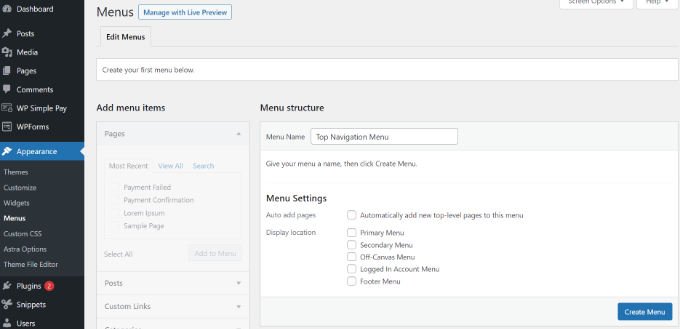
Once you’re there, provide a name for your menu, like ‘Top Navigation Menu’, and then click the ‘Create Menu’ button.
This will expand the menu area, and it will look like this:
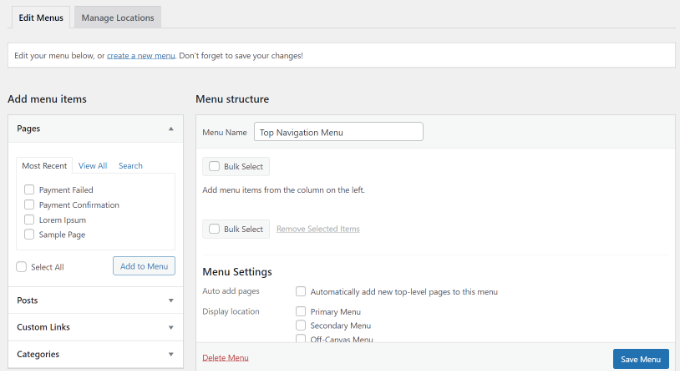
Next, you can choose the pages you want to add to the menu. You can either automatically add all new top-level pages, or you can select specific pages from the left column.
First, click the ‘View All’ tab to see all your site’s pages. After that click the box next to each of the pages you want to add to your menu, and then click on the ‘Add to Menu’ button.
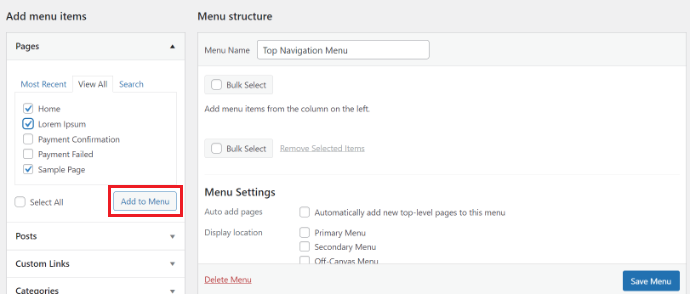
Once your pages have been added, you can move them around by dragging and dropping them in the ‘Menu Structure’ section.
This way you can change their order and rearrange them.
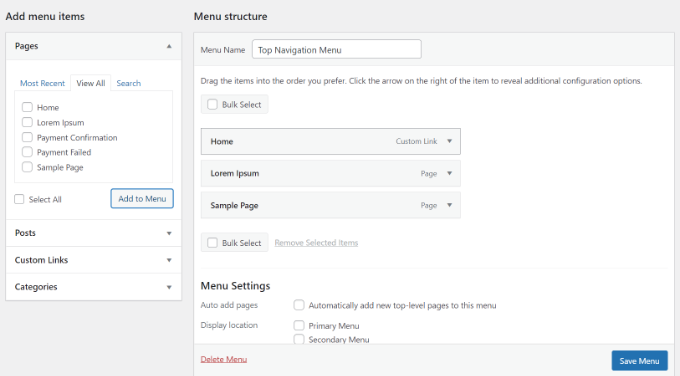
Note: All menus have their items listed in a vertical (top to bottom) list in the menu editor. When you put the menu live on your site, it’ll either display vertically or horizontally (left to right), depending on the location you select.
Most themes have several different locations where you can put menus. In this example, we’re using the Astra theme, which has 5 different locations.
After adding pages to the menu, select the location where you want to display the menu and click on the ‘Save Menu’ button.
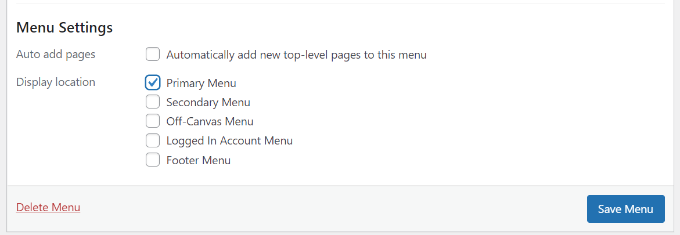
Tip: If you’re not sure where each location is, try saving the menu in different places, then visit your site to see how it looks. You probably won’t want to use all the locations, but you might want to use more than one.
For more details on this, you may want to see our tutorial on how to create a vertical navigation menu in WordPress.
Here’s our finished menu on the site:

Creating Drop-Down Menus in WordPress
Drop-down menus sometimes called nested menus, are navigation menus with parent and child menu items.
When you run your cursor over a parent item, all the child items will appear beneath it in a sub-menu.
To create a submenu, drag an item below the parent item, and then drag it slightly to the right. We’ve done that with 3 sub-items beneath ‘Services’ in our menu:
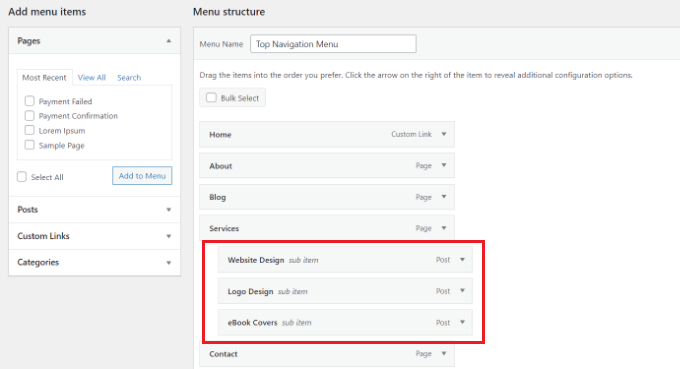
You can even add multiple layers of dropdowns so that your sub-menu can have a sub-menu. This can end up looking a bit cluttered, and many themes do not support multi-layer drop-down menus.
For more detailed instructions, please see our tutorial on how to create a dropdown menu in WordPress.
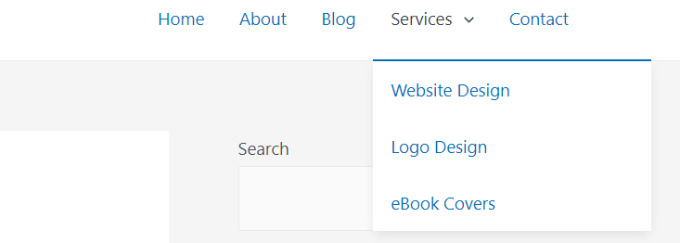
Here’s the sub-menu live on our demo site:
Adding Categories to WordPress Menus
If you’re using WordPress to run a blog, then you may want to add your blog categories as a drop-down in your WordPress menu.
We do this on WPBeginner and have multiple categories like news, themes, tutorials, and more.
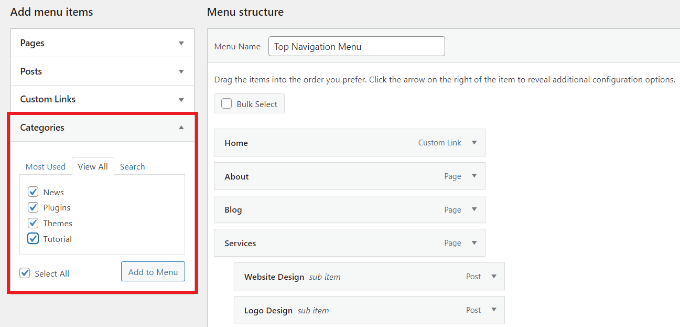
You can easily add categories to your menu by clicking the Categories tab on the left side of the menu screen. You may also need to click the ‘View All’ tab to see all your categories.
Simply select the categories you want to add to the menu, and then click the ‘Add to Menu’ button.
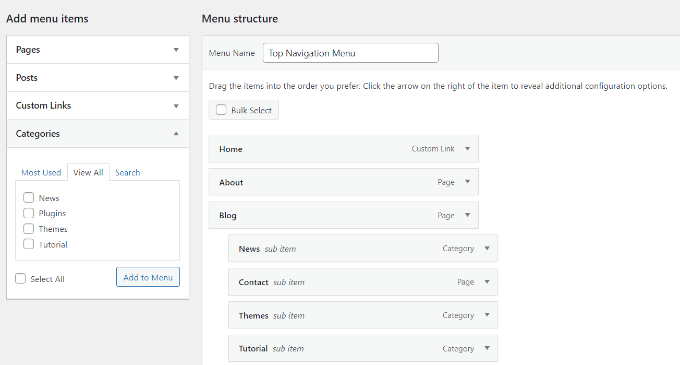
The categories will appear as regular menu items at the bottom of your menu.
Next, you can drag and drop them into position. For example, we’re going to put all of these categories under the Blog menu item.
For further instructions, please refer to our beginner’s guide on how to add topics in WordPress navigation menus.
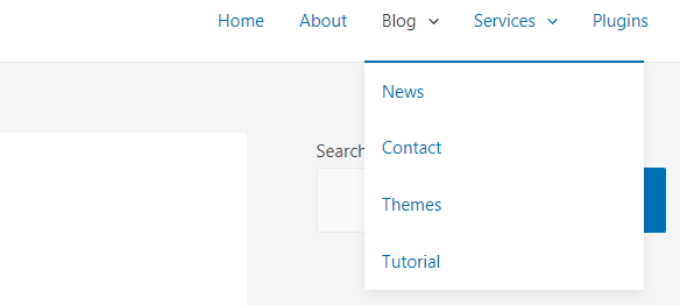
Here’s how different categories appear in the navigational menu on our demo site:
Adding Custom Links to Your WordPress Navigation Menus
Aside from categories and pages, WordPress also makes it super easy to add custom links to your menu. You can use it to link to your social media profiles, your online store, and other websites that you own.
To do this, you’ll have to use the ‘Custom Links’ tab on the Menu screen. Simply add the link along with the text you want to use in your menu and click the ‘Add to Menu’ button.
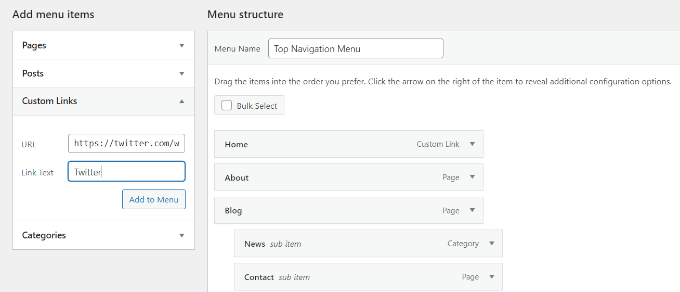
You can even get creative and add social media icons in your menu or call-to-action buttons to get more conversions.
Editing or Removing a Menu Item in WordPress Navigation Menus
When you add pages or categories to your custom navigation menu, WordPress uses the page title or category name as the link text. You can change this if you want.
Any menu item can be edited by clicking on the downward arrow next to it.
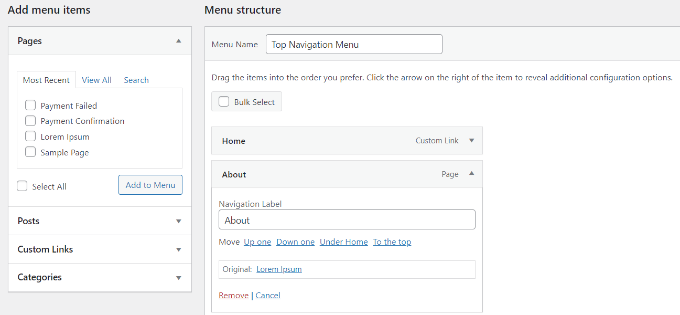
You can then change the name of the menu item from here. This is also where you can click ‘Remove’ to take the link off your menu altogether.
If you are struggling with the drag-and-drop interface, then you can also move the menu item around by clicking the appropriate ‘Move’ link.
Adding Navigational Menus in Full Site Editor (FSE)
The new full site editor allows you to customize your WordPress themes using the block editor. It was released in WordPress 5.9 and enables you to add different blocks to your templates to create a unique design.
To add a navigational menu using the full site editor, visit the Appearance » Editor from your WordPress dashboard.
We’ll use the default Twenty Twenty-Three theme for this tutorial. For more details, you can see our article on the best WordPress full site editing themes.
Once you’re in the editor, go ahead and click on the ‘Navigation’ tab to expand it.
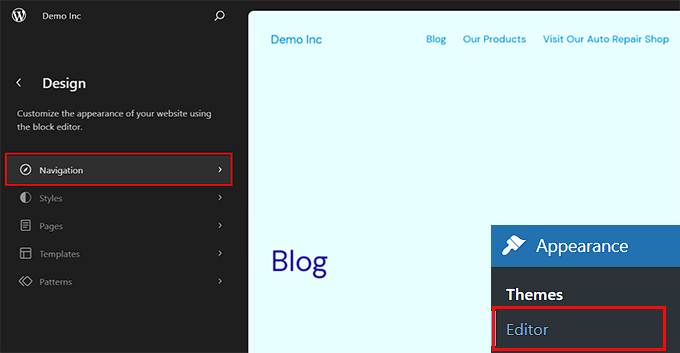
This will open some new settings in the left column.
From here, simply click the ‘Edit’ icon at the top.
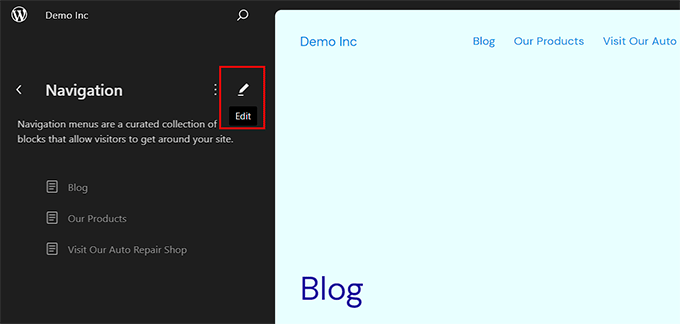
This will launch the full site editor on your screen where you can click the ‘+’ icon to add a navigation menu item.
A prompt will now open up and you can select an option that appears in the dropdown menu.
However, if you want to add a custom link, then you can add a label and URL for the navigation menu item in the block panel. You can also add a search option to your menu.
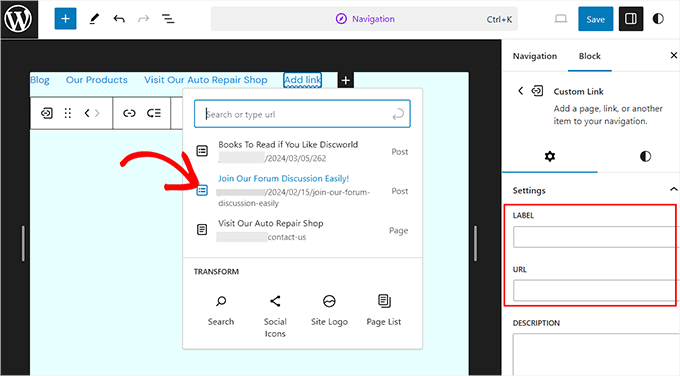
Once you have added an item, switch to the ‘Styles’ tab from the column on the right.
You can now change the typography, appearance, height, spacing, letter case, and text decoration for your menu items.
If you want to add a sub menu, then you can also do that by clicking on its icon in the block toolbar.
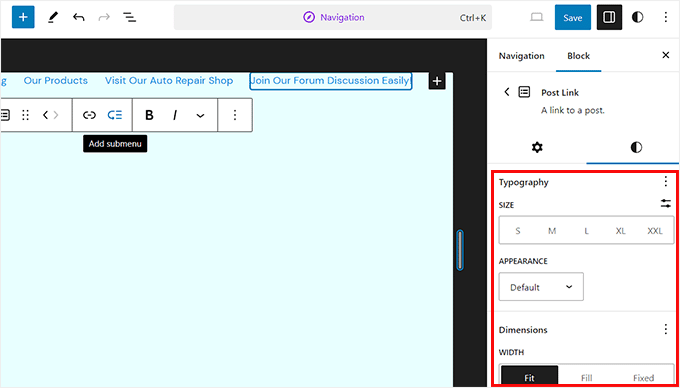
When you’re done, you can preview the changes to see how the menu looks in real time. Then don’t forget to click the ‘Save’ button at the top.
Adding WordPress Menus in Sidebars and Footers
You don’t have to just stick to the display locations for your theme. You can add navigation menus in any area that uses widgets, like your sidebar or footer.
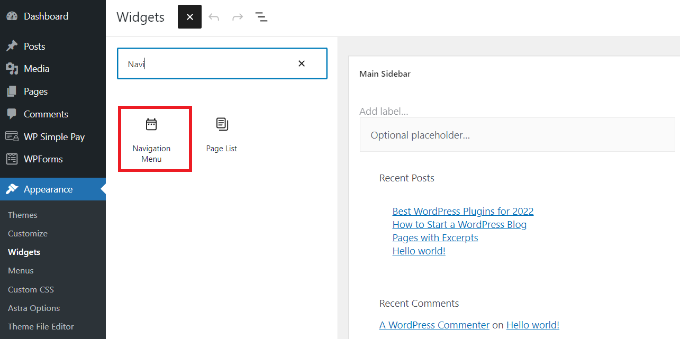
Simply go to Appearance » Widgets and then click the ‘Add Block’ (+) button at the top and add the ‘Navigation Menu’ widget block to your sidebar.
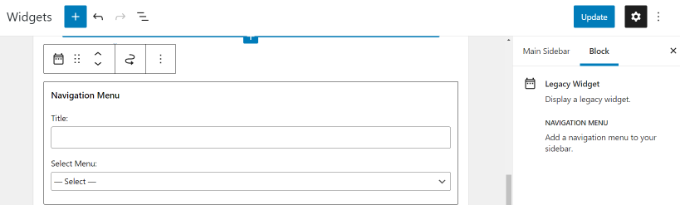
Next, add a title for the widget and choose the correct menu from the ‘Select Menu’ dropdown list.
When you’re done, simply click the ‘Update’ button.
Here’s an example of a custom WordPress footer menu built on Syed Balkhi’s website.

Going Further with Navigation Menus
If you want to create a truly epic menu with loads of links, we’ve got a tutorial on how to create a mega menu in WordPress.
This lets you create a drop-down with lots of items including images.
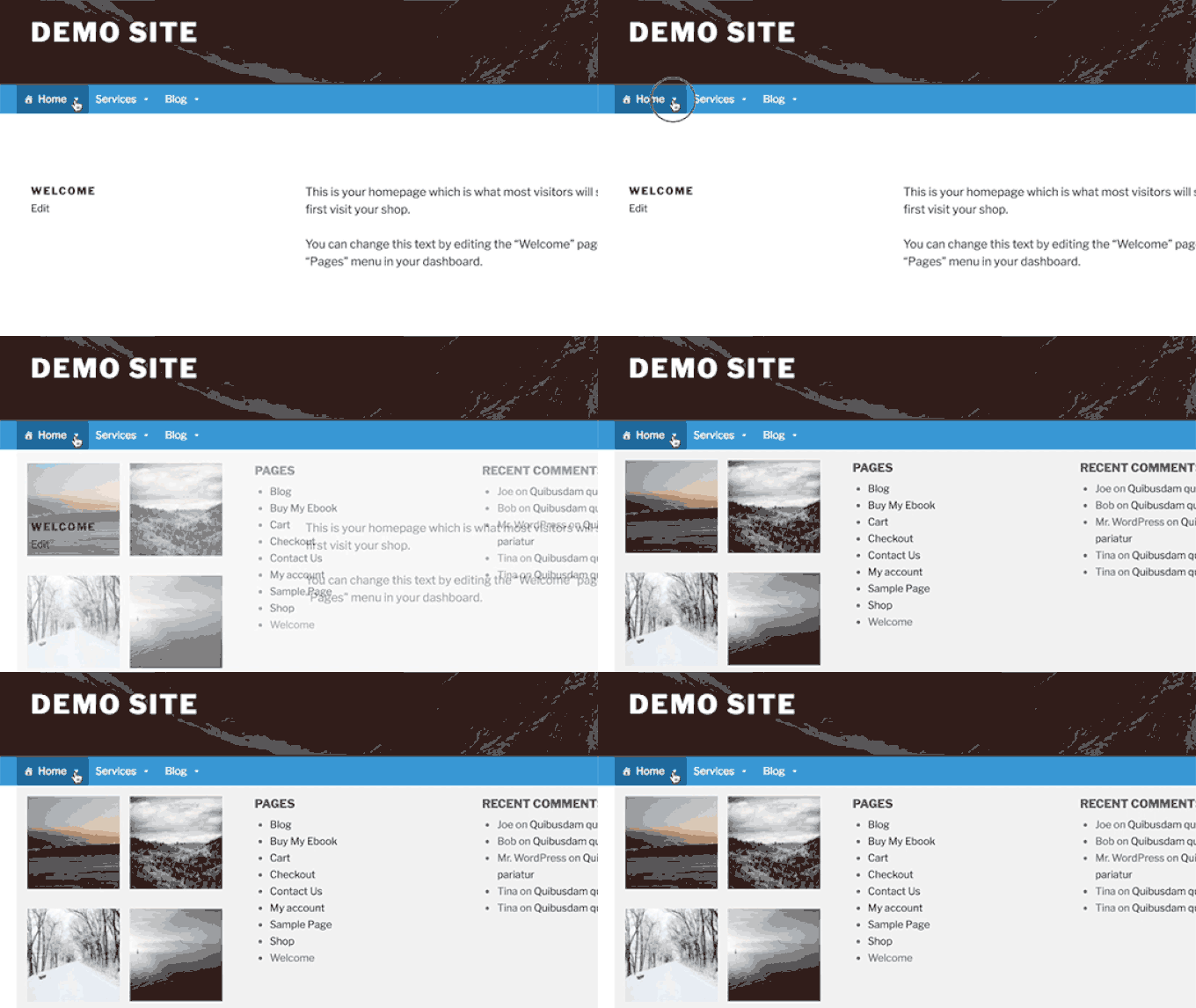
Mega menus are a great option if you have a large site, such as an online store or news site. This type of menu is used by sites like Reuters, Buzzfeed, Starbucks, etc.
FAQs About WordPress Menus
Here are some of the most common questions we hear about WordPress navigation menus from beginners.
1. How do I add a homepage link to a WordPress menu?
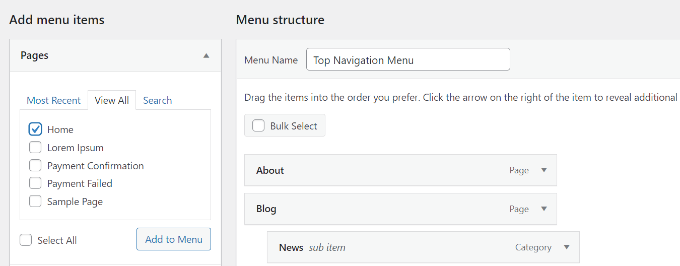
To add your homepage to a navigation menu, you’ll need to click the ‘View All’ tab under Pages. From there, you should see your homepage.
Check the box next to ‘Home’ and click ‘Add to Menu’. Don’t forget to save your changes.
2. How do I add multiple navigation menus in WordPress?
In WordPress, you can create as many menus as you like. To place a menu on your website, you’ll need to add it to one of your theme’s menu locations, or to a widget area as we showed above.
If you want to add multiple navigation menus to your WordPress site, first create the menus following our tutorial above.
To place them on your site, click on the ‘Manage Locations’ tab.
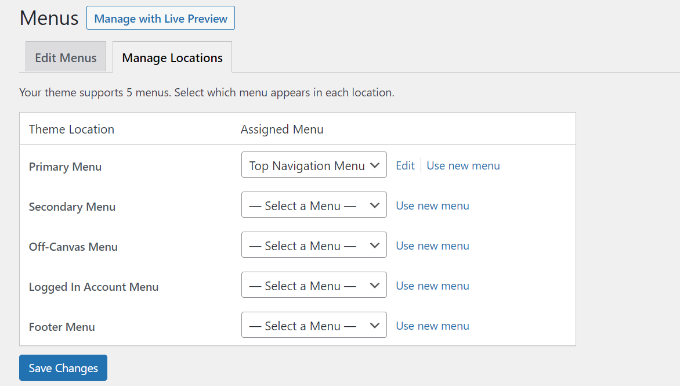
From here, you can select which menu you’d like to display in the menu locations that are available in your theme.
If you want to add a new menu location to your site, see our tutorial on how to add custom navigation menus to WordPress themes.
We hope this article helped you learn how to add a navigation menu in WordPress. You may also want to check out our guides on how to style navigation menus in WordPress and how to create a sticky floating navigation menu in WordPress.
If you liked this article, then please subscribe to our YouTube Channel for WordPress video tutorials. You can also find us on Twitter and Facebook.





Syed Balkhi says
Hey WPBeginner readers,
Did you know you can win exciting prizes by commenting on WPBeginner?
Every month, our top blog commenters will win HUGE rewards, including premium WordPress plugin licenses and cash prizes.
You can get more details about the contest from here.
Start sharing your thoughts below to stand a chance to win!
Jiří Vaněk says
Regarding adding pages to the menu, don’t know how to solve the search problem? Or if you haven’t met him. I have a website where there are currently about 600 pages, which are mainly used for dictionary purposes. The problem is, when I want to add one of the pages to the menu, I write its link in the search, so wordpress does not find it and I have to first display all and find it alphabetically. It delays my work quite a bit and I haven’t figured out where the problem is.
WPBeginner Support says
You would want to try writing the title of the page, otherwise you could use custom links and link to the page if you have the URL directly.
Admin
Jiří Vaněk says
Yes, I do. I type the site name into the search box and WordPress lists similar sites, but usually not the one I’m looking for. So I will search further where the problem might be.
David Keevis says
Thanks so much for a really excellent tutorial. We’re building our site with multiple CPT’s and this post clearly explained what was needed. Had it implemented in a couple minutes. We’re using Generate Press/Generate Blocks and the query loop is exceptionally powerful. Y’all just made our day!!!!
WPBeginner Support says
Glad to hear our guide helped!
Admin
NPH LLC says
If I “remove” a link within my main navigation menu, can I bring it back easily? We want to take a page offline while we are reconfiguring it.
Thanks!
WPBeginner Support says
Yes, you can easily add and remove menu items and if the menu items even if the item is not currently on the menu. You would want to ensure you clear any caching on your site so your visitors see the up-to-date menu.
Admin
Akanksha says
Thank you ..This was very helpful to me
WPBeginner Support says
Glad it was helpful!
Admin
Sunny says
A very basic question. How can you link your website URL to your homepage? Meaning, having the website URL, also as your homepage section in the menu. Thanks
WPBeginner Support says
You could either set the menu to the homepage you have set under Settings>General for your site or create a custom URL and add your domain there to point to your homepage.
Admin
Lisa says
I’m confused about how to get my posts where I want them to go… I have a recipe blog. On the top of my site, I have categories you can click such as “Dinner recipes” and “Side dishes”… How do I get my specific posts to go on those specific pages when you click on the title at the top of the page?
aberry says
Is there a way that when you add a category it automatically adds the sub categories?
WPBeginner Support says
You would want to take a look at one of our older articles covering this below for showing subcategories on the parent category page:
https://www.wpbeginner.com/wp-tutorials/display-subcategories-on-category-pages-in-wordpress/
Admin
HJ says
Very basic question, but how to enable menu on a subpage? I designed some subpages, but the menu is not visible on top. In my main pages the menu is visible. How to enable the menu to make it visible on the sub-pages?
WPBeginner Support says
You would want to reach out to the support for your specific theme, it sounds like your theme may remove the menu for certain pages. If you reach out to the support they should let you know how to add the menu back.
Admin
Janien says
I’m trying to get a navigation menu that is sticky and is not transparent. I’ve tried everything. Am I allowed to change the navigation bar in a theme?
WPBeginner Support says
You are but it would require some coding knowledge, we would recommend reaching out to your theme’s support and they can normally assist.
Admin
Miranda says
I have made a navigation menu but it won’t show up on the mobile site and when I go to navigation menu settings it does not have mobile menu as an option. Do you know how I can fix this or do I need to find a different theme?
WPBeginner Support says
You would need to reach out to the support for your specific theme for it not displaying properly and they would be able to assist.
Admin
sadik says
Thenk you Wp Begginer
WPBeginner Support says
You’re welcome
Admin
Nanyc says
This helped a lot. I wanted a heads up before I started. Presented very well.
WPBeginner Support says
Glad our article was helpful
Admin
atta says
Thanks for the detailed guide. I have a question: how can we add a navbar (for a landing page) which links the landing page sections/elements instead of navigating to other pages. An example is Wikipedia. On any Wikipedia page, you can click on the name of the section and it will immediately go down to that section.
WPBeginner Support says
For that, you would want to use anchor links which we cover in our article below:
https://www.wpbeginner.com/beginners-guide/how-to-easily-add-anchor-links-in-wordpress-step-by-step/
Admin
Gina says
Hi,
I created categories and added to my menu so that once a reader clicks they can find all the blog posts on that category. My problem is that I don’t want the blog name to appear at the top of the page, that is, Blogging category => Blogging category description => blog posts, how do I remove that?
WPBeginner Support says
That would depend on your specific theme’s styling. If you reach out to your theme’s support they should be able to assist with changing what is shown
Admin
wan says
i try to add menu item on my menu structure. even when i save menu, the website doesn’t change. why?
WPBeginner Support says
You would want to ensure your site or your hosting provider does not have a cache that could be causing your issue.
Admin
Keith says
Great resources
WPBeginner Support says
Thank you
Admin
Linda McMillan says
Hello, I am using Elementor and OceanWP. I set up a custom link in my menu so that when clicking on it goes to the Home page. How can I make it go instead of just to the Home page, but down the page to a certain section? I appreciate your help.
WPBeginner Support says
You would want to take a look at making an anchor link: https://www.wpbeginner.com/beginners-guide/how-to-easily-add-anchor-links-in-wordpress-step-by-step/
Admin
Annie says
Pretty much there with the navigation. One question though, I have one point in my navigation “products” from there it splits into 3 other sections (drop down menu coming up). I don’t want visitors be able to access this product page as it will be empty, I want them to choose directly from the drop down menu instead of accessing the products page first. So products will be still displayed in the navigation but will be inaccessible, visitors have to click onto the drop down menu to choose what they are after. How do I do this? I m I m removing the whole products section it wont be displayed in the navi anymore, how can I make the products page inaccessible?
WPBeginner Support says
You can create a custom link under Appearance>Menus titled Products and link it to either a different page or # which should keep the users on the same page they are on.
Admin
Ishan says
Thank you for your help.I was facing the same problem
Terry L. Cooper says
How old is this anyway?? I’m not seeing any of this on the WP page.
WPBeginner Support says
The steps in this article should still work for WordPress.org sites, are you on WordPress.com? https://www.wpbeginner.com/beginners-guide/self-hosted-wordpress-org-vs-free-wordpress-com-infograph/
Admin
Azizi says
Sorry sir, which WordPress theme you’re using on WPbeginner.com?????
WPBeginner Support says
We are using a theme we created for our site built on the Genesis Framework, for more on what we’re using on our site you would want to take a look at our blueprint page here: https://www.wpbeginner.com/blueprint/
Admin
Inzamam ul haq says
It really helped me. very informative.Thanks
Natalie V says
Hi! Thanks so much for this post. It helped me a lot. I have the “Karuna” theme. Whenever I add more menu options (I have 4) they are displayed in two row. I would like them all to be in one row. Is there a way to fix this? Thank you so much!
David says
Needed to link a buy now button to woo commerce cart page. Spent two days going in circles. Tried to contact woo with little success. Then found you guys who helped solve the problem.
Often it is the little things which can stop us in our tracks. A big thank you for the simplified set of clear instructions.
Elliot Kershaw says
Hello,
I am making a website with Ocean WP and Elementor, however I am unable to see the menu at the top of all of my pages. It only appears at the top of the home page. So people can navigate to any page from the home page, however if anyone wanted to navigate back to the home page or to another page from there, it would tricky. Do you have a solution for this? Thank you!
Lindsey says
Thank you for these instructions, very helpful! I have a question that I think relates back to my menu but I’m not totally sure. When I click on a menu item from the home page the site address adds “aboutme” between the main address and the menu page. I do not have anything called “about me” on my site. I don’t understand why it is adding this extra piece of information to each page. Any suggestions on how to remove this “aboutme” information?
hans says
Thank you.
I learned much knowledge.
Karen says
Hi. I am using Ocean WP and Elementor.
I have a menu organized, but there on one of my Nested menu dropdown sections I want the FIRST category NOT to be linked to a page (I tried to remove the link but I failed).
The nested section is as follows: THERAPY (on top)>Individual>Group
I don’t want THERAPY to lead to a page, it’s blank, it’s just a category I guess. I’ve done this in my previous site but I can’t for the life of me remember how to do it!
I did create a “page” called Therapy so it would show up in the menu options…help me obi wan kenobi you are my only hope!
Dr Karen
WPBeginner Support says
Hi Karen,
Add your top link Therapy as a ‘Custom Link’. In the URL field enter # sign and click add to menu. Adjust its position in the menu and then click on Save Menu button.
Admin
Eric Wenocur says
Aha, that’s how you do it! Thanks, great tutorials!
WPBeginner Support says
You’re welcome, glad you like our content
saurabh says
Hello,
We use the two menu system (i.e. primary/top & main/secondary menu) across our websites. And the top/primary menu does not appear on the mobile website.
One of our clients, want both the menus to be visible on the mobile site. Any suggestions on how to do that?
(The website is running on newspaper theme, if that helps.)
Ahmed says
Suppose I want to post many articles related to android. Should I create a android page or android category in my wp menu.
WPBeginner Support says
Hi Ahmed,
Categories are better to sort your content into different topics. You can add a category to your website’s navigation menu and then it will show all posts filed under that category.
Admin
Lerissa says
Hi – Thanks for providing this.
I don’t have any items in my Pages section, which is strange, because my site has several. Did I configure a setting wrong?
Lerissa
WPBeginner Support says
Hi Lerissa,
What happens when you click on ‘View All’ under pages?
Admin
Tom says
Thanks for this illustration.
Manish Ransubhe says
hi sir
thank you, i have started my new WordPress blog and I Stuck on the menu I don’t know how to add menu thanks for your this useful post and Your site helped me to launch my website.
WPBeginner Support says
Hi Manish,
Glad you found this guide helpful. You may also want to subscribe to our YouTube Channel for WordPress video tutorials.
Admin
Cyndi Jarvis says
Hi and thanks for your support. I have a website almost completed, pretty basic but want to link the menu items to the page that relevant text exists and somehow be able to take the user back to the main menu with a back button. Can you please help.
Thanks
WPBeginner Support says
Hi Cyndi,
The tutorial above allows you to link to pages and add them to navigation menus. Seems like you want something a little different, can you please provide more details?
Admin
cyndi says
Thanks for trying to help. I am not looking for anything unusual with my menu in the website. I have menu items setup as Home, About Us, Services, Contact. The menu name is First Menu and set to primary. What happens is that I click on Home and the page flashes but I don’t go anywhere. This happens with all of the menu items I click on. Any suggestions what I have setup incorrectly?
Thanks
WPBeginner Support says
Hi Cyndi,
You can try this. Go to Apperance » Menus page and click on create a new menu. The following the instructions in the article create new menu by adding your pages from left column to the right. After that select the location for your menu ‘Primary’ and then click on save menu button.
If this doesn’t solve your issue, then preview your website with a default theme. If your navigation menu works as expected with the default theme, then there may be some issue with your current theme. Hope this helps.
Admin
Regina Clarke says
This was so helpful and it worked beautifully on my laptop. But on my iPhone the submenu categories I dropped into my Blog menu (which all show up indented as they should) also include the description I created of the category. On my laptop that appears on the archive page for each category but on the phone it appears in the dropdown, which makes it all look muddy. Is there a way to create yet another indent for just the descriptions under each category, effectively nesting three levels?
Thanks very much for any suggestions.
Jillian says
Hi there, I have created a nested menu which looks great in the desktop version, but when it gets to the mobile version everything nested is shown on the menu at once! It creates a super long menu page. I have a responsive theme and am unsure if can be fixed.
Amber Shock says
Thanks for making such an easy to follow video. It helped a lot and I quickly got my issue figured out.
Bartek says
I have problems that wordpress doesn´t let me add any category any more or even is deleting and changing place of some which were once added. Anybody know what can be a reason?
Ahmed Azeem says
My website don’t have option of primary, secondary but main and footer menu. I want to add top menu in my website can you please guide me how to add top menu. also in my portfolio page whatever items I am adding is not showing so kindly help me out regarding that. Thanks in advance.
John says
I thought this was an explanation about how to add a navigation menu in your WordPress site, but it’s missing the vital code to actually add it to your website. This is the dumbest tutorial (or article title) I have ever seen.
WPBeginner Support says
Hi John,
You may want to check out our tutorial on how to add custom navigation menus in WordPress.
Admin
Shibani says
I have a site where I want to display custom menu which is a category – like travel. It works fine, but it displayed – Category – Travel above posts. How can I hide that? I’m using wordpress.com and using free plan.
Prachi says
Suppose my website is example.com
I want to create a tab called HOME and place it menu.
Whenever I am creating this HOME, the url does not accept example.com
It is becoming as example.com/home.
What should I do?
WPBeginner Support says
Hi Prachi,
WordPress already has a navigation menu that you can use. On the navigation menus screen click on the pages and then click on View All. There you will see all your pages and an item called Home. Select home and then click on add to menu button.
Admin
John says
I have followed the above instruction. My menu though will not actually appear on any of the sites pages. May I have some guidance please ?
John
Haitham Alnaqeb says
Have tried a different themes? Sometime the themes you are using is not supported to some of these futures.
Ike Ezeani says
I created a second dropdown menu but when I click the main menu I see the dropdown but it takes to a blank page. Please help.
Stephen B says
Hello,
When I log into my wordpress, my edit menu looks completely different and I am having a significantly difficult time adding menus and customizing my site because of this. Can you help me?
Malkeet says
Hi, Thanks for the nice detailed explanation of adding menu, but how to call this menu ????
Husnaa says
Thanks for helping me out.
Keep helping others.
Lucy says
Hi, I’m really struggling with navigation for a clients site and am not sure how to explain what i need. When you click on a Top-Level menu item, I want it to open an additional menu underneath. Each Top-Level will have a different sub menu that stays activated whilst you are in that area of the site.
Like on this website
When you click on say “Commercial Solar” another menu appears and allows you to browse the commercial solar area. The top menu stays selected throughout.
Any help you can offer would be great! Thanks Lucy
WPBeginner Support says
Hi Lucy,
Please see our article on how to add a menu item without linking to a page.
Admin
David Blaska says
I want to link my pages to headers on the home page that synopsize those pages. How to do? (Like “Our History,” “Who We Are,” etc.) I have a page for each of those but a small blurb on each on the Home Page. Would like for visitors to click on the header of each of those.
Michael says
Hi, I need for my main navigation window to ‘push up’ as opposed to ‘drop down’. I’m using Google Doubleclick Ad Exchange for display ads and they claim that my drop down menu could create false clicks on ads. Is there anyway that I could make it push up?
Emma says
Thank you so much for this, been trying to figure out how to create drop down menus, this really helped!