


Do you want to instantly switch between user accounts in WordPress?
When testing new features on your website, you may need to switch between accounts with different user roles. Logging in and out of these accounts manually takes time and can quickly get frustrating.
In this article, we will show you how to instantly switch between user accounts in WordPress.
Why Switch Between WordPress User Accounts?
By default, WordPress allows you to add new users and authors to your website. Each account has a user role that controls the actions they can perform on your website and the information they can access.
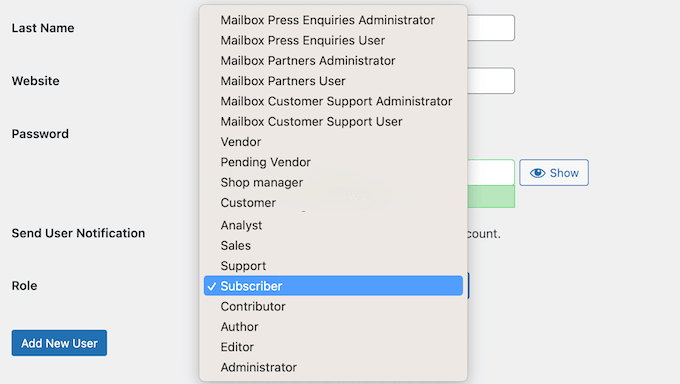
As the site owner, you are automatically assigned the administrator user role. This gives you complete control, including the ability to manage all user accounts.
When testing new features on your website, you may need to see how things look to people with different user roles and permissions. This is particularly important for sites that have lots of different users, such as multi-author blogs or membership websites.
You can create test accounts and then log in and out of these accounts manually. However, this will take a lot of time and can make it difficult to thoroughly test new features on your WordPress blog.
With that in mind, let’s see how you can instantly switch between user accounts in WordPress.
Video Tutorial
If you don’t like the video or want text instructions, then just continue reading.
How to Instantly Switch Between User Accounts
The quickest way to switch between different test accounts is by using User Switching. This free plugin allows you to access any user account with the click of a button and without entering any passwords.
First, you need to install and activate the User Switching plugin. For more details, see our step-by-step guide on how to install a WordPress plugin.
Upon activation, you need to go to the Users page in your WordPress dashboard. You can now hover your move over any account and click on the ‘Switch To’ link when it appears.
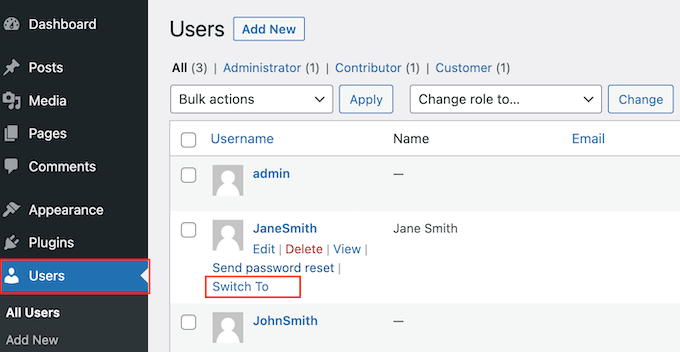
The plugin will now log you into that user account without asking for a password or username. With that done, you can test your WordPress website while logged in as that user.
User switching is only available for users with the admin role, so you won’t see the ‘Switch To’ link while logged in as any other user.
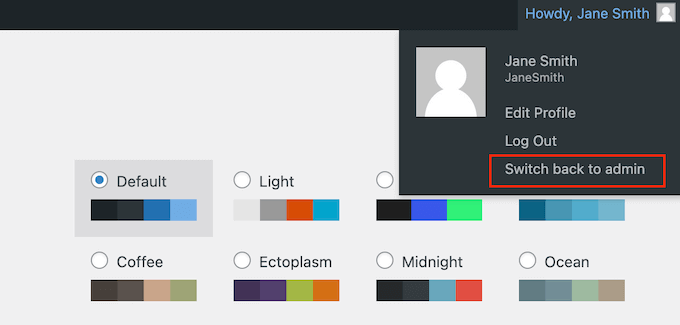
When you are ready to switch back to the admin account on your WordPress blog, simply hover over the username in the toolbar. In the dropdown that appears, click on ‘Switch back to admin.’
We hope this article helped you instantly switch between user accounts in WordPress. You may also want to check out our guide on how to force strong passwords on users, or see our expert pick of the best free user management plugins for WordPress.
If you liked this article, then please subscribe to our YouTube Channel for WordPress video tutorials. You can also find us on Twitter and Facebook.


Jiří Vaněk
After implementing MemberPress, I started making a lot of adjustments to the website to make it more user-friendly for the community registering on it. This, of course, meant a lot of testing. I found it really frustrating to constantly switch between the admin account and the test user to see how the changes applied. I used several browsers to deal with this, but it wasn’t ideal. This solution saved me a lot of time and frustration, and it’s a really great complement to the MemberPress plugin for testing.
Kim
Is it possible to use User Switching plugin and a roles plugin to created an editor who can switch roles?
WPBeginner Support
You may need to check with the support for User Switching but you should be able to with the correct user permissions.
Admin
kzain
Does the User Switching plugin pose any security risks if accidentally accessed by someone with less technical knowledge, and are there recommended best practices to mitigate such risks? Very informative article though!
WPBeginner Support
The plugin would only be active to Admin users on the site and would not add additional security issues that and admin user would already be able to achieve.
Admin
Kzain
thank you for the response, now it make sense to me, appreciate your time
Dennis Muthomi
This is a interesting plugin.
My site has two accounts – one for content creation without admin privileges, and another admin account for overall site management.
Constantly logging in and out can be tedious, so being able to switch instantly between these accounts would streamline my workflow significantly.
Amer Saeed
when switched to a woocomerce user account,
how can i come back to administrator account ?
WPBeginner Support
There should be the option at the top of admin pages you look at or in the admin toolbar of your site to swap back
Admin
Beth Coleman
Thanks for sharing this great resource of information – ALL very useful to my business.
Cynthia
Humm that plug-in sounds scary as he_ _. I’m just envisioning a glitch where you can’t get your admin role back, or even worse a hacker exploiting that plug-in getting into user accounts by bypassing passwords. Yikes.
Think I’ll stick with the extra minute it takes to log in as a different user.