


We’ve been running WordPress sites for over a decade, and one feature we always recommend is showing when a post was last updated. It’s a small detail that makes a big difference.
That’s why, at WPBeginner, we display the last updated date on all our posts. It shows readers that our content is fresh, accurate, and trustworthy.
What many site owners don’t realize is that this can also help with SEO. Search engines favor content that’s regularly updated.
In this guide, we’ll show you multiple ways to display the last updated date of posts in WordPress.
💡Quick Answer: Displaying Last Updated Date
If you don’t have time to read the full guide, here is the quick answer on the two best methods to show when your posts were last modified:
- Method 1 (Recommended): Use the WPCode plugin. This is the safest and easiest method. It works for all themes (including Block themes) and allows you to insert the date without risking site errors.
- Method 2 (Advanced): Edit Theme Files. This involves adding code to your
functions.phpor template files. It is best suited for developers or those using Classic themes who are comfortable with PHP.
Why Display the Last Updated Date of Your Posts in WordPress?
When visitors view a post or page on your WordPress blog, your WordPress theme will show the date when the post was published. This is fine for most blogs and static websites.
However, WordPress is also used by websites where old articles are regularly updated. In these publications, it is important to display the date and time the post was last modified.
For example, on WPBeginner, we regularly update our tutorials and show the ‘last updated’ date on each post. If we only displayed the published date, our readers would skip the post, assuming the information is out of date.
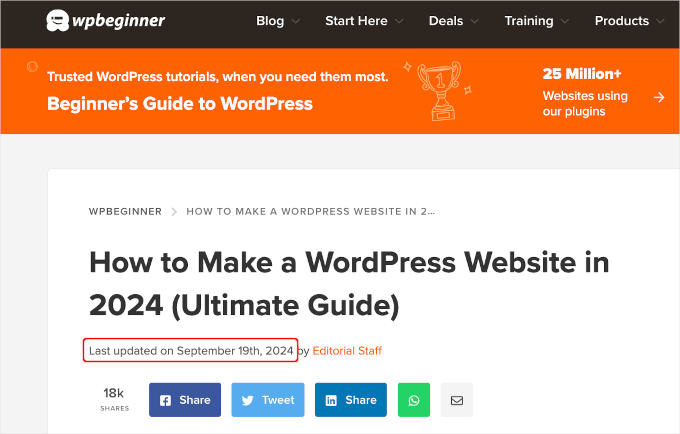
Another example is news websites. They often update old stories to show new developments, add corrections, or insert media files. If they only showed the published date, then their users would miss those updates.
Additionally, Google and other search engines like to rank the most up-to-date information. Displaying your updated date helps Googlebot and others know when the post was last touched.
Note: Keep in mind that simply changing the date isn’t enough. You must genuinely improve the content for this strategy to be effective.
How to Display the Last Updated Date of Your Posts in WordPress
This tutorial requires you to add code to your WordPress files. If you haven’t done this before, then we recommend you take a look at our guide on how to copy and paste code in WordPress.
With that in mind, we’ll show you 2 methods for easily displaying the last updated date for your posts in WordPress. You can go ahead and click on the jump links below to use your preferred method.
Let’s get started!
Method 1: Showing Last Updated Date Before Post Content
You can easily show the last updated date before your content by adding custom code to your website. However, even the smallest error in the code can make your site inaccessible.
That’s why we recommend using WPCode. We’ve thoroughly tested it and found it to be the safest and easiest way to add custom code.
To learn more about our experience, check out our WPCode review.
First, you will need to install and activate the free WPCode plugin. For more information, see our step-by-step guide on how to install a WordPress plugin.

Note: The WPCode premium version has more features! So, if you like the free version, you can upgrade and enjoy a private cloud library, conversions pixel addon, built-in access controls, and multi-site support. To learn more about the plugin, you can go through our complete WPCode review.
Once the plugin is activated, navigate to Code Snippets » + Add Snippet in your WordPress dashboard. Search for ‘last updated date,’ and hover your mouse over the result titled ‘Display the Last Updated Date.’
The code checks to see if a post’s published date and last modified dates are different. Specifically, it checks if the post was updated more than 24 hours after it was published. (This is the way we do it here at WPBeginner.)
Next, you can just click the ‘Use Snippet’ button.
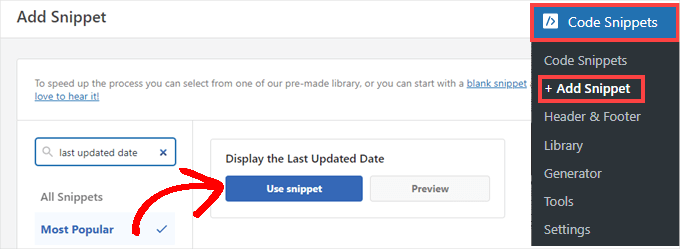
Then, you will see the ‘Edit Snippet’ screen. WPCode has already configured the snippet for you.
All you have to do is toggle the switch to ‘Active’ and click ‘Update’ when you’re ready.
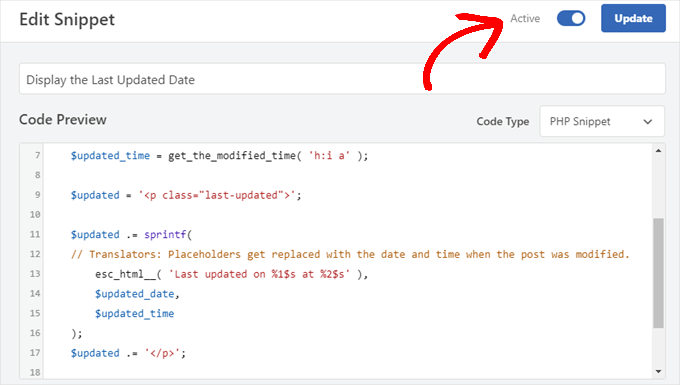
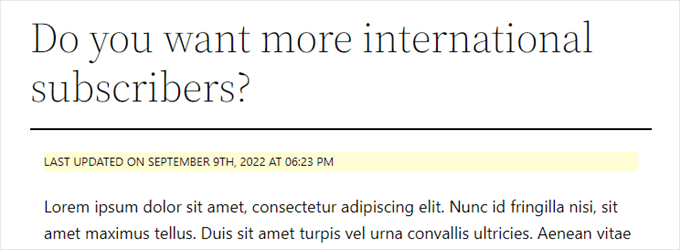
The code snippet displays the updated date using your theme’s default styles. You can use custom CSS to make it look nicer.
Simply go to Appearance » Customize and click on the ‘Additional CSS’ tab. You can paste the following CSS snippet there as a starting point:
.last-updated {
    font-size: small;
    text-transform: uppercase;
    background-color: #fffdd4;
}
And this is how it looks on our demo WordPress website:
Additionally, if you’re an advanced user and feel comfortable doing so, you can add the following to your theme’s functions.php file.
Just connect to your website via FTP or through your WordPress hosting file manager and find the file in your site’s /wp-content/themes/yourthemename/ folder.
$u_time          = get_the_time( 'U' );
$u_modified_time = get_the_modified_time( 'U' );
// Only display modified date if 24hrs have passed since the post was published.
if ( $u_modified_time >= $u_time + 86400 ) {

	$updated_date = get_the_modified_time( 'F jS, Y' );
	$updated_time = get_the_modified_time( 'h:i a' );

	$updated = '<p class="last-updated">';

	$updated .= sprintf(
	// Translators: Placeholders get replaced with the date and time when the post was modified.
		esc_html__( 'Last updated on %1$s at %2$s' ),
		$updated_date,
		$updated_time
	);
	$updated .= '</p>';

	echo wp_kses_post( $updated );
}
Method 2: Adding Last Updated Date in Theme Templates
Note: This method is intended for older Classic themes. If you are using a modern block theme (FSE) like Twenty Twenty-Four, we recommend using Method 1 instead.
You can also display the updated date by editing specific WordPress theme files.
Many WordPress themes use their own template tags to show post metadata like date and time. Other themes use content templates or template parts.
You need to look for the file that contains the code responsible for displaying the date and time. Then, you can either replace that code with the following or add it right after.
$u_time = get_the_time('U');
$u_modified_time = get_the_modified_time('U');
if ($u_modified_time >= $u_time + 86400) {
echo "<p>Last modified on ";
the_modified_time('F jS, Y');
echo " at ";
the_modified_time();
echo "</p> "; }
Important: We strongly recommend creating a child theme before making changes to your theme files. If you edit the parent theme directly, your changes will be lost when you update the theme. You should also create a complete backup of your WordPress site.
If you don’t want to display the time the post was updated, you can simply remove the lines of code that refer to the_modified_time().
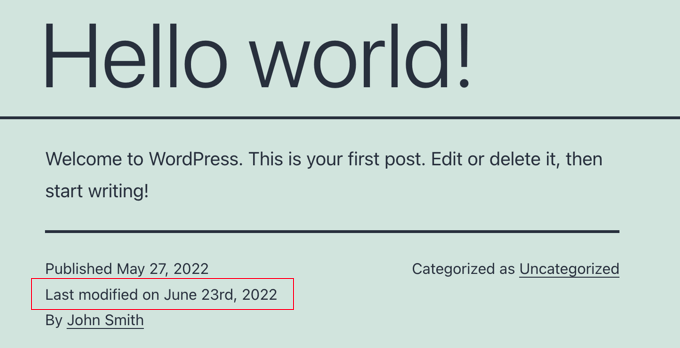
This is how it looked on our demo site. With the Twenty Twenty-One theme, we added the code snippet to the template-tags.php file inside the inc folder.
Bonus Tip: How to Manage the Last Updated Date of Your Posts
Now that we have added the last updated date for each post, it will automatically update every time you make a change to any post. But what if you’re only making a small correction rather than a full update, such as fixing a spelling mistake or adding a tag?
For small changes, it is usually best to leave the modified date unchanged from an SEO perspective. Your readers will then see the date when the last major update was made to the post.
AIOSEO, also known as All in One SEO, is the best WordPress SEO plugin on the market. It helps you improve search rankings without learning complicated jargon, so you can increase your website traffic.

If you’re already using AIOSEO to improve your search engine rankings, then you can use it to manage the modified date of your posts as well.
If you haven’t, then the first thing to do here is to install and activate AIOSEO. You can learn more in our guide on how to set up All in One SEO for WordPress correctly.
Note: You can use the AIOSEO free version to do this task. However, by purchasing the pro version, you’ll be able to access advanced features such as ChatGPT AI tools, content decay tracking, a redirection manager, and an internal link assistant. For more information, you can read our complete AIOSEO review.
Upon activation, you will find a new checkbox labeled ‘Don’t update the modified date’ when editing posts. You can check the box when making minor changes to a post.
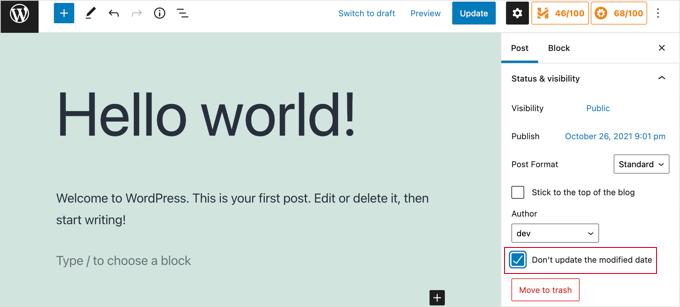
This is useful when fixing typos or simple mistakes, and you can uncheck the box when making changes you want your readers and search engines to know about.
Video Tutorial
Need a visual guide? Then, you might appreciate our quick video tutorial featuring WPCode:
Frequently Asked Questions Related to Showing the Last Updated Date of Your Posts
Here are some questions that our readers have frequently asked about showing the last updated date of WordPress posts:
How can I tell when WordPress was last updated?
To check your WordPress core software status, go to Dashboard » Updates.
If you are looking for the last time a specific post was updated, check the date metadata under the headline or look at the ‘Revisions’ panel inside the post editor.
How to display post date in WordPress?
Most WordPress themes automatically display the published date under the post title. To show the last modified date instead, you typically need to add a code snippet to your theme or use a plugin like WPCode, as detailed in this guide.
How to find out when a page was last updated?
Check the metadata usually located above or below the article headline. If the date is hidden, you can right-click the page, select “View Page Source,” and search for the dateModified schema tag to see the exact timestamp.
How do I see the history of changes on WordPress?
Open the specific post or page in the WordPress block editor. In the right-hand settings sidebar, look for the ‘Revisions’ tab. Clicking this opens a timeline where you can compare changes and restore previous versions of your content.
To get started, see our beginner’s guide on WordPress post revisions.
We hope this tutorial helped you learn how to display the last updated date of your posts in WordPress. You may also want to learn how to disable Google Fonts on your WordPress website, and our list of excellent WordPress website examples that you should check out.
If you liked this article, then please subscribe to our YouTube Channel for WordPress video tutorials. You can also find us on Twitter and Facebook.


Suman Sourabh
Helpful. I think we can use the WP Last Modified Info plugin as well. I have used it to display the “Last updated date” on a page. Basically, I had to copy the php snippet and paste it on the theme file. Worked perfectly.
Jiří Vaněk
Thanks for the snippet. It works perfectly. I have a bilingual website and I edited the snippet using AI so that it was in the correct language mutation on both the CZ and EN versions. But I used your snippet as a basis and it works great.
Bobbi
How do you get Bing to pull the updated date as opposed to the original published date? I have it set up so that Google does, but Bing doesn’t seem to want to
WPBeginner Support
If you just recently added this then you would need to give Bing time to recrawl your site’s content.
Admin
Daniel M.
Simply echo “the_modified_date()” where you want to show it in your theme files.
WPBeginner Support
That is better used within the WordPress loop if you want to use it, we recommend the second method in this guide if you wanted something similar.
Admin
Ajit Kumar
Hey, I am using WordPress Twenty Twenty-Three Theme I have used the above code which you provide in my Function.php Now the latest update date showing on all posts, I was waiting for Google crawling, and after Google crawled the data showed the Published date instead of Updated date.
How to get an Updated date on my Google Rich Snippet Please help I am very Thank full to you!
Thank You So Much!
WPBeginner Support
If you remove the published date from your posts that can help have Google show the updated date instead but there is not a guarantee of the date that Google will show as Google determines which one it decides to show.
Admin
Imran
I tried this but it shows both original published date and last updated date.
I want to show
if the post is update- show updated date
if not
just show original date.
How to do this.
WPBeginner Support
For what you’re wanting you would want to add an else statement that had your theme’s original option to display the date using the method to edit your theme template from this article. An example of what you would add is the code below:
else {

// Theme's code

}
Admin
Adam Baney
The code to insert into a theme file worked perfectly! I added it as a function in my functions.php file, and called it on the page. The allows me to update the code in 1 place, and it will update across my site, in case I want to show the last modified date for multiple post types or in custom templates. Thank you!
WPBeginner Support
Glad our guide was helpful!
Admin
MOHAMMED AQRABI
I have a question, for example, if I now display the date of the last update of the article and I have 800 articles and all the dates have changed for all articles at once, will this affect or harm the search engines
WPBeginner Support
It should not cause an issue, you would mainly need to give time for Google to recrawl your updated dates.
Admin
Raphael
Thank you so much for this tutorial!
I used the first method and it perfectly works for me but I am having one issue, the post is still showing the published date on google search instead of the latest update date.
How can I do away with this?
WPBeginner Support
It would depend on how recently it has changed, if you just added the updated date you would need to wait for Google to recrawl your post.
Admin
Masrafi
Hello, this was a very helpful blog and video. But when I apply, it shows the end of the content. please tell me the solution
WPBeginner Support
You may need to check with the support for your specific theme to check the placement of your code in case your theme has a different method for displaying the publish date.
Admin
Dean
s there a way to hide this on pages and only show on blog posts ? tx
WPBeginner Support
You would want to use the second method in this article for that
Admin
Gianluigi Filippelli
if ( get_post_type() ‘page’ ){
return $custom_content;
} else {
return $content;
}
Laura
Just a quick question, the updated date shows at the bottom of my posts, as opposed to the top.
Is there a solution to ensure the new updated date is at the beginning of the posts?
WPBeginner Support
It would depend on how your theme is designed. If you reach out to your theme’s support they should be able to help you place it in the correct location
Admin
Raman
Hi Team,
I am able to print updated date but it’s getting rendered below the featured image, can you advise how can print the udpated date on the top of the featured image, means right below the title.
WPBeginner Support
You would want to reach out to the support for your specific theme and they should be able to assist with that placement.
Admin
Sanaullah Farooq
Hello,
I want to show only post update date on page and in search results instead of publish date. How can I achieve that? I have tried everything.
WPBeginner Support
If you are unable to remove the published date then we would recommend reaching out to your specific theme’s support and they would be able to help you remove that.
Admin
Rachel Joan
OMG…
Thank you for saving my hours…
Thank you for this code.
You are the problem solver.
WPBeginner Support
Glad our guide was helpful
Admin
Danyl
Hi how about list of users who updated the post?
WPBeginner Support
You would want to take a look at your post revisions for that information
Admin
ali karimi
thanks a lot for your help
WPBeginner Support
You’re welcome
Admin
Ankit Sheoran
Last update is not showing in google what should i do but showing in my website
WPBeginner Support
If the change is recent, you would need to wait for Google’s cache to clear. Otherwise, you would want to check with your theme’s support to ensure they are not setting the specific publish date elsewhere
Admin
Shubham Davey
What if I want to show only the updated date & not the published date? The method shown here displays both published & updated date, I don’t want that, just updated date, that’s it.
WPBeginner Support
It would depend on your theme but you would use method 2 to replace the display of the last edited date. The location of that code varies from theme to theme.
Admin
Charles
Hello I applied the code but it keeps popping out error
WPBeginner Support
It would depend on the specific error but for the most common reasons you would want to take a look at our article here:
https://www.wpbeginner.com/beginners-guide/beginners-guide-to-pasting-snippets-from-the-web-into-wordpress/
Admin
John
The PHP code worked great, but how do I limit it to post pages only. Once I added the code to functions.php it displayed last updated on both pages and posts. What do I need to add to limit it to just posts?
Thanks,
John
WPBeginner Support
To limit it to posts you would use an if statement after the function:
function wpb_last_updated_date( $content ) {

if ( is_single() ) {
and add a closing
}above the add_filter lineAdmin
John
Thank you for the quick response!
I tried the code, but it prevents my blog pages from rendering. However, my blog post pages continue to work and display last updated date.
Do you have any idea why that is?
WPBeginner Support
You may want to reach out to your theme’s support, this code shouldn’t prevent the rendering of content unless something theme-specific is conflicting with it.
Romeo
Still worked in September 2019 for one of my sites. For my Genesis based site, I needed to use the Genesis Simple Edits plugin to easily modify the post info since they put the post info in an array, instead of in a function.
WPBeginner Support
Thanks for sharing what worked for you
Admin
sarkariyojanainfo
Thank you for this post, I tried it and its working Fine..
WPBeginner Support
You’re welcome, glad our article could be helpful
Admin
Kirsty
Hi there,
I’m having the opposite problem – I have a new website and have backdated my posts to the date that they were originally created, but my site is showing the dates that they were last updated.
Any advice on how to fix this, or if there is a link to another tutorial for that somewhere would be greatly appreciated, I can’t find one!
Thanks.
WPBeginner Support
By default, WordPress should work like this, you may want to reach out to the support for the specific theme you’re using to see if they have a setting for this.
Admin
Giacomo
Hi, will it impact SEO if I show both the posted, and the updated date?
Thanks!
WPBeginner Support
Unless I hear otherwise, we haven’t tested the SEO impact of having both displaying at the same time but your post’s metadata should let search engines know which date to look at.
Admin
Noz
Thanks.. is there a way to show the Last modified field Only After certain time from date of post?
i.e if the next day you edited a post for some reason, doesn’t have to show as modified..
WPBeginner Support
Not at the moment but we can certainly look into an option to do that.
Admin
Bill Hogsett
i have a page that lists books that I have read and I update the page when I start a new book.
On the sit’s homepage I have a menu link to the book list. I would like to have button, or maybe just text, next to the homepage link showing the last time the book list page has been updated.
Any suggestions?
Thanks.
WPBeginner Support
You could either add a text widget or edit the menu item’s title manually when you update the page.
Admin
Herbert
I am using Method 1 since Method 2 doesnt seem to work on my theme. Is there a way to have the text be displayed n the bottom of the post? Your response would mean a lot. Thank you
WPBeginner Support
For relocating the publish date you would want to reach out to the support for the theme you are currently using for how to do that with your theme.
Admin
Pete
This is great. Quick question, I can’t seem to get it to only show on post and not pages? I tried to add method 2 to the single post template, but that didnt seem to work. It doesnt contain a bit about date or time. Even though the date is displayed in header.
Should i be adding more to show date and time in the single post template?
WPBeginner Support
Your specific theme may be pulling that information from another file. If you reach out to your specific theme’s support they should be able to assist.
Admin
Tudor
Hi, how to make last updated date show only on specific pages?
Alexander
Hi, thanks so much for this guidance freely given.
Suppose I do not want to show the published date but only the last updated date? How can I modify the code to achieve that, please?
Thanks
Alexander
WPBeginner Support
You would need to modify your theme’s templates, as each theme is different you would need to check with your theme’s support for where the published date is located
Admin
Melanie
Hi,
I found your information helpful. But perhaps you can answer two more questions:
When is it best to completely update a post aka republish it versus just provide the “last updated” information? Sometimes republishing something feels like cheating – it’s a lazy way to update my blog.
I’ve also read that having two dates on a post can confuse Google when it is crawling your site. Of course, I would like for them to pick up the latest date so it shows next to the description in the search results. Is there a way to show one or the other?
Right now, I have removed the entry date on posts while employing the “last updated” date (using css for both). Problem is that if I haven’t updated something, then it shows no date which is also a no-no according to the post above.
A LOT to address here, I know! But if you would be so kind to consider a reply, I would appreciate it.
Thanks!
WPBeginner Support
Hi Melanie,
It is best to simply update a post if changes are minor. However, if a post is completely outdated and a rewrite contains all new information, then you can publish it as a new article and redirect your old article.
Admin
Dat Nguyen
Thank you.
It so helpful.
I need it.
Christie
How do you keep the “last updated” from appearing at the top of specific pages. I really only want it on blog posts, not my homepage, contact page, etc.? thanks.
Laura
This code is excellent. Thanks so much. I’m following pretty much all of it, but I’m just curious what the 86400 number added to the updated time is doing.
Thanks in advance.
WPBeginner Support
Hi Laura,
86400 is number of seconds in a day. The code checks if the modified time is larger than or equals to a day.
Admin
Morsi
Hello, can i use the first méthod and using the translation file to translate it into my language ?
Sunny Mui
Thanks, this was helpful for implementing last updated text on my blog.
One point, the theme specific code is actually incorrect. You forgot the “echo get_…” before the get_the_modified_time() function.
Right now it just says:
the_modified_time(‘F jS, Y’);
echo ” at “;
the_modified_time();
When it should say:
echo get_the_modified_time(‘F jS, Y’);
echo ” at “;
echo get_the_modified_time();
Jamie Brower
Can you please tell me how to post the modified date AFTER the content. I tried using a in the footer.php but then it just displays before the content AND in the footer. I would just like the footer to display.
Daniele
Thanks guys, it works like a charm! A so so cool tip!
If you want to add the last modified ONLY ON POSTS, that works for me (I’m Italian and I edited it not showing the hour and modified the date order):
function wpb_last_updated_date( $content ) {
$u_time = get_the_time(‘U’);
$u_modified_time = get_the_modified_time(‘U’);
if ($u_modified_time >= $u_time + 86400) {
$updated_date = get_the_modified_time(‘d F Y’);
$updated_time = get_the_modified_time(‘H:i’);
$custom_content .= ‘Articolo aggiornato il ‘. $updated_date . ”;
}
if(is_single()){
$custom_content .= $content;
return $custom_content;
}
return $content;
}
add_filter( ‘the_content’, ‘wpb_last_updated_date’ );
David Aguirre
Dude, this is gold, I don’t know why anyone has thanked you before.
Thank you
PET
Yeah, good stuff! Thanks bro!
David
I have applied above all settings on my website and its working fine.
But I have one question that when two dates shown above content then which date will be shown in google search engine result page? Please provide answer because I have done all this only for showing last update date in google search engine result page.
ahmed
i like this it is very good and easy to install with genesis child theme function.php thank you
Vishal Mukherjee
Hi,
Added the following code to functions.php
function wpb_last_updated_date( $content ) {
$u_time = get_the_time(‘U’);
$u_modified_time = get_the_modified_time(‘U’);
if ($u_modified_time >= $u_time + 86400) {
$updated_date = get_the_modified_time(‘F jS, Y’);
$updated_time = get_the_modified_time(‘h:i a’);
$custom_content .= ‘Last updated on ‘. $updated_date . ‘ at ‘. $updated_time .”;
}
$custom_content .= $content;
return $custom_content;
}
add_filter( ‘the_content’, ‘wpb_last_updated_date’ );
Works fine for posts but … the same is displayed in Pages also.
I want it only for post. or if pages then at a different place eg End og the page article.
Best Wishes
Vishal Mukherjee
Victor Step
Thank you for the code.
However, there is a common problem that Google pulls the date of the embedded youtube video instead of the updated blog post date. In your case, I see that the search results do in fact show the correct date, and not the embedded video’s upload date. How did you achieve this? Thank you.
RUWAN
hello, I want only show updated date like your website, not both(updated and published date), when I add your code to site then its shows that both dates, please guide me to show only that updated date. thanks
Ludwig Sörmlind
Thank you for this post, I tried it and it works like a charm. I went for the site-specific plugin-option.
Ebuka
Thanks a lot it worked perfectly. but for the custom CSS only the “text-transform” worked on my theme. Other CSS like; color, text-weight, background-color etc. did not work. Please is there any possible way around it?
peter
hi syed ,am peter. the code work on my theme, but when i tried to add css style , i mean this code .last-updated {
font-size: small;
text-transform: uppercase;
background-color: #fffdd4;
}
my site goes blank. please what do i do to restore my website…
WPBeginner Support
Hi Peter,
We are not sure what may cause this. Just to be on the safe side, please take a look at our guide on how to add custom CSS in WordPress.
Admin
Steve W
Thank you for this tip. I actually turned it into a shortcode so that it only shows up where I want it, and not on every page or post. [last_updated]
Velyz Zhang
Hi,
Actually the code is work, but the result showing some numbers before “last update”
1494555840LAST UPDATED ON JUL 9, 2017
Every single post that I updated showing different numbers like that. Any one can help me?
Thank you
mathhew
Can you please explain how to apply it for genesis framework. i tried it but it didn’t worked