


Without a contact form, your WordPress site is missing the easiest way for visitors to reach you.
Adding one is easy. The hard part is choosing from the many plugins that all promise to do it well.
At WPBeginner, we’ve tested dozens of WordPress contact form plugins. Some are overcomplicated nightmares that require a developer. Others are so basic they can’t handle anything beyond “name and email.”
The best ones sit in between: powerful enough to grow with your business, simple enough to set up without a developer.
In this guide, I’ll share my findings on the 7 best contact form plugins for WordPress. You’ll see what makes each one different, who it’s best for, and its pros and cons.

Contact Form Plugins at a Glance
| Product | Starting Price | Best For |
|---|---|---|
| WPForms | Free (Paid plans from $49.50/year) | Beginners and small businesses |
| Formidable Forms | Free (Paid plans from $39.50/year) | Directories and data-driven apps |
| Gravity Forms | $59/year | Agencies and accessibility-focused sites |
| Contact Form 7 | Free | Lightweight, code-based forms |
| WS Form | Free (Paid plans from $59/year) | Deep customization |
| Ninja Forms | Free (Paid bundles from $99/year) | Feature-packed on a budget |
| Fluent Forms | Free (Paid plans from $55/year) | A lightweight, fast-loading builder |
Why Add a Contact Form to Your WordPress Site?
A contact form gives visitors a structured way to reach you without exposing your email address to spam bots. It is often the first contact someone has with your business, so a form that is broken, confusing, or buried under spam costs you leads before you know they exist.
You can add a professional contact form to any WordPress site in a few minutes, and here are the benefits of using a plugin:
- You own your data. Form submissions go directly to your site, not a third-party service.
- Plugins handle the hard part. No coding needed to add fields, conditional logic, or spam protection.
- Integrations are built in. Most form plugins connect to your email list, CRM, or payment processor.
- Setup is fast. Most plugins let you publish a working form in under 5 minutes.
- You can grow over time. Start with a basic contact form and add payments or surveys later.
How I Evaluated the Best Contact Form Plugins for WordPress
I personally installed and tested each plugin on a WordPress site to understand how it performs from setup to submission. My goal was to find which ones are easy to use and reliable in practice.
Here’s what I focused on during testing:
- Installation and setup: I installed each plugin from the WordPress dashboard and timed how long it took to publish a working contact form from scratch.
- Builder usability: I tested the drag-and-drop interface (or lack of one) to see how quickly I could add fields, reorder them, and adjust settings without checking documentation.
- Feature depth: I tested every major feature listed by the developer, including conditional logic, multi-step forms, spam protection, and calculations, to see how each worked in practice.
- Integrations: I checked how easily each plugin connected to common tools like Mailchimp, Stripe, and Google Sheets.
- Spam protection: I looked at what spam prevention options each plugin offers out of the box, since this is one of the most common pain points with contact forms.
- Pricing and free tier value: I compared what each free version actually includes and whether paid plans offer fair value for the features unlocked.
- Support and documentation: I checked the quality of official docs, tutorials, and response channels for each plugin.
This process showed me which plugins hold up in real use and which only look good on a feature list.
Why Trust WPBeginner
Our team installs and tests every plugin we recommend on real WordPress sites. We only recommend plugins that meet our internal standards for usability, reliability, and honest value. You can read more about our process in our editorial guidelines.
Now, let’s look at the 7 best contact form plugins for WordPress.
- WPForms – Best Contact Form Plugin for Beginners and Small Businesses
- Formidable Forms – Best for Building Directories and Data-Driven Apps
- Gravity Forms – Best Contact Form Plugin for Agencies and Enterprise Users
- Contact Form 7 – Best Free, Lightweight Contact Form Plugin
- WS Form – Best Contact Form Plugin for Developers Needing Maximum Customization
- Ninja Forms – Best Contact Form Plugin for Budget-Conscious Users
- Fluent Forms – Best Contact Form Plugin for Speed and Modern UX
- What Is the Best Contact Form Plugin for WordPress?
1. WPForms – Best Contact Form Plugin for Beginners and Small Businesses
🟢 We run this in production. It powers WPBeginner’s main contact form, reader survey, and migration form (40,000+ submissions/year).
WPForms is the contact form plugin I recommend most to beginners and small business owners, and it’s the one we use on our own websites. It’s not the cheapest option, but it’s the easiest to use and offers plenty of integrations and customization options.
I’ve used and tested WPForms dozens of times, and the pattern is always the same: log in to the WordPress admin area, click ‘Add New Form,’ pick a template, and have a working form live in under 5 minutes. There’s no need for tutorial videos or support tickets.
If you need a detailed walkthrough, see our WPForms review.
My Experience
The template library saves you a lot of time. With over 2,100 pre-built templates, you rarely start from scratch. Whether you need a donation form, event registration, a survey with conditional logic, or something more specialized, templates cover most common use cases.
WPForms also includes an AI-powered form builder with a chat interface. I described a basic client feedback form in plain English, and WPForms generated a complete form with the right fields in seconds.
The drag-and-drop builder makes customizing those templates straightforward. You drag fields into position, labels are easy to edit, and nothing requires touching code.
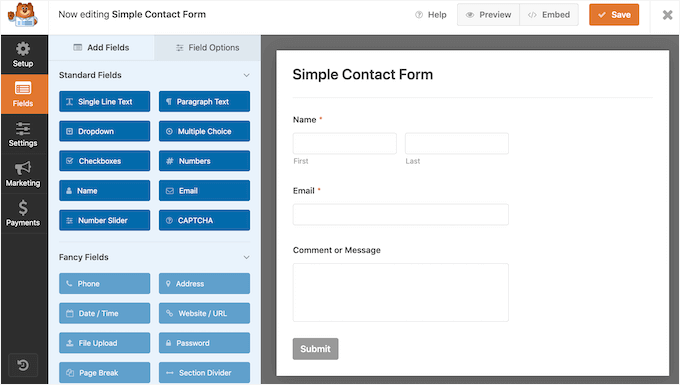
Smart conditional logic also lets you show or hide fields based on what a user selects. It’s intuitive to set up and works reliably across different devices.
Another feature I liked is Quiz mode. It lets you build interactive quizzes with automatic scoring, making it a great fit for everything from classroom assessments to fun personality quizzes.

If you’re building payment forms, then WPForms connects to Stripe, PayPal, Square, and Authorize.Net through its addons. Setting up a simple order or donation form with payment processing took me less than 10 minutes.
Beyond payments, the 40+ addon library covers nearly every use case: file uploads, surveys, conversational forms, repeater fields, and calculations.

I connected WPForms to Constant Contact, Mailchimp, and HubSpot. You can also integrate with Google Workspace apps like Drive, Sheets, and Calendar.
WPForms also includes spam protection out of the box. I could switch on a honeypot, Akismet, or a CAPTCHA like Cloudflare Turnstile or reCAPTCHA without installing anything extra.
The form abandonment recovery feature was also useful in testing. It captures partial entries before someone submits, so you can follow up with leads who didn’t finish the form. User journey tracking provides even more context by showing how visitors interact with your forms before submitting.
When it comes to WPForms Lite, it includes basic field types, unlimited forms, and unlimited submissions. You’ll need a paid plan to access conditional logic, multi-page forms, most integrations (beyond email), and crucially, form entry storage in the WordPress dashboard.
✅ WPForms Pros
- Most beginner-friendly interface
- 2,100+ templates and AI form builder
- Excellent documentation and support
- 5+ million active installations with a 4.8 rating (WordPress.org)
- 40+ addons for payments, surveys, and more
- Integrates with all major CRMs and email marketing services
- Form abandonment recovery included
❌ WPForms Cons
- Free version is limited (basic form fields only, no entry storage)
- Addon costs can add up quickly once you need several premium features
Pricing: Free (Paid plans from $49.50/year)
Why I Recommend WPForms: It gets beginners from zero to a working form quickly, and the template library and addon ecosystem handle almost every use case you’ll run into.
Note: If you are a registered nonprofit organization, you can qualify for the WPForms nonprofit discount, which gives you 75% off the regular price.
2. Formidable Forms – Best for Building Directories and Data-Driven Apps
🟡 Hands-on tested for this review. Built 2 form types on a staging site: a real estate directory with Views and a payment form with conditional logic.
Formidable Forms is more than just a contact form plugin. If you need to turn form submissions into searchable directories, calculators, or data-driven listings, it’s built for those use cases.
I first tried Formidable Forms to build a real estate agent directory. What stood out immediately was how it stores form submissions as structured database entries instead of simply forwarding them by email.
For more insights into the plugin, see our Formidable Forms review.
My Experience
The drag-and-drop builder covers the basics well. With 100+ templates and built-in AI form generation, getting a form up and running doesn’t take long.

Where Formidable separates itself is the Views feature. After I tried submitting information through the form, Formidable Views automatically turned those entries into a searchable directory with filters, maps, and individual agent pages.
You also don’t need to add custom code or database queries. And form data becomes something you can display, filter, and build entire workflows around, not just store in an inbox.

Formidable also handles advanced data work well. Calculations, quizzes, user registration, PDF generation, and charts are all built into the platform. I used the calculation feature to build a simple mortgage estimator, and it worked cleanly.
Payment processing connects to PayPal, Stripe, Authorize.Net, and many other popular payment gateways. Setting up a paid submission form was straightforward once I understood the field mapping.
The 60+ integrations cover the tools most businesses already use. I connected Formidable to HubSpot and Google Sheets, and the Zapier and ChatGPT integrations add flexibility for more complex workflows.
Formidable Forms covers the spam basics too, with CAPTCHA and honeypot fields available to filter out bot entries.
Formidable also has a developer-friendly layer. Hooks and APIs give you deep control if you want to extend Formidable beyond what the UI offers.
Note that while Formidable Forms’ free version includes a drag-and-drop builder, basic forms, and limited integrations, it lacks the Views feature that makes Formidable special. Views, directory displays, and advanced data functionality require the Plus plan or higher.
If you’re considering Formidable specifically for directories or data-driven apps, budget for at least the Plus tier from the start.
✅ Formidable Forms Pros
- Goes beyond forms to build apps and directories
- Views turns entries into searchable directories, listings, and calculators
- Strong developer community and documentation
- 300,000+ active installations with a 4.8 rating (WordPress.org)
- AI form generation built in
- Supports payments, quizzes, PDFs, and charts
- 60+ integrations including Salesforce and HubSpot
❌ Formidable Forms Cons
- More complex than beginner-focused plugins
- Requires time investment to learn Views feature
- Free version is very limited
Pricing: Starts at $39.50/year (Free version available)
Why I Recommend Formidable Forms: It turns submissions into structured, displayable data, saving you from hiring a developer when you need directories, listings, or calculators built on form data.
3. Gravity Forms – Best Contact Form Plugin for Agencies and Enterprise Users
🔵 We’ve used this before, then moved on. An older WPBeginner project ran on Gravity Forms.
Gravity Forms is one of the best contact form plugins for agencies because it’s dependable. There’s no free version and no AI form builder, but you get strong accessibility support and a 15-year track record behind it.
When I first set it up on a test site, the first thing I noticed was how deliberately it was built. Every field uses proper semantic HTML, ARIA labels, and keyboard navigation support by default.
This way, accessibility is built in from the start instead of being something you have to add later. See our detailed Gravity Forms review for more information.
My Experience
The drag-and-drop interface covers 30+ field types and gets the job done cleanly. It won’t win awards for visual polish, but everything is where you expect it to be.
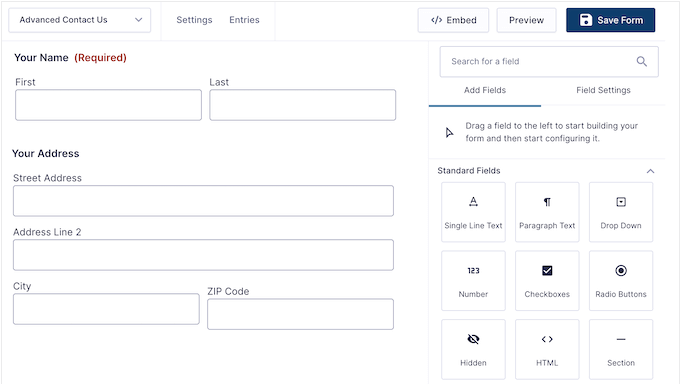
Gravity Forms builds in support for WCAG 2.1AA accessibility standards, so its forms work well with screen readers and keyboard navigation. You still apply the settings as you build, but the accessibility groundwork is there from the start.
It’s used on government sites, university systems, and enterprises where accessibility isn’t optional.
The conditional logic is powerful enough for most advanced workflows. I tested it with a form that displayed Section C only after users met multiple conditions, and Gravity Forms handled everything without issues.
Workflow automation connects directly to payment processing through Stripe, Authorize.Net, PayPal Checkout, and Mollie. During testing, I set up a multi-step application form with conditional routing and payment collection in a single afternoon.

The 50+ third-party integrations cover the tools agencies use most. I connected Gravity Forms to HubSpot, Slack, and Agile, and all three worked exactly as documented.
Plus, multisite support on the highest tier is a genuine advantage for agencies. Managing forms across multiple client sites from one license simplifies billing and maintenance.
For spam, Gravity Forms gives you reCAPTCHA, Akismet, and honeypot options in the settings, so you can block bot submissions without a separate plugin.
One downside is that Gravity Forms assumes you know what you’re building. There’s no AI form generator or large template library to guide you. Beginners who need more structure will find WPForms or Fluent Forms much easier to start with.
✅ Gravity Forms Pros
- Built-in WCAG 2.1AA accessibility support
- Reliable conditional logic for complex forms
- Highest tier includes unlimited sites (great for agencies)
- 30+ field types with semantic HTML markup
- Ticket-based support included (priority on Elite)
- 50+ third-party integrations
❌ Gravity Forms Cons
- No free version
- Steeper learning curve for beginners
- Fewer pre-built templates than competitors
Pricing: Starts at $59/year. The free demo at gravityforms.com/demo gives you a hands-on look before buying, which is helpful given that there’s no free plan.
Why I Recommend Gravity Forms: It’s the most reliable option I’ve tested for accessibility and complex conditional logic. Agencies managing multiple client sites will get strong value from the Elite tier’s unlimited site licensing.
4. Contact Form 7 – Best Free, Lightweight Contact Form Plugin
🟡 Hands-on tested for this review. Built 2 form types on a staging site: a basic contact form and a multilingual form with reCAPTCHA. Tested the shortcode and Gutenberg block embed options.

Contact Form 7 is the original free WordPress contact form plugin. It’s been around since 2007 and still has 10+ million active installations in 2026.
Developers continue to use it because it’s free, lightweight, and does exactly what it says.
My Experience
There’s no drag-and-drop builder here. You add fields by editing form markup manually, using shortcodes like [text* your-name] to define each input. For developers who prefer working with code over clicking through a GUI, this approach can actually be faster.
I built two contact forms from scratch, and the shortcode method was quicker than navigating a visual builder.
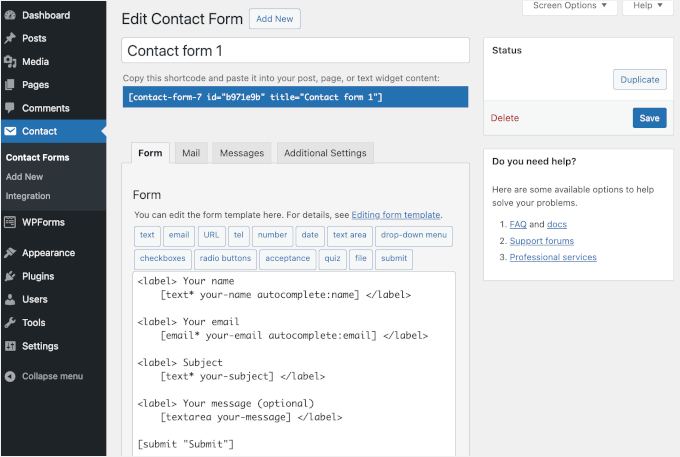
The plugin is deliberately lightweight, which means minimal server load even on resource-constrained hosting. I tested it on a site with 30+ active plugins and saw no performance degradation.
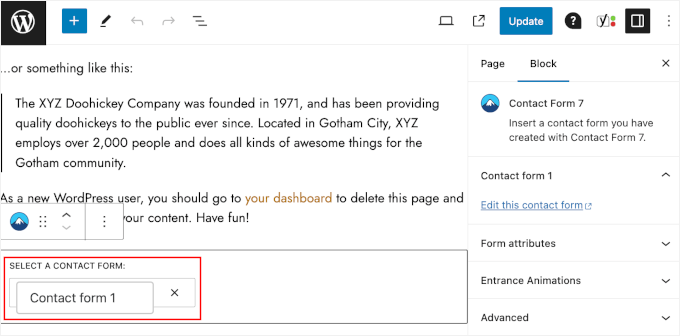
Contact Form 7 supports both shortcode and Gutenberg block embeds, so you can add forms to pages, posts, or widget areas using whichever method you prefer. I tested both approaches by embedding the same form in multiple locations.
Built-in field validation handles basic input checking on submission. It covers the fundamentals reliably without being as polished as modern alternatives. Email validation and required field checks worked as expected during testing.
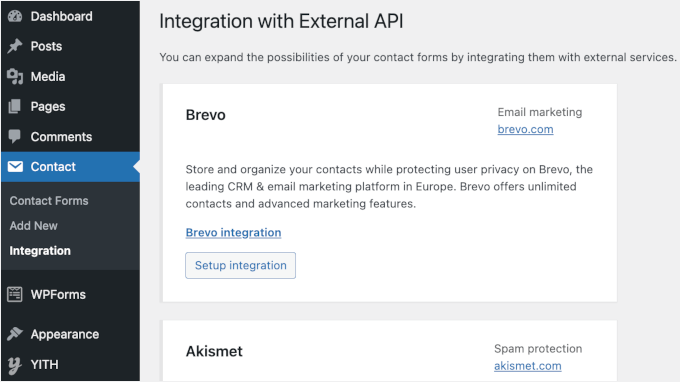
Optional integrations with reCAPTCHA, Akismet, Stripe, and Brevo are available, but none are active by default. You configure them manually, which suits developers but adds friction for anyone else.
Multi-language support covers 68 locales, making Contact Form 7 a practical choice for multilingual sites without needing an extra translation plugin.
The plugin also sets no cookies and does no tracking by default, which simplifies GDPR compliance on privacy-conscious projects.
The official documentation is thorough. And because Contact Form 7 has such a long history and huge install base, you’ll find a large community and plenty of third-party tutorials when you need help.
The limitation that matters most is entry storage: Contact Form 7 doesn’t save submissions to your WordPress dashboard by default. It only emails them, so if an email fails to deliver, that message is gone unless you add a companion plugin like Flamingo to log entries.
It also ships with no built-in spam protection, and conditional logic requires a third-party add-on. If you want these things handled out of the box, a builder like WPForms or Fluent Forms will be less work.
✅ Contact Form 7 Pros
- 100% free with no premium version
- Lightweight and fast (minimal code bloat)
- Trusted by 10+ million active installations
- Multi-language support (68 locales)
- No cookies or tracking by default
- Gutenberg block integration for easy embedding
❌ Contact Form 7 Cons
- No drag-and-drop interface (manual shortcode editing)
- No built-in conditional logic or spam protection
- No entry storage by default (submissions are emailed only, not saved to your dashboard)
- Poor beginner experience compared to modern alternatives
Pricing: Free (100% free, open-source, no premium version)
Why I Recommend Contact Form 7: It’s the most lightweight free contact form option available, with zero bloat and a zero-cost price tag. Developers who are comfortable with shortcodes will find it faster to work with than any drag-and-drop builder.
Note: If you’re deciding between Contact Form 7 and WPForms, check out our detailed comparison of Contact Form 7 vs. WPForms.
5. WS Form – Best Contact Form Plugin for Developers Needing Maximum Customization
🟡 Hands-on tested for this review. Built 3 form types on a staging site with device-specific breakpoints: desktop-optimized inquiry form, mobile-responsive calculator, and form with calculation functions.
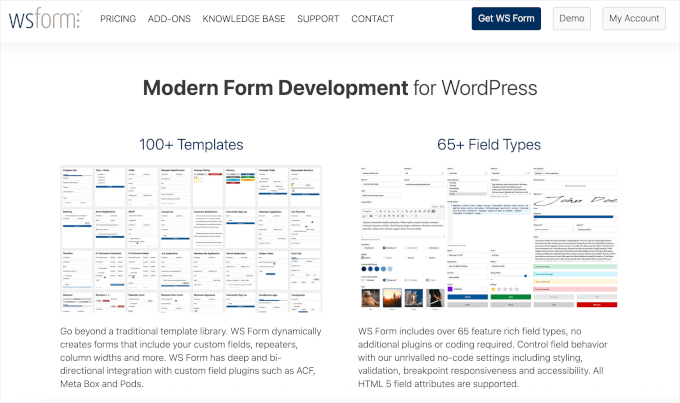
WS Form is a favorite among WordPress developers. It doesn’t have WPForms’ install base or Gravity Forms’ name recognition, but it offers something neither of those provides: true breakpoint-based design and the deepest conditional logic system available.
My first impression was that the interface looks dense, with a lot happening on screen. But once I understood the layout, I realized the complexity is intentional. WS Form is built for people who want total control.
My Experience
The builder immediately showed why developers recommend WS Form. Instead of relying on a single responsive layout, I could customize how the same form appeared on desktop, tablet, and mobile (a feature known as breakpoint-based design).
That level of control is rare among WordPress form plugins and makes it much easier to fine-tune the user experience for different devices.
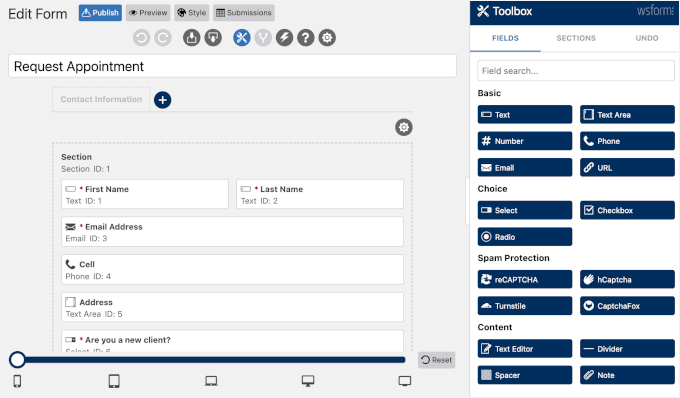
AI-powered form generation can also create a working form from a simple prompt, helping you get complex projects started faster.
Conditional logic is WS Form’s strongest area. During testing, I built a form that showed and hid sections, updated field values, and sent different email notifications based on users’ answers, all without writing custom code.
Combined with calculated fields that support 200+ variables and functions, it’s powerful enough to build pricing calculators, quote forms, and other interactive workflows.
WS Form also fits naturally into developer workflows and supports 90+ integrations. If you’re building custom WordPress sites, you’ll appreciate its integrations with ACF, Meta Box, and Pods, which let forms read from and write to custom fields.
WS Form handles spam through the usual tools, including CAPTCHA and honeypot fields you can add to any form.
If you’re testing WS Form to decide whether to buy, the free version gives you a decent sense of the editor. It includes the core builder, 30+ field types, and basic conditional logic, which is more generous than WPForms Lite. But you lose breakpoint-specific customization, advanced calculation functions, and most integrations in the free tier.
Plus, WS Form assumes you’re comfortable with concepts like breakpoints, data grids, and repeatable sections. If those terms feel unfamiliar, the learning curve will be steep. The smaller user base also means fewer community tutorials compared to more popular plugins.
✅ WS Form Pros
- Exceptional customization and conditional logic
- Breakpoint-specific design (separate mobile, tablet, desktop layouts)
- Native Bootstrap and Foundation rendering for theme consistency
- 100K+ active installations and a 4.8 rating (WordPress.org)
- 65+ field types with 200+ calculation functions
- AI-generated forms via OpenAI, Google Gemini, and Anthropic
- Bi-directional integration with ACF, Meta Box, and Pods
❌ WS Form Cons
- Complex interface (not beginner-friendly)
- Smaller community and fewer tutorials than top plugins
- Advanced features require understanding of web development concepts
Pricing: Starts at $59/year (Free version available as WS Form LITE)
Why I Recommend WS Form: It gives developers a level of layout control and conditional logic depth that no other WordPress form plugin matches. If you know what breakpoints and data grids are, this is your tool.
6. Ninja Forms – Best Contact Form Plugin for Budget-Conscious Users
🟡 Hands-on tested for this review. Built 3 form types on a staging site using the free version: a basic contact form, an event registration form, and a survey.
Ninja Forms has the most generous free version of any contact form plugin I’ve tested. While most free tiers give you a handful of basic fields, Ninja Forms gives you 28+ fields, unlimited forms, calculations, and free submission management out of the box.
There are no aggressive upsells or artificial limits designed to push you toward a paid plan. Read our complete Ninja Forms review for details.
My Experience
The free version includes more than I expected. During testing, I could build functional forms using a wide selection of fields, create as many forms as I needed, and access calculation features.
I tested building a simple lead capture form, an event registration form, and a multi-field survey, all without hitting any paywall friction.
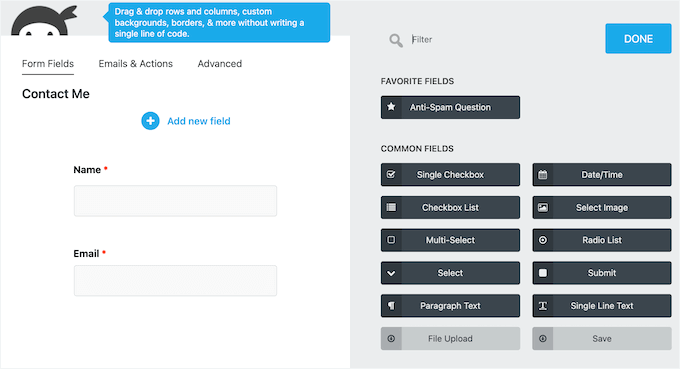
Submission management is also included in the free version, so I could view, edit, and export entries directly from the WordPress dashboard. This is critical because many free form builders lock even basic entry management behind a paywall.
What really sets Ninja Forms apart is its modular add-on system.
If you need advanced functionality like file uploads, payment processing, or integrations with Stripe, PayPal, Mailchimp, or Constant Contact, you can purchase only the add-ons you need instead of paying for a large feature bundle.
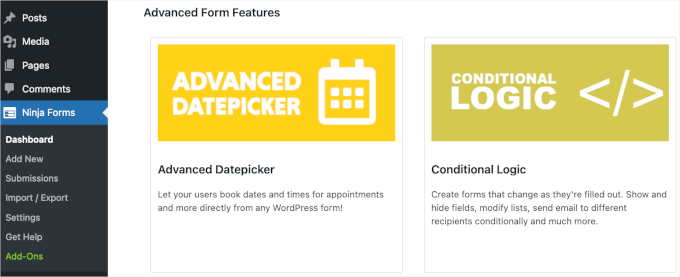
I tested adding the Stripe addon to collect payments on a form, and the integration was straightforward. That flexibility makes Ninja Forms a good choice if you’re working with a limited budget.
For developers, Ninja Forms also offers room to grow. You can inject custom code without modifying the core plugin, and compliance features for WCAG 2, HIPAA, and PCI make it suitable for projects with stricter accessibility or regulatory requirements.
Documentation and support are solid. The plugin has an active community forum and a responsive support team for paid users.
But Ninja Forms’ interface feels dated compared to modern alternatives like Fluent Forms or WPForms. It works well, but the builder lacks the visual polish that makes those plugins feel faster and more intuitive.
The form editor interface hasn’t changed much in years, which matters if you’re spending time in it daily. Keep in mind that buying three or four individual add-ons can also sometimes end up costing more than a single premium license from WPForms or Formidable Forms.
✅ Ninja Forms Pros
- Feature-rich free version with 28+ fields, unlimited forms, and calculations
- Modular pricing lets you buy individual add-ons instead of a full bundle
- 600,000+ active installations with long track record
- Unlimited forms and submissions in the free version
- Developer-friendly with accessibility and compliance-related features
❌ Ninja Forms Cons
- Interface feels dated compared to modern alternatives
- Add-on costs can add up if you need multiple integrations
Pricing: Core plugin 100% free; bundled plans start at $99/year
Why I Recommend Ninja Forms: No other contact form plugin gives you this much in the free version without pushing you toward an upgrade. The modular pricing model means you only pay for the integrations you actually need.
7. Fluent Forms – Best Contact Form Plugin for Speed and Modern UX
🟡 Hands-on tested for this review . Built 3 form types on a staging site: conversational contact form, multi-step form with conditional routing, and payment form with CRM integration.
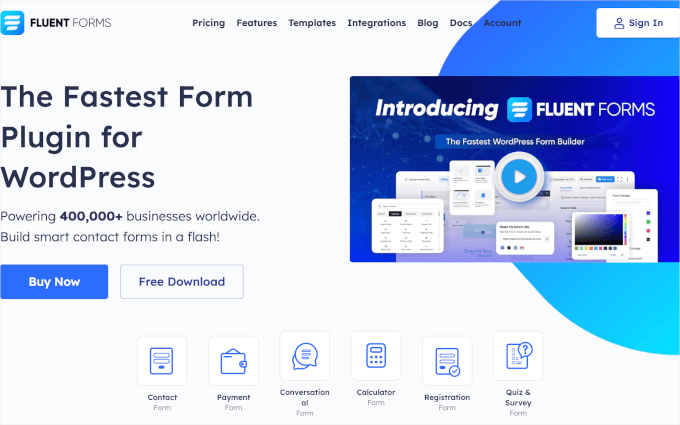
Fluent Forms markets itself as the fastest WordPress form builder. In my testing, that claim holds up, and the interface is clean and modern.
If you’ve ever had a form builder freeze while dragging a field, Fluent Forms will feel like a significant improvement.
My Experience
The drag-and-drop builder impressed me with how responsive it felt. Even on an overloaded site, dragging fields felt instant, with no lag.
With more than 65 customizable field types available, I never felt limited by what I could build.
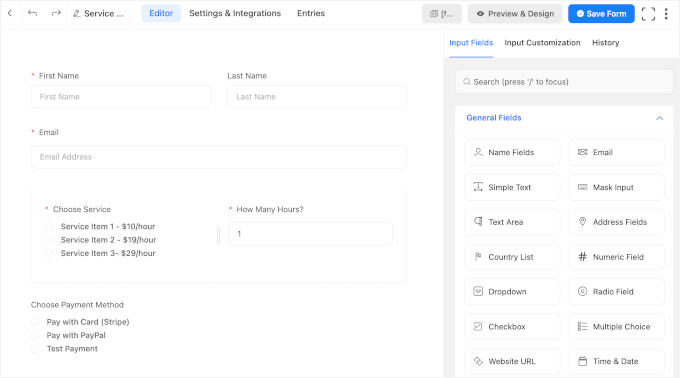
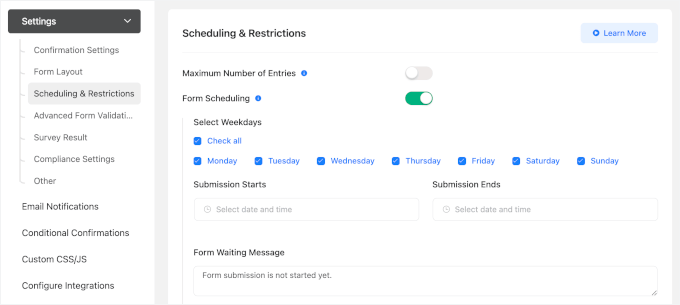
Fluent Forms also packs in a lot of practical features. For example, you can create a workflow where users complete a multi-step form, see pricing updates automatically based on their selections, and receive a downloadable PDF confirmation after submitting.
You can even schedule when the form is available, all without needing extra plugins.
The AI Form Builder is a nice time-saver. During testing, it generated a solid first draft in under a minute that only needed a few small adjustments before it was ready to use.
Fluent Forms also fits well into agency workflows. I connected it to Mailchimp and a CRM without trouble. The built-in reporting made it easy to review submission trends and field analytics directly from the WordPress dashboard.
Lifetime pricing is another advantage if you’re managing multiple client sites and want to avoid recurring subscription costs.
Fluent Forms’ free version includes the core drag-and-drop builder, basic field types, and form creation, but lacks advanced features like scheduled forms, PDF generation, and most integrations.
For a simple contact form, the free version is adequate, but if you’re planning to add emails, payments, or advanced workflows, the paid plan is necessary.
Additionally, Fluent Forms has a smaller user community than WPForms or Gravity Forms. That means fewer third-party tutorials and community answers when you run into something unusual.
✅ Fluent Forms Pros
- Fastest, most responsive interface
- Lifetime pricing option (one-time payment)
- Conversational forms for higher engagement
- 700,000+ active installations with a 4.8 rating (WordPress.org).
- 65+ customizable input fields
- AI Form Builder using ChatGPT prompts
- Visual data reporting with charts
❌ Fluent Forms Cons
- Free version more limited than Ninja Forms
- Smaller community and fewer third-party integrations than other popular contact form plugins
Pricing: Starts at $55/year (Free version available; lifetime plans from $279)
Why I Recommend Fluent Forms: It’s the fastest form builder interface I’ve tested, and the lifetime pricing option makes it an easy choice for anyone building client sites long-term. The conversational forms feature alone is worth exploring if you care about form completion rates.
What Is the Best Contact Form Plugin for WordPress?
After testing all seven contact form plugins, WPForms is my top pick for most users. It has the best balance of ease of use, template variety, and integration options. If you’re building your first contact form or managing forms for small business clients, WPForms gets you from zero to a working form faster than the others I tested.
For agencies, enterprises, and projects where accessibility compliance is non-negotiable, Gravity Forms builds in strong WCAG 2.1AA accessibility support and handles complex conditional logic reliably.
For directories and data-driven apps, Formidable Forms stands out: its Views feature turns form submissions into searchable directories, calculators, and listings.
For developers who need deep customization, WS Form offers breakpoint-based design and conditional logic depth that no other plugin in this list can match.
For speed and a modern interface, Fluent Forms had the most responsive builder I tested, plus conversational forms if you care about completion rates.
On the free side, Ninja Forms has the most feature-rich free tier: 28+ fields, unlimited forms, and calculations that cover most real-world contact form needs without spending a cent.
Contact Form 7 is the lighter, no-frills alternative, best if you’re comfortable building forms with a bit of shortcode.
Contact Form Plugin FAQs
Which is the best contact form plugin for WordPress?
WPForms is one of the best contact form plugins for most WordPress users. It’s beginner-friendly, has 2,100+ templates, offers AI tools, and works well for everything from simple contact forms to multi-step surveys.
What features should I look for in a contact form plugin?
Look for a drag-and-drop builder, form spam protection, conditional logic, and integrations with your email or CRM tool. Mobile responsiveness and active plugin updates are also important for long-term reliability.
How do I add a contact form to WordPress?
Install a contact form plugin like WPForms, create a new form using a template, and copy the shortcode or block onto any page or post. Most plugins let you publish a working form in under 5 minutes.
What’s the difference between WPForms and Gravity Forms?
WPForms is beginner-friendly with a large template library and a free WPForms Lite version. Gravity Forms has no free version but offers stronger accessibility support and more advanced conditional logic, making it better suited for agencies and enterprise sites.
How do I prevent spam on my contact forms?
Most contact form plugins support reCAPTCHA, Akismet, or honeypot fields. For example, you can find WPForms, Gravity Forms, and Fluent Forms’ spam protection options in their settings panels.
Which Is the Best WordPress Form Plugin? (Video)
This video walks through the key features of the best WordPress form builders:
More Resources for Building WordPress Forms
I hope this guide helped you choose the best contact form plugin for your WordPress site.
If you want to go deeper on contact forms in WordPress, these guides will help you get the most out of whichever plugin you choose:




Albert Ho
WP Forms is easy to use. Thank you WP Forms.
WPBeginner Support
Glad to hear you found a plugin from our list helpful!
Admin
Daphane
I’m a nonprofit and I like to have peer-to-peer campaigns run where the number of volunteers and funding goals are tracked and displayed on the website each time a volunteer joins and a donation is made. Which form would be best and easier at doing this? I might like a progress bar, but it’s not necessary because I can use the goal number.
WPBeginner Support
For what you’re wanting we would recommend taking a look at some of the plugins in our data visualization list below:
https://www.wpbeginner.com/showcase/best-data-visualization-wordpress-plugins/
Admin
Oliver
I couldn’t agree more about contact form 7 total pain in the butt. so complicated to do the simplest of things had to add custom css to my site just to make the characters big enough to be read. anything is better that it I loke others saw how popular it is but dont be fooled choose something else
WPBeginner Support
Thank you for sharing your experience with the plugin
Admin
Jessili
I am a beginner and using wordpress forms in my website. Is there anyway possible to put all data from the forms that come on the emails to a google sheet or an excel file with/without the use of additional plugins so I dont have to manually sort the data?
Looking forward to a way out!
Thanks in advance!
WPBeginner Support
It would depend on the plugin being used, some have that option in their pro version.
Admin
J Rux
Can you send a pdf file to the customer after they submit a form using WP Lite?
WPBeginner Support
You can certainly add a download link to your confirmation message if you wanted.
Admin
Jan
Thanks a lot for the guide! I installed WPForm and It seems that WPForm Lite doesn’t allow you to see your entries unless you upgrade to the Pro Version. The free version is basically not usable or am I missing something? Thanks a lot for your feedback
WPBeginner Support
The plugin is still useable, it will still send entries to the email address you set in the form settings
Admin
Ranojit Kumar
Can I create complex form with WPForms?
WPBeginner Support
It would depend on the complexity, you can reach out to WPForms to see if what you want is doable and if not, Formidable Forms should be able to handle more complex forms.
Admin
Vincent Olaer
I have tried using Gravity Forms and Contact form 7. Before, I thought that Contact form 7 is the best. So I used it in many projects. However, as years passed by, it was actually left behind and has been plagued by spam.
Gravity Form is the second contact form that I have tested. I have used it in many projects and it’s very versatile.
Wishing to use “WP Forms” hopefully.
WPBeginner Support
Thanks for sharing your experience with these plugins
Admin
Paul
Before I joined my new department, they built the site to use Caldera Forms for the user registration. How hard would it be to convert to WPForms? How would I export and import the customer data from Caldera Forms to WPForms?
WPBeginner Support
You would want to reach out to WPForms support for the currently recommended method of transferring
Admin
Taslim Hossain
The #1 Contact form for WordPress is WPForms. The user interface is Beautiful and easy to set up, Excellent !
WPBeginner Support
Glad you’re enjoying using WPForms
Admin
Yasir Mehmood
I am using WP Forms lite for my blog but I am not receiving e-mails for the entries posted. Any solution?
WPBeginner Support
It would likely be due to how your site is sending the emails, you should be able to get around that issue using SMTP which we cover in our article here: https://www.wpbeginner.com/plugins/how-to-send-email-in-wordpress-using-the-gmail-smtp-server/
Admin
Andrew Marcelli
Thanks for the great article. I love WPForms. I use it on all my sites. I tried multiple plug-ins for forms and WPForms was the easiest to get up and running.
WPBeginner Support
You’re welcome, glad you’ve been enjoying WPForms
Admin
Shakeel Anjum
I’m currently using the WPForms Lite version and I absolutely love it. It’s the most beginner friendly & no. 1 free WP contact form plugin.
WPBeginner Support
Glad you like the WPForms plugin
Admin
Louise
Is a good beginning to collect data for site
WPBeginner Support
Thank you, glad you like our article
Admin
Caroline Veilleux
If you want to make a really simple contact form, I really recommend Ninja forms. In case you want to make something more complicated and add Paypal payments, go for Gravity forms. WPforms works great but is really expensive.
WPBeginner Support
Thanks for sharing your opinion
Admin
WPBeginner Support
Thank you for your feedback, if you’re looking for calculator fields for the moment we would recommend Formidable Forms
Admin
Bhabishya Bhatt
WPForms is great plugin very easy to use, firstly I used Contact Form 7 it stops working sometime…
WPBeginner Support
Thank you for your feedback, glad you’re enjoying WPForms
Admin
Munna Chowdhury
I used to use CF 7. Now I’ve moved to WPForms for me and my clients as it saves our time. Recommended for both techies & non-techies.
WPBeginner Support
Thank you for sharing your recommendation
Admin
Unarine Leo
Hi, After installing wp contact form how do I make the recepient receive an auto response?
WPBeginner Support
Each plugin has a different location for that so the where and how depends on the plugin you installed.
Admin
Muhammad junaid
It’s explained very well thanks for such information.. you are not only wpbeginner but also expert pro and pro❤❤
WPBeginner Support
Thank you, glad you found our article well explained
Admin
David TC
I currently use Formidable forms, and I so much love it. But, for the sake of this post, I’m going to install Wpforms on the new site I’m working on. Maybe I might fall in love with it, too.
WPBeginner Support
Thanks for sharing what you’re using, we hope you enjoy WPForms as well as Formidable
Admin
Muhammad Waqas
Very helpful post.
WPBeginner Support
Thank you, glad it was helpful
Admin
Umer hassan
Nice post learned a lot from it. I really needed this one thanks a lot.
WPBeginner Support
Glad our post could be helpful
Admin
Purity
Am a new user to wp forms and so far I love the layout and the simplicity….the best part is that one can create a beautiful contact form without any help…
WPBeginner Support
Glad you’ve been enjoying WPForms
Admin
Jochen Gererstorfer
WPForms Lite is a good way to go, if you can’t spend money.
But simple calculator fields would be nice.
Louise Findlay
I love how simple WP Forms makes creating a contact form. It’s easy, has a great free plan and is responsive.
WPBeginner Support
Glad you’ve been enjoying WPForms
Admin
Lauren Nicole
Any ideas for a form plugin that generates a unique url for each form and not a shortcode? I want to link a form to a button by using the form’s url, but I am having a hard time finding a plugin that does this. WP forms gives me a shortcode and an embed code but neither will work with a button.
WPBeginner Support
For what it sounds like you’re wanting, as you have WPForms you would want to take a look at the form pages addon
Admin
Mike
created a form with wpform lite from blank but don’t get notification despite setting everything up in notification with my email. was it because i created from bank. ? because the contact form is working
WPBeginner Support
If your contact form is not sending the messages, then it is due to how WordPress sends messages by default and you would need to look into using SMTP: https://www.wpbeginner.com/plugins/how-to-send-email-in-wordpress-using-the-gmail-smtp-server/
Admin
Alex Smyrk
Is there a way with any form plugin for logged in users on the front-end to submit a form, and at a later date login and update it (on the front-end)? I am currently trying to do this with 10web Form Maker plugin (using their MYSQL Mapping) and Participants Database and also using Form Makers own table wp_formmaker_submits. But it’s not so straightforward.
WPBeginner Support
For that, you would want to check with the form plugin’s support for what is available at the moment.
Admin
Brian Haines
RE: WPForms
“The free version comes with all the basic contact form features including basic form fields, captcha for spam protection, email notifications, and a thank-you page for form confirmation.”
Actually “captcha for spam protection” is not included in the free version of WPForms.
WPBeginner Support
You would want to go under WPForms>Settings>reCAPTCHA for where to activate CAPTCHA in the free version
Admin
Andrew Zicklin
Is there a form solution that will transfer the information to a spreadsheet. In other words, as people sign up, Their info gets downloaded one by one into a spreadsheet?
Thanks,
WPBeginner Support
You could use WPForms to collect the information and then export the entries to a CSV which can be opened as a spreadsheet
Admin
Pratik
I did not find a solution to what I was looking for. I have 15 services on my website and I have 15 separate web pages for each of the services. I want to have a small request for quote form in every service page. Will I have to create 15 different forms to identify what service someone is requesting for?
WPBeginner Support
You could do that or create a dropdown for users to select the service and add the same form to each page.
Admin
amit sharma
thanks for the information about WordPress plugin it is really useful
WPBeginner Support
Glad you found our content helpful
Admin
Jeff
I enjoyed your article like I do all your articles, and I check your website for answers to everything I am researching for my WordPress website before making any decisions.
I was using WPForms Lite with dependable success and then one day my form turned to just the code, and I redid the form over and over with the same results never figuring out what the problem was. I now need to add a new contact form and after reading your article I am going to give WPForms Lite another try in hopes this time it works for me.
Thank You
WPBeginner Support
Thank you for trying the plugin again, if you continue to run into that issue please reach out to the plugin’s support and they should be able to assist.
Admin
Faith
From the article:
“WPForms Lite is available for free in the official WordPress plugin directory meaning you can install it on as many sites as you like for free.
The free version comes with all the basic contact form features including basic form fields, captcha for spam protection, email notifications, and a thank-you page for form confirmation.”
I downloaded this plugin explicitly for the captcha feature, and it’s telling me I need to upgrade to the paid version to access it. Not pleased.
WPBeginner Support
CAPTCHA should still be available to be used with the forms without the need to upgrade to a paid version, if you are receiving a message that you are required to upgrade you would want to reach out to WPForm’s support and they should be able to assist
Admin
ilse
Unfortunately WPforms doesn’t offer the Captcha Functionality (anymore?) in the free version
WPBeginner Support
It should still be in the settings. If you reach out to WPForm’s support and let them know they should be able to assist.
Admin
Chris McCreery
You don’t recommend Contact Form 7? Is that because you don’t earn a commission?
WPBeginner Support
We explain why we don’t recommend it in the cons section for the plugin.
Admin
Coen
In my opinion the plugin is bloated with unnecessary code blocks, loading on all pages. It brings your website speed down and is not very flexible either. I used it on many site and don’t recommend it as well.
Greg
Wpforms is great, shame the $200 price tag for the Pro is too high
WPBeginner Support
Thank you for that feedback, while it is priced similarly to other form plugins, it is something to take into consideration
Admin
Maxwell
You guys need to be more open about owning WPForms. You always make it the best and write nowhere that you own it. I think you have a great blog, but need to be more open about this with your readers.
Editorial Staff
Hi Maxwell, thanks for leaving a response and your kind words about WPBeginner.
With regards to WPForms, we do have WPForms listed in our Products section that’s visible in the top menu. We also recently did an announcement blog post about WPForms Form Pages which also included that WPForms is our product. It’s also mentioned in our FTC Disclosure page that’s linked from every page. Unfortunately, it’s simply not scalable to add a disclaimer every time we mention our products within the articles.
Admin
Mark Sagent
Forminator by WPMU Dev is free an has all the features of the premium plugins featured on this post. I’m not sure why Forminator is not on this list?
WPBeginner Support
Thank you for recommending a plugin for when we look at updating this article, the plugins in this article are ones we’ve tested and would recommend at this time
Admin
gabor79
hello
I am looking for contact form with double opt-in feature. Visitor should click on url in email to verify comment. Is there any? (newsletter plugins are available but I am not sure if I could use)
Thanks
narendra singh
In this article, the contact form important plugin is well-informed. And even after reading this article I have used WPForms to create a contact form. Which attracted me and seemed convenient.
stuart siney
Having bashed my head in stress and frustration i have tired all other forms and have just installed wp forms and can tell you this is the best and easiest form builder out there………….. ty
WPBeginner Support
Hi Staurt,
Glad you found it useful. Don’t forget to follow us on Facebook for more WordPress tips and tutorials.
Admin
Lee
Great article and helped me decide what to use on my own small blog. Thanks.
Faris Naqib
I want to add function in my form like they have additional box if they selected the option.
For example: I list 3 option = Single, Married & Divorced
And then, if they select married, another form appear like name of spouse, age and so on.
If they not select married, the additional form not appear. I used contact form 7 but it’s do not have the function.
My question is what plugin form I can used to perform the function and it’s free or premium?
Sunday
Thanks for this good article and the many others. Agreed WPForm lite has free version. But how do I see my entries for this free version? I am a beginner. Thanks and many thanks.
WPBeginner Support
Hi,
Your form submissions are sent to you via email. If you are not getting email notifications, then please see our article on how to fix WordPress not sending email issue.
Admin
Ashish Ajani
Great to see different options and comparison for contact form plugins. I guess the Contact Form 7 is the best but others like WPForms and Ninja Forms are worth giving a try. Thanks.
thierry
march2019. I uninstall contact form 7. Since 2 months in conjunction with advance CF7, IT FAILS It seems to be caused by reCaptcha. I had to reinstall the whole WP site. VERY DANGErOUS TO USE. I am switching to NINJA Forms a lot more stable. Still searching an elegant solution to view the submissions in a page.
B rgds
Thierry BE
ps: I have also received a very inappropriate reply from support.
sandeep singh
Contact form 7 works well for me, but I heard it does load on every page which slows down the site, is wp form loads only for the exclusive pages?
I mean does it hamper site speed?
WPBeginner Support
Hi Sandeep,
WPForms is optimized for speed and performance and does not affect your site speed.
Admin
Nyks
>> Pirate Forms: It’s a completely free plugin with no paid upgrades.
Obviously, this is either outdated or wrong. There is a paid upgrade called “Pirate forms extended”, avaiable on the official plugin-developer-site.
WPBeginner Support
Hi Nyks,
Thanks for pointing out. We have updated the article to reflect these changes.
Admin
TJ
I just started a web hosting and design business. This site was very useful to point me towards the more popular form builders out there. I just have two follow ups that I am hoping I can get some help with.
First, the information for Formidable Forms seems to be outdated. Specifically the cost. According to their site there are now four packages to choose from. The cheapest (one site) is $49/yr. The most expensive (unlimited) is $399/yr. they have three site and fifteen site options in between.
Second, I originally was going to go with Gravity Forms based on the review here and executing their demo it appears it offers all of the customization and features I need. However, there are a lot of negative review regarding support and I do not care to be dead in the water on the occasion that I need support.
I have used WPForms Lite and I was very happy with it and how easy it was to create a form. However, the form was a simple contact form. I am now in need of creating file upload forms, registration foms, and others. I am concerned that as my customization needs grow it may outgrow what WPForms offers given that WPForms simplifies the user interface to make it easier for beginners. I do not expect any solution to satisfy everyone’s needs. I just need help finding the solution that will serve me best moving forward. I could probably get away with a 15 or 20 site package while my business grows. So, I can take advantage of cost savings that way. However, I would like something that offers a strong feature set without forcing you to dip into your wallet every time you want to add a feature (a.k.a no Ninja Forms). If anyone can please help I would appreciate it
WPBeginner Support
Hey TJ,
We have updated the article with current pricing for Formidable Pro. Currently, the pro version of WPForms supports file uploads, user registration, user submitted content, and other types of forms via addons. It is growing really fast and new features are added regularly.
Admin