


Jeśli kochasz WordPress i polegasz na WPBeginner w kwestii samouczków, wskazówek i przewodników, chcemy pokazać Ci łatwy sposób, aby upewnić się, że łatwo znajdziesz samouczki WPBeginner podczas wyszukiwania w Google.
Wyszukiwanie Google oferuje funkcję zwaną „Preferowane źródła”. Pozwala ona wybrać strony internetowe z treściami, które chcesz widzieć częściej w wynikach wyszukiwania.
Zamiast przewijać wiele stron wyników wyszukiwania, możesz ułatwić Google wyświetlanie najtrafniejszych artykułów WPBeginner, dzięki czemu szybko uzyskasz potrzebne wskazówki dotyczące WordPress. 🎯
W tym krótkim przewodniku pokażemy Ci dokładnie, jak ustawić WPBeginner jako Preferowane źródło w wyszukiwarce Google (zajmuje to tylko dwa kliknięcia).
💡 Dlaczego ustawić WPBeginner jako Preferowane źródło w Google?
Ustawienie WPBeginner jako preferowanego źródła zapewnia, że nasze samouczki WordPress i przewodniki pojawią się w sekcji „Najważniejsze historie” oraz w specjalnej sekcji „Z Twoich źródeł” w wynikach wyszukiwania.
W ten sposób, niezależnie od tego, czy rozwiązujesz problem z wtyczką, dostosowujesz motyw, czy naprawiasz problem na swojej stronie internetowej WordPress, najpierw zobaczysz treści WPBeginner. Oszczędzi Ci to czas i pomoże szybciej uzyskać potrzebne odpowiedzi.
Jest to szczególnie ważne, biorąc pod uwagę, że AI (sztuczna inteligencja) odgrywa coraz większą rolę w decydowaniu o tym, co pojawia się w wynikach wyszukiwania Google. Ustawienie preferowanych źródeł oznacza, że możesz otrzymywać treści z zaufanych stron internetowych.
Oto jak ustawić WPBeginner jako preferowane źródło w Google:
1️⃣ Krok 1: Przejdź do Preferencji Źródeł Google dla WPBeginner
Najpierw po prostu kliknij ten link. Zostaniesz przeniesiony bezpośrednio do WPBeginner na liście Preferencji Źródeł.
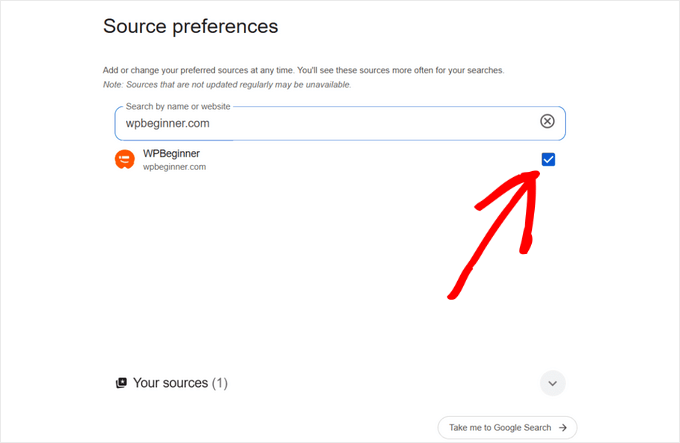
2️⃣ Krok 2: Wybierz WPBeginner
Następnie kliknij pole wyboru obok WPBeginner, aby dodać je jako preferowane źródło. ✅
3️⃣ Krok 3: Odśwież swoje wyniki
Po wybraniu WPBeginner po prostu odśwież wyniki wyszukiwania Google.
To wszystko! Teraz będziesz częściej widzieć treści WPBeginner w sekcjach „Najważniejsze historie” i „Z Twoich źródeł”, co ułatwi znajdowanie naszych nowych samouczków i przewodników.
Bądź na bieżąco z WPBeginner
Dodanie WPBeginner jako preferowanego źródła to tylko jeden ze sposobów na bieżąco śledzenie naszych najnowszych artykułów.
Możesz również:
- Zasubskrybuj nasz biuletyn e-mailowy, aby otrzymywać nasze najnowsze wiadomości, wskazówki i oferty.
- Dołącz do naszej grupy WPBeginner Engage na Facebooku i uzyskaj pomoc od prawdziwych użytkowników WordPress.
- Zasubskrybuj nasz kanał YouTube, aby otrzymywać nasze najnowsze samouczki wideo.
Mamy nadzieję, że ten artykuł pomógł Ci dowiedzieć się, jak najpierw widzieć artykuły WPBeginner w Google. Możesz również zapoznać się z naszym ostatecznym przewodnikiem po SEO WordPress dla początkujących lub przyjrzeć się najlepszym wtyczkom WordPress, których codziennie używamy do prowadzenia naszych stron.
Jeśli podobał Ci się ten artykuł, zasubskrybuj nasz kanał YouTube po samouczki wideo WordPress. Możesz nas również znaleźć na Twitterze i Facebooku.



Masz pytanie lub sugestię? Zostaw komentarz, aby rozpocząć dyskusję.