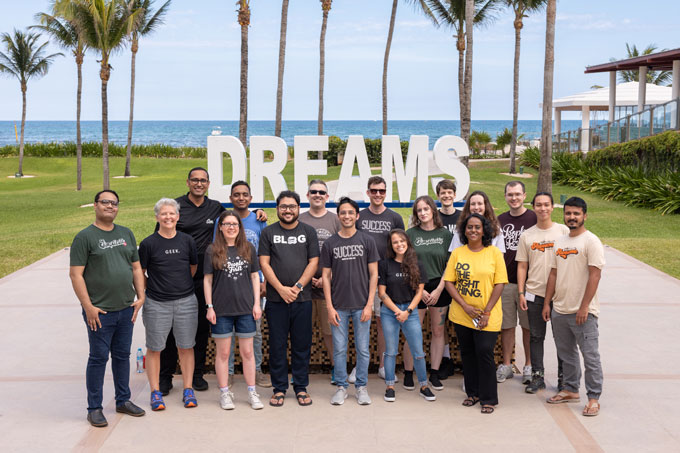
Det mest erfarna teamet av WordPress-experter och pedagoger.
Över 16+ års erfarenhet av WordPress och webbutveckling.
Teamet som ger råd till några av de största WordPress-pluginsen i branschen som används av över 25 miljoner webbplatser.
Led av WPBeginner-grundaren, Syed Balkhi, en högt respekterad WordPress-expert.
Erfarenhet
Vår redaktion inkluderar ett dedikerat team av programmerare, skribenter, videoproducenter och redaktörer med över 16 års erfarenhet av WordPress, webbhotell, e-handel, SEO och online-marknadsföring.
Vårt redaktionsteam hanterar allt innehåll vi publicerar på WPBeginner. Till skillnad från andra kopierande handledningswebbplatser är varje person i vårt team en sann WordPress-utövare. Du kan läsa mer om vår redaktionella process här.
Teamet leds av världens mest kända och högt respekterade WordPress-expert, Syed Balkhi. Han tog examen från University of Florida och har byggt WordPress-webbplatser sedan 2006.
Syed är också grundaren av några av de mest populära WordPress-plugins på marknaden.
Om WPBeginner
WPBeginner är den största gratis WordPress-resursen för nybörjare att lära sig WordPress. Vi är en del av Awesome Motive-familjen och når över 100 miljoner besökare varje år. Vårt innehåll faktagranskas och granskas av vårt redaktionsteam för noggrannhet och integritet. Du kan läsa mer om oss och vår redaktionella process.
Om du någonsin har försökt skapa bildgallerier i WordPress vet du hur frustrerande det är när de inte ser bra ut på mobilen. Du lägger tid på att arrangera vackra foton, bara för att se dem brytas på telefoner och surfplattor, sakta ner din webbplats eller ge besökare en… Läs mer »
Det finns många plugins som gör det enkelt att acceptera betalningar i WordPress, men vad händer om du föredrar att få betalt i kryptovaluta? Det är här en Bitcoin-donationsknapp kan vara användbar. En Bitcoin-donationsknapp gör det enkelt för läsare från… Läs mer »
Att sälja annonsutrymme är ett av de bästa sätten att tjäna pengar online. Att skapa, lägga till och spåra dina annonser kan dock bli tidskrävande och komplicerat. Det är därför vi rekommenderar AdSanity-pluginet. Det är en kraftfull lösning för att hantera och spåra annonser, vilket gör det… Läs mer »
Nyligen frågade en av våra läsare oss hur man visar barnsidornas sidor i en WordPress-sida? Det är en fråga vi får ganska ofta på WPBeginner, och den belyser ett vanligt behov av att förbättra webbplatsnavigering och användarupplevelse. Om du organiserar din WordPress-webbplats med… Läs mer »
Vi vet alla att videor är mycket engagerande. Om du vill lägga till videor på din webbplats eller redan har videor på din webbplats, kommer du att älska den här artikeln. I den här artikeln delar vi 9 användbara Youtube-tips för att krydda din WordPress… Läs mer »
Att bygga en positiv online-gemenskap är viktigt för alla webbplatser. Du vill att dina läsare ska ha en bra upplevelse och känna sig välkomna. Ibland kan du dock ha störande användare som inte följer reglerna. Du kan behöva stoppa vissa personer från att interagera på din… Läs mer »
Att visa registrerade användare på din WordPress-webbplats kan öka engagemanget och skapa en starkare känsla av gemenskap. Det är ett utmärkt sätt att uppmärksamma dina medlemmar och visa att du värdesätter deras deltagande. Men om din webbplats har många användare, kan det vara svårt att lyfta fram dem alla… Läs mer »
En av de största utmaningarna vi har ställts inför som bloggare är att få folk att dela vårt innehåll på X/Twitter. Det räcker inte att bara publicera dina artiklar; du måste göra det enkelt för dina läsare att sprida ordet. Det är där "klicka för att twittra"-rutor… Läs mer »
jQuery hjälper dig att skapa interaktiva, användarvänliga och vackra webbplatser. För dem med lite CSS- och HTML-kunskap låter jQuery komplicerat, men med lättföljda handledningar kan vem som helst lägga till snygga effekter på sin webbplats. I den här artikeln kommer vi att lista några av de bästa jQuery… Läs mer »
Videor är ett av de bästa sätten att öka användarnas engagemang. Nyligen frågade en av våra användare oss om ett sätt att skapa delningsknappsöverlägg på videor som liknar den populära webbplatsen UpWorthy. I den här artikeln visar vi dig hur du lägger till delning… Läs mer »
Stores the traffic source or campaign that explains how the user reached your site.
6 months
_gat
Used to throttle request rate.
1 minute
_gid
Used to distinguish users.
24 hours
__utma
Used to distinguish users.
Persistent
__utmb
Used to determine new sessions/visits.
30 minutes
__utmc
Used to determine if the user is in a new session/visit.
Session
__utmt
Used to throttle request rate.
10 minutes
__utmv
Used to store visitor-level custom variable data.
2 years
_ga
Used to distinguish users.
2 years
Marknadsföringskakor används för att följa besökare på webbplatser. Avsikten är att visa annonser som är relevanta och engagerande för den enskilda användaren.
OptinMonster är ett kraftfullt verktyg för leadgenerering som hjälper företag att konvertera besökare till prenumeranter och kunder.
Used to store interaction and conversion data for campaigns in conjunction with Revenue Attribution.
1 year
_gat_omTracker*
Set, controlled and used by Google Analytics to collect and store data and then send that data to Google Analytics. OptinMonster provides the name if there is no existing tracker found on that page.
-
omCountdown-{id}-{elementId}
Used for countdown elements {elementId} in campaigns {id} to determine when it should complete.
-
om-{id}-closed / omSlideClosed-{id}
Used specifically with slide-in campaigns {id} to determine if it has been closed or not by a visitor.
30 days
om-success-cookie / omSuccessCookie
Used to determine if a visitor has successfully opted in to any campaign on your site to unlock content when using our Content Locking feature.
365 days
om-success-{id} / omSuccess-{id}
Used to determine if a visitor has successfully opted in to a campaign with the ID of {id} on your site.
365 days
omSeen-{id}
Used to determine if a visitor has been shown a campaign by the slug.
30 days
om-{id}
Used to determine if a visitor has interacted with a campaign ID of {id} on your site.
30 days
_omappvs
Used to determine when a new visitor becomes a returning visitor.