


You’ve got a new post idea and you’re ready to start writing. But how do you know anyone is actually searching for it?
Keyword research answers that with real search data. Instead of guessing, you write about the exact things people are already typing into Google.
In this guide, I’ll walk you through the process I use, from your first seed keywords to optimizing the finished post in WordPress. It’s the same approach we rely on at WPBeginner to plan our own content.

You can use the quick links below to jump to any section:
- Step 1: List Your Seed Keywords
- Step 2: Find Keyword Ideas With Google Autocomplete and People Also Ask
- Step 3: Check Search Volume and Keyword Difficulty
- Step 4: Find Competitor Keywords and Content Gaps
- Step 5: Choose Keywords That Survive Google's AI Overviews
- Step 6: Match Keywords to Search Intent
- Step 7: Group Keywords Into Topic Clusters
- Step 8: Optimize for Your Keywords in WordPress
- Frequently Asked Questions About Keyword Research
- Additional Resources for WordPress SEO
Step 1: List Your Seed Keywords
A seed keyword is a broad term that describes your site or business. It’s not the exact phrase you’ll target, just a starting point for research.
For example, a food blogger’s seed keywords might look like this: meal prep, healthy dinners, chicken recipes, lunch ideas for work, high-protein meals, budget recipes.
A bakery’s seeds might look more like this: birthday cakes, wedding cakes, cookies by mail, cupcakes, custom cakes Austin, gift boxes.
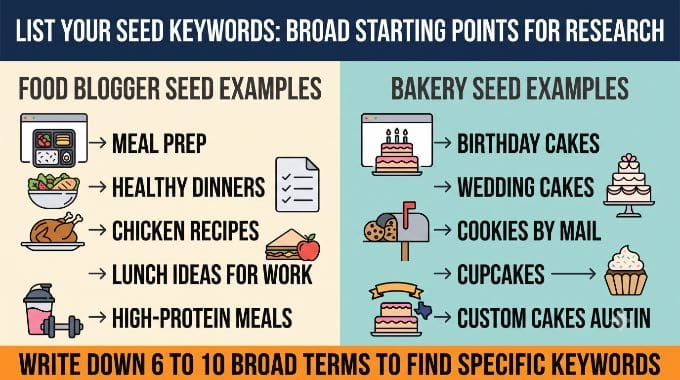
Write down 6 to 10 broad terms like these before moving on. You’ll use them to find more specific keywords in the next step.
Step 2: Find Keyword Ideas With Google Autocomplete and People Also Ask
Your seed keywords are too broad to target on their own. Google itself will show you the exact phrases people type to find a business like yours, and there are three free places to look.
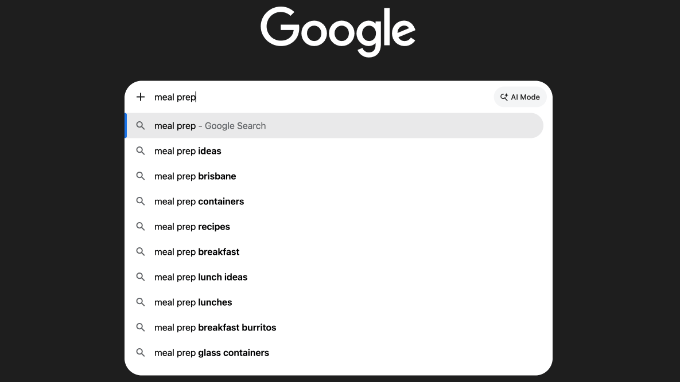
Type a seed keyword into Google’s search bar and read the autocomplete dropdown.
Typing ‘meal prep’ brings up suggestions like ‘meal prep lunch ideas,’ ‘meal prep containers,’ and ‘meal prep breakfast burritos.’
Next, search the keyword and check the ‘People Also Ask’ box on the results page.
Searching ‘cookies by mail’ surfaces questions like ‘What are the best cookies to ship in the mail?’ and ‘How do you keep cookies fresh when shipping?’

Scroll to the bottom of the results page for a ‘Related searches’ section, which surfaces more variations on your original search.
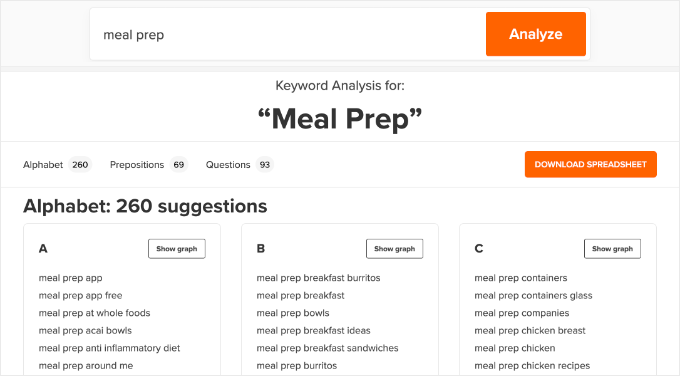
Two tools can help speed this up. The free WPBeginner Keyword Generator takes a seed keyword and returns 300+ related ideas, organized by alphabet, prepositions, and questions.
LowFruits‘ Keyword Finder (premium tool) pulls suggestions straight from Google’s autocomplete data. It can also extract People Also Ask questions in the same search.
Step 3: Check Search Volume and Keyword Difficulty
Once you have a big list of keyword ideas, you need to know two things about each one: how many people search for it, and how hard it will be to rank for.
Search volume is roughly how many people search a phrase every month. Keyword difficulty, often shortened to KD, is a score (usually 0 to 100) for how hard it is to rank on page 1.
Google Keyword Planner is a free option that comes with a Google Ads account, and it’s a reasonable starting point if you’re not ready to pay for a dedicated tool.
To use it, open the Keyword Planner, choose ‘Discover new keywords,’ and enter a seed keyword or your site’s URL. It returns related phrases with a monthly search range and a competition level.
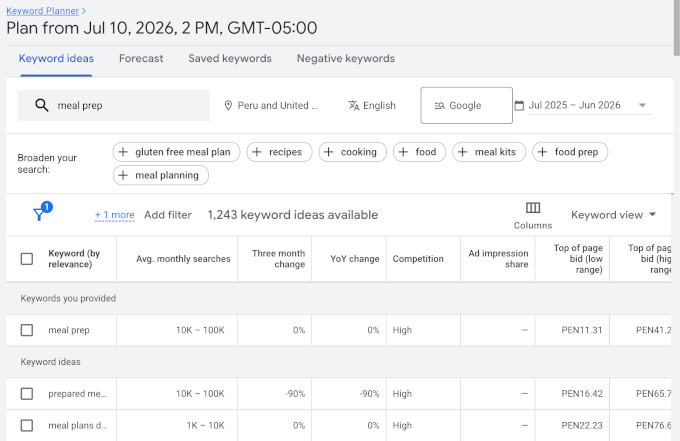
Keep in mind that this competition score is about paid ads, not how hard a keyword is to rank for organically, so treat it as a rough guide.
For more detail, I use Semrush‘s Keyword Magic Tool.
Just enter a single seed keyword and it returns thousands of related phrases, each with an exact monthly search volume, a difficulty score for ranking organically, and a search intent label.
You can filter that list on the spot, for example to show only low-difficulty questions so you spot the winnable keywords quickly. (Ahrefs‘ Keywords Explorer works the same way.)
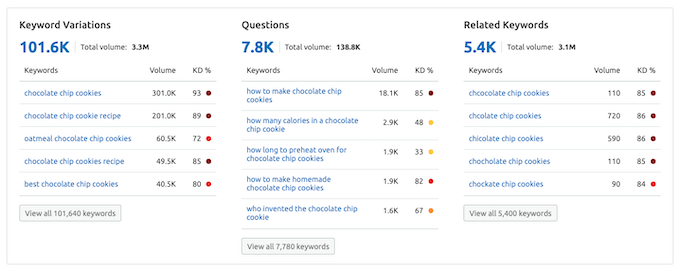
A high search volume looks tempting, but it’s not the whole story. A keyword with 200 searches a month that you can actually rank number 1 for beats a 20,000-search keyword that leaves you stuck on page 5 with next to no traffic.
Instead, look for the right user intent, a lower difficulty score, and ‘good enough’ volume, rather than chasing the highest number on the screen.
Don’t throw out keywords that show zero or very low volume, either. Keyword research tools consistently undercount long, specific phrases.
For example, ‘How to keep cookies soft when shipping in summer’ might show zero volume in a tool, but it will bring you the exact person who’s about to place an order.
Working through this step, the food blogger ends up with phrases like ‘meal prep ideas for the week,’ ‘high protein meal prep,’ ‘meal prep for beginners,’ ‘cheap meal prep for the week,’ and ‘meal prep containers.’
The bakery collects phrases like ‘birthday cake delivery Austin,’ ‘custom cakes near me,’ ‘how to ship cookies without breaking,’ ‘best cookies to mail,’ and ‘gluten free birthday cake Austin.’
By the end of this step, you should have somewhere between 100 and 300 real phrases to work with.
Step 4: Find Competitor Keywords and Content Gaps
Now, it’s time to find the sites that actually show up when you search for your seed keywords. These aren’t necessarily your direct business rivals, just whichever sites Google is currently ranking.
Pick 3 to 5 of these sites. A tool like Semrush, Ahrefs, or a cheaper option like Ubersuggest or Keywords Everywhere lets you paste in a competitor’s URL and see every keyword that page ranks for.
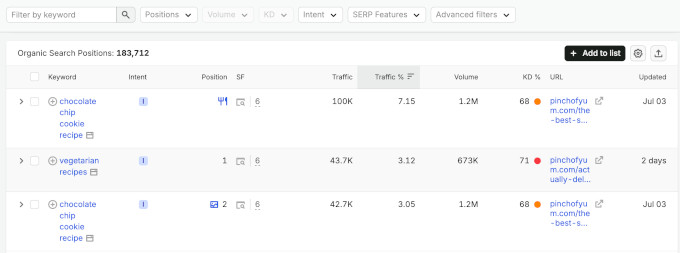
Look for the content gap: keywords they rank for that you don’t have a post targeting yet. That gap is your to-do list.
For the food blogger, a competitor’s meal-prep post might have sections for ‘how to store meal prep,’ ‘how long does meal prep last,’ and ‘best containers.’ Those can become new sections in an existing post, or posts of their own.
For the bakery, a competitor might rank for ‘corporate gift cookies,’ which is exactly the kind of lucrative angle you’d never think to target on your own.
For more information, see our roundup of the best SEO checker and website analyzer tools.
Step 5: Choose Keywords That Survive Google’s AI Overviews
Google’s AI Overviews can answer plenty of searches directly on the results page, which means the searcher never clicks through to a website.

You can protect your traffic by favoring keywords where a short AI answer isn’t enough:
- Recipes with photos, steps, and ratings. A quick AI answer can’t replace the photos, star ratings, and step-by-step a cook wants open while they’re actually making the dish.
- Comparisons and ‘best’ roundups. Someone searching ‘best cookie delivery service’ wants to weigh real options and read opinions, not settle for one flattened answer.
- Local and transactional keywords. Searches like ‘order cakes,’ ‘wedding cakes in Austin,’ or ‘wedding cake delivery’ end in a sale, and an AI Overview can’t bake and ship a cake for anyone.
- Personal experience and trust-based content. Angles only you can write, like ‘I tested 5 meal-prep containers’ or ‘my grandmother’s recipe,’ are ones that AI has no way to fake.
For more on adapting your content strategy to this shift, see our guide on how to optimize your content for Google AI Overviews.
Step 6: Match Keywords to Search Intent
Two searchers can type nearly the same thing and want completely different results, such as one looking to learn and one ready to buy.
Before you start writing, sort every keyword you’ve collected into one of these 4 intent types:
| Intent | What They Want | Example | Good For |
|---|---|---|---|
| Informational | To learn | ‘how to meal prep chicken’ | Blog posts, email signups |
| Commercial | To compare before buying | ‘best cookie delivery service’ | Reviews, roundups |
| Transactional | To buy or act now | ‘order birthday cake Austin’ | Product or service pages |
| Navigational | A specific brand or place | ‘[bakery name] hours’ | Homepage, contact page |
This matters because intent decides what kind of page or blog post you build.
Someone searching ‘order birthday cake Austin’ wants a page where they can place an order, not a 2,000-word post about the history of cake.
Match the page to the intent, or you won’t rank for it.
Step 7: Group Keywords Into Topic Clusters
With your keywords collected and tagged, you can organize them so that each post has a clear target.
Start by assigning one primary keyword to each post you plan to write. If two posts target the same keyword, they’ll compete against each other in the search results instead of both ranking.
From there, group your keyword list around a pillar page. A pillar page is a broad, comprehensive post that covers an entire topic and earns the most internal links on your site.
The narrower posts around it are your cluster content. Each cluster post targets one subtopic and links back to the pillar.
To decide which keyword becomes the pillar, pick the broadest phrase that sums up the whole topic. The more specific, longer-tail phrases around it become your cluster posts.
For the food blogger, that might mean a pillar page on meal prep for beginners, with cluster posts on containers, weekly meal plans, and high-protein meal prep.
For the bakery, the pillar might be wedding cakes in Austin, with cluster posts on pricing, delivery, and flavor options.
Once each post is published, you need to link them together. Every cluster post should link up to the pillar, and the pillar should link back down to each cluster.
This internal linking shows Google and your readers how the pieces fit together, and it points your site’s authority toward the pillar page you most want to rank.
Step 8: Optimize for Your Keywords in WordPress
Once you know which keyword each post is targeting, you can apply that research in WordPress with an SEO plugin.
A plugin lets you set a focus keyword, sometimes called a keyphrase, for a post in the WordPress content editor. It then checks your meta title, meta description, and content against that keyword to make sure your content is optimized.
AIOSEO, Yoast SEO, and Rank Math are the 3 most popular choices, and all of them have a free version.
In AIOSEO, scroll to the plugin’s meta box while editing a post and enter your focus keyphrase. The plugin scans your content and returns an SEO score, along with specific suggestions for improving it.
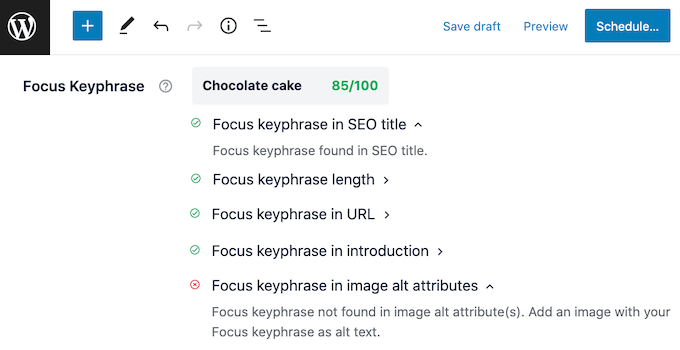
After you save your changes, watch the score indicator. It updates right away, so you can confirm the optimization actually took effect instead of guessing.
For more details, see our guide on how to add keywords and meta descriptions in WordPress.
You don’t need to force your keyword into every sentence. Use it naturally in your title, your first paragraph, and a subheading or two, and let the plugin’s suggestions guide the rest.
Frequently Asked Questions About Keyword Research
How many keywords should I target in one blog post?
Focus on one primary keyword per post, plus a handful of closely related phrases you can work in naturally. Trying to rank one post for several unrelated keywords usually means it ranks well for none of them.
What’s a good search volume for a small or new website?
There’s no universal number to aim for. A new site is better off targeting keywords with 100 to 300 monthly searches and low difficulty than chasing a 10,000-search keyword it has no realistic shot at ranking for yet.
Do I need a paid tool like Semrush, or is free keyword research enough?
Free tools such as Google Autocomplete, People Also Ask, Google Keyword Planner, and the WPBeginner Keyword Generator are enough to get started and find real keyword ideas.
A paid tool like Semrush or Ahrefs adds volume and difficulty data plus competitor keyword gaps, which help you prioritize once you have more content published.
How often should I redo my keyword research?
Revisit it whenever you’re planning new content, and do a broader refresh every few months to catch new autocomplete suggestions and shifts in what your competitors are ranking for.
Can I still rank if my keyword might trigger a Google AI Overview?
Yes, but pick your angle carefully. Keywords with local, transactional, or highly personal intent are much less likely to be fully answered by an AI Overview, which leaves room for your page to earn the click.
Additional Resources for WordPress SEO
I hope this article helped you learn how to do keyword research for your WordPress site.
You may also like to see some other guides about WordPress SEO:
- Ultimate WordPress SEO Guide. A complete walkthrough of WordPress SEO basics, from setup to ranking in AI search.
- How to Add Keywords and Meta Descriptions in WordPress. A closer look at applying your target keywords to individual pages and posts.
- How to Install Google Analytics in WordPress. Track whether your new keywords are actually bringing in traffic.
- WooCommerce SEO Made Easy. Apply the same keyword research process to product titles, descriptions, and categories.
If you liked this article, then please subscribe to our YouTube Channel for WordPress video tutorials. You can also find us on Twitter and Facebook.


Moinuddin Waheed
Keyword research forms the backbone of the seo and having a proper keywords research before writing the blog posts is the best approach of writing blog posts.
I have realised that most of the beginners while starting out their blog journey, never give emphasis to this aspect until they realise their mistakes and find ways to get organic traffic.
I have done the same mistake when I started and realised only when started digging around seo.
This kind of articles has been very helpful in my seo journey.
Hajjalah
I used to create a lot of content on my blog by simply looking for trending searches on Google because I thought it’s quantity that matters most. But I later discovered that these trends are mostly for a few days which caused my blog posts to get very low ranking and traffic.
But after reading this article, things drastically changed after implementing a serious keyword research for every blog post. I currently post fewer posts than in the past but are of great value and have higher rankings in the Search engines. Great thanks indeed to WPBeginner for this useful trick.
Mrteesurez
Great article.
Most of the bloggers outside have issue with keyword research even before writing any post, you firstly need to do a keyboard research of the topics you are writing about, lack of this knowledge causes most of the contents not to rank well on search engines.
I learnt from this guide and have aquired another tips to come up with better keywords. Thank you.
WPBeginner Support
Glad you found our article helpful!
Admin
Ayanda Temitayo
One thing I wish I knew before starting my blog is keyword research. it will remain my greatest mistake till date. Without Keyword research, I think writing a blog post is a waste of time if you don’t have the Knowledge of what users are searching for.
But when I finally got to know about Keyword research, semrush was my best tool. I think Semrush statistics are somehow accurate.
I’m seeing some other great tools to try out in this post. Thanks for this awesome article wpBeginer.
WPBeginner Support
You’re welcome, even if you did not start with using keyword research your old content is still valuable and you can use keyword research going forward
Admin
Mrteesurez
I completely agree with you about the importance of keyword research, it can make or break a blog’s success. I too made the mistake of overlooking this early on, and it was only after realizing its impact that I started incorporating keyword research into my strategy. Like you, I found Semrush invaluable for its accuracy and depth but I couldn’t afford to use it.
However, experimenting with other tools can also uncover new insights and help me refine keywords. This article is a great reminder to continuously explore and adapt to enhance our blogging strategies.
Anuoluwapo Olabode Oludare
Thanks for this article but do you have a detailed comparison between All in one SEO plugin and Yoast plugin?
I want to make the switch to All in one SEO but Yoast was also recommended by many experts.
WPBeginner Support
We have a comparison article for our opinion on the two plugins you can take a look at below!
https://www.wpbeginner.com/opinion/yoast-seo-vs-all-in-one-seo-pack-which-is-the-best-wordpress-seo-plugin/
Admin
Jiří Vaněk
I’ve already learned a lot about SEO, but what I constantly struggle with are the keywords. Every article like this one helps me better understand this topic. Thanks to that, I’ve even signed up for several tools and I’m going to try out your advice in practice.
WPBeginner Support
We wish you luck in your learning journey
Admin
Mariel
I really appreciate your wonderful insight into Wordpress. I have a website for years yet am now sold on switching to WP. Thank you!
WPBeginner Support
Glad you’ve found our guides helpful!
Admin
Kenneth Ojeisekhoba
Love your content so much.
There is a little typo on paragraph 2. Letter ‘s’ was mistakenly added to the word ‘better’.
WPBeginner Support
Thank you for pointing that out, the typo should be fixed now
Admin
Steve P.
Great article, thanks for posting and updating it.
WPBeginner Support
Thank you, glad you found our article helpful!
Admin
Sham
This was extremely helpful
WPBeginner Support
Glad our guide was helpful
Admin
Andrew Scott Wight
this is the most informative article iv read in years.
WPBeginner Support
Thank you, glad you’ve found our content informative
Admin
osama
if I’m a beginner and want to start my personal blog what should I do for it first
keyword research or article writing or making a website and buy a domain and purchase hosting??? waiting for a meaning full reply
WPBeginner Support
That is a question of personal preference for which to do first. As long as you do all of those steps you can have a great site, you can add keywords to your articles by updating them or you can use the keywords to help you decide what to write about. You would purchase a domain and hosting once you are ready.
Admin
suhail dar
but these tools are not free at all
WPBeginner Support
While Ahrefs and SEMRush don’t have free versions currently, Answerthepublic has a free option with the ability to go pro.
Admin
Ashutosh Panda
Yes. This article was so helpful. Again feeling pleasure to be here.
Dustin W. Stout
Great read! This ultimate guide indeed emphasized proper ways to do keyword research in WordPress and why it matters. Such a helpful beginners guide.
Eki Ayemenere.
Semrush is a must have for SEO analysis. Though a bit pricey, But It’s totally worth it. With Semrush, I can easily spy on my competitors’ keyword, ad campaign, check my ranking and the authority of my site, and more, in one place.
Answer the public is a cool tool I came across in one of your articles recently. And since then, I’ve been using it to come up with subheadings for my blog posts.