


Bir WooCommerce mağazasını yönetmek çok fazla meşguliyet gibi gelebilir. Mağaza sahipleriyle, ürün açıklamaları yazmak, aynı müşteri sorularını yanıtlamak ve satış verilerini anlamlandırmaya çalışmak için sayısız saat harcayan, tüm bunları siparişleri paketleyip gönderirken yapanlarla çalıştım.
Genellikle işletmelerini büyütmeye odaklanmak için gün içinde yeterli zaman olmadığı hissine kapılırlardı.
Bu kılavuzda, yapay zekayı görevleri otomatikleştirmek, zaman kazanmak ve WooCommerce'te satışları artırmak için kullanmamı önerdiğim kanıtlanmış, başlangıç dostu yolları size göstereceğim. Başlamak için büyük bir bütçeye veya teknik bir dereceye ihtiyacınız yok.
Bu araçların sizi gerçekten önemli olan şeylere odaklanmanız için nasıl özgürleştirebileceğine bakalım.
Yapay Zeka WooCommerce Mağazanız İçin Neler Yapabilir?
Yapay zeka, çevrimiçi mağazanızdaki tekrarlayan görevleri yerine getirerek zamandan tasarruf etmenize ve gelirinizi artırmanıza yardımcı olur. Ayrıca WooCommerce verilerinize dayanarak daha akıllı kararlar almanıza da yardımcı olur.
Teknik becerilere veya büyük bir bütçeye ihtiyacınız yok çünkü günümüzün yapay zeka araçları diğer WordPress eklentileri gibi çalışır.
Yapay zeka, çevrimiçi mağazanıza nasıl destek olabileceğinin temel yolları şunlardır:
- Satış yapan ürün açıklamaları yazın.
- Rutin idari işleri otomatikleştirin (sipariş mesajları, ürün etiketleme, hatırlatıcılar vb.)
- Ürün ve açılış sayfaları oluşturun ve iyileştirin.
- Yapay zeka sohbeti veya yardım masası araçlarıyla anında müşteri desteği sağlayın.
- Nelerin işe yaradığını ve nelere dikkat edilmesi gerektiğini vurgulamak için satış performansını analiz edin.
- Bir SEO uzmanı kiralamadan ürünleri SEO için optimize edin.
- E-posta, sosyal medya ve reklamlar için ölçeklenebilir pazarlama içeriği oluşturun.
Küçük WooCommerce mağazaları için bu özellikle değerlidir. Ek yardım kiralamak her zaman mümkün değildir ve her şeyi manuel olarak yapmak büyümenizi yavaşlatabilir.
Yapay zeka, strateji, müşteri hizmetleri ve mağazanızı ölçeklendirme dahil olmak üzere işletmenizin önemli kısımlarına odaklanmanıza olanak tanıyan, gece gündüz çalışan uygun fiyatlı bir asistan görevi görür.
Bu yazıda ele alacağım her şeye hızlı bir genel bakış. Farklı bölümlere atlamak için aşağıdaki hızlı bağlantıları kullanabilirsiniz:
WooCommerce Mağazanızda Yapay Zeka Kullanmanın 5 Güçlü Yolu
Şimdi, mağazanızda bugün yapay zekayı kullanmaya başlayabileceğiniz pratik yolları inceleyelim. Bu araçlar kurulumu kolay olacak şekilde tasarlanmıştır ve günlük operasyonlarınızda gerçek bir fark yaratabilir.
1. 60 Saniyede Yüksek Dönüşüm Sağlayan Bir E-Ticaret Mağazası Oluşturun
Mağazanızın tasarımı satışlar üzerinde büyük bir etkiye sahiptir, ancak bir tasarımcı kiralamak gerçekten pahalı olabilir. İşte e-ticaret web sitenizi oluşturmak için yapay zekayı kullanmak size çok zaman ve para kazandırabilir.
SeedProd’un yapay zeka web sitesi oluşturucusu, WooCommerce web sitenizin temelini 60 saniyenin altında bir sürede hızla oluşturmanıza yardımcı olur.
Boş bir sayfayla başlamak yerine, yalnızca işletmenizi açıklarsınız ve SeedProd AI, başlangıç sayfaları, tasarım stilleri ve içerikle otomatik olarak eksiksiz bir site düzeni oluşturur.
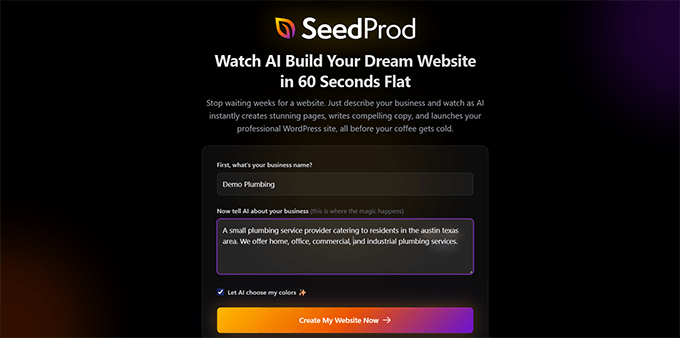
Bu, özellikle yeni bir mağaza açıyorsanız veya mevcut bir mağazayı yeniden tasarlıyorsanız faydalıdır.
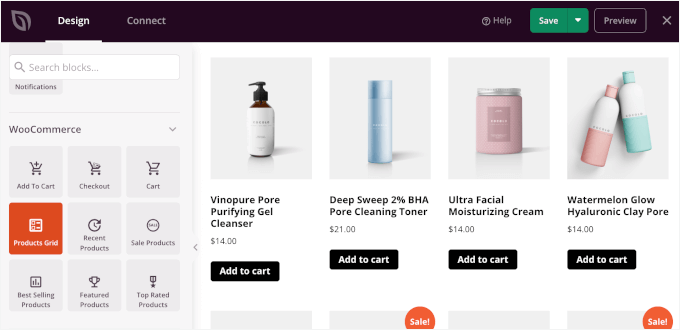
Ardından, gerektiğinde bireysel ürün sayfalarını, açılış sayfalarını ve ödeme akışlarını ince ayar yapmak için WooCommerce + SeedProd'u kullanabilirsiniz. SeedProd, birden fazla WooCommerce bloğu içerir, bu nedenle bu işlem hızlı ve kolaydır.
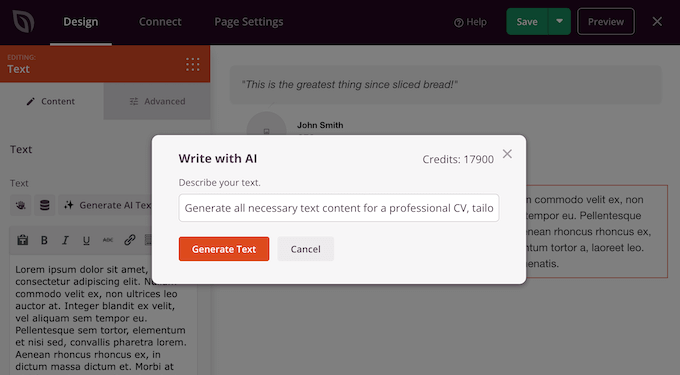
Ayrıca WooCommerce sayfalarınızdaki içerik için yerleşik yapay zeka desteği de içerir.
Bu, sayfa oluşturucudan ayrılmadan kolayca görüntüler ve yazılı metinler oluşturmanıza olanak tanır.
Ayrıntılar için, yapay zeka ile web sitesi oluşturma ve WooCommerce ürün sayfalarınızı nasıl özelleştireceğiniz hakkındaki kılavuzlarımıza bakın.
SeedProd'u Doğru Kullanma Yöntemi:
- Yapay Zeka Web Sitesi Oluşturucu: İşletmenizi basit bir dille tanımlayarak WooCommerce uyumlu bir site düzeni oluşturun. SeedProd, düzeni, sayfaları ve başlangıç içeriğini sizin için oluşturur.
- Yapay Zeka Ürün Sayfası Metni: Sıfırdan başlamadan, taraması ve dönüşüm sağlaması daha kolay sayfalar oluşturarak ikna edici ürün açıklamaları ve başlıkları hızla oluşturun.
- Sürükle ve Bırak Mağaza Oluşturucu: Ürün ızgaralarını, ödeme sayfalarını ve açılış sayfalarını kodlama veya tema dosyalarına dokunma zahmetine girmeden görsel olarak özelleştirin.
- Önceden Hazırlanmış WooCommerce Şablonları: Profesyonelce tasarlanmış şablonları kullanarak satış sayfalarını, yakında çıkacak sayfaları, potansiyel müşteri hunilerini ve ürün lansmanlarını daha hızlı başlatın.
- Dönüşümler İçin Optimize Edildi: Yüksek dönüşüm sağlayan ürün ve açılış sayfaları oluşturmanıza yardımcı olmak için geri sayım sayaçları, referanslar, incelemeler ve CTA'lar için yerleşik bloklar.
Deneyimim: Bir süredir SeedProd kullanıyorum. İsteğe bağlı açılış sayfalarını hızla oluşturmayı çok kolaylaştıran yerleşik yapay zeka özelliklerini seviyorum. Ayrıca sıfırdan yapay zeka ile web siteleri kodladım ve SeedProd, en kolay yapay zeka web sitesi oluşturucu olarak öne çıktı.
Fiyatlandırma: Yıllık 39,50 ABD Doları'ndan başlayan fiyatlarla.
2. Gerçekten Satan Ürün Açıklamaları Oluşturun
Benzersiz ve ikna edici ürün açıklamaları yazmak, bir WooCommerce mağazasını yönetmenin en çok zaman alan kısımlarından biridir.
Ürün açıklamaları yazmanın bir yolu, basitçe ChatGPT veya başka bir yapay zeka aracını kullanmaktır. Ancak, her ürün için bir komut istemi yazmanız ve ürün ayrıntılarını manuel olarak sağlamanız gerekir.
Bu, yapay zekayı kullanmanın amacını, yani zaman kazanmayı ve şeyleri otomatikleştirmeyi ortadan kaldırır.
Öte yandan, StoreAgent gibi bir yapay zeka aracı, ürününüzün en iyi özelliklerini ve faydalarını vurgulayan ilgi çekici metinleri anında oluşturabilir.
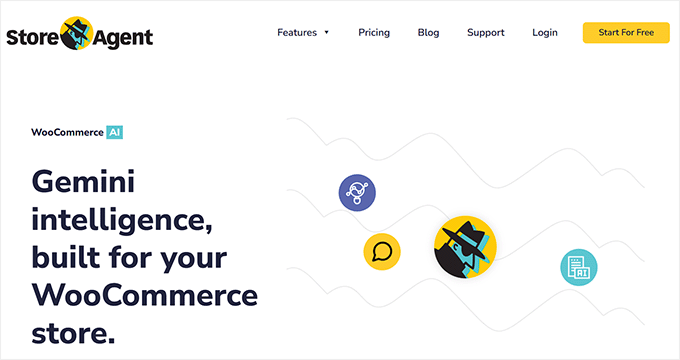
Örneğin, "Mavi pamuklu tişört" gibi düz bir açıklama yerine, yapay zeka "Her mevsim için mükemmel, %100 nefes alabilen kumaştan üretilmiş, ultra yumuşak mavi pamuklu tişörtümüzle gün boyu konforu yaşayın" gibi bir şey oluşturabilir.
Bu, yalnızca saatlerce süren iş yükünüzü azaltmakla kalmaz, aynı zamanda ürün sayfanızın SEO'sunu iyileştirir ve daha fazla ziyaretçiyi alıcıya dönüştürmeye yardımcı olur.
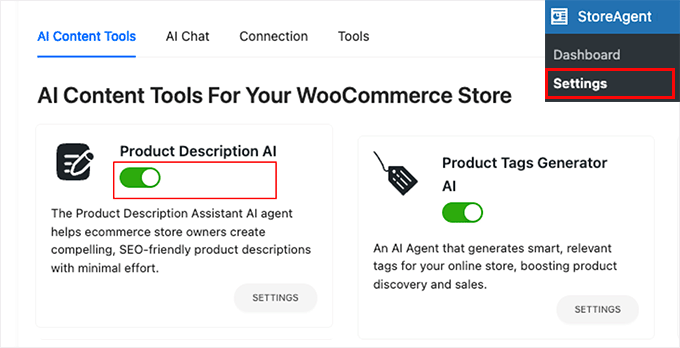
Başlamak için, yapay zeka kullanarak otomatik olarak WooCommerce ürün açıklamaları oluşturma kılavuzumuza bakın.
StoreAgent'ı Doğru Kullanma:
- Yapay Zeka Ürün İçeriği Oluşturucu: Tek tıklamayla uzun ve kısa ürün açıklamaları, etiketler ve inceleme özetleri oluşturur.
- Yapay Zeka Destek Sohbet Botu: Mağazanızın içinde ürün verilerinizi, politikalarınızı ve SSS'lerinizi kullanarak müşteri sorularını yanıtlar.
- Dönüşüm İçgörüleri: Ürün sayfalarınızı tarar ve netliği ve satışları artırmak için iyileştirmeler önerir.
- Yerel WooCommerce Entegrasyonu: Kodlama, komut istemleri veya API anahtarları gerektirmeden doğrudan kontrol panelinizde çalışır.
Deneyimim: StoreAgent'ın bir WooCommerce mağazasını yönetmek için büyük bir zaman kazancı olduğunu gördüm. Yüzlerce ürüne sahip bir dropshipping mağazasında denedim ve toplu ürün açıklaması oluşturucu bana çok zaman kazandırdı. Yapay zeka sohbet botu, müşteri sorularını anında yanıtlamaya yardımcı oldu, bu da daha fazla dönüşümle sonuçlandı.
Fiyatlandırma: Aylık 19 ABD Doları'ndan başlayan fiyatlarla. Sınırlı özelliklere sahip ücretsiz bir plan da mevcuttur.
3. Mağazanızın Tekrarlayan Görevlerini Otomatikleştirin
Tipik bir çevrimiçi mağazada, küçük görünen ancak işletmeniz büyüdükçe tekrarlayan ve zaman alan birçok görev vardır.
Örneğin, sipariş takip e-postaları göndermek, bir satın alma işleminden sonra müşterileri etiketlemek, tekrar alıcılar için kuponlar oluşturmak, e-tabloları güncellemek veya stok azaldığında ekibinizi bilgilendirmek.
Bu görevler kendi başlarına küçük görünürler, ancak mağazanız büyüdükçe hızla artarlar. Kısa süre sonra ya fazladan saatler çalışırsınız ya da bunları halletmesi için başkasını ödersiniz.
İşte Uncanny Automator'ın devreye girebileceği yer burasıdır. Bu, WooCommerce mağazanızın 150'den fazla farklı uygulama ve eklentiye bağlanmasına olanak tanıyan nihai WordPress otomasyon eklentisidir.
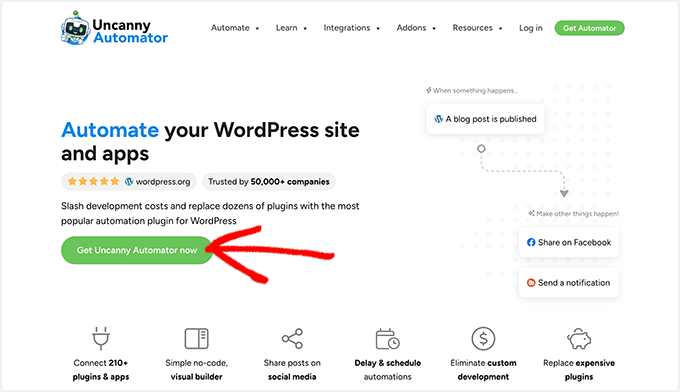
Basit bir örneğe bakalım. Bir müşterinin manuel olarak e-posta yazmak veya araçlar arasında veri kopyalamak zorunda kalmadan, bir satın alma işlemini tamamlamasının ardından WooCommerce'in otomatik olarak kişiselleştirilmiş bir takip mesajı göndermesini istediğinizi hayal edin.
Uncanny Automator ile bunu bir kez ayarlayabilir ve biri sipariş verdiğinde her seferinde otomatik olarak çalışmasını sağlayabilirsiniz.
Uncanny Automator'ı kurup etkinleştirdikten sonra, yeni bir otomasyon oluşturmak için Automator » Yeni Tarif Ekle sayfasına gidebilirsiniz.
Tarifeyi tetikleyecek uygulamayı seçmeniz istenecektir. Örneğin, buraya WooCommerce'i seçebilirsiniz.

Bundan sonra, otomasyonu neyin tetikleyeceğini seçmeniz gerekecektir.
Örneğin, 'Bir misafir satın alma işlemini tamamladığında' seçeneğini seçebilirsiniz.
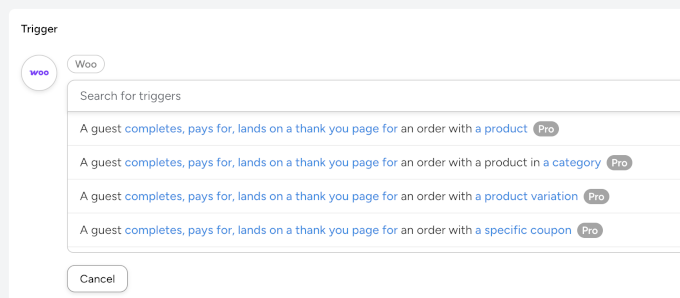
Bundan sonra, bu tetikleyici çalıştığında gerçekleştirmek istediğiniz eylemi seçebilirsiniz.
Burada, bağladığınız uygulamaları veya WooCommerce mağazanıza yüklenen eklentileri seçebilir veya istenen bir eylemi gerçekleştirmek için bir yapay zeka platformuna (örneğin, Google Gemini, ChatGPT, Claude vb.) bağlanabilirsiniz.
Örneğin, bir yapay zekaya bağlanıp kullanıcının satın alma işlemine göre bir ek satış mesajı oluşturabilirsiniz.
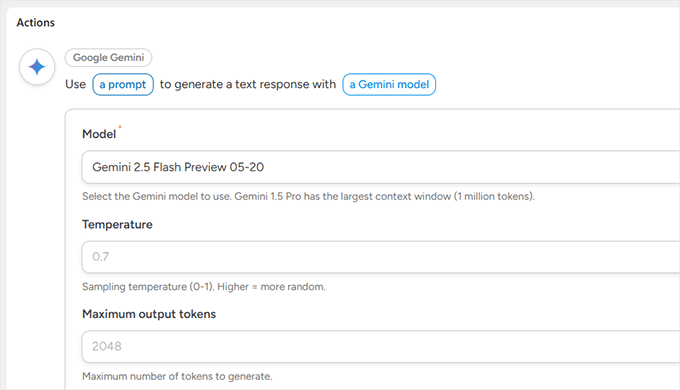
Uncanny Automator, OpenAI, Gemini, Anthorpic Claude ve diğer birçok popüler yapay zeka platformunu destekler. Bu, otomasyonlarınızda yapay zeka araçlarını kullanmanıza ve daha akıllı iş akışları oluşturmanıza olanak tanır.
Nasıl kullanılacağına dair ayrıntılar için, Uncanny Automator ile otomatik iş akışları oluşturma kılavuzumuza bakın.
Uncanny Automator'ı Doğru Kullanma:
- Mağaza İş Akışlarını Otomatikleştirin: Müşteriler satın aldığında, inceleme bıraktığında, sepeti terk ettiğinde veya üyelik durumunu değiştirdiğinde eylemleri tetikleyin — kodlama gerekmez.
- WooCommerce'i Diğer Eklentilere, Uygulamalara ve Yapay Zeka Platformlarına Bağlayın: Mağazanızı senkronize tutmak için WPForms, LearnDash, Mailchimp, Google Sheets, Slack ve 100'den fazla hizmetle entegre olur.
- Kişiselleştirilmiş Müşteri Deneyimleri: Kullanıcıların ne satın aldığına veya neye göz attığına göre hedeflenmiş takip e-postaları otomatik olarak gönderin, ödüller verin veya özel içeriğin kilidini açın.
- Manuel Görevleri Azaltın: Tekrarlayan yönetici işlerini (kullanıcıları etiketleme, CRM kayıtlarını güncelleme ve kupon oluşturma gibi) akıllı otomasyon tarifleriyle değiştirin.
- Çok Adımlı Otomasyonları Destekler: Bir eylemin başka bir eyleme yol açtığı gelişmiş iş akışları oluşturun — pazarlama, üyelik iş akışları ve satın alma sonrası diziler için mükemmeldir.
Deneyimlerim: Uncanny Automator'ı oldukça fazla kullandım. Popüler yapay zeka platformlarıyla entegrasyonu, doğrudan WordPress içinde otomasyonlar oluşturmayı kolay ve daha ucuz hale getiriyor. WordPress eklentileri ve düzinelerce üçüncü taraf uygulama ile entegre oluyor. Ayrıca diğer yapay zeka otomasyon araçlarıyla karşılaştırıldığında çok daha az karmaşık buluyorum.
Fiyatlandırma: Yıllık 149 ABD Doları'ndan başlayan fiyatlarla
7/24 Anında Müşteri Desteği Sağlayın
Müşteriler alışveriş yaparken sorularını anında yanıtlayabilmeyi, ancak pahalı canlı sohbet yazılımları veya özel bir destek temsilcisi için bütçeniz olmamasını dilediniz mi?
Müşteriler hızlı yanıt alamadığında, genellikle mağazanızı terk eder ve başka yerden satın alırlar. Bu, özellikle nakliye süreleri, iade politikaları veya ürün bulunabilirliği gibi basit sorular olduğunda sinir bozucudur.
İşte WPChat burada devreye giriyor. Müşterilerin, zaten kullandıkları WhatsApp, Messenger, Instagram ve Telegram gibi mesajlaşma uygulamaları aracılığıyla sizinle sohbet etmelerini sağlıyor.
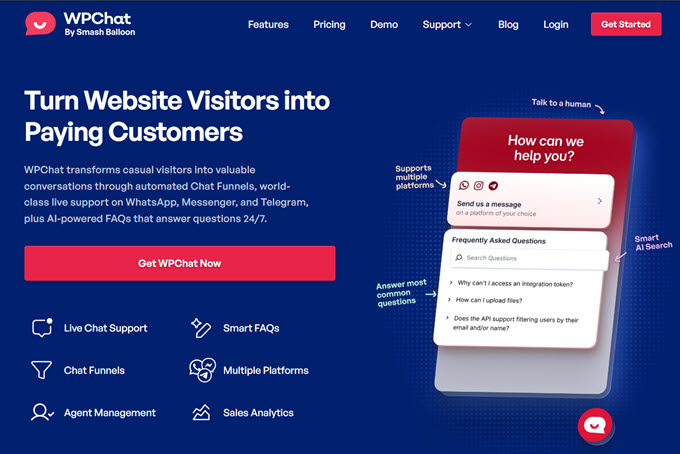
Bu, onlarla gerçek zamanlı olarak konuşmanızı ve sitenizden ayrıldıktan sonra bile sohbeti sürdürmenizi kolaylaştırır.
Bu, müşteri web sitenizi kapattığında kaybolan geleneksel canlı sohbet kutularından farklıdır. WPChat ile sohbet, tıpkı bir arkadaşla konuşmak gibi telefonlarında devam eder.
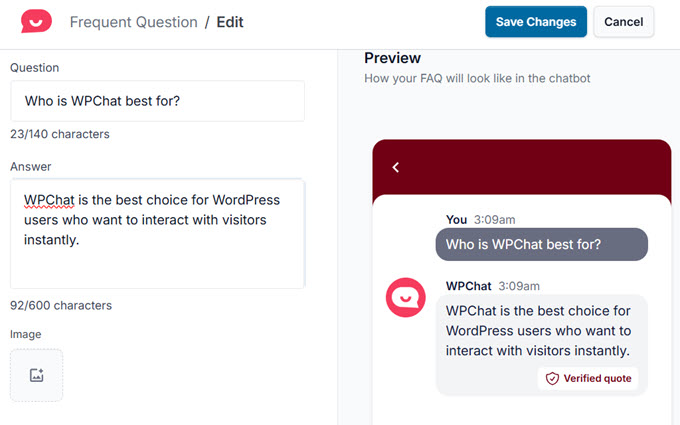
Ayrıca WPChat, yapay zeka destekli Akıllı SSS'ler sunar, böylece müşteriler çevrimdışı olduğunuzda bile anında yanıt alabilirler. Bu, tekrarlayan destek sorularını azaltmaya yardımcı olur ve sizin de önemli sohbetlere odaklanmanızı sağlar.
WPChat sadece destek değildir; aynı zamanda otomatik sohbet hunileriyle ziyaretçilere satın alma kararlarında rehberlik ederek dönüşümleri artırmanıza da yardımcı olur.
Nasıl kullanılacağına dair ayrıntılar için WooCommerce mağazanıza canlı sohbet nasıl eklenir rehberimize bakın.
WPChat'i Doğru Kullanma:
- Popüler Mesajlaşma Uygulamalarında Sohbet Edin: Yalnızca web sitenizde değil, WhatsApp, Messenger, Instagram ve Telegram'da müşterilerle konuşun.
- Yapay Zeka Destekli Akıllı SSS'ler: Mevcut olmadığınızda bile yaygın soruları anında otomatik olarak yanıtlayın.
- Satışlar İçin Sohbet Hunileri: Müşterilerin ürün seçmelerine ve satın alma işlemlerini tamamlamalarına yardımcı olan otomatik konuşma akışları oluşturun.
- Özelleştirilebilir Sohbet Asistanı: Özel renkler, mesajlar ve görünürlük kurallarıyla markanıza uyum sağlayın.
- Dahili Ekip Araçları: Destek temsilcileri ekleyin, müsaitliği yönetin ve konuşmaları otomatik olarak yönlendirin.
- Net Analizler: Sohbetleri, temsilci performansını ve popüler soruları doğrudan WordPress kontrol panelinizden izleyin.
Deneyimim: Desteğin satışları yavaşlattığı mağazalarda WPChat'in büyük bir fark yarattığını gördüm. Müşteriler anında yanıt aldıklarında, daha hızlı karar verirler ve bu ziyaretçilerin daha fazlası ödeme yapan müşterilere dönüşür.
Fiyatlandırma: Yıllık 49$'dan başlar. WordPress.org'da sınırlı otomasyonlarla kullanılabilen ücretsiz bir sürümü mevcuttur.
5. Ürünlerinizi Yapay Zeka ile Arama Motorları İçin Optimize Edin
Ürünlerinizin Google aramalarında görünmesini sağlamak, daha fazla trafik ve satış elde etmenin en kolay yollarından biridir. Zorluk, anahtar kelimeler, meta veriler veya yapılandırılmış veriler hakkında bilgi sahibi değilseniz SEO'nun karmaşık gelebilmesidir.
All in One SEO (AIOSEO), ürün SEO'sunu erişilebilir kılmak için doğrudan WooCommerce ve WordPress içinde çalışır. Arama motorlarının (Google gibi) mağazanızın ürünlerini arama sonuçlarında kolayca göstermesini sağlayan yerleşik şema işaretleme desteği ile birlikte gelir.
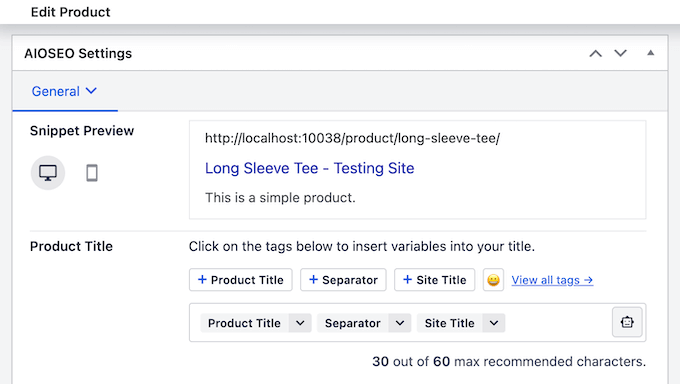
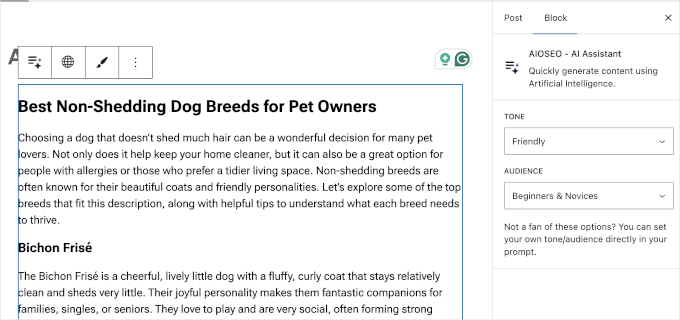
All in One SEO ayrıca, pazarlama içeriği yazmanıza ve WordPress'ten ayrılmadan yapay zeka görselleri oluşturmanıza yardımcı olan yerleşik bir Yapay Zeka Asistanı ile birlikte gelir.
Mağaza sahipleri için bu büyük bir zaman tasarrufu sağlar. Dönüşüm sağlayan ikna edici ürün açıklamaları oluşturmak, binlerce ürün için optimize edilmiş SEO başlıkları yazmak veya yüksek kaliteli fotoğrafları olmayan ürün kategorileri için öne çıkan görseller oluşturmak için yapay zekayı kullanabilirsiniz.
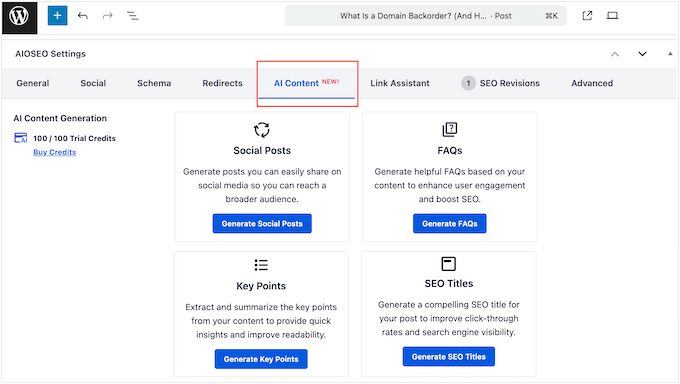
AIOSEO ayrıca güçlü bir Sosyal Medya gönderi oluşturucu içerir.
Bu, Instagram, Facebook ve daha fazlası gibi platformlarda mağazanızı tanıtmak için yapay zekayı kullanarak kolayca sosyal medya gönderileri oluşturmanıza yardımcı olur.
Ayrıca, sitenizi yapay zeka sohbet botları için daha erişilebilir hale getiren LLMs.txt dosyası desteği ile birlikte gelir. Bu, içeriğinizin yapay zeka platformları tarafından daha sık alıntılanmasını sağlayabilir.
WooCommerce mağazaları için bu, yapay zeka botlarının kataloğunuzu tam olarak nasıl indeksleyeceğini kontrol edebileceğiniz anlamına gelir, böylece arama yapan kullanıcılara ürünlerinizi doğru bir şekilde önerebilirler.
AIOSEO'yu Doğru Kullanma:
- İçerik Oluşturma için Yapay Zeka Asistanı: Bir istem yazarak ürün sayfası metinleri, blog yazıları, SSS bölümleri veya meta açıklamaları yazın.
- Görüntü Oluşturucu: Tasarımcıya gerek kalmadan saniyeler içinde ürün sayfaları için özgün, markaya uygun görseller oluşturun.
- Sosyal Medya Gönderileri: Yapay zeka kullanarak Sosyal Medya gönderileri oluşturmak için önceden yapılandırılmış bir araçla birlikte gelir.
- LLMs.txt Oluşturucu: llms.txt ve llms-full.txt dosyalarını özelleştirerek yapay zeka arama motorlarının ve büyük dil modellerinin sitenizi nasıl görüntüleyeceğini kontrol edin.
- WooCommerce Sayfa İçi SEO Araçları: Ürün başlıklarını, meta açıklamalarını, şema işaretlemelerini ve daha fazlasını doğrudan WooCommerce düzenleyicisinde optimize edin.
- Şema İşaretleme Desteği: Listelemelerinizin arama snippet'lerinde öne çıkmasına yardımcı olmak için otomatik olarak ürün şeması, inceleme şeması ve SSS şeması ekleyin.
- SEO Analizi ve Öneriler: Her ürün sayfasının arama görünürlüğünü iyileştirmek için net puanlar ve uygulanabilir öneriler alın.
Deneyimim: AIOSEO'yu başvurduğum SEO araç setim olarak kullanıyorum. Hem arama motorları hem de yapay zeka destekli keşif araçları için optimize etmenin en kolay yolu olduğunu gördüm. Şema işaretlemesi, yapay zeka özellikleri ve e-ticaret hazırlığı için kapsamlı desteği, onu herhangi bir WooCommerce mağazası için olmazsa olmaz kılıyor.
Fiyatlandırma: Yıllık 49,50$'dan başlar. Temel SEO'yu kapsayan ücretsiz bir sürümü mevcuttur. Yapay zeka kredileri plana göre değişiklik gösterebilir.
Bonus: Mağazanızın Performansını Sade Bir Dille Anlayın
Google Analytics büyüme için esastır, ancak gezinmesi bunaltıcı olabilir.
MonsterInsights, en önemli WooCommerce analizlerinizi doğrudan WordPress kontrol panelinize getirerek bunu çözer.
Karmaşık verileri net raporlara dönüştürerek, sitenizden ayrılmadan en çok satan ürünlerinizi, dönüşüm oranlarınızı ve gelir kaynaklarınızı görmenizi sağlar.
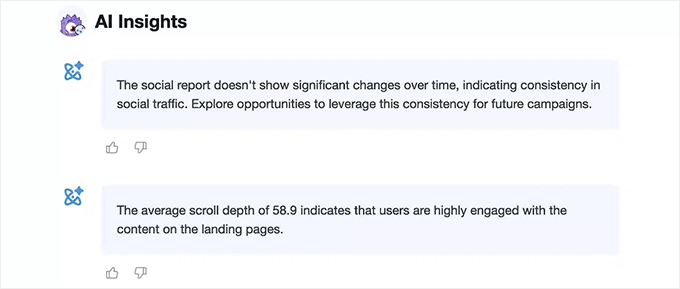
MonsterInsights ayrıca mağazanızı yönetmenize yardımcı olacak güçlü yapay zeka araçları içerir. Yapay Zeka Analizleri özelliği, mağazanızın sağlığını proaktif olarak izler, satış eğilimlerini ve trafik değişikliklerini izleyerek size Analizler » Yapay Zeka Analizleri'nde anında bir genel bakış sunar.
Anormallikleri otomatik olarak tespit eder, böylece ani trafik düşüşleri gibi sorunları anında yakalarsınız.
Belirli sorgular için Yapay Zeka Sohbetleri özelliği kişisel veri analistiniz olarak görev yapar. “Bu hafta en çok satışı hangi pazarlama kanalı getirdi?” veya “En popüler ürünlerim hangileri?” gibi düz İngilizce sorular sorabilir ve anında, veriye dayalı yanıtlar alabilirsiniz.
MonsterInsights'ı Doğru Kullanma:
- Basit WooCommerce Raporları: Satış verilerini, geliri, dönüşüm oranlarını ve en iyi performans gösteren ürünleri doğrudan WordPress içinde görüntüleyin.
- Gelişmiş E-ticaret Takibi: Sepete ekleme etkinliklerini, ürün gösterimlerini, ödeme davranışlarını ve daha fazlasını otomatik olarak izler.
- Trafik ve Pazarlama Analizleri: Ziyaretçilerinizin tam olarak nereden geldiğini ve hangi kanalların en çok satış getirdiğini görün.
- İçerik Analizleri: Hangi ürün sayfalarının ve blog gönderilerinin en çok etkileşim aldığını öğrenin.
- Kodlama Gerekmez: MonsterInsights, Google Analytics'i birkaç tıklamayla doğru şekilde kurar - GA yapılandırma sorunları yaşamazsınız.
Deneyimim: WPBeginner'da hangi içeriğin en iyi performansı gösterdiğini anlamak için MonsterInsights kullanıyoruz. Tahminleri ortadan kaldırır ve karmaşık analiz panolarında inceleme yapmadan neyi geliştireceğimize karar vermemize yardımcı olur.
Fiyatlandırma: Yıllık 99,50$'dan başlar. Temel metrikleri içeren ücretsiz bir sürümü de mevcuttur.
Yapay Zeka WooCommerce Mağazanız İçin Ne Kadar Para Tasarruf Edebilir ve Kazandırabilir?
Yapay Zeka kullanmanın yatırım getirisi, hem tasarruf edilen zamandan hem de elde edilen gelirden gelir. Gerçekçi sayılara bakalım.
Gerçek Sayılar: Zaman Tasarrufu Dökümü
Yaygın görevleri otomatikleştirerek her ay ne kadar zaman tasarrufu yapabileceğinize dair muhafazakar bir tahmin:
| Görev | Manuel Süre (aylık) | Yapay Zeka Destekli Zaman (aylık) | Tasarruf Edilen Saatler |
|---|---|---|---|
| 20 Ürün Açıklaması Yazma | 10 saat | 2 saat | 8 saat |
| 100 Destek Sorgusunu Yanıtlama | 8 saat | 3 saat | 5 saat |
| 4 Blog Yazısı Yazma | 12 saat | 4 saat | 8 saat |
| Sosyal Medya Yönetimi | 10 saat | 5 saat | 5 saat |
| Toplam | 40 saat | 14 saat | 26 saat |
Gelir Etkisi: Ne Beklemeli
Zaman tasarrufunun ötesinde, yapay zeka doğrudan kârınızı artırabilir. Daha iyi ürün açıklamaları ve SEO, dönüşüm oranlarını %5-10 artırabilir.
Bu arada, terk edilmiş sepet e-postaları, aksi takdirde kaybedilecek satışların %10-15'ini kurtarabilir. Bu küçük, tutarlı kazanımlar zamanla genel gelirin önemli ölçüde artmasına katkıda bulunur.
Başlarken: İlk Yapay Zeka Uygulamanız
Başlamaya hazır mısınız? Anahtar, yüksek etkili bir alanla başlayıp oradan genişlemektir.
30 Günlük Yapay Zeka Uygulama Planınız
Bu ay boyunca bunalmadan yapay zeka araçlarını kullanıma sunmak için basit bir plan:
- 1. Hafta: Ürün Açıklamaları. Tüm ürün açıklamalarınızı oluşturmak veya yeniden yazmak için bir yapay zeka yazarı kullanın. Fayda odaklı ve SEO dostu olmalarına odaklanın.
- 2. Hafta: Müşteri Desteği. En sık sorulan sorularınızı yanıtlamak için bir yapay zeka sohbet botu kurun. Kullanması için bir cevap bilgi tabanı oluşturun.
- 3. Hafta: Analitik. Veri toplamaya başlamak için MonsterInsights gibi bir araç yükleyin. Bu haftanın sonunda, neyin işe yaradığını görmek için içgörüleri gözden geçirin.
- 4. Hafta: Optimizasyon. Sonuçlarınızı gözden geçirin, yapay zeka çıktılarını iyileştirin ve e-posta pazarlaması veya SEO gibi ek bir alana otomasyonu genişletin.
WooCommerce'de Yapay Zeka Kullanımı Hakkında Sıkça Sorulan Sorular
Yapay zeka mağazamdaki kişisel dokunuşu ortadan kaldıracak mı?
Hayır. Yapay zeka, ilk taslakları yazmak veya aynı temel soruları tekrar tekrar yanıtlamak gibi yapmamanız gereken tekrarlayan görevleri yerine getirmek için oradadır. Bu, müşterilerle bağlantı kurmak ve ürünlerinizi iyileştirmek gibi yalnızca sizin yapabileceğiniz şeylere odaklanmanız için size zaman kazandırır.
Yapay zeka hata yaparsa ne olur?
Yapay zekayı bir yedek değil, bir yardımcı olarak düşünün. İçerik ve yanıtları çok hızlı bir şekilde oluşturabilir, ancak yine de çıktıyı kendi üslubunuza ve doğruluğunuza uyacak şekilde gözden geçirmeniz ve iyileştirmeniz gerekir. Hızlı bir düzenleme çok işe yarar.
Bu araçları kullanmak için teknik becerilere ihtiyacım var mı?
Hayır. Bu kılavuzda bahsedilen her araç normal bir WordPress eklentisi gibi çalışır. Birkaç tıklamayla kurabilir ve kullanabilirsiniz - kodlama gerekmez.
Yapay zeka araçları tipik olarak ne kadar tutar?
Çoğu yapay zeka aracı ayda yaklaşık 20-50 ABD dolarından başlar ve birkaçı ücretsiz sürümler veya denemeler sunar. Çoğu durumda, tasarruf edilen zaman ve elde edilen satışlar abonelik maliyetine değer.
Hangi araçla başlamalıyım?
Şu anda size en çok zaman alan görevle başlayın. Ürün açıklamaları yazmak işleri yavaşlatıyorsa, bir yapay zeka içerik aracıyla başlayın. Destek bunaltıcıysa, bir sohbet botuyla başlayın. Küçük bir iyileştirme ivme yaratabilir.
Yapay zeka araçları mevcut WooCommerce kurulumumla çalışacak mı?
Evet. Burada listelenen tüm araçlar doğrudan WooCommerce ve WordPress ile entegre olur. Standart temalar, eklentiler ve barındırma ortamlarıyla çalışırlar.
WooCommerce Mağazaları İçin Ek Kaynaklar
Yolculuğunuzda size yardımcı olmak için, mağazanızı başarıya hazırlamanıza yardımcı olacak bazı faydalı kılavuzlar:
- WordPress ile Online Mağaza Başlatma İçin Kapsamlı Kılavuz
- Online Mağazanız İçin En İyi WooCommerce Eklentileri
- İçerik Pazarlaması İçin En İyi 7 Yapay Zeka Aracını Test Ettim: Neler Buldum?
- Blog Yazarları / Pazarlamacılar İçin En İyi 12 ChatGPT Alternatifi
Bu makaleyi beğendiyseniz, lütfen WordPress video eğitimleri için YouTube Kanalımıza abone olun. Bizi ayrıca Twitter ve Facebook'ta da bulabilirsiniz.



Bir sorunuz veya öneriniz mi var? Tartışmayı başlatmak için lütfen bir yorum bırakın.