


Do you want to display a list of all authors on your WordPress blog?
An author list will show at a glance who is writing for your blog and allow your visitors to more easily find content written by their favorite authors.
In this article, we’ll show you how to list all authors from your blog in WordPress.
If you’re running a multi-author blog, then you may wish to list all of your authors in a post or a sidebar widget. This will show the human side of your WordPress blog to your readers, and let them quickly find more content written by their favorite authors.
Your list could contain the full name or display name of each author, a photo or avatar, and their bio. You could also link their names and avatars to the posts they have written.
Another way to highlight your team in WordPress is to make a staff directory with employee profiles. This is a better method if you want to include staff members who don’t have a user profile on your website.
With that being said, let’s have a look at how to list all authors from your WordPress blog. We’ll cover two methods, and you can use the list below to quickly navigate through the post.
Method 1: List WordPress Authors Using a Plugin
The first thing to do is install and activate the Author Avatars List/Block plugin. For more details, see our step by step guide on how to install a WordPress plugin.
This is the simplest method if you want to display an avatar or photo for each author.
Listing WordPress Authors in a Post
If you want to add a list of authors to a blog post, then you need to create or edit the post. Once there, you should click the blue ‘+’ icon at the top left of the screen to add a new block.
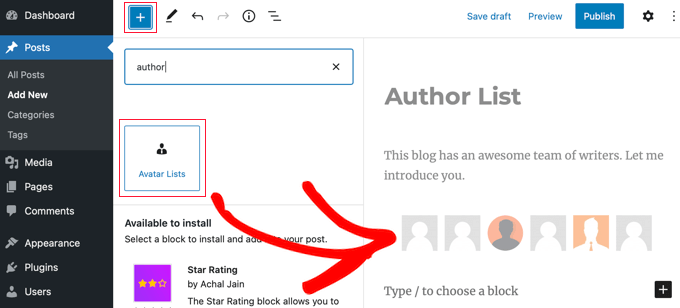
You will need to locate the ‘Avatar Lists’ block and drag it into the post. After that, you can use the block settings pane on the left to configure the list.
First, you need to select which roles to display by checking the boxes in the ‘Which roles to display’ section. Note that if you leave them all unchecked, then an error message will be displayed on the published post.
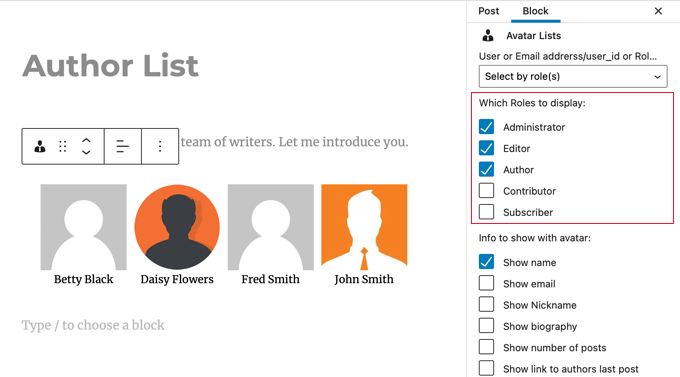
You also need to select which information you wish to display with the avatar. You can display each user’s name or display name, their email address and biography, the number of posts they have written, and a link to their latest post.
In this tutorial, we’ll just display their name.
Next, you should scroll down to ‘Link avatars to’ and select ‘Author Page’. Now when you click on the author’s avatar or name, you will be taken to their author page where you can view the posts they have written.
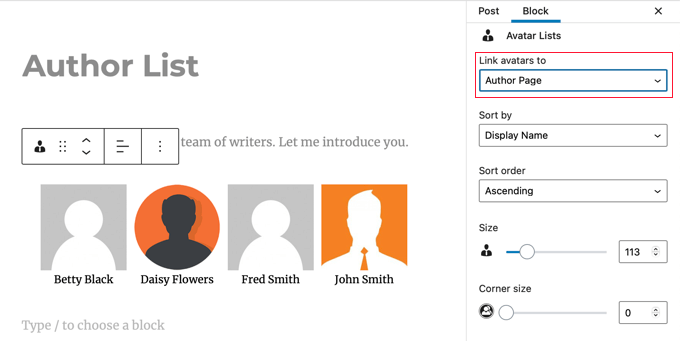
You can also choose how to sort the list, the size of the avatars, and whether to round them.
Finally, you need to scroll down and click the ‘Advanced’ section to display its settings. Here, you should type ‘1’ into the ‘Required number of posts’ field. This will make sure that only users who have written posts on your website will be displayed.
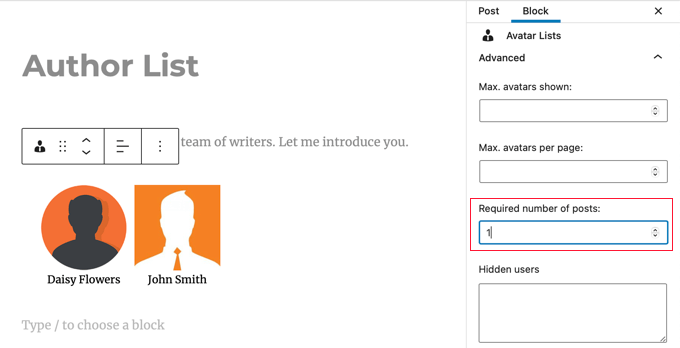
Don’t forget to publish or update the post when you’ve finished.
The Author Avatars List/Block plugin also allows you to add author lists to your website using shortcode. This is handy if you are using the classic WordPress editor. For more details, refer to the plugin’s documentation.
Listing WordPress Authors in the Sidebar
You might like to place your author list in the sidebar instead of a post. If so, then you need to navigate to Appearance » Widgets. Once there, you should click the blue ‘+’ icon at the top left of the screen to add a new widget.
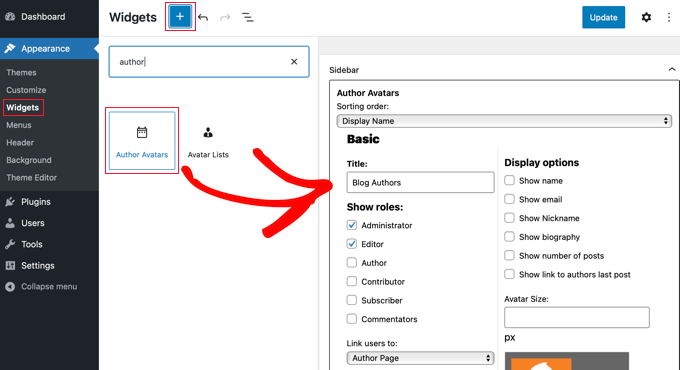
Next, you need to find the ‘Author Avatars’ widget and drag it to the sidebar. You can then configure the widget using the same settings that we covered above.
When you’re finished, don’t forget to click the ‘Update’ button at the top of the screen to store the new widget.
This is how it looks on our demo website.
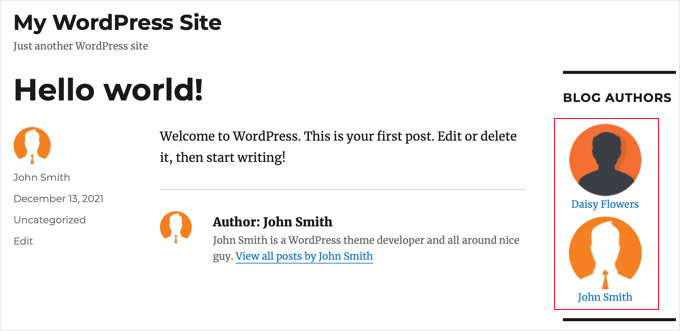
Displaying a Photo Instead of Gravatar
By default, this plugin displays the Gravatar connected to the author’s email address. In some cases, your authors may prefer to display a photo that’s specific to your blog.
You can achieve this by installing a plugin that allows your authors to upload a photo to their user profile. You can learn how in our guide on how to add an author’s photo in WordPress.
Method 2: List WordPress Authors Using Code
To display a list of authors on your website using code, you’ll need to edit your theme files. If you need help adding code to your site, then refer to our beginner’s guide on how to paste snippets from the web into WordPress.
Simply add the following code snippet to your theme’s index.php template before the loop.
<ul>
<?php wp_list_authors('exclude_admin=0&optioncount=1&show_fullname=1&hide_empty=1'); ?>
</ul>

Here’s how it looks on our demo website.
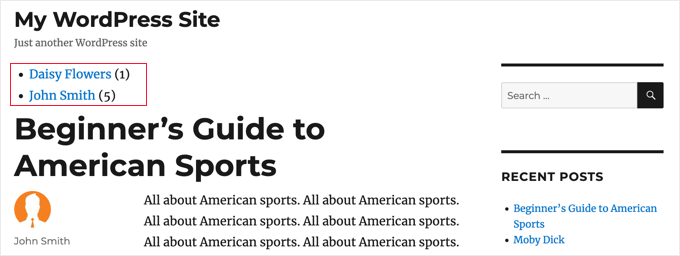
If you’d like to use this code in a sidebar widget, then you will have to create a custom WordPress widget.
We hope this tutorial helped you learn how to list all authors from your blog in WordPress. You may also want to learn how to track visitors to your website or check out our list of the best social media plugins for WordPress.
If you liked this article, then please subscribe to our YouTube Channel for WordPress video tutorials. You can also find us on Twitter and Facebook.





Syed Balkhi says
Hey WPBeginner readers,
Did you know you can win exciting prizes by commenting on WPBeginner?
Every month, our top blog commenters will win HUGE rewards, including premium WordPress plugin licenses and cash prizes.
You can get more details about the contest from here.
Start sharing your thoughts below to stand a chance to win!
mohadese esmaeeli says
Hello! How interesting and practical! We are a content production team, and we prepare some blog posts collaboratively. However, during publication, only the name of one author was possible to be listed under the post. The solution you mentioned is excellent and practical, and I am currently implementing it on our website.
WPBeginner Support says
Glad our guide helped you solve that issue
Admin
takaitra says
Another good list authors widget, with more features: http://wordpress.org/extend/plugins/list-authors/
I’ll look into adding an option to show avatars.
Gagan says
Thanks alot..
Gagan says
I’ve have a question, how to show top 10 contributors ?
Editorial Staff says
With this plugin, don’t know if there is a way that exist, but there are other ways that exist. We will do a write up on that.
Admin
Fonda says
Hello!
How can you add gravatar and descriptions?
Thanks!!!
Editorial Staff says
What do you mean by descriptions? To add gravatar, you would simply have to add the code for author email in the gravatar code.
Admin
James Duffell says
The description is referred to as “Biographical Info” within the users profile
Anton Trollbäck says
Hi! Thanks for this great little plugin. But I would also like it to show gravatars. I don’t really understand “add the code for author email in the gravatar code.”
Do you mind explaining?
Thanks,
Anton
Editorial Staff says
Yes, please view our already written article on (how to display author list with avatars)