


Your comment section is where your community comes to life. It’s an important space for connection, conversation, and reader engagement.
As the author, your replies are a key part of that interaction. You want to make sure your voice is easy for readers to find to encourage even more discussion.
Highlighting your comments gives them the attention they deserve. This simple touch makes your entire discussion area look more professional, organized, and engaging.
We believe that small design choices can make a big impact on user experience. And this is one of the easiest and most effective changes you can make.
In this article, we’ll show you how to easily highlight the author’s comments in WordPress.

Why Highlight Author’s Comments in WordPress?
Comments are a great way to build user engagement on your website. If you want to get more comments on your articles, then you can encourage that by actively participating in the discussions.
For a new WordPress blog, you can easily reply to comments and take part in discussions with your readers. If you run a multi-author blog, then you can encourage authors to help with the comment moderation as well.
However, most WordPress themes don’t distinguish between comments, and they are listed using the same style.
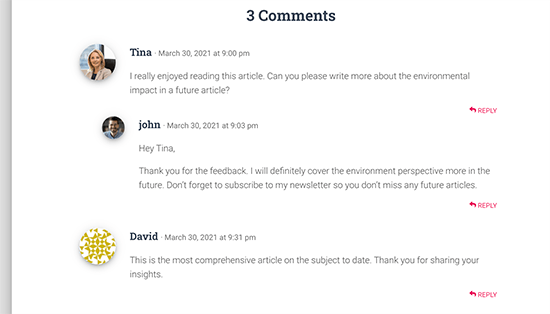
A casual reader may scroll through the comments, not realizing the additional content contributed by the author in the discussion.
Highlighting author’s comments helps you remedy that and makes the author’s comments stand out and be more noticeable.
The ultimate goal here is to encourage new users to join in the comments and ultimately subscribe to your newsletter or become a customer.
That being said, let’s take a look at how to easily highlight author comments in WordPress.
Highlighting Comment Author in WordPress
The easiest way to highlight comments by post author is by adding custom CSS to your WordPress theme. This allows you to easily add the code needed and see a live preview of how it would look on your website without saving it.
First, you need to visit Appearance » Customize in WordPress admin area. This will launch the WordPress theme customizer interface. You’ll notice a bunch of options in a column on your left and a live preview of your website.

From here, you need to click on the ‘Additional CSS’ tab.
This will open a text area where you’ll be adding the custom CSS.
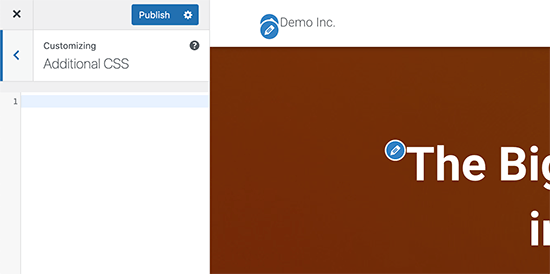
However, you would want to see how the custom CSS will look when applied.
To do that, you need to navigate to a blog post that contains comments by a post author.
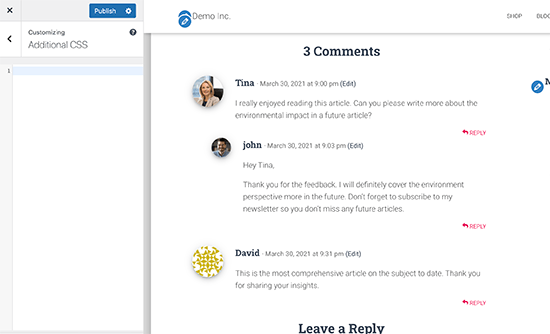
Scroll down to the comments section and then add the following custom CSS in the Custom CSS box on the left.
.bypostauthor {
background-color: #e7f8fb;
}
You’ll immediately notice the author comment change matching the custom CSS you entered.
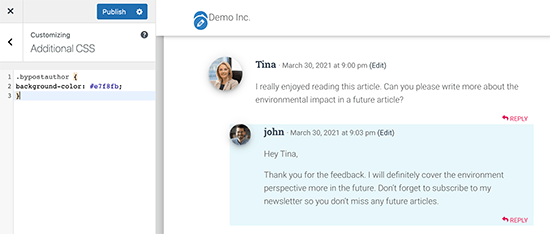
So how does this all work?
You see, WordPress adds some default CSS classes to different areas of your website. These CSS classes are there regardless of which WordPress theme you are using.
In this sample code, we have used the .bypostauthor CSS class, which is added to all comments added by a post author.
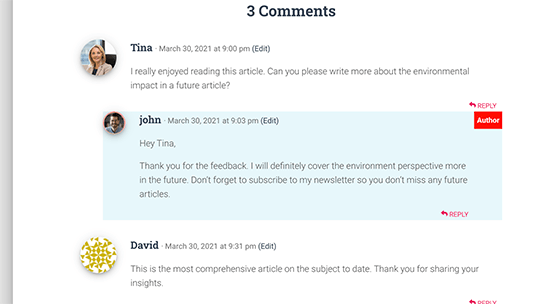
Let’s add some more CSS styles to make it even more prominent. Here is a sample code that adds a small ‘Author’ label to the comments by the post author and a border around the author’s avatar image.
.bypostauthor:before {
content:"Author";
float:right;
background-color:#FF1100;
padding:5px;
font-size:small;
font-weight:bold;
color:#FFFFFF;
}
.bypostauthor .avatar {
border:1px dotted #FF1100;
}
This is how it looked on our test website.
Highlighting Comments by User Role in WordPress
Now, many WordPress blogs have team members responsible for answering comments. Popular websites may have post author, administrator, and moderators all answering comments to boost user engagement.
How do you highlight a comment added by a staff member that is not the actual author of the post?
There is an easy hack to achieve that. However, it requires you to add custom code to your WordPress website. If you haven’t done this before, then see our article on how to paste snippets from the web into WordPress.
First, you need to add the following code to your theme’s functions.php file or in a code snippets plugin:
if ( ! class_exists( 'WPB_Comment_Author_Role_Label' ) ) :
class WPB_Comment_Author_Role_Label {
public function __construct() {
add_filter( 'get_comment_author', array( $this, 'wpb_get_comment_author_role' ), 10, 3 );
add_filter( 'get_comment_author_link', array( $this, 'wpb_comment_author_role' ) );
}

// Get comment author role
function wpb_get_comment_author_role($author, $comment_id, $comment) {
$authoremail = get_comment_author_email( $comment);
// Check if user is registered
if (email_exists($authoremail)) {
$commet_user_role = get_user_by( 'email', $authoremail );
$comment_user_role = $commet_user_role->roles[0];
// HTML output to add next to comment author name
$this->comment_user_role = ' <span class="comment-author-label comment-author-label-'.$comment_user_role.'">' . ucfirst($comment_user_role) . '</span>';
} else {
$this->comment_user_role = '';
}
return $author;
}

// Display comment author
function wpb_comment_author_role($author) {
return $author .= $this->comment_user_role;
}
}
new WPB_Comment_Author_Role_Label;
endif;
Instead of editing your theme’s functions.php file, we recommend adding this code with WPCode.
This code snippets plugin makes it safe and easy to add custom code in WordPress.

To get started, you need to install and activate the free WPCode plugin. If you need help, see our guide on how to install a WordPress plugin.
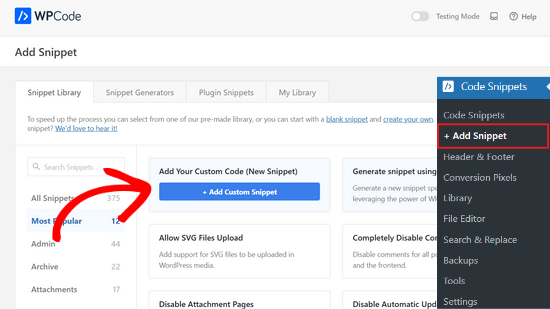
Once the plugin is activated, go to head to Code Snippets » Add Snippet from your WordPress dashboard.
Then, hover your mouse over the ‘Add Your Custom Code (New Snippet)’ option and click the ‘Add Custom Snippet’ button.
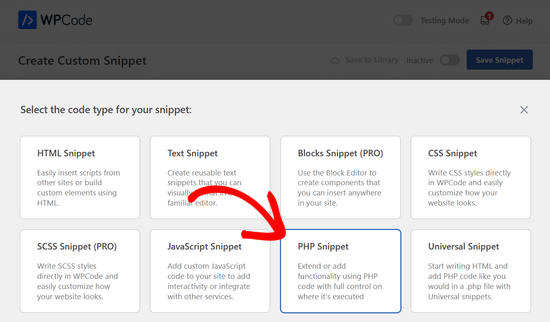
Next, select ‘PHP Snippet’ as the code type from the options that appears on the screen.
Now, you can add a title for your snippet and paste the code from above into the ‘Code Preview’ box.
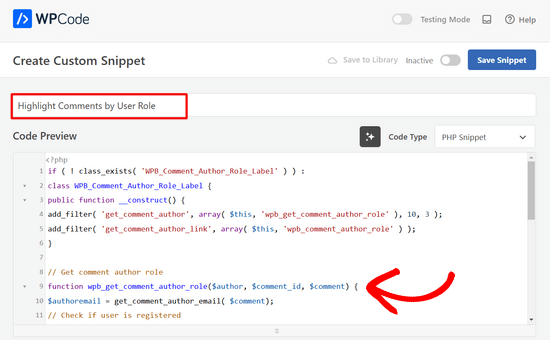
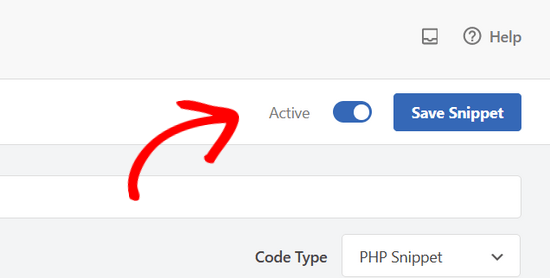
After that, simply toggle the switch from ‘Inactive’ to ‘Active’ and click the ‘Save Snippet’ button at the top of the page.
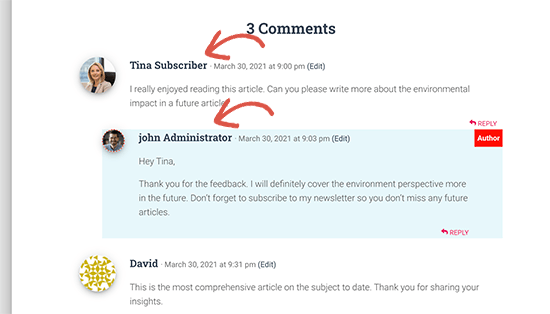
This code simply adds the user role label next to the comment author’s name. This is how it would look without any custom styling.
Let’s make it a little prettier by adding some custom CSS. Go to Appearance » Customize page and switch to the Additional CSS tab.
You can use the following CSS to style the user role label in the comments.
.comment-author-label {
    padding: 5px;
    font-size: 14px;
    border-radius: 3px;
}

.comment-author-label-editor {
background-color:#efefef;
}
.comment-author-label-author {
background-color:#faeeee;
}

.comment-author-label-contributor {
background-color:#f0faee;
}
.comment-author-label-subscriber {
background-color:#eef5fa;
}

.comment-author-label-administrator {
background-color:#fde9ff;
}
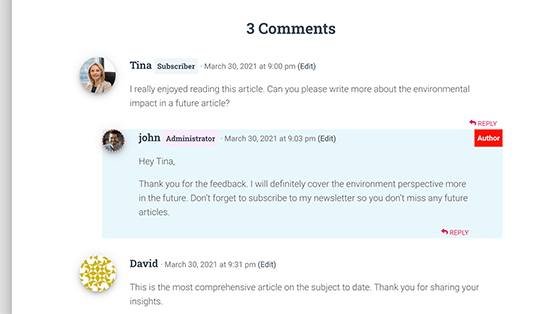
This is how it looked on our test site. Feel free to modify the code to match your theme’s colors and style.
For more details, you may want to read our article on how to add user role labels to WordPress comments.
We hope this article helped you learn how to highlight author comments in WordPress. You may also want to see our tutorial on how to highlight new posts for returning visitors in WordPress and our expert picks of the best author bio box plugins for WordPress.
If you liked this article, then please subscribe to our YouTube Channel for WordPress video tutorials. You can also find us on Twitter and Facebook.





Jiří Vaněk
I find it quite important to visually separate user comments from the author’s comments. It makes sense to me, especially because it clearly shows that the author of the article is responding, and they are likely the most knowledgeable about the topic. If the implementation is this straightforward, that’s absolutely great!
Dennis Muthomi
I have a QUESTION on Comments – since comments are user-generated content, is there any way to get them indexed by search engines?
I know forum and community posts often show up in search results, so I’m curious if something similar works for WordPress comments.
WPBeginner Support
Normally if you check with your SEO plugin they may have a tool or setting to add markup for your comments
Admin
Rafael
Not work for me
I use custom theme with comments.php from twenty Twenty Thirteen.
Where can I add more CSS classes ?
WPBeginner Support
Hi Rafael,
Please see our guide on how to add custom CSS in WordPress.
Admin
Irfan Ali
Thank you very much.
Haina
Hi! Whenever somenone leaves a comment on my website, the author name appears in gray. How can I change that do black? Also, a “permalink” word is always bellow the date and time of the comment . How can I get rid of that? Any help will be much appreciated. Thanks.
WPBeginner Support
Hi Haina,
Please take a look at our guide on how to style WordPress comments.
Admin
Haina
Thanks for the quick reply. However, my understanding of CSS is less than “fair”. If you could give me direct instructions on how to get the comment author name in black, it would be great. If not, I understand also. Thanks.
Martin
How is it possible to exclude any replies to the authors comment from the styling?
Peter Huan
I tried to it but i could not. I was added to my theme opition by myself.
May be i was changed “div”…
Thank you for topic.
Fahad
There is a problem with changing the background if the auther is the creator of the comment and someone else replied, since the nested reply will also have the same highlighted background!
deven
Nice post … but is there any plugin for doing the same ( there are some but 2-3 yers old ) looking for a new one with more customize options.
char
Is there a way to give each author (the main ones) different color comments?
Editorial Staff
Yes, it is possible to assign different color comments for registered users. The class would look like .comment-author-username. Replace username with the author’s username.
Admin
Ahmad Raza
I followed the way you described but i have not found <li id=”comment-“> template in my comments.php
Any solution?
Editorial Staff
Just updated the article, so it is more current.
Admin
Gretchen Louise
I’d love to see this tutorial updated to apply to Genesis and multi-author blogs!
Keith Davis
Useful tip.
When I read post comments, I tend to read the author’s comments on the assumption that what he says carries more authority.
I’m OK with the CSS but never sure about the php.
You may have enticed me to start messing with the php!
joyoge bookmark
nice tutorial, thank you
janghuan
In my wordpress version,I just need to add a exist class that the wordpress generates.It’s “comment-author-admin”.Maybe the class “bypostauthor” that wordpress generates also does work.
Blake Imeson
This method would fail for multi-author blogs right?
Editorial Staff
You can probably add a comma and add more user IDs, but it will show all editor’s comment in highlighted version, so yes it will be a fail if you look at it that way.
Admin