


Do you want to add an author bio box to your WordPress posts?
The author bio box is a small section where you can display information about the post author, show social media links, and more. However, some WordPress themes don’t have this feature built-in, or you may want to customize it.
In this article, we’ll show you how to easily add an author info box to your WordPress blog.
Why Add an Author Info Box in WordPress?
By default, most WordPress themes will display the author’s name on a blog post but no other information about them.
Showing the actual person behind the content helps build credibility with your readers and can strengthen your site’s authority.
While an ‘About Me’ page can help, not every reader will take the time to visit it. Plus, if you have a multi-author WordPress site, then an author box can be useful to your readers who want to know more about the author behind each post.
Author boxes also provides authors an additional incentive to contribute more often and interact with readers, since they can share their own website and social media links to build their followers.
If you want more users to submit content to your website, then an author info box is a great way to attract writers looking for exposure and new audiences.
With that said, let’s show you how to add an author info box in WordPress. Simply use the quick links below to jump straight to the method you want to use.
- Method 1: Adding Author Info Box Using Your WordPress Theme Settings
- Method 2: Adding Author Info Box in WordPress Using a Free WordPress Plugin
- Method 3: Display Author Info Box in WordPress Sidebar Widget Area
- Method 4: Adding Author Info Box by Adding Code to WordPress
- Method 5: Adding Author Info Box in WordPress With AIOSEO's Author SEO
- Bonus: Displaying Author Info Box in WordPress with a Premium Page Builder Plugin
Method 1: Adding Author Info Box Using Your WordPress Theme Settings
Some of the best WordPress themes will come with an author info box that will automatically display below each article.
First, you’ll want to see if your current theme has built-in support for an author info box.
To do this, simply go to Users » All Users in your WordPress admin panel.
Then, hover over the user profile you want to change and click the ‘Edit’ link.
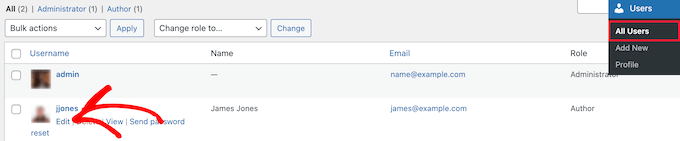
This brings you to the profile edit screen.
You’ll want to scroll down the page to the ‘Biographical Info’ section to add the author’s bio. You can also use HTML in this field to manually add links to the author’s social media profiles.
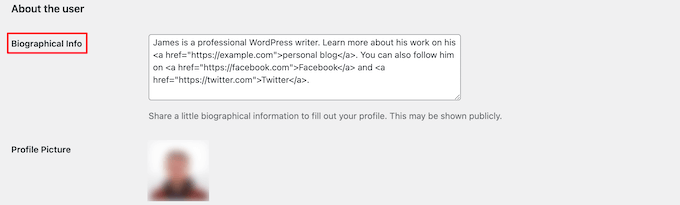
The author profile photo is automatically fetched from the service Gravatar. If the author has already set up an account, then this will display automatically.
Once you’re finished, make sure to click the ‘Update Profile’ button at the bottom of the page to save your changes.
Now, you can view any article on your website written by that author, and you’ll see your author bio box live.

Method 2: Adding Author Info Box in WordPress Using a Free WordPress Plugin
If your theme doesn’t have the option to show an author bio box or you want to customize how it looks, then this method is for you.
To do this, we’ll be using the Author Bio Box plugin. It’s one of the best author bio box plugins for WordPress that lets you simply add a customizable author bio box to your site.
First thing you need to do is install and activate the plugin. For more details, see our beginner’s guide on how to install a WordPress plugin.
Upon activation, you need to visit Settings » Author Bio Box to configure the plugin settings.
Here, you can choose the colors, gravatar size for the author photo, location to display the author bio box, and more.
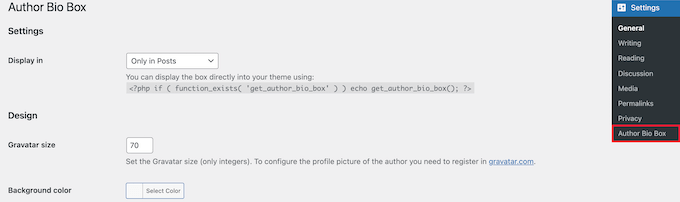
Once you’re done, make sure to click the ‘Save Changes’ button at the bottom of the screen to store your changes.
Next, you need to visit Users » All Users and click on the ‘Edit’ link below the user you want to add a bio.
Then, scroll down to the ‘Contact Info’ section on the edit profile screen.
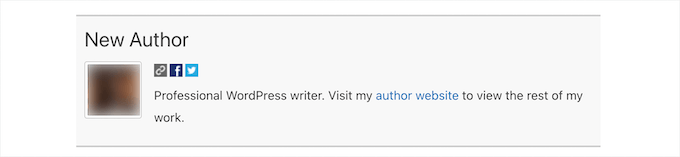
Here, you can add social media links for your author’s social media profiles. The plugin will only show icons for social networks where you enter a URL.
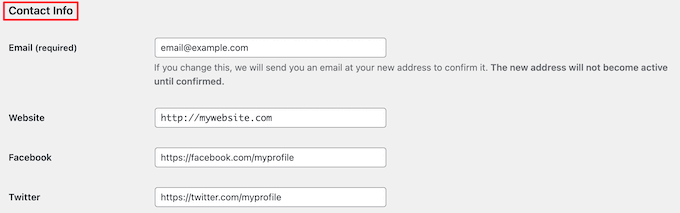
After that, scroll down to the ‘Biographical Info’ section to add the author’s bio.
You can also use HTML in this field to manually add links or use basic HTML formatting options.
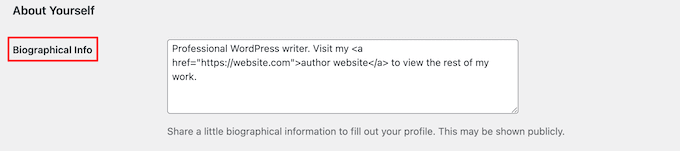
Once you’re finished, make sure to click the ‘Update Profile’ button to save your user profile changes.
You can now visit any article written by that user to see the author info box in action.
Method 3: Display Author Info Box in WordPress Sidebar Widget Area
Do you want to show the author info in the sidebar or widget area, instead of below the article? If yes, then this method is for you because it allows you to show the author info box in a sidebar widget.
For this method, you’ll need to install and activate the Meks Smart Author Widget plugin. For more details, see our step by step guide on how to install a WordPress plugin.
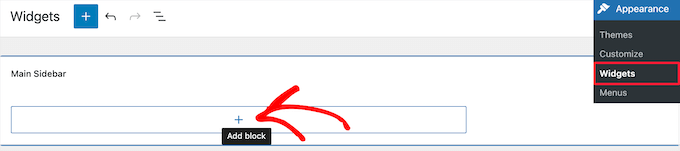
Upon activation, you need to visit Appearance » Widgets in your WordPress dashboard.
Then, click the ‘Plus’ add block icon in the ‘Sidebar’ widget area.
After that, you need to search for ‘Meks Smart Author’.
Then, click on the block to select it.
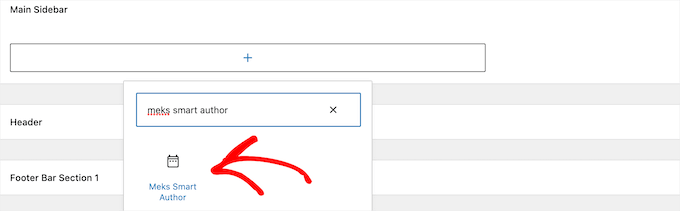
The widget comes with a number of options for you to customize how it displays.
The most important option you need to check is the checkbox next to ‘Automatically detect author’.
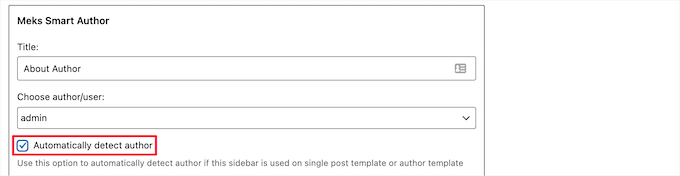
Then, click on the ‘Save’ button to store your widget settings.
You can now visit your website to see the author bio widget in action.
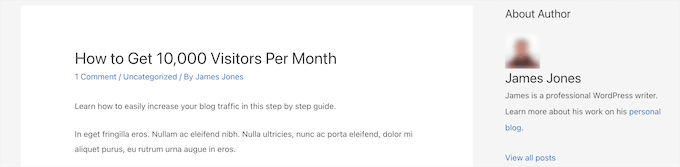
This plugin fetches user information from their WordPress profile. You or your authors need to fill in their bio information by editing their profiles.
To learn more about editing user profiles, see our guide on how to add new users and authors to your WordPress blog.
Method 4: Adding Author Info Box by Adding Code to WordPress
This method is for more advanced users because it requires you to edit your WordPress theme files. If you haven’t done this before, then see our guide on how to copy and paste code in WordPress.
Then, you can add the following code snippet to your functions.php file, in a site-specific plugin, or by using a code snippets plugin.
function wpb_author_info_box( $content ) {

global $post;

// Detect if it is a single post with a post author
if ( is_single() && isset( $post->post_author ) ) {

// Get author's display name
$display_name = get_the_author_meta( 'display_name', $post->post_author );

// If display name is not available then use nickname as display name
if ( empty( $display_name ) )
$display_name = get_the_author_meta( 'nickname', $post->post_author );

// Get author's biographical information or description
$user_description = get_the_author_meta( 'user_description', $post->post_author );

// Get author's website URL
$user_website = get_the_author_meta('url', $post->post_author);

// Get link to the author archive page
$user_posts = get_author_posts_url( get_the_author_meta( 'ID' , $post->post_author));

if ( ! empty( $display_name ) )

$author_details = '<p class="author_name">About ' . $display_name . '</p>';

if ( ! empty( $user_description ) )
// Author avatar and bio

$author_details .= '<p class="author_details">' . get_avatar( get_the_author_meta('user_email') , 90 ) . nl2br( $user_description ). '</p>';

$author_details .= '<p class="author_links"><a href="'. $user_posts .'">View all posts by ' . $display_name . '</a>';

// Check if author has a website in their profile
if ( ! empty( $user_website ) ) {

// Display author website link
$author_details .= ' | <a href="' . $user_website .'" target="_blank" rel="nofollow">Website</a></p>';

} else {
// if there is no author website then just close the paragraph
$author_details .= '</p>';
}

// Pass all this info to post content
$content = $content . '<footer class="author_bio_section" >' . $author_details . '</footer>';
}
return $content;
}

// Add our function to the post content filter
add_action( 'the_content', 'wpb_author_info_box' );

// Allow HTML in author bio section
remove_filter('pre_user_description', 'wp_filter_kses');
This code simply fetches the author information and displays it below WordPress posts.
We recommend adding this code with WPCode, the best code snippets plugin for WordPress. It makes it safe and easy to add custom code in WordPress, without editing your theme’s functions.php file.
To get started, you need to install and activate the free WPCode plugin. If you need help, see this tutorial on how to install a WordPress plugin.
Upon activation, go to the Code Snippets » + Add Snippet page from your WordPress dashboard.
From there, find the ‘Add Your Custom Code (New Snippet)’ option and click the ‘Use Snippet’ button underneath it.
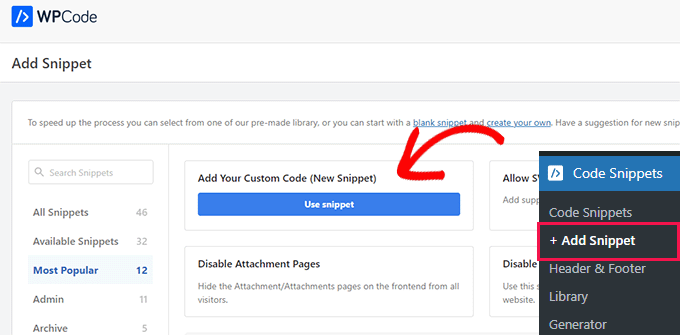
Next, add a title for your snippet and paste the code from above into the ‘Code Preview’ box.
Don’t forget to choose ‘PHP Snippet’ as the code type from the dropdown list on the right side of the screen.
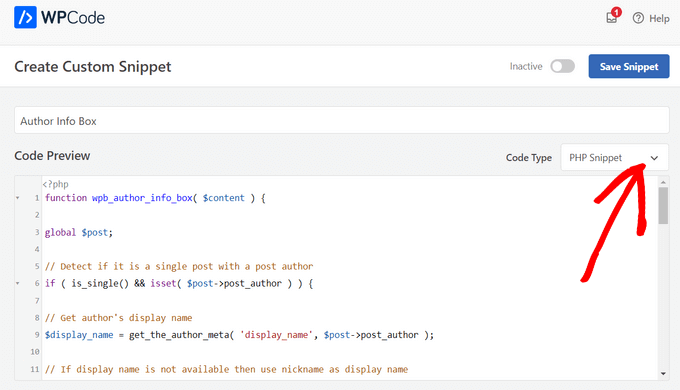
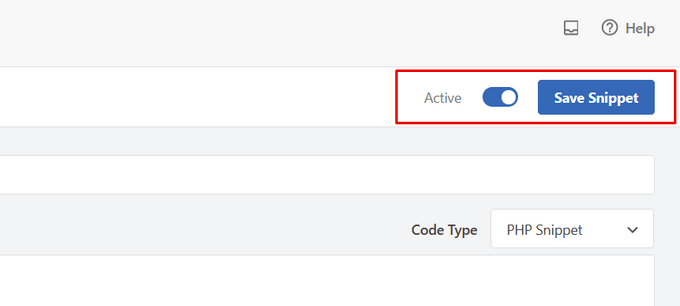
After that, simply toggle the switch from ‘Inactive’ to ‘Active’ and hit the ‘Save Snippet’ button.
Now, you need to style this author info box to look nice and match your WordPress theme. If you don’t know CSS, see our guide on how to easily add custom CSS to your WordPress site.
Next, navigate to Appearance » Customize in your WordPress admin panel.
This brings up the WordPress theme customizer panel. You need to click on the ‘Additional CSS’ tab.
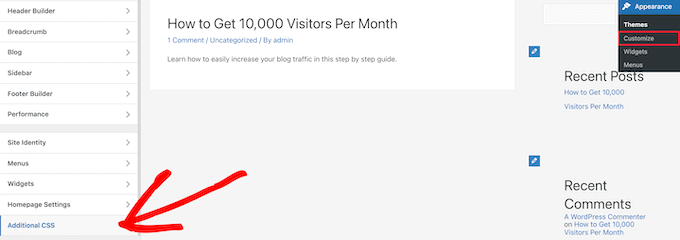
This lets you add custom CSS code directly to your WordPress theme and see the live changes.
Here is some sample CSS code to help you get started:
.author_bio_section{
background-color: #F5F5F5;
padding: 15px;
border: 1px solid #ccc;
}

.author_name{
font-size:16px;
font-weight: bold;
}

.author_details img {
border: 1px solid #D8D8D8;
border-radius: 50%;
float: left;
margin: 0 10px 10px 0;
}
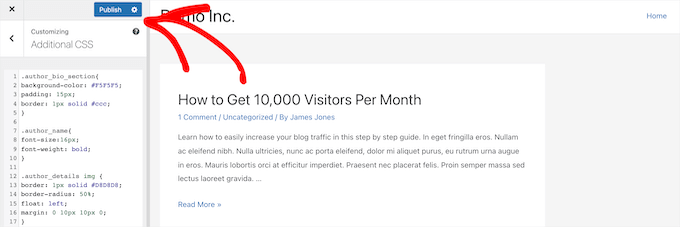
Next, add the code directly to the ‘Additional CSS’ box.
Then, click the ‘Publish’ button to make your changes live.
Now, you can visit one of your WordPress blog posts and see your new author info box.
Here is how the author bio box looked on our theme.

Method 5: Adding Author Info Box in WordPress With AIOSEO’s Author SEO
All in One SEO (AIOSEO) is the best WordPress SEO plugin on the market, with over 3 million users. You can also use it to add detailed author info boxes on any WordPress post or page.
Unlike the other methods, this method will help you improve your SEO using AIOSEO’s powerful Author SEO addon. It allows you to showcase your experience, expertise, and authority in order to meet Google’s E-E-A-T content guidelines.
To get started, you need to install and activate the All in One SEO plugin. If you need help, see our tutorial on how to install a WordPress plugin.
Note: There is a free version of All in One SEO that you can use. However, to access the Author SEO features, you need the AIOSEO Pro plan.
Once the plugin is activated and set up, go to Users » All Users from the WordPress dashboard. Then, click on the author’s name or the ‘Edit’ link below it.
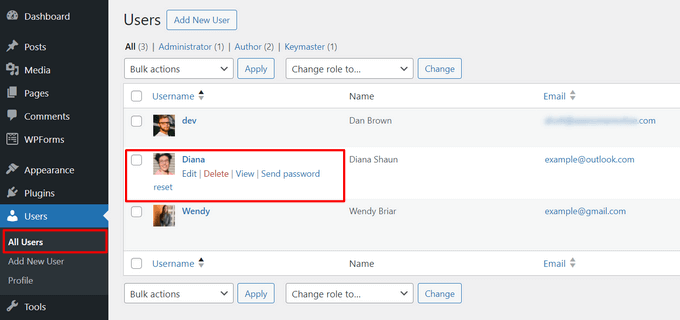
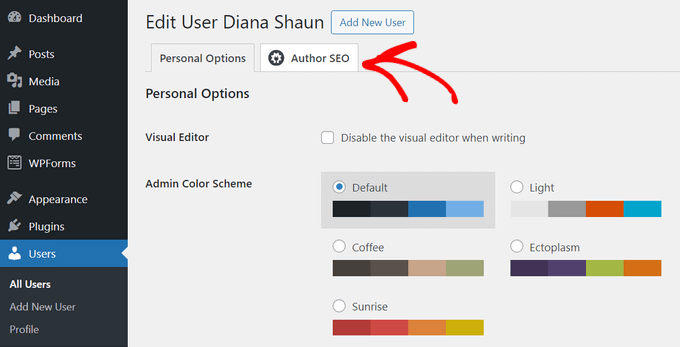
This will open up the ‘Edit User’ page for that author. On this page, you need to click on the ‘Author SEO’ tab.
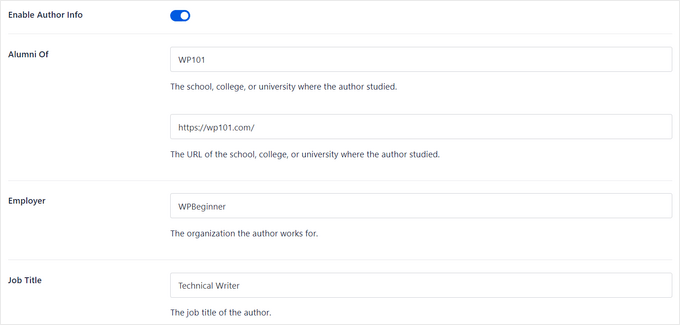
From the Author SEO section, you can add information like education, employer, and job title to validate your E-E-A-T signals.
You can also add topic categories that you know about to showcase your areas of expertise to search engines and readers.

Note: These topic categories first need to be entered by going to the Search Appearance » Advanced » Author Experience Topics settings panel in All in One SEO.
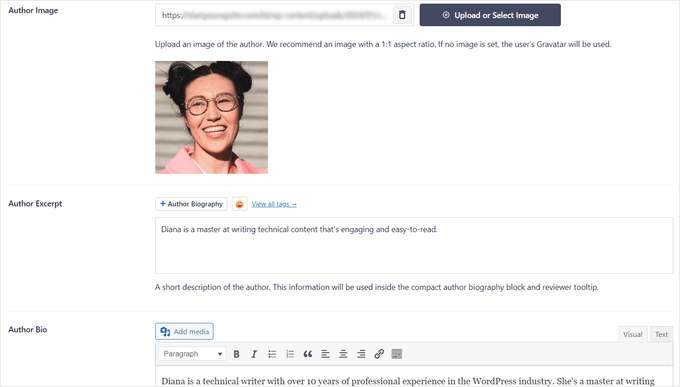
Next, you can scroll down to add an author image, author excerpt, and a full author bio.
You can also display social profiles in your author info box by entering your profile URL for Facebook, Instagram, Twitter, YouTube, and more.
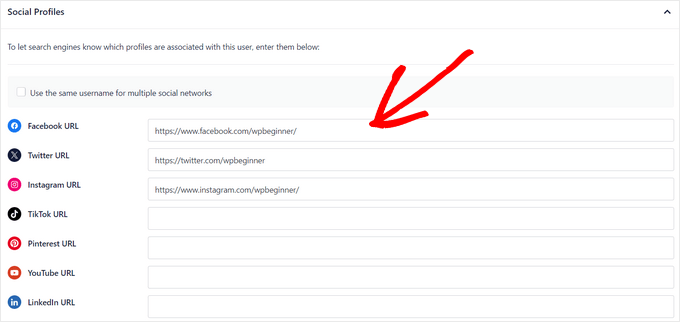
There’s also an ‘Append Author Bio to Posts’ setting that you can toggle to enable or disable.
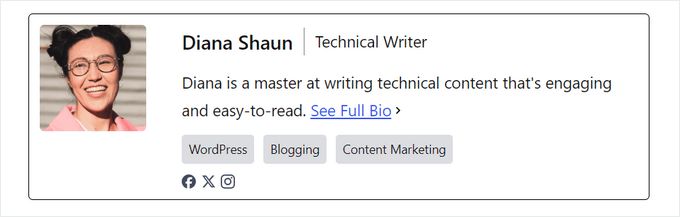
If this setting is enabled, All in One SEO will automatically display a compact author bio at the bottom of your posts.

You can disable the setting if you want to manually add compact or full author bios at the bottom of posts using AIOSEO’s author bio blocks. For more details, see this guide on adding author blocks in your posts.
For this tutorial, we’ll leave the setting enabled to automatically append author bios to posts.
Once you’ve finished filling in your author information, don’t forget to click on the ‘Update User’ button to store your changes.
Now, you can visit one of your WordPress posts to see your new author info box in action.
Bonus: Displaying Author Info Box in WordPress with a Premium Page Builder Plugin
If you want to create a completely custom WordPress theme and be able to easily display an author info box anywhere on your site, we recommending using SeedProd.
SeedProd is the best drag and drop page builder for WordPress. It lets you easily create custom WordPress themes and page layouts, no coding required.
It comes with over 300+ theme and page templates that you can import in 1-click. The theme templates include every part you need for a website including a homepage, single page, single post, blog archive, contact page, and more.
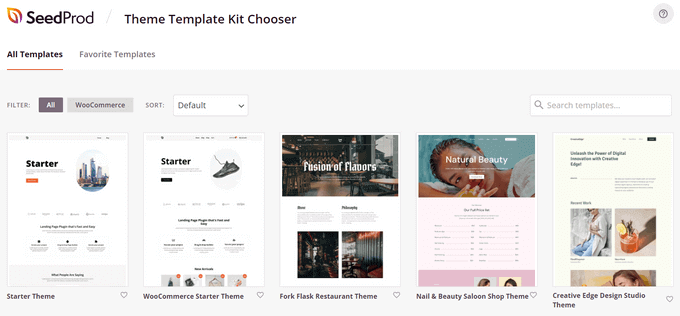
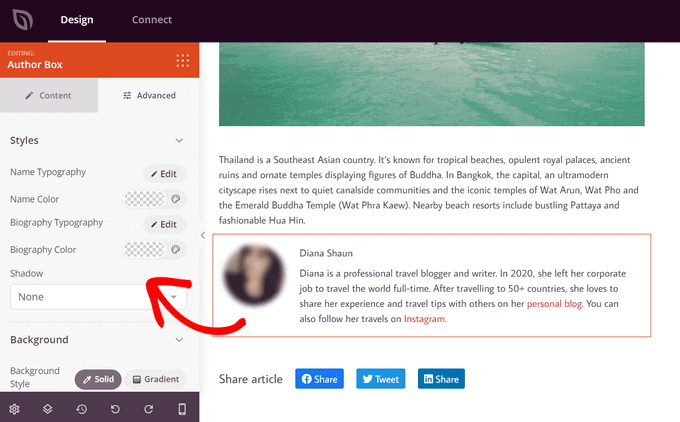
You can customize your theme any way you want using the visual theme builder. SeedProd makes it easy by offering 90+ ready-made blocks that you can drag and drop onto any page, including an ‘Author Box’ block.
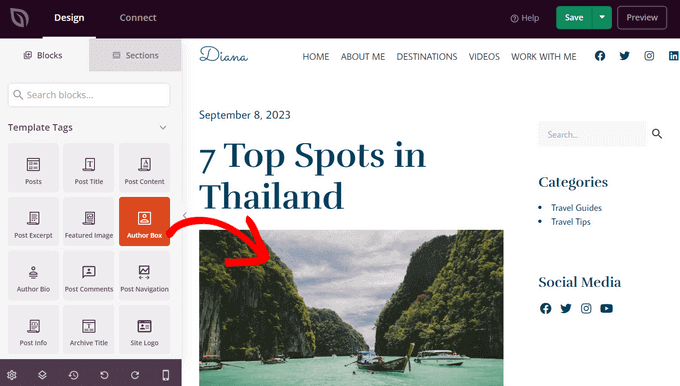
After adding the Author Box block to your page, simply click on it to edit the details.
You can change the typography, font size, alignment, background color, border, enable or disable the profile picture, and more.
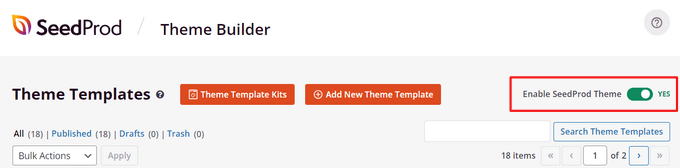
Once you’ve finished customizing, simply enable your new SeedProd theme.
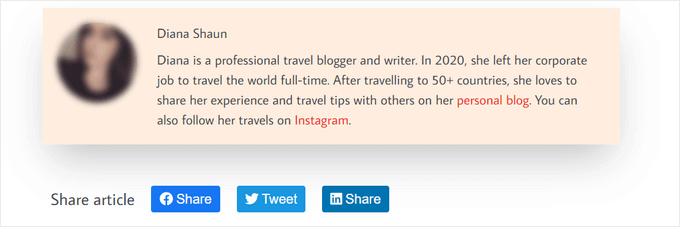
Now you can visit your WordPress site and see your custom author info box.
For more details, see our tutorial on how to create a custom WordPress theme with SeedProd.
We hope this article helped you learn how to add an author info box to WordPress posts. You may also want to see our guide on how to choose the best WordPress hosting and our expert picks of the best AI chatbots software for your website.
If you liked this article, then please subscribe to our YouTube Channel for WordPress video tutorials. You can also find us on Twitter and Facebook.





Syed Balkhi says
Hey WPBeginner readers,
Did you know you can win exciting prizes by commenting on WPBeginner?
Every month, our top blog commenters will win HUGE rewards, including premium WordPress plugin licenses and cash prizes.
You can get more details about the contest from here.
Start sharing your thoughts below to stand a chance to win!
Dennis Muthomi says
thank you for this incredibly helpful guide!!!
my WordPress theme had a basic author bio box, but it doesn’t allow me to include links to the author’s social media profiles.
I was about to hire a developer to add that feature but I have tried out Author Info Box as you have highlighted and it has fixed this issue.
You saved me some bucks there…haha!
WPBeginner Support says
Glad we could help!
Admin
Michael says
Simple and perfect, thank yo!
WPBeginner Support says
You’re welcome
Admin
Jiří Vaněk says
Thanks for providing the complete php code. In Elementor, I solve it with a widget, but outside of Elementor, I would very much like to use a ready-made solution from you.
Gleni says
This only works for posts. I usually post everything from pages, not posts. How can I get this sorted?
WPBeginner Support says
We don’t have a specific method we would recommend for pages at the moment but we will look into the possibilities in the future.
Admin
Bojan says
Please, replace this code with this if you want to show only on blog posts:
// Detect if it is a single post with a post author
if ( is_single() && isset( $post->post_author ) ) {
with:
// Detect if it is a single post with a post author
if ( is_singular(‘post’) && isset( $post->post_author ) ) {
WPBeginner Support says
Thanks for sharing this for those looking for that customization
Admin
Mark Beese says
I would like to add something like the option of related stories to the author box, but show a random selection of others posts/stories from that author. Is that possible?
WPBeginner Support says
For something like that, we would recommend taking a look at our guide below for showing related posts by the same author:
https://www.wpbeginner.com/wp-tutorials/how-to-display-related-posts-by-same-author-in-wordpress/
Admin
Ramon says
This is excellent, works out of the box.
Keep in mind that you might want to add a “title” attribute to a href links ..
WPBeginner Support says
Thanks for sharing your recommendation.
Admin
Kelly says
I came here for your opinion because my SEO teacher (paid class) says that even though my website/URL is my name, Google needs to know who wrote the posts. I write them (with the exception of guest writers from time to time). You said, “For a single-author WordPress blog, you can just add an about me page.” Do you mean just have an about me page on your blog? Or link to the about me page within the author box at the end of posts?
WPBeginner Support says
That would be a personal preference decision but having an about page publicly visible was what we recommended. It is not required in every article.
Admin
Rozard says
I added the code in Theme function.php. It’s working better than a plugin. I just need little bit help if that is possible. My website is not in English, which is right to left. I added a css code that start paragraph from right to left, now the problem is that most of the author bios are in English, is there way to modify the alignment of bios to make left to right?
I really appreciate your help. Thank you
WPBeginner Support says
You would need to add in the CSS for the author box:
direction: ltr;
Admin
Jerry says
I have an author info box that shows at the end of every blog post. I want it to be shown on my About me static page as well apart from the blog post. How can I enable this?
WPBeginner Support says
It would depend on what is adding the author box, if your theme is adding it you would want to reach out to your theme’s support for having it appear on a page.
Admin
usef says
Hi. I used the method 4. It worked like a charm. Thank you for sharing this.
WPBeginner Support says
You’re welcome, glad you found our guide helpful
Admin
Lauren Colquhoun says
Hello
Could you please tell me how to only display the author bio box for certain categories? Thank you
WPBeginner Support says
If you are using the widget method you can conditionally display the widget using the method from our guide here: https://www.wpbeginner.com/plugins/how-to-show-or-hide-widgets-on-specific-wordpress-pages/
Admin
Gustavo Razzetti says
Hi I used the plugin and now it’s showing two bios–the one generated by the plugin and the one created by WordPress (which looks uglier and I don’t want to use). How I avoid having two bios?.
WPBeginner Support says
If your theme included its own author bio, you would need to reach out to the theme’s support for how to remove it
Admin
Prajyot Kumbharjuvekar says
Looks like the Guerrilla’s Author Box plugin is no longer available… Do you can you suggest any alternatives? thank you
WPBeginner Support says
While we don’t have a recommended plugin at the moment, we will certainly look to update this article with an alternative
Admin
Louis Chaussé says
Hi,
I have a problem with method #3
I added the php code to the functions.php file and the css to additonal css section in WP
Everything is working except that the bio is displaying twice on the page…
Once at the proper place at the bottom of the post, and it is also displaying at the top of the page (before header)
Any thoughts?
Warwick Levey says
Is there anyway to disable to author box for profiles which don’t have any info in the author bio?
We use a custom field to add authorship to guest posts, and we don’t have a bio for most of our guests, and the blank box at the bottom of the page is z bit of an eyesore for these posts.
Thanks in advance for any help
Elizabeth Thompson says
Does this mean I have to give them user access????
This doesn’t make sense for me? THey’re random people?
Thanks
re: Each author on your site will need to add their biographical information and links to their user profiles. They can do this by logging in to their WordPress account on your website and then click on the Profile link from the WordPress admin menu.
WPBeginner Support says
Hi Elizabeth,
Random people should not have access to your WordPress site. Please see our beginner’s guide about WordPress user roles and permissions.
Admin
Morteza says
Hi to all!
How to add EDD vendor name in EDD receipt?
I add this to my downloads page by adding:
echo get_the_author_meta( ‘name_of_store’, $post->post_author );
and
echo get_the_author_meta( ‘display_name’, $post->post_author );
,
It seems in this case I need to hook this, BUT HOW?
thanks
Mick says
Thanks for this which is what I was looking for. Although now I see it with the bio in 2 places, what I would like is that the bio at the end of each post different to the bio down the side.
Is this possible or do I have to remove Meks and replace it with some other plugin?
Thanks
Wilson Lee says
Hey,
This was just what I was looking for. I think I will stick with installing a plug-in though.
Coding makes my head hurt.
Thanks for the great wordpress content!
Wilson
Matt Stephens says
hahaha! I thought exactly the same thing while reading through the post. Why go through the stress of coding, when there’s a plugin to get the job done?
Manjit Kumar says
It’s great and so much helpful…
ingresos pasivos says
Hi, I was wondering how I can add a margin higher than my box using the code that you left us.
My box shows very close to the letters of my post, I hope your answer.
A big greeting.
Vishal Rana says
very helpful thanks a lot
Hina Ilyas says
I have added the Guerrilla’s author box, but author details still don’t show on my posts. I can only see these three lines:
Author: Hina Ilyas
Filed Under: Weekly Rundown
Tags:
i don’t understand what is the issue!
Magnus says
If I use method 3, it only shows the author info box when viewing a post.
The post itself doesn´t show at all.
Any suggestions?
Thank you in advance.
Kingsford says
Please how can I add the author box to specific categories only?
Pls help.
Andy W. says
You may have found the answer for this already (it’s kind of disappointing someone makes this posts and doesn’t respond to the questions), but I used this to display the box on only certain categories.
If you want to display the author box only on single posts that are assigned to any category, change:
// Detect if it is a single post with a post author
if ( is_single() && isset( $post->post_author ) ) {
to
// Detect if it is a single post with a post author
if ( is_single() && isset( $post->post_author ) && has_category() ) {
If you want to display the box ONLY in a certain category, then change the above to:
// Detect if it is a single post with a post author
if ( is_single() && isset( $post->post_author ) && in_category(‘X’) ) {
Change “X” to the category ID.
To include more than one category, simply replay “X” with an array() of category IDs:
// Detect if it is a single post with a post author
if ( is_single() && isset( $post->post_author ) && in_category( array(‘X’, ‘X’) ) ) {
Joseph says
Hi andy can you help me, i-followed the method #3, how can i hide it to my wocommerce product page description here’s the site
Joseph says
i just solved it, i used this code of yours:
// Detect if it is a single post with a post author
if ( is_single() && isset( $post->post_author ) && has_category() ) {
thanks for this
Shraddha Kapoor says
Hi. I am facing a problem while adding hyperlink in the author bio. I tried add hyper link using anchor text at edumovlive.com but failed. Can anyone help me to get hyperlink in author bio.
Gabrielle says
Hi, i added custom admin column: thumbnail to all users table
, how can i print each user gravatar, by user id, inside this column?
I added sucessfully featured image column inside all post table,
that links each image to each post via edit link, is there a way to add gravatar column in all users that links to edit user?
Anis Chity says
How can I add links to my posts within the author box?
Nishat says
Thanks for the post, great help. Is it possible to make the author box interactive? Like the bottom of this page?
I would like something similar to the ‘as well as’ feature but I know nothing about CSS.
Agus Tamanuri says
Nice Post ..
Thanks for Your Article,
gagan says
I added author box using method 3 but it showing author box above sharing icons how to move this down near comment section??
Annie says
Do I need add links to social media profiles to the author, any idea?
Amir says
For method #3 which is really the simplest and the fastest (involves some php coding skills) I added a break tag on the line where it shows picture and text as follows. Because it looks odd when only the first line of the bio shows up next to the picture and the rest of the bio separately.
$author_details .= ” . get_avatar( get_the_author_meta(‘user_email’) , 90 ) . ” . nl2br( $user_description ). ”;
Deyo says
The hard coding worked perfectly with a little style tweaking, many thanks!
under the // Get author’s biographical information or description is the some kind of way to control the word or character count without having to edit the user bio itself? Maybe similar to controlling the excerpt length on a post page in functions?
King says
I dont know how to add codes via my functions.php i might get an error. Any plugin to add codes into functions.php?
Wajiha Rizvi says
You have to add it after the closing php tag that looks like this ( ?> ) in you child theme’s functions.php file.
Lorraine Reguly says
Hi. I have three sites. For some reason, my author box automatically shows up on one of them. I had to install the Guerilla plugin to get it to show up on the others.
Why would one site show it and not the other two???
Shafi Khan says
Hey There, Great article. The video attached to the post is not for instructions on “how to install a plugin” as written above it.
It it is a mistake, please correct it
sonja says
Hi there, having trouble with the picture for the author box. I’ve moved the author widget to the sidebar for it to appear and it has along with the text but scratching my head on what to do to get the picture to show up also. I’m using a WordPress theme. Thanks for all your help!
Christopher Simmons says
Heya… dealing with this today. Theme has a nice author box, but missing the socials at bottom.
Love your roll your own example, which we’re messing with “right now” — any chance you might expand on the example to include pulling in the “if socials” from the user meta, below the author’s website link ?
TIA ! Thanks for another great article
(12 year WP user — so not just for beginners! )
Peter Brown says
Did you ever figure this out Christopher? I’m having the same issue with my theme.
Natanael David says
Hi, thanks for this! I’m having a lot of help from you guys! For this and other functions.
One question: How can I set the max lenght in the Author description. Also, can I use a custom text for the box description in the single page and a full description in the Author page?
moon says
Hi,
Thanks for your helpful information.
I have a problem, but I don’t know how to describe it. I added a picture into article, and set it style=”float: right; margin-left: 20px;”
It can show the web page well upon browsed on desktop computer, left hand side is content, and right hand side show picture.
but it cannot show the web page well upon browsed on mobile phone, please refer below URL:
Is it possible to show text first, and the picture under the text not around the picture?
If so, how?
Please try to help me out.
Thanks in advance.
Best regards,
Mario says
Hi guys,
Do you know a way of inserting the author’s widget next to the post entry, but not in a sidebar? just as here:
thanks!
WPBeginner Support says
You may want to add a widget area right next to the content.
Admin