


Do you want to display or hide a category depending on whether it has any posts in WordPress?
By default, WordPress does not display empty categories. However, sometimes you may want to show them even when they have no content.
In this article, we will show you some easy ways to hide or display a category in WordPress, depending on whether it has any posts.
Why Hide or Display Empty Categories in WordPress
WordPress comes with two default taxonomies: categories and tags. While tags are used for specific topics of an article, categories are used in a much broader sense.
Many site owners use categories to create different sections for their WordPress websites.
For instance, at WPBeginner, we have different categories that cover the main sections of our overall content.
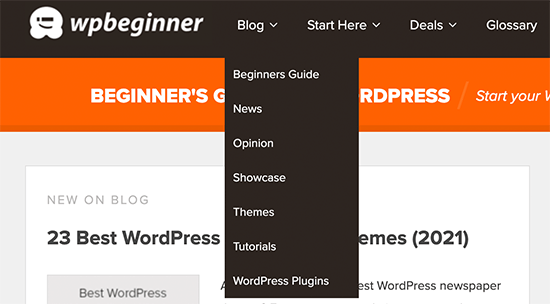
By default, WordPress does not show empty categories in category widgets and category lists.
However, some website owners may still need to show empty categories on their WordPress blogs.
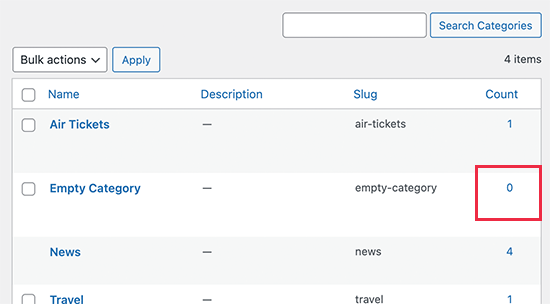
For instance, if they are working on a custom theme design or if they simply want their users to see the empty categories and fill them with user-generated content.
Similarly, some websites may want to hide certain categories that don’t have any posts while still showing other empty categories.
In this guide, we will show you how to easily hide or display empty categories in WordPress.
How to Show Empty Categories in WordPress
WordPress now uses widget blocks to replace the old classic widgets. This makes it a bit more difficult to change the parameters used by the categories block to list categories.
To achieve our desired result, we will need to write our own code to list categories and then display it using a shortcode.
For this tutorial, you will need to add some code to your WordPress website. If you haven’t done this before, then see our guide on how to add custom code snippets in WordPress.
First, you need to add the following code to your theme’s functions.php file or add the code snippet using WPCode (recommended).
For detailed instructions, see our guide on how to easily add custom code in WordPress.
function wpb_list_categories() {

// define category list parameneters
$args = array (
'echo'			=> false,
'title_li'		=> '',
'hide_empty'	=> 0
);

// get categories list
$display_cats = wp_list_categories($args);

//display custom categories list
return $display_cats;
}

// create shortcode
add_shortcode('custom_categories_list','wpb_list_categories');
This code simply uses our own parameters to list categories, and one of these parameters is to change the hide_empty category parameter.
After that, you can display your custom categories by adding the shortcode block to your widget area and then adding the [custom_categories_list] shortcode inside it.
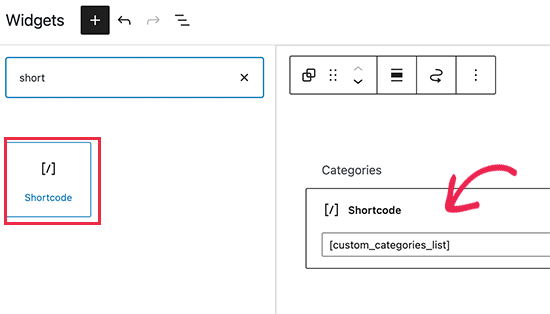
Once you are finished, don’t forget to update your widgets settings.
Then, you can visit your website to see the categories in action.
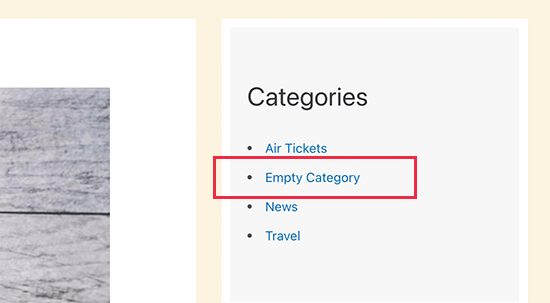
Hide Specific Categories in Your Category List
Similarly, you can use the same approach to exclude categories that you don’t want to be included in the categories list.
Simply modify the above code like this:
function wpb_list_categories() {

// define category list parameneters
$args = array (
'echo'			=> false,
'title_li'		=> '',
'exclude'               => '12,16,21',
'hide_empty'	=> 0
);

// get categories list
$display_cats = wp_list_categories($args);

//display custom categories list
return $display_cats;
}

// create shortcode
add_shortcode('custom_categories_list','wpb_list_categories');
In this code, we have hidden the categories by adding the exclude parameter. Next to it, you need to provide the IDs of the categories you want to hide.
Tip: We have written a guide that shows you how to find category IDs in WordPress.
You can now go ahead and display your custom categories by adding the shortcode block to your widget area and then adding the [custom_categories_list] shortcode inside it.
Exclude Category Pages From Search Engines
If you are displaying empty categories on your website, then you may want to exclude them from search engines until you have some content there.
Some users may also want to exclude some categories from search engines to avoid duplicate content and other SEO issues.
To do that, you will need to install and activate the All in One SEO for WordPress plugin. For more details, see our step-by-step guide on how to install a WordPress plugin.
All in One SEO for WordPress is the best WordPress SEO plugin on the market and allows you to easily control your site’s appearance in search results.
Once you have installed the plugin, you will see a setup wizard. It is quite self-explanatory, but if you need help, then follow our guide on setting up All in One SEO.
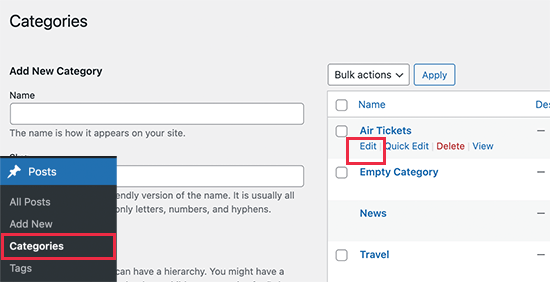
Next, you need to visit the Posts » Categories page and click on the ‘Edit’ link below the category that you want to exclude.
On the Edit Category page, you need to scroll down to the All in One SEO section.
Then, switch to the ‘Advanced’ tab.
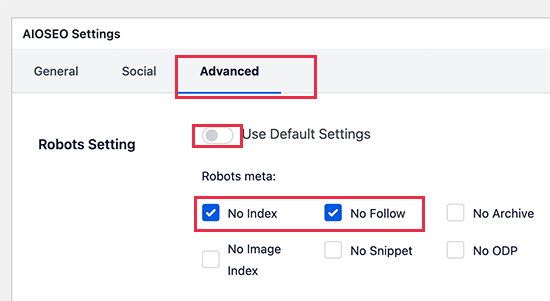
From here, you need to turn off the ‘Default Settings’ option next to the Robots Setting. You will now see options to tell search engines not to follow and index this category.
Once finished, don’t forget to click on the ‘Update’ button to save your settings.
All in One SEO will now start telling search engines not to index or follow that particular page.
Note: Posts filed under that category may still get indexed by search engines and will appear in search results.
Expert Guides on WordPress Categories
Now that you know how to display or hide empty categories in WordPress, you may like to see some other guides related to WordPress categories:
- Glossary: Category
- Glossary: Taxonomy
- How to Add Categories and Subcategories in WordPress
- Categories vs Tags – SEO Best Practices for Sorting Your Content
- How to Add Categories and Tags for WordPress Pages
- How to Add Categories to a Custom Post Type in WordPress
- How to Properly Change, Move, and Delete WordPress Categories
- How to Style Individual Categories Differently in WordPress
- How to Enforce One Category Per Post in WordPress
- How to Rename the Uncategorized Category in WordPress
We hope this article helped you learn how to hide or display empty categories in WordPress. You may also want to see our guide on how to show personalized content to different users in WordPress and our expert picks for the best WordPress plugins for business websites.
If you liked this article, then please subscribe to our YouTube Channel for WordPress video tutorials. You can also find us on Twitter and Facebook.





Syed Balkhi says
Hey WPBeginner readers,
Did you know you can win exciting prizes by commenting on WPBeginner?
Every month, our top blog commenters will win HUGE rewards, including premium WordPress plugin licenses and cash prizes.
You can get more details about the contest from here.
Start sharing your thoughts below to stand a chance to win!
MIke Dutton says
I wonder if it possible to adapt this for Taxonomy terms. So only display something if a particular Taxonomy term has posts.
randy says
OMG so helpful for running and if statement to see if there are posts in a category, regular post type or custom post type. Many thanks!
John Hartley says
Easiest example I found anywhere…saved me some heartache, so thanks!
michelle says
really useful, thanks. I have placed a link back to this on my own blog so that I can share it with others
Editorial Staff says
Thanks Michelle
Admin
Luke Jones says
Excuse me if I’m wrong but doesn’t it do this already in the most recent versions?
Editorial Staff says
Read the first two lines of the post. We already mention that using the wp-list-cats, yes it does, but if you are doing some more customization and need it hard coded without calling a function, then this is the way you will go.
Admin
Enk. says
It seems interesting but I seriously didn’t understand it. When we can name/rename a category from news to Blog. Whats the thing else than showing only if it has posts? *confused :s
Editorial Staff says
This is only for very customized settings, but it is still good to know for those who does not. Yes you can rename a category, but how many times. If you have 7 custom page templates where you want to call one category 7 different names, then how would you go about it. For Sales / Splash pages, this will help.
Admin
Enk. says
ah thanks, now I can say its pretty useful. Thanks a ton !