


When managing your WordPress site, you might find that RSS feeds aren’t really necessary. These feeds help users subscribe to your blog updates, but they can make smaller sites look cluttered.
Many users prefer to disable RSS feeds to keep their sites streamlined and focused. At WPBeginner, we’ve also disabled several RSS feeds to help improve our SEO rankings.
Unfortunately, WordPress doesn’t offer an easy way to turn off these feeds. This can be frustrating if you want a cleaner, more straightforward experience.
The good news is that there are plugins that can help you disable RSS feeds on your site. Based on our experience, we found AIOSEO to be a great, no-code solution. Meanwhile, for a custom approach, WPCode offers an option with snippets.
In this article, we’ll guide you through two simple methods to turn off RSS feeds in WordPress, ensuring your site remains tidy and tailored to your specific needs.
What are RSS Feeds and Why Disable Them?
RSS is a type of web feed that helps users get real-time updates and content from your website.
RSS stands for Really Simple Syndication or Rich Site Summary. It allows your readers to automatically receive new content in email newsletters, RSS feed readers, and other devices.
While RSS feeds are useful for your website, WordPress can add multiple feeds that might not be useful. For instance, there are taxonomy feeds, author feeds, individual post and page feeds, and more.
You can disable these RSS feeds and save search engines like Google from exhausting their website crawl quota. This way, search engine bots won’t crawl feeds that aren’t relevant to your site and instead index more important pages.
Plus, disabling RSS feeds makes sense if you’re not running a WordPress blog but are using WordPress more as a CMS (content management system) or simple website builder. It’s also perfect for eCommerce stores that don’t have a blog.
With that in mind, we’ll show you how to disable RSS feeds in WordPress. Here’s a quick look at all the methods we’ll cover in this article:
Let’s jump right in!
Method 1: Disable RSS Feeds Using a Plugin
The easiest way to disable RSS feeds is by using a WordPress plugin like All in One SEO (AIOSEO).
It’s the best SEO plugin for WordPress and lets you optimize your site for search engines without requiring technical knowledge or hiring an expert.
This method is easier and is recommended for beginners. We’ll use the AIOSEO Lite version for this tutorial because it allows you to disable RSS feeds in WordPress.
However, if you want to boost your search rankings, then you can use the AIOSEO Pro version to unlock more powerful features like XML sitemaps and redirection manager, broken link checker, and the link assistant.
The first thing you need to do is install and activate the AIOSEO plugin. For more details, see our step-by-step guide on how to install a WordPress plugin.
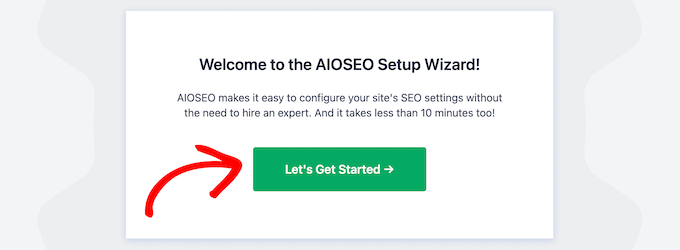
Upon activation, you’ll see the setup wizard. Simply click the ‘Let’s Get Started’ button and follow the onscreen instructions. For more details, please see our guide on how to set up All in One SEO in WordPress.
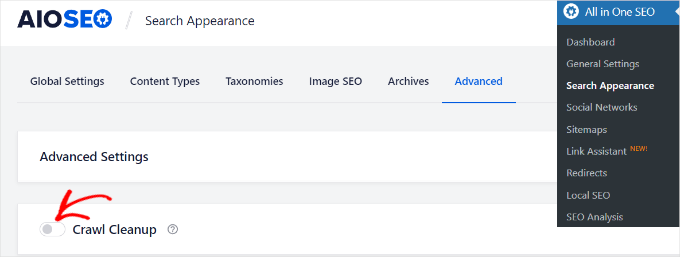
Next, you can go to All in One SEO » Search Appearance from your WordPress dashboard and head to the ‘Advanced’ tab.
After that, you can scroll to the ‘Crawl Cleanup’ option and click the toggle to enable it.
Once you’ve enabled the ‘Crawl Cleanup’ option, simply scroll down to the RSS feeds you want to disable.
We recommend keeping the ‘Global RSS Feed’ option enabled because it allows your subscribed users to get the latest updates. Disabling this would mean people won’t be able to subscribe to your website, which could hurt your WordPress SEO.
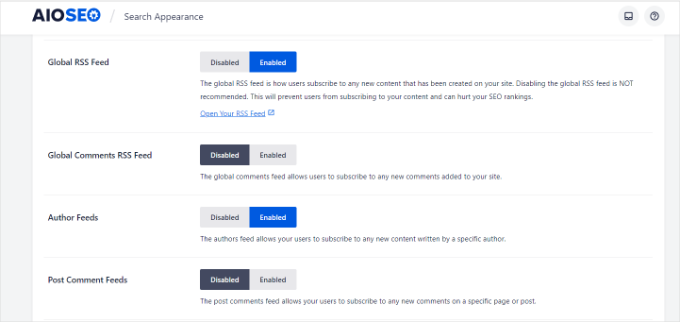
On the other hand, you can disable other types of RSS feeds.
For example, you can switch off RSS feeds for authors, search, attachments, taxonomy, and more.
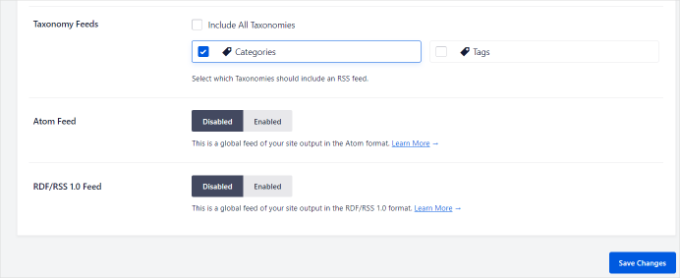
Don’t forget to click the ‘Save Changes’ button when you’re done.
Method 2: Manually Disable RSS Feeds in WordPress
Another way of disabling RSS feeds in WordPress is by adding code to your theme’s functions.php file.
We don’t suggest editing the functions.php file itself unless you’re an advanced user because even the slightest mistake can break your site.
That’s why we recommend using WPCode to paste any snippets into WordPress.
First, you’ll need to install the free WPCode plugin. For more info, check out our step-by-step guide on how to install a WordPress plugin.
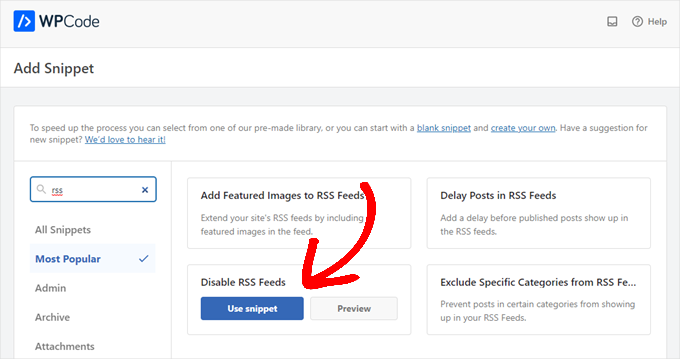
Upon activation, simply navigate to Code Snippets » Add Snippet from your WordPress dashboard. Then, type ‘rss’ into the search bar to find the pre-configured ‘Disable RSS Feeds’ snippet in the WPCode library.
Then, you can hover over the ‘Disable RSS Feeds’ entry that appears to the right and then click the ‘Use snippet’ button.
On the next page, you will see the following snippet. Notice that WPCode has already set all the options for you. With the preset snippets, you don’t have to customize a thing.
If you are an advanced user, you can still copy/paste this into your own functions.php file:
/**
 * Display a custom message instead of the RSS Feeds.
 *
 * @return void
 */
function wpcode_snippet_disable_feed() {
	wp_die(
		sprintf(
			// Translators: Placeholders for the homepage link.
			esc_html__( 'No feed available, please visit our %1$shomepage%2$s!' ),
			' <a href="' . esc_url( home_url( '/' ) ) . '">',
			'</a>'
		)
	);
}

// Replace all feeds with the message above.
add_action( 'do_feed_rdf', 'wpcode_snippet_disable_feed', 1 );
add_action( 'do_feed_rss', 'wpcode_snippet_disable_feed', 1 );
add_action( 'do_feed_rss2', 'wpcode_snippet_disable_feed', 1 );
add_action( 'do_feed_atom', 'wpcode_snippet_disable_feed', 1 );
add_action( 'do_feed_rss2_comments', 'wpcode_snippet_disable_feed', 1 );
add_action( 'do_feed_atom_comments', 'wpcode_snippet_disable_feed', 1 );
// Remove links to feed from the header.
remove_action( 'wp_head', 'feed_links_extra', 3 );
remove_action( 'wp_head', 'feed_links', 2 );
You can change the placeholder text to your custom message if you want to. However, that’s entirely optional.
All you have to do now is toggle the ‘Active’ switch and click ‘Update.’
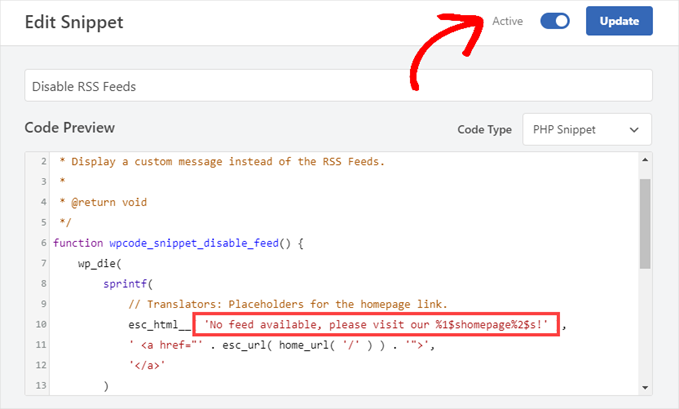
From now on, your RSS feeds will be disabled.
Alternative: Manually Disable RSS Feed Links in WordPress Pages
If you want to make your RSS feeds less visible without disabling them entirely, you can simply remove the links WordPress includes in your site’s header.
This allows you to generate RSS feeds in the background and use them internally without promoting them to your website visitors.
Simply head over to Code Snippets » Library from your WordPress dashboard. Then, you’ll want to search for the ‘Disable RSS Feed Links’ snippet.
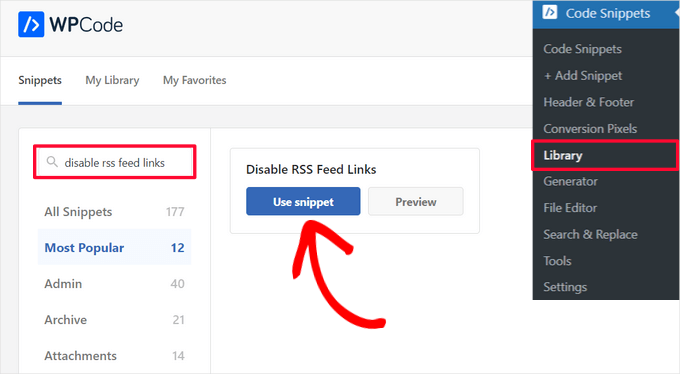
When you find the snippet in the library, hover over it and click the ‘Use snippet’ button.
WPCode will then automatically add the code for you and select the proper insertion method.
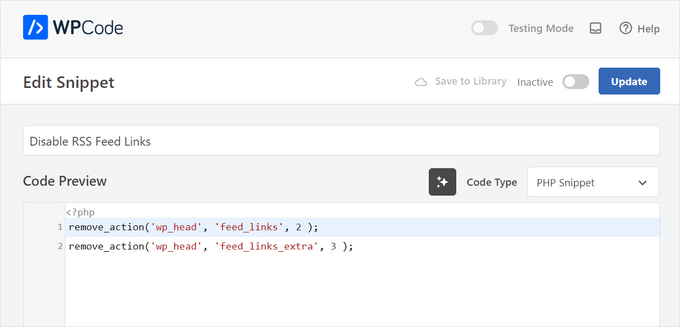
After that, just toggle the switch from ‘Inactive’ to ‘Active’ and click the ‘Update’ button.
And that’s all there is to it.
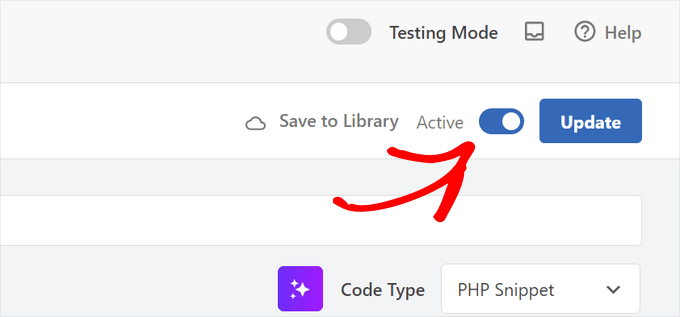
Now the RSS feed links won’t appear on your WordPress site, but your feed will still be generated in the background.
Bonus Tip: Exclude Specific Categories from WordPress RSS Feed
You may not want to completely disable RSS feeds on your WordPress website. Excluding certain categories can be a practical solution for keeping your RSS feed active while allowing more control over what content appears.
This approach lets you separate course-specific content from general blog posts or prioritize certain topics, like ‘Features’ over ‘News.’
It’s also especially helpful if your email list is connected to your RSS feed, which prevents you from overwhelming subscribers with too many updates.
WPCode can help with this. Using its pre-configured snippet called ‘Exclude Specific Categories from RSS Feed,’ you can keep certain content out of your feed.
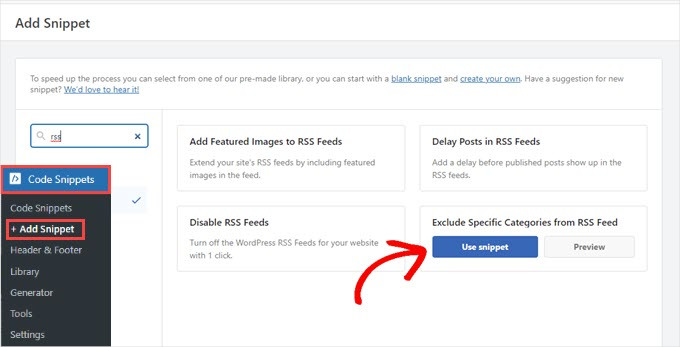
So, whether you want to separate course-related posts or prioritize different types of articles, you can do that with no problem.
For more details, you can check out our guide on how to exclude specific categories from WordPress RSS feed.
We hope this article helped you learn how to disable RSS feeds in WordPress. You may also want to see our guides on how to completely customize your WordPress RSS feeds and how to fix WordPress RSS feed errors.
If you liked this article, then please subscribe to our YouTube Channel for WordPress video tutorials. You can also find us on Twitter and Facebook.


Mrteesurez
This is helpful.
It’s also recommended for eCommerce or eLearning stores that don’t have posts, nice article.
But the method of using WPcode didn’t disable the RSS for particular page or taxonomy. It disable them all and replace with custom message.
How can I only select or adjust to only disable RSS on specific post, taxonomy or post type ??
WPBeginner Support
If you want to exclude a category from your RSS feed then you would want to take a look at our article below:
https://www.wpbeginner.com/wp-tutorials/how-to-exclude-specific-categories-from-wordpress-rss-feed/
Admin
frank
The code has priority 1 in several lines but the wp code plugin as well as the t code fragment and places priority 10 for all the code in general, is it necessary to change it to priority 1 as well? or does it make no difference?
WPBeginner Support
It should not be required but should you have any trouble you can feel free to change the priority of the snippet from the plugin
Admin
Vishal
Hi.. Team
Helpfull Article
after installing the RSS feed disabled plugin, Whether or not articles will appear in Google News
WPBeginner Support
Google News currently requires an RSS feed to pull your information from.
Admin
Vishal
I do not want anyone to take the content of the website from the RSS feed. I want to stop the RSS feed for the third party website.
My website is also in Google News. I want to give my RSS feed To Google News. But not other third Party websites.
Please Guide me How to Stop RSS Feed For 3rd party Websites
WPBeginner Support
We do not have a recommended method for that kind of limitation at the moment.
Tobias Hyldeborg
After having pasted the code in my functions.php, nothing happens. I still get a page saying “You do not have an RSS reader installed”. Are there other ways to remove the RSS feed, I am trying to minimize the use of plugins on my site.
WPBeginner Support
You may want to ensure you cleared any caching in your browser/hosting provider to ensure you’re not viewing a cached page.
Admin
Adam
How to block /feed/ in .htaccess? I have visit of many clawler.
Mike Mahaffey
HI
Can you tell me about Wordpress adding “feed” to the end of some of my urls that show up as 404 errors?
/what-to-make-a-website-aboutfeed
I’ve been redirecting them but don’t know whether that’s necessary or not?
Does this even have anything to do with RSS? And do you know how to stop it from happening?
Thanks for your website, I don’t know where I would be without it.
james
after disabling feed annd removing link rel of feed in my view source ive set an 500 response code in my google webmaster,,
sumit
thant a great artical some one are feeded my artical then with your help i disabled my sited feed thanks you very much.
wazomba
I fisrt used to plugin to disable RSS feed. But the RSS link still appeared on BP Wall, so I simply add a css trick in me theme style file : .feed{display:none;}. Done!
Annn
Does removing RSS access have any effect on rankings?
or does this simply prevent people taking content via rss methods…
Thanks
Mia Rhode
Does temporarily disabling my RSS feed delete my database of current subscribers? I am trying to post an article and backdate it, so I don’t want it to be sent out via RSS.
Jhonatan
The function is pretty neat and helpful.
The function does not allow WordPress to add any information to the RSS .php files.. instead it re-writes it.
I advise anyone to install the plugin and to add the function into functions.php of your theme file.
The plugin removes the generate HTML source code, you will get rid of 2 useless lines.
Tim G.
Thanks for sharing this! It worked great with one exception: when I add ‘/?feed’ to the end of the root domain, it is still calling a listing page showing the posts that I am trying to make inaccessible via the built-in feeds.
I’ve tried refreshing my permalinks but that didn’t make a difference. Is there some other rule I need to add to the functions file (in a child theme in case that matters, btw) to address this, or maybe I can disallow it from the .htaccess file?
Debbie
My comments get published as posts which end up in my main RSS feed. Any idea on how to fix this? Ive read it may be a setting but so far we cant find it.
nacho
Hi there! nice post!!!
I love the functions.php code, but I’m using buddypress and the code dont disable the activity feed, someting like:
How could I disable this?
Thanks in advanced and regards from Spain.