


Would you like to create a separate page for blog posts in WordPress?
By default, WordPress displays your blog posts on the home page. However, if you are making a business website or simply want to customize your homepage, then you may want a separate page for your blog section.
In this article, we will show you two ways to create a separate page for blog posts in WordPress.
Why Display Blog Posts on a Separate Page?
The home page is the front page of your WordPress website and the first page your visitors see. By default, WordPress shows your most recent posts on your home page, and that makes sense if you are running a blog.
But it’s not always ideal for small business websites. You will probably want a more engaging home page that tells users about your business, products, and services, lets them know how to contact you, and boosts your sales conversion.
Now, if you also want to run a blog on your website, then you will need to provide another page where visitors can go to read your posts.
Having said that, we will show you how to easily create a separate page for blog posts in WordPress.
In this tutorial, we have discussed two methods, and you can use the links below to jump to the method of your choice. Keep in mind that the second method is the simplest and offers the most customization:
Video Tutorial
If you’d prefer written instructions, then just keep reading.
Method 1: Creating Separate Pages for Blog Posts in WordPress
You can create a separate page for blog posts using the default settings in WordPress.
However, this method takes a little more work than Method 2 and does not offer as many customization options.
Creating a Separate Home Page and Blog Page
First, you will need to create two separate pages in WordPress to use as your home page and blog page.
You don’t need to add any content to those pages, and you can name them anything you like. For instance, some business websites use ‘News’ for their blog page.
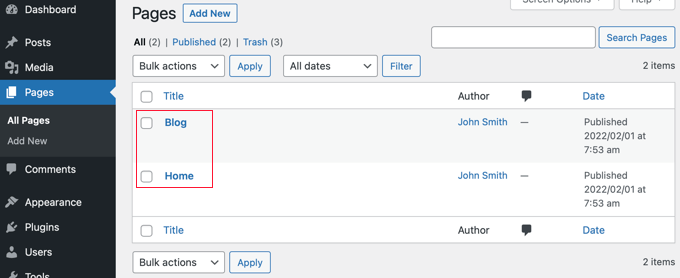
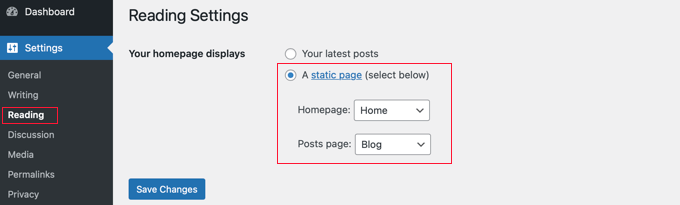
Once you have created those pages, visit the Settings » Reading page in the WordPress admin area.
Now, under the section labeled ‘Your homepage displays’, you need to click on the button for ‘A static page’.
After that, you can select the Home and Blog pages you created earlier. You should then scroll down and click the ‘Save Changes’ button.
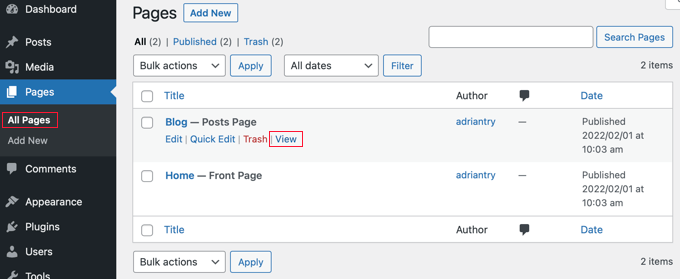
Now, when you navigate to the Pages » All Pages screen from the WordPress dashboard, you will see that the Home page is labeled ‘Front Page’ and the Blog page is labeled ‘Posts Page’.
Go ahead and click on the ‘View’ link under the Blog page to preview it.
The appearance of these pages depends on your WordPress theme, and you may wish to configure these settings.
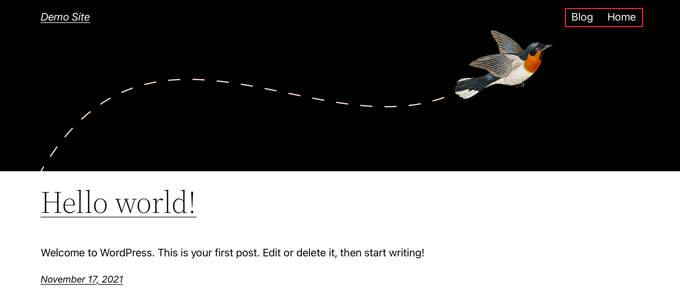
For example, if your theme has a navigation menu, then you will notice that WordPress has automatically added the new Blog and Home pages. If not, then refer to our beginner’s guide on how to add a navigation menu in WordPress.
Customizing Your Home Page
So far, your new home page is blank. Now it’s time to add information about your business, products, and services and let your visitors know how they can contact you.
You can learn how to do that in our guide on how to create a custom home page in WordPress. In Method 1, we show you how to use the block editor to add cover images, columns, tables, text and media, galleries, and more.
You’ll also find lots of creative customization ideas in our guide on how to edit a WordPress home page easily and effectively.
Customizing Your Blog Page
If you’re happy with the way your blog page looks, then your job is finished.
However, if you are currently using a block-based theme, then you can also customize your blog page by visiting the Appearance » Editor screen from the WordPress dashboard.
Once you are there, select the ‘Pages’ option from the left column in the full site editor.
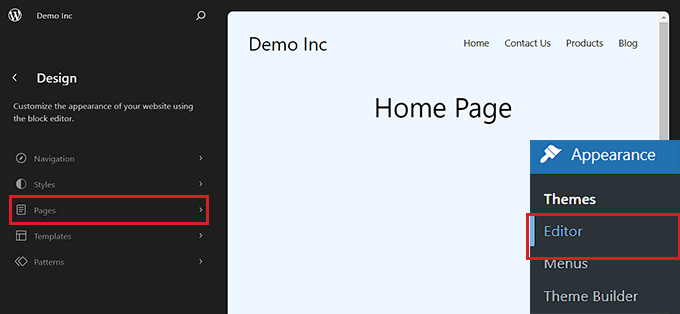
This will open a list of all the pages on your website in the left column.
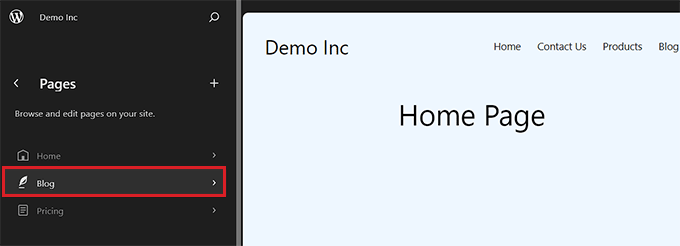
From here, select the ‘Blog’ page option and then click on the page preview on the right to start customizing your blog page.
You can now click on the add block ‘+’ button in the top left corner of the screen and add blocks of your choice to the page.
Additionally, you can change the background, text, or link color on your blog page by clicking on the ‘Styles’ icon at the top right corner of the screen.
This will open a block panel on the right from where you can click the ‘Typography’ tab to change text color, the ‘Colors’ tab to change background color, and the ‘Layout’ tab to configure your blog page’s dimensions.
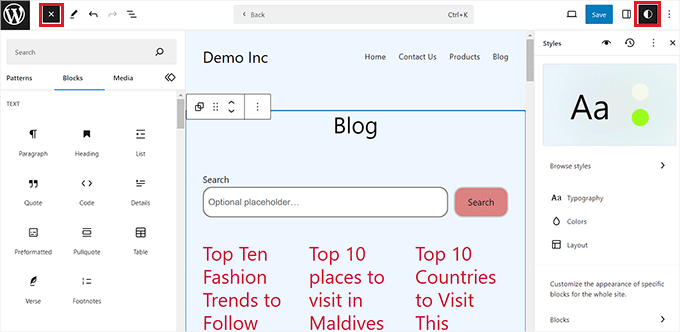
Once you are done, don’t forget to click the ‘Save’ button at the top to store your settings.
Now, you can visit your WordPress blog page to see how it looks.
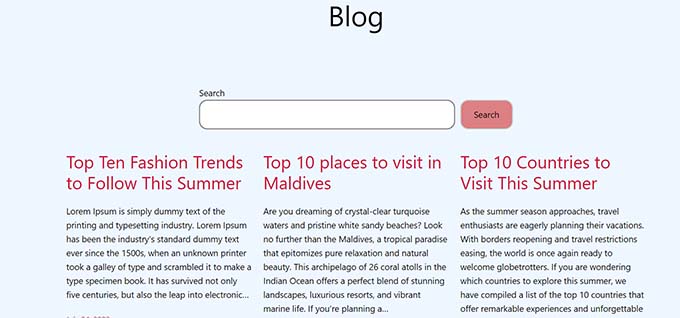
However, if you are using a classic theme, then you will need to use Method 2 instead to customize your blog post page.
Method 2: Creating a Customized Page for Blog Posts With a Drag & Drop Builder (Recommended)
A theme builder plugin allows you to easily create a custom WordPress theme without any code. That includes the ability to create and customize a separate page for blog posts.
Installing the SeedProd Theme Builder
First, you need to install and activate the SeedProd plugin. For more details, see our step-by-step guide on how to install a WordPress plugin.
SeedProd is the best drag-and-drop WordPress page builder for businesses, bloggers, and website owners. It also has a theme designer that allows you to easily customize your blog page and much more.
You can read our complete SeedProd review for more details.
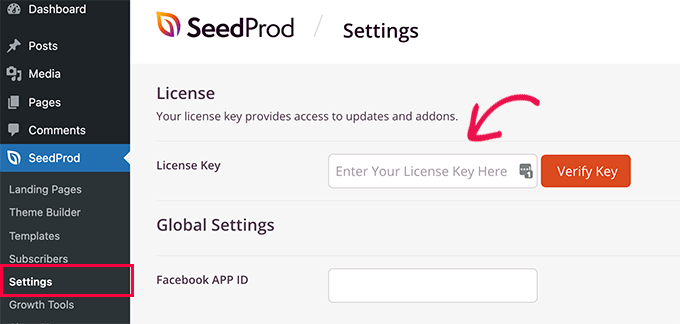
Upon activation, visit the SeedProd » Settings page to enter your license key. You can find this information in your account on the SeedProd website.
After that, it’s time to create a custom WordPress theme. This is much simpler than it sounds.
Creating a Custom WordPress Theme
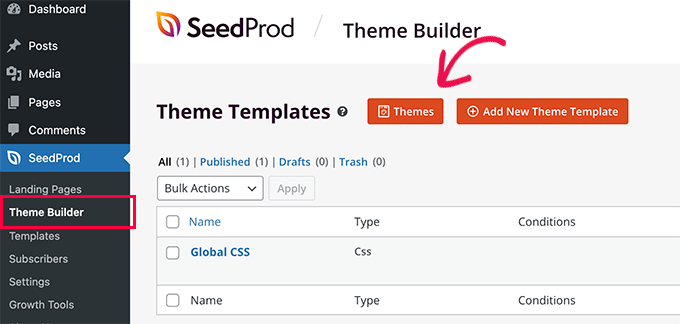
First, you need to visit the SeedProd » Theme Builder page. Here, you’ll use one of SeedProd’s ready-made themes as a starting point. This will replace your existing WordPress theme with a new, custom design.
You can do that by clicking the ‘Themes’ button.
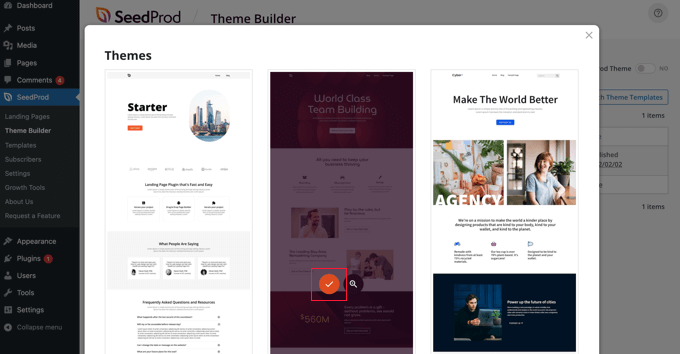
You will now be shown a list of professionally designed themes that are designed for different types of websites.
For example, there are templates called ‘Modern Business’, ‘Marketing Agency’, and ‘Mortgage Broker Theme’.
Have a look through the options and select one that best matches your needs by clicking the checkmark icon.
Once you have chosen a theme, SeedProd will generate all the theme templates, including one for your blog index and one for your home page.
These are not just empty pages but come set up with attractive layouts and placeholder content that’s easy to customize.
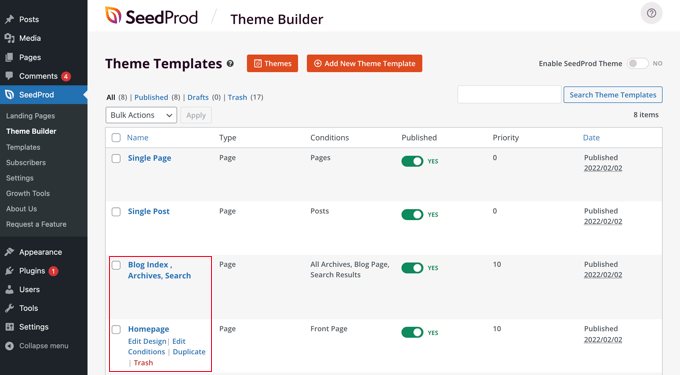
In this tutorial, we will show you how to customize the home page and blog index templates.
You might also like to customize the other templates. To learn how to do that, see our beginner’s guide on how to easily create a custom WordPress theme.
Customizing Your Home Page
Once you have generated your theme templates, you can edit them using the SeedProd theme builder. We will start with the Homepage template.
Simply click the ‘Edit Design’ link under the homepage to get started.
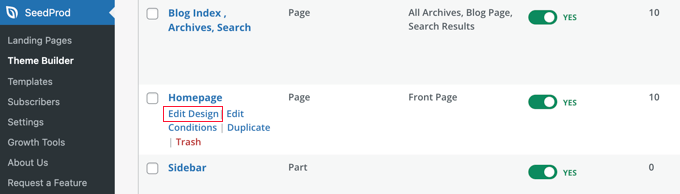
This will launch the template file in the SeedProd theme builder.
This simple drag-and-drop builder will show a live preview of your page to the right and a block toolbar on the left.
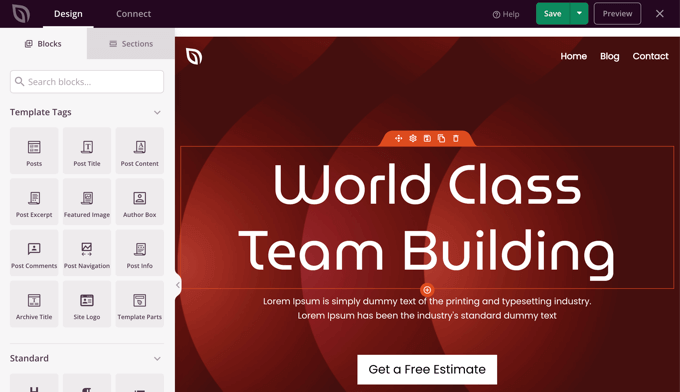
You can customize any block by clicking on it, dragging blocks up and down with your mouse, and adding new blocks to the page.
We’ve written a complete guide on how to create a custom home page in WordPress. Simply scroll down to Method 2 to learn how to customize your home page using SeedProd.
Customizing Your Blog Page
The SeedProd theme builder also provides plenty of ways to customize your blog index page.
Get started by clicking the ‘Edit Design’ link under the page.
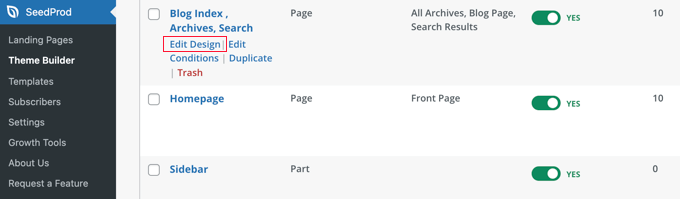
You will see the same preview pane on the right and the toolbar on the left. You can customize the blog page the same way you did with the home page.
For example, when you click on the headline, you will be able to see all of its settings. You can edit the text, change the alignment and font size, and more.
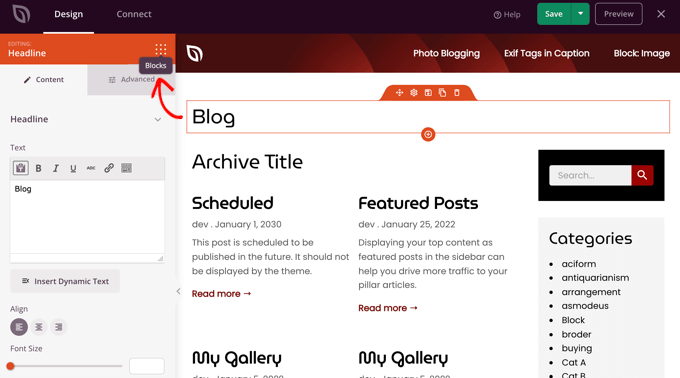
Once you’ve finished, you’ll need to click on the ‘Blocks’ icon to return to the toolbar.
The SeedProd theme builder offers additional Template Parts blocks, such as a Posts block, which displays a list of your blog posts.
The Posts block has already been added to the blog index template for you, and in this template, the block displays your posts in two columns. We can change this to a single column.
Simply click on the Posts block and then change the ‘Columns’ setting to 1.
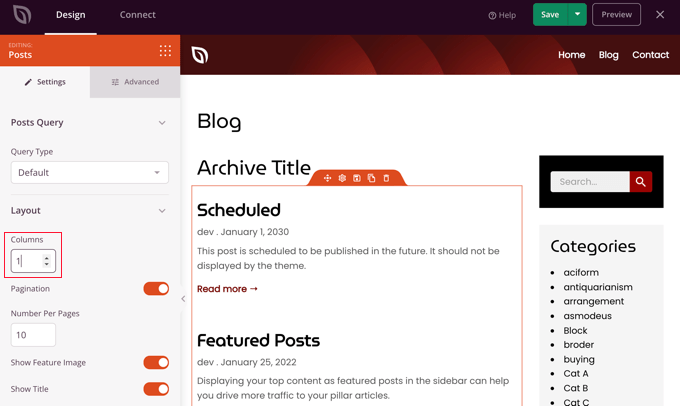
The layout will immediately change to a single column.
As you scroll down the Posts block settings, you’ll find toggle switches that let you choose whether or not to display the post’s feature image and title. You can also choose which header tag to use for the post title.
There are also options for displaying different post metadata. You can toggle the date modified, author, date and time published, and the comment count.
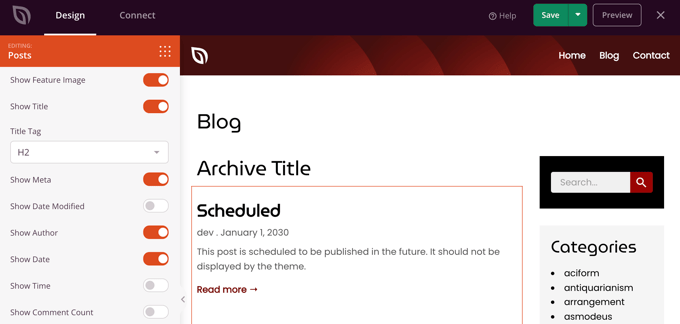
Here are a few more ways that you can customize your blog index:
- You can filter the index by post type, category, tag, or author.
- The sort order of the posts can be changed.
- You can choose how many posts are displayed on a page.
- You can toggle the post excerpt and customize its length.
Once you have finished customizing your blog page, make sure you click the ‘Save’ button at the top of the screen. Then, you can return to the list of templates by clicking the ‘X’ icon.
Enabling the SeedProd Theme
Once you have finished customizing the theme templates, you will need to publish the new custom theme.
Simply toggle the ‘Enable SeedProd Theme’ setting to the ‘YES’ position.
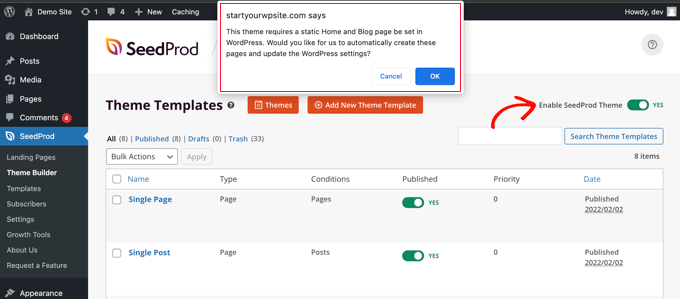
You will immediately see a notification that the WordPress Home and Blog page settings need to be changed. When you click the ‘OK’ button, these settings will be changed for you.
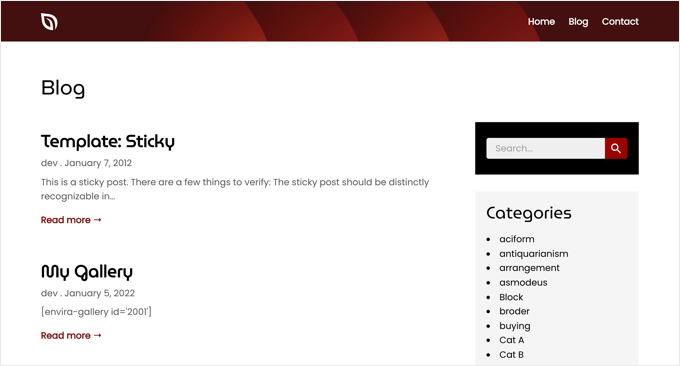
You can now visit your website to view your new home page and blog page. This is how the blog index page looks on our demo site.
Bonus: Display Your Recent Posts in WordPress
Once you have created a separate blog page, you can still show some recent posts on your home page to encourage users to explore more of your site.
To do this, open your homepage in the WordPress block editor. Once you are there, click the ‘Add Block’ button at the top left corner of the screen to open the block menu.
From here, simply add the ‘Latest Posts’ block to the page. Once you do that, you can customize the list of recent posts to display post excerpts, author names, and dates according to your liking.
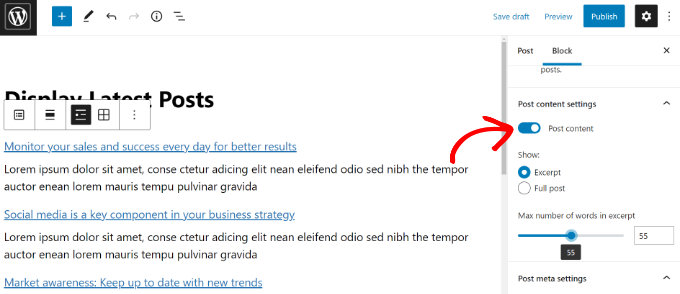
Finally, click the ‘Publish’ button at the top to store your settings. Now, some of your recent posts will still be displayed on the home page to ensure that users spend more time on your website.
For more information, you can see our tutorial on how to display recent posts in WordPress.
We hope this tutorial helped you learn how to create a separate page for blog posts in WordPress. You may also want to learn how to choose the best WordPress hosting or check out our list of the best live chat software for small businesses.
If you liked this article, then please subscribe to our YouTube Channel for WordPress video tutorials. You can also find us on Twitter and Facebook.





Syed Balkhi says
Hey WPBeginner readers,
Did you know you can win exciting prizes by commenting on WPBeginner?
Every month, our top blog commenters will win HUGE rewards, including premium WordPress plugin licenses and cash prizes.
You can get more details about the contest from here.
Start sharing your thoughts below to stand a chance to win!
HP says
Thank you!!!!!!
WPBeginner Staff says
Simply go to Settings -> Permalinks and in the custom structure add this:
/blog/%postname%/
Braydan says
How would I go about getting all “Posts” to display as “example.com/blog/my-blog-post” without having the pages of my website do the same?
Suvendra says
Nice exactly what I was looking for
GO says
Is there a way to post blog entries in different pages of the site? I would like to divide my blog into 3 section and post different blog entries in the different pages
Tom Durkin says
Look at making a loop that only displays one category and then put those in custom templates for each of the pages.
Upasna says
When I go to the ‘Template’ option, in the drop down list, there is no option for Front page Template..!! What do I do now??
Jess says
I’m having the same problem
WPBeginner Support says
If you do not see a Front Page Template, then this means that your theme does not have a template with this name. You can use a template provided by your theme or create a custom page template for your blog page.
Admin
ali says
I make a blog in your described way but it goes to front page …..
means that when i click the blog in the menu it show the same page(front page).
i follow the exact way you mention in tutorial….
Please help.
bob says
Great post. Thanks.
DrLightman says
It works, expect in the case I want to use a custom template for the posts page.
Even if I’m allowed to pick the template when creating the Blog page, and I selecte this page in reading for posts, it seems WP always uses index.php instead of the custom template.
Ewa says
I have the same problem and have no idea how to fix it Could anybody help..?
Motener says
Hi Sir/Mam
I NEED TO LEAR HOW TO MAKE A BLOG?
HOW I START?
WPBeginner Support says
You can check out our guide on how to install WordPress, you can also take advantage of our free blog setup service.
Admin
Tash says
Thank you for this! I’ve been working on creating a separate blog tab for my wordpress site and your process was outlined very well (easy to follow!). Thanks for help!
Shao says
This was perfect, exactly what i needed. My previous sites used some complicated technique to show posts as a page. But using your method now shows a page with all our blog posts! So simple! Keep up the helpful tips. Am def coming back here if i run into any more issues with WordPress.
Matt says
Thanks for this, it worked perfectly on my site using the default 2014 theme.
Ana Estrada says
I tried adding the blog to my website, but I does not come out correctly. When I set the home page as the front page and the blog page as the post page, the content on the blog page is the exact same contact you see on my home page. How would I be able to fix this?
Mauro Mascia says
Take a look at here:
http://codex.wordpress.org/images/1/18/Template_Hierarchy.png
and double check what template is used for the homepage and what is the default template.
In my case there was a home.php, which is used as default if no template is specified in the blog page.
Johanna says
Thank you very much! This guide solved the exact problem I had.
Simon says
Simple instructions but no results, doesnt work but thanks for trying
Edgar Lopez says
Don’t say “it doesn’t work” when it obviously does based on the other comments. Sounds like it is user error.
Anastasia says
I did that and lost my homepage :((( it says: 404 — Fancy meeting you here!
Don’t panic, we’ll get through this together. Let’s explore our options here.
I’m using Responsive theme… Please help!
Krish says
Thank you
kyra says
hi there… I am using the Customiz’r theme and I am not able to designate my homepage as an actual ‘page’. I want the homepage to be what it is now (see codecompliedcheck.com), but this page shows up in the menu as ‘Custom’, not as ‘Page’, so when I go to the setting to designate my actual homepage as the ‘static page’, it’s not even in the dropdown menu for me to choose. Which means that I’m not able to designate the ‘CCC Blog’ page I created as the ‘posts page’. Can you help me figure this out? Thanks in advance.
WPBeginner Support says
Kyra, we don’t provide support for WordPress themes (because there are thousands of them). However, did you check theme customize screen located under Appearance » Themes » Customize. You will probably see front page options there.
Admin
Kelsey says
Kyra did you figure it out? I am having the same problem.
Justin says
I am having the same problem as Kyra and Kelsey. Any luck??
Digiwebpro says
What about SEO? this page should be indexed? If the page shows the snippets of the posts, then is considerated like duplicate content? Thanks
WPBeginner Support says
No if it shows snippets of posts, then it is not considered duplicate.
Admin
Arianne says
How do you get snip it’s to show? I’ve gone to settings – reading -and checked summary, but my blog still shows the full length of the post.
WPBeginner Support says
Check our guide on how to display post excerpts in WordPress themes.
edwin says
Hi, thanks for your tutorial, I want to know if it´s posible to have two diferent pages showing diferent posts from a wordpress site. thanks.
WPBeginner Support says
Yes it is possible.
Admin
Cheryl says
How?
WPBeginner Support says
Create a new template and use WP_Query to select the posts you want to display. We would try to cover this in a tutorial soon. see this:
Sam says
Thanks for help.
Zeeshan says
One more thing, i’ve asked for the help to support team and they told me to use Visual Composer to create that static home page and blog page, i don’t know how to use Visual Composer to create a static home page… If you are familiar with it then can you make a tutorial for that? It will be great if you make a tutorial for Visual Composer to create a static home page and blog pgae
WPBeginner Support says
Zeeshan you need to create a new page. On the admin menu click on Pages and then on Add New. You will see that an editing interface will appear with a larger text box. This larger text box will have two buttons on top of it Visual and Text. The text editor is plain text editor with no styling buttons. The Visual editor has styling buttons and is supposed to be beginner friendly.
Admin
Zeeshan says
Hi so would you please tell me any alternative or should i send you some screenshots to help me out further?
I’ve tried twice but it didn’t work for me coz there is no Front Page template exists in the theme, i am using Premium EffectiveNews theme from themesforest and i just wonder why it isn’t so modern lol… jokes apart anyways there are 6 templates exist in page attributes section 1-Default template 2-Authors 3-Contact us 4-Full width 5-Reviews 6-Sitemap… I’ve tried 2 times by selecting default template, disabled comments and trackbacks plus i changed Reading Settings also as static page, front page as “home” and posts page as “Blog” it didn’t work for me
WPBeginner Support says
Please contact theme author for support
Admin
Todd says
Hi-
I have a separate page for blog posts to appear, but the entire blog post appears (I’m displaying 10 at a time). How do I select just 55 words or such to appear instead of the entire blog post?
Thank you!
Todd
WPBeginner Support says
Check out our guide on how to display post excerpts in WordPress themes.
Admin
Christine says
Wow. Wonderful info. I still have a question. How can I create multiple blog pages? Is that possible? I would love to separate my blog posts by topic so I want to create multiple blog pages. Can you please help? Thank you.
WPBeginner Support says
Christine to separate your blog into multiple pages by topics you already have Categories. You can then put those categories in your navigation menu from Appearance » Menus screen. If you want you can place categories as sub-menus under your blog page in the navigation menu.
Admin
Lucas says
Simple and clear explanation.
Thanks for share
Luka says
Hi,
I have difficulties with sliders now. Now the sliders from front static page are showing also in blog page and i don’t want slider there. Any idea how to remove sliders from blog page and still have blog page for posts?
Thanks!
G Bewley says
Thank you very much!
Ryan McGovern says
Thanks mate,
just what I needed.. so easy !!
Jason says
Thanks so much
Becky says
Thank you!
Davis Harrigan says
I’m using Skylark as my theme – would these steps work to create a “custom”/another page where I can put posts?
WPBeginner Support says
Yes, this should work fine on your theme.
Admin
Stuart says
This article was so helpful! Thanks for putting it up!
Rick says
How can I have some fixed introductory text on the blog page above the posts?
Thanks for your suggestionsa about creating the blog vs front page. Very helpful!
Leslie says
Every time I search for help, I seem to run into one of your articles. They are very helpful! I’m hoping you may be able to work you magic on this problem….
A child theme was created specifically to help remove the page titles from showing up in the body of the site and remain solely in the tabs. This worked great until this week, the individual blog titles disappeared.
The code used is
.home h1.entry-title {
display: block;
}
Any suggestions?
Thank you.
WPBeginner Support says
It is difficult to guess what could have gone wrong. Did you recently updated the parent or child theme or installed a new plugin?
Admin
Gauri says
Great article. I am currently helping with a WP website where some posts were put up on a page. Now we want to stop posting on that page and post on another one, without losing the previous posts. How do i do that? Thanks.
WPBeginner Support says
You can create a separate page. For example you had your posts on a page called Blog Posts and you want to move your posts to a new page called “News”. Then all you need to do is create a News page in WordPress. Go to Settings – Reading and select that page as your blog page. You can also create a custom page with a custom query to load only the specific posts on that page.
Admin
Kashif Khan says
Awesome explanation in simple way.really very help full
Jenni says
Thanks so much! I could work out how to write a page, and I could work out how to write a blog, but I could not work out how to write a blog in a page. Your step-by-step instructions worked perfectly. Another step in building my confidence, so thanks again
sommy uwakwe says
Thanks for the article. I have created pages already and I want to be adding specific posts to specific pages. Like I have a page for music and poems so I want post music stuffs on the music page and poems on the other page. Please guide me through this
WPBeginner Support says
Perhaps the best way to do this is by creating categories and using category archives.
Admin
Duska says
Please, can you explain. I have categories, but can’t see how to use them for this. I want to choose before I click on publish button to which menu item to publish a post. Please, would you give specific steps for an example of this, or point to an article with explanation?
WPBeginner Support says
You can add categories to your sidebar, from Appearance » Widgets screen. Click on Categories widget and drag and drop it to a sidebar and then preview your website. You can also add categories to your website’s navigation menu from Appearance » Menus screen.
Sonia says
How do I get my blog posts to be housed under /blog/ (e.g. http://www.website.com/blog/blog-post-name)? If I write a post, I can’t do this and if I write a page, then it doesn’t function like a blog post (e.g. Not categorized, no date, no author).
jaiprakash says
helpful indeed
thanks
Wesley says
Thanks, bro!
Ignacio Castro says
I have been using a WP theme called Customizr, and I haven’t figure it out how to get my blog up and running (I believe it’s a problem with the template, but it could just be me not knowing how to do it). Anyway, I will give it a try to the categories suggestion above, but is there a way to create a child page template that allows to get the posts into a page, if it doesn’t come with the theme? Thanks in advance.
Ignacio Castro says
The categories option works, but I don’t like how the page looks, which again I think it depends on the theme you use. In mine, it basically shows a big Archive title at the beginning of the page, which doesn’t help much. Any feedback here is appreciated. Thanks.
Jahkie says
this is actually pretty easy to follow..thanks
R Sharma says
I used to have my blogs appear on a bespoke web page i.e. /whats-new/blog but after having a wordpress update they stopped appearing on the whats-new page but on a new page on their own i.e. /blog.
i tried what you’ve outlined above but cant get it to revert. Am i missing something?
WPBeginner Support says
There could be quite a few reasons for that. First of all you should update your permalinks and see if this fixes the problem. If you are using a custom theme with homepage settings, then you should check those settings.
Admin
Jacobs says
Nice one. Could you please suggest one or more themes that come with pages for blog posts, What I want is to be able to list topics of blogs related to every page on the page. For instance, I want to create pages for cars, boats and bikes. I want to have mysite.com/cars, mysite.com/boats, etc and I want blogs for each page listed accordingly. Please suggest any responsive theme that can do this. Thanks and cheers!
WPBeginner Support says
You can easily do that by using categories. For example, you can publish posts in cars and boats categories and then add those categories to your WordPress Navigation menus from Appearance » Menus screen
Admin
paladin says
Thanks for share
vico vo says
Thanks. I turned off comment on page
Ankur Upadhyay says
Thanks for this article. You made it look so easy. I will try it out on my blog.
Jigar Doshi says
Very helpful indeed.
It is so much easier than I had thought it to be.
Thanks.