


Categories provide an easy way to sort your WordPress content. However, there is so much more that you can do with them to make your website user-friendly and boost its SEO.
At WPBeginner, we understand the importance of organizing content effectively, especially through categories. Over the years, we have explored various tricks and tips to highlight key category content on our site, helping us boost traffic and increase user engagement.
This has allowed us to show relevant content to our audience in a way that is both accessible and appealing, ultimately improving their experience with our site.
In this article, we will show you some of the most wanted category hacks and plugins for WordPress.
Why Use Category Hacks in WordPress?
Category is one of the default taxonomies in WordPress. It is used to sort all the blog posts on your site into different sections.
Using categories on your WordPress site makes it easier for users to navigate your site. It also lets you organize your content in a way that makes sense and helps your site rank higher in the search engine results.
You can also use different hacks to enhance the functionality and appearance of categories, making them more user-friendly and effective.
For example, you can add icons and images to your categories to make them visually appealing and easily recognizable for users.
Similarly, you can create custom category templates to control the layout of each category page.
Having said that, let’s look at some of the most wanted category hacks and plugins in WordPress:
- Category RSS Feeds
- Category List With RSS Feed Links
- Adding Category Icons in WordPress
- Enable Categories for Pages
- Enable Sticky Posts for Category Archives
- Creating Category Templates in WordPress
- Exclude Specific Categories From RSS Feed
- Show Recent Posts From Specific Categories
- Assign an Author to Specific Categories
- Show Excerpts on Category Pages
- Bonus: Display the Most Popular Tags in WordPress
1. Category RSS Feeds
Each category in WordPress has its own RSS feed that you can easily locate by adding ‘feed’ at the end of the category page URL, like this:
https://www.example.com/category/news/feed/
You can add this link to your category template pages to showcase RSS feeds. This will allow users to subscribe to your categories and remain updated about the content that you are publishing.
You can even create separate RSS feeds for each category to avoid confusion among your users.
For detailed instructions, see our tutorial on how to make separate RSS feeds for each category.
2. Category List With RSS Feed Links
The default categories widget in WordPress does not allow you to display an RSS feed link next to category names.
If you would like to display feed links next to category names, then add this code to your theme’s functions.php file or use a code snippets plugin like WPCode:
function wpb_categories_with_feed() {
    $args = array(
        'orderby' => 'name',
        'feed' => 'RSS',
        'echo' => false,
        'title_li'     => '',
    );
    $string .= '<ul>';
    $string .= wp_list_categories($args);
    $string .= '</ul>';

    return $string;

}

// add shortcode
add_shortcode('categories-feed', 'wpb_categories_with_feed');

// Add filter to execute shortcodes in text widgets
add_filter('widget_text', 'do_shortcode');
You will then need to add a [categories-feed] shortcode inside a text widget to list categories with feed links next to them.
For details, see our tutorial on how to easily add custom code in WordPress.
3. Adding Category Icons in WordPress
Images make the web more interesting. You can use images to make your category pages stand out.
To associate images with your categories, you need to install and activate the Categories Images plugin. For detailed instructions, see our beginner’s guide on how to install a WordPress plugin.
Upon activation, visit the Posts » Categories page from the WordPress dashboard. Here, you will notice that the plugin is showing a placeholder image for your existing categories.
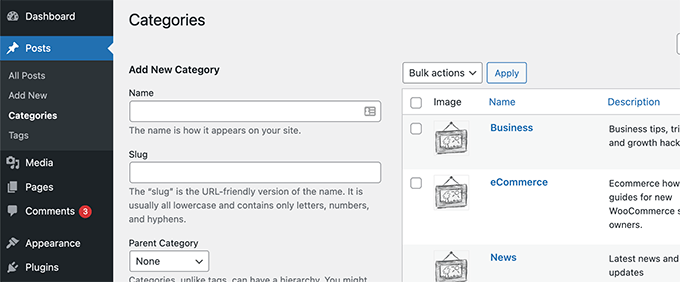
Now, simply click the ‘Edit’ link under any of the categories.
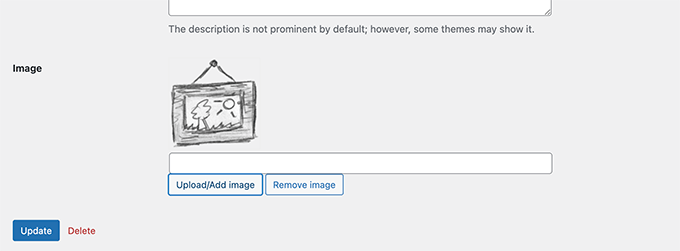
This will direct you to the ‘Edit Category’ page, where you must click the ‘Upload/Add New Image’ button to add an image you want to use for that particular category.
For more information, see our tutorial on how to add taxonomy images (category icons) in WordPress.
4. Enable Categories for Pages
By default, categories are only available for posts in WordPress. However, you can associate them with any post type, including pages.
To do this, install and activate the Pages with category and tag plugin. For details, see our tutorial on how to install a WordPress plugin.
Upon activation, the plugin will work out of the box, and there will be no settings for you to configure.
Simply visit the Pages menu tab from the WordPress dashboard, where you will see that the tags and post categories are now available for your WordPress pages.
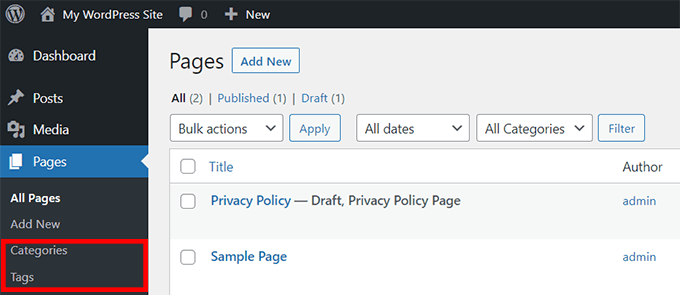
For detailed instructions, see our tutorial on how to add categories and tags for WordPress pages.
5. Enable Sticky Posts for Category Archives
In WordPress, you can make posts sticky to feature them on your home page.
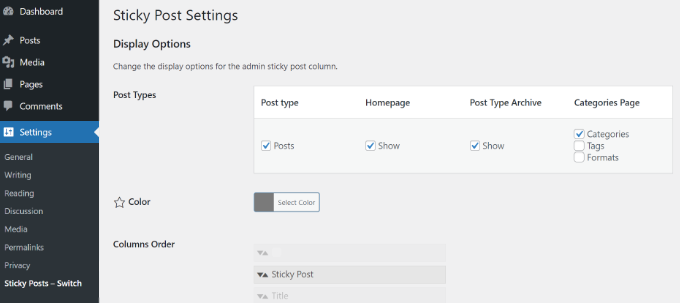
To add sticky posts for your category pages, simply install and activate the Sticky Posts – Switch plugin.
Note: Keep in mind that the plugin hasn’t been tested with the latest version of WordPress. However, when we tested it, it seemed to be working fine. For more details, you may want to see our guide on the use of outdated plugins.
Upon activation, visit the Settings » Sticky Posts – Switch from the WordPress admin sidebar. Here, you can configure the display options for the sticky posts.
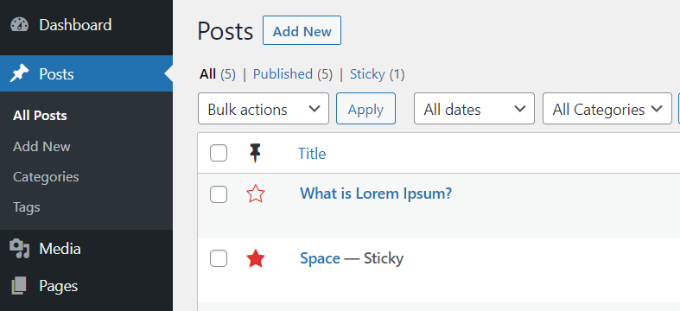
Now, when you go to your WordPress site, you can make any category post sticky by clicking on the star icon.
See our tutorial on how to add sticky posts for WordPress categories for detailed instructions.
6. Creating Category Templates in WordPress
WordPress comes with a powerful theme engine. By default, it looks for templates with specific names in your theme to display certain pages. For example, the category.php template in a theme is used to display all category pages.
Similarly, you can create templates for specific categories by naming the template with the category name. For example, to create a template for the movies category, you will name the template file category-movie.php.
Use your theme’s category.php file as the starting point for your single category template and then make the necessary changes.
For more detailed instructions, take a look at our tutorial on how to create category templates in WordPress.
7. Exclude Specific Categories From RSS Feed
By default, all your posts appear in your site’s RSS feed.
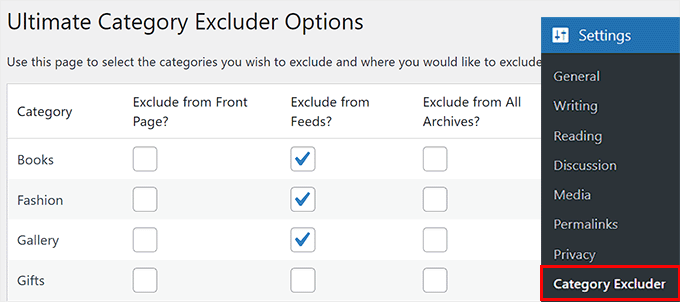
However, if you would like to hide certain categories from your site’s main RSS feed, then simply install and activate the Ultimate Category Excluder plugin.
Upon activation, visit the Settings » Category Excluder page from the WordPress dashboard to select the categories you want to hide from your RSS feeds.
For more details, see our tutorial on how to exclude specific categories from WordPress RSS feed.
8. Show Recent Posts From Specific Categories
The main use of categories is to help you sort your content and help your users find content easily. If a user finds a post in a specific category interesting, then they are likely to read similar posts in the same category.
To display recent posts from a category, you can add this code to your website using a code snippets plugin like WPCode:
function wpb_postsbycategory() {
// the query
$the_query = new WP_Query( array(
    'category_name' => 'travel',
    'posts_per_page' => 5
) );

// The Loop
if ( $the_query->have_posts() ) {
    $string .= '<ul class="postsbycategory widget_recent_entries">';
    while ( $the_query->have_posts() ) {
        $the_query->the_post();
            if ( has_post_thumbnail() ) {
            $string .= '<li>';
            $string .= '<a href="' . get_the_permalink() .'" rel="bookmark">' . get_the_post_thumbnail($post_id, array( 50, 50) ) . get_the_title() .'</a></li>';
            } else {
            // if no featured image is found
            $string .= '<li><a href="' . get_the_permalink() .'" rel="bookmark">' . get_the_title() .'</a></li>';
            }
            }
    } else {
    // no posts found
 $string .= '<li>No Posts Found</li>';
}
$string .= '</ul>';

return $string;

/* Restore original Post Data */
wp_reset_postdata();
}
// Add a shortcode
add_shortcode('categoryposts', 'wpb_postsbycategory');
Once you do that, don’t forget to replace ‘travel’ with your own category’s slug (the category name used in URLs) and save your changes.
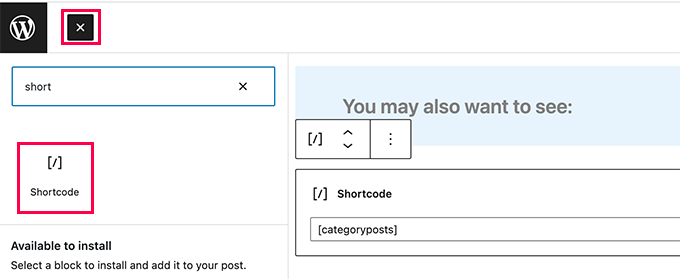
You will then need to add the shortcode [categoryposts] to where you want to add recent posts for the specific category.
For detailed instructions, see our tutorial on how to display recent posts from a specific category in WordPress.
9. Assign an Author to Specific Categories
When managing a multi-author WordPress site, you may want to assign authors to specific categories.
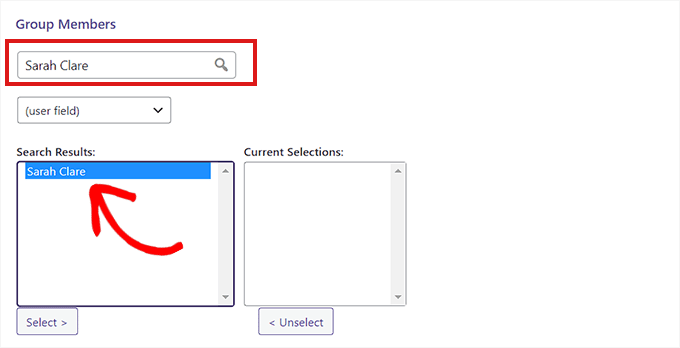
To do this, you must install and activate the PublishPress Permissions plugin. Upon activation, visit the Permissions » Groups page and create a new group.
Once you do that, add an author as a member in it.
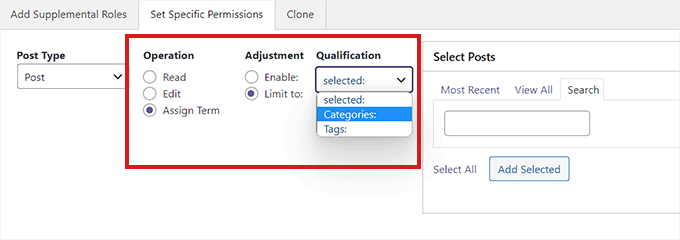
After that, switch to the ‘Set Specific Permissions’ tab and select the ‘Post’ option from the ‘Post Type’ dropdown menu.
This will open up more settings where you must choose the ‘Categories’ option from the ‘Qualification’ dropdown menu.
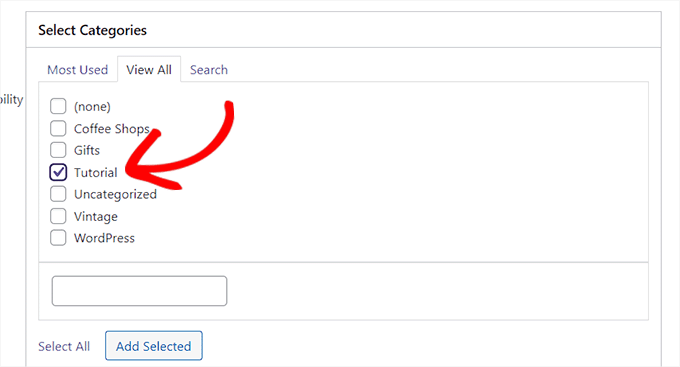
This will open the ‘Select Categories’ section.
Here, check the box next to the category that you want to restrict the author to.
Once you are done, click the ‘Save Permissions’ button to store your settings.
For detailed instructions, see our tutorial on how to restrict authors to specific categories in WordPress.
10. Show Excerpts on Category Pages
We recommend our users to display excerpts on archive and category pages. Displaying excerpts cut down your page load time, which is good for SEO.
Apart from that, it also protects you from the duplicate content issue on your site. To replace full content with excerpts on category pages, simply add this code to your theme’s functions.php file or a code snippets plugin like WPCode:
function my_excerpts($content = false) {
if(is_category()) :
    global $post;
    $content = $post->post_excerpt;
// If the post has explicitly set excerpt use that
    if($content) :
        $content = apply_filters('the_excerpt', $content);
// If no excerpt is set
    else :
        $content = $post->post_content;
        $excerpt_length = 55;
        $words = explode(' ', $content, $excerpt_length + 1);
        if(count($words) > $excerpt_length) :
            array_pop($words);
            array_push($words, '...');
            $content = implode(' ', $words);
        endif;
        $content = '<p>' . $content . '</p>';
    endif;
endif;
return $content;
}
add_filter('the_content', 'my_excerpts');
You can also replace content with excerpt by editing your theme’s category.php file and replacing the_content with the_excerpt.
For more instructions, see our tutorial on how to display post excerpts in WordPress themes.
Bonus: Display the Most Popular Tags in WordPress
Once you have configured all the categories to your liking, you can also display the most popular tags on your website.
Categories usually get more attention than tags because of their wider scope and are also sometimes added to the navigation menu.
However, displaying popular tags will allow users to get an idea of the frequently discussed topics on your website, leading them to discover more content. This can boost your page views and user engagement.
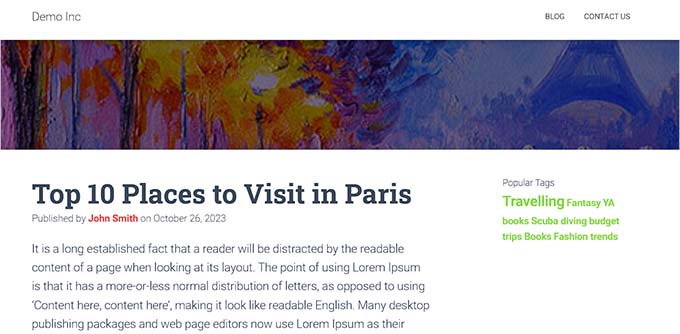
To display popular tags, you must install and activate the TaxoPress plugin. Upon activation, visit the TaxoPress » Terms Display page and click the ‘Edit’ link.
Next, you can choose a title for displaying tags, select a post type from which to fetch data and select the tags as the taxonomy to be displayed.
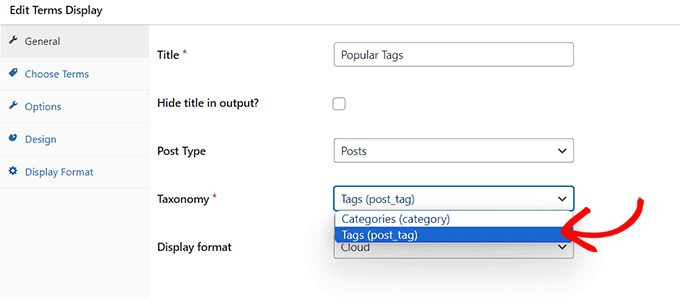
After that, switch to the ‘Choose Terms’ tab and select the ‘Counter’ option from the ‘Method for choosing terms from the database’ dropdown menu and select descending order for it.
Then, select the ‘Counter’ option from the ‘Method for choosing terms for display’ dropdown menu and choose the ‘descending order for it as well.
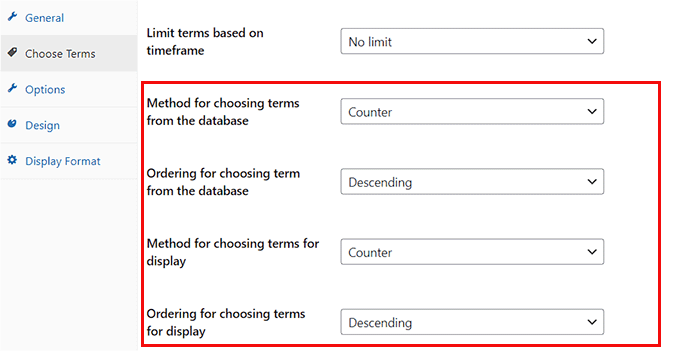
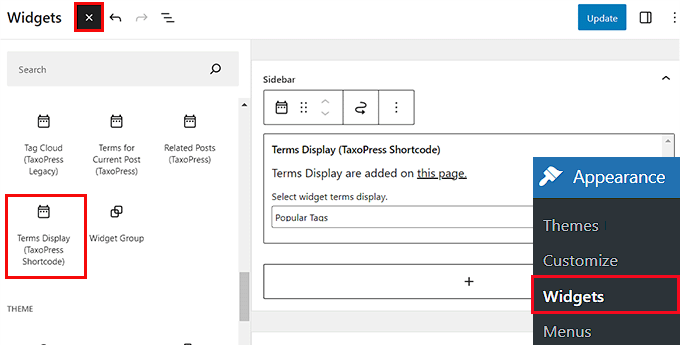
Now, click the ‘Save Display Terms’ button to store your settings. Next, visit the Appearance » Widgets page and add the ‘Terms Display’ block from the menu.
Finally, click the ‘Update’ button at the top to store your settings. For details, see our tutorial on how to display the most popular tags in WordPress.
We hope this article helped you learn some new category hacks and plugins for WordPress. For more best practice tips, see our guide on the best tools for WordPress freelancers, designers, and developers or our list of important things to do once you install WordPress.
If you liked this article, then please subscribe to our YouTube Channel for WordPress video tutorials. You can also find us on Twitter and Facebook.


Philip Kelly
Been searching.. can’t find a way to include “empty” categories in the WP block editor’s “Categories Block.” Private Posts in a particular category are not included in the category count. And if all the posts in that category are Private, the category count in wp_terms_taxonomy is zero. And if the count is zero, the category is not included in the category list.
WPBeginner Support
We will look into possible options but, private posts are normally not posts you want to be shared with your entire audience. You may want to consider how you are using those posts for if they should be in your widget.
Admin
Gery
I was hoping to find a way that will allow the text editor to suggest Categories when creating a link inside the text editor. Right now when you start typing you will get posts and pages suggestions only.
Victor Iweanya
Thanks for this post. Is there a way that posts on a wordpress website can be automatically categorized based on certain keywords in the post.
For example a job listing board where jobs are classified based on academic qualification requirements. So lets say a Job requires a Msc degree, automatically the post goes into Msc jobs category like this website here
a humble observer
you have a typo in number 8 that makes wordpress crash, the first line should have $the_query not just $query.
WPBeginner Support
Thanks for notifying us. We have fixed it.
Admin
faisal
You would have to modify the plugin you are using for that.
Veronica Scholtz
I am running two category blogs on my page on separate pages – Blog 1 and Blog 2. I am using a widget plugin to show the archives for each specific category in a sidebar. When I list the archive for Category 2/Blog 2, it lists the archives of Blog 2 on the page of Blog 1. How can I change/fix this? I would sincerely appreciate your help.
Katinka Hesselink
These days I’m using a category description on most of my categories. Which is great as it shows up on the category pages in the default WordPress themes. However, just now I find out that this description also shows up as alt-text in the default category widget. That’s a bit much. So I want the option to turn that OFF…
shubehndu bhatnager
How to display category wise post thumblings on homepage
mcnater
How about having the posts in the categories show up as image links instead of a simple blog? How do we do that? Thanks.
Samedi Amba
Nice one here. And much appreciated. I was shocked to discover that one can actually add categories to pages. Makes me love wordpress everyday
thomas
One more plugin for the road
WP Exclude From Homepage
Exclude categories, tags, posts or pages from your homepage (without breaking pagination)
https://wordpress.org/plugins/wp-exclude-from-homepage/
Wish Maker
Very useful post. I just work with categories. Thank you!:)
fazreen
great hacks.. especially to show the certain category
Danielle LaPorte
hey hey…what about the semi-automation “similar” or “you might also enjoy” type of function for selecting previous posts to link to. it was there in an old version of WP and went away with upgrades. I miss it.
Great post. Thanks so much.
countzeero
Great Stuff! I will be referring to this while redesigning my clutterlovers blog… thanks!
ngassmann
How about when displaying in breadcrumbs a list of categories, excluding the parent category when listing children.
Editorial Staff
You would have to modify the plugin you are using for that.
Admin