


Do you want to display custom fields outside the loop in WordPress? Normally, custom fields are displayed inside the WordPress loop along with other post content and metadata. In this article, we will show you how to display custom fields outside the loop in WordPress.
What Are Custom Fields in WordPress
Custom fields allow you to add additional meta data into your WordPress posts and then display them along with your post content.
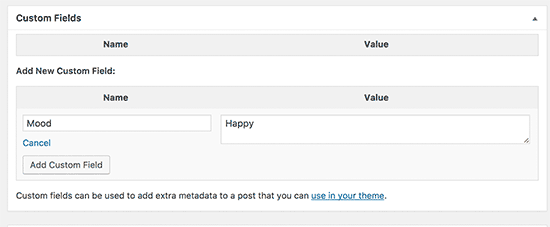
You can add custom fields by simply enabling the custom fields metabox under the Screen Options. You can also create custom metaboxes in WordPress to give your custom fields a better user interface.
For more details, see our beginner’s guide on using WordPress custom fields.
Since custom fields add metadata to posts, they can be easily displayed inside the WordPress loop along with other post content. However, sometimes you may want to display them outside the loop. For example, in a sidebar widget. This is when it becomes a bit tricky.
That being said, let’s see how to easily display custom fields outside the loop in WordPress.
Display Custom Fields Data Outside The Loop in WordPress
Instead of displaying custom fields meta data outside the loop, we’ll actually show you how to use multiple loops in your WordPress themes without affecting the main loop.
This article requires you to add code to your WordPress theme files. If you haven’t done this before, then you may want to see our guide on how to copy and paste code in WordPress.
You’ll need to add the following code to your theme files where you want to display the custom fields data in WordPress.
<?php
global $wp_query;
$postid = $wp_query->post->ID;
echo get_post_meta($postid, 'Your-Custom-Field', true);
wp_reset_query();
?>
This code simply loads up the global variable $wp_query to get the post ID. After that, it uses get_post_meta() function to fetch and output your custom field data.
Don’t forget to change Your-Custom-Field with your actual custom field.
You can customize the code to match your needs. You can also use other query arguments to fetch and display custom fields data for different posts and pages.
Let’s take a look at another example. This one uses WP_Query class which is a much better and more flexible way to use multiple loops in your WordPress theme files.
Simply add this code to your theme or child theme where you would like to show the custom field.
$args = array (
// Post or Page ID
'p' => 231,
);

// The Query
$the_query = new WP_Query( $args );

// The Loop
if ( $the_query->have_posts() ) {

	while ( $the_query->have_posts() ) {
		$the_query->the_post();
		echo get_post_meta( get_the_ID(), 'Mood', true);
		}


	/* Restore original Post Data */
	wp_reset_postdata();

} else {

echo 'Nothing found';

}
Don’t forget to replace Mood with your own custom field name and post ID with your own post or page id.

That’s all for now.
We hope this article helped you learn how to display custom fields outside the loop in WordPress. You may also want to see our WordPress theme cheat sheet for beginners.
If you liked this article, then please subscribe to our YouTube Channel for WordPress video tutorials. You can also find us on Twitter and Facebook.



Syed Balkhi says
Hey WPBeginner readers,
Did you know you can win exciting prizes by commenting on WPBeginner?
Every month, our top blog commenters will win HUGE rewards, including premium WordPress plugin licenses and cash prizes.
You can get more details about the contest from here.
Start sharing your thoughts below to stand a chance to win!
ajay singh says
how i get acf field value out of loop
Shuvo says
What do I put to replace ‘Your-Custom-Field’? The name of the cpt or the slug?
WPBeginner Support says
You would replace that with the name of the custom field
Admin
Daniel R says
Hi there,
Great article, I’ve used WPB a few times to help me work some things out!
I’m currently trying to get the custom field information from the most recent post in a specific category, and to display this as inline text within a paragraph.
Do you know if there is any plugin for this or if we can achieve this with PHP/JavaScript?
Basically what I want to ask WordPress is “Go and get the most recent post in the todays-tip category then find the value of the custom field ‘odds’ and display ‘odds’ inside this span.’
Really I’d like to stay away from hard coding this into the page and would prefer a shortcode/JS solution as the paragraph is editable. Basically one of the webmasters might go in and change the text in the paragraph but still want to show the ‘odds’ in a certain place. The page is built on a drag-n-drop editor on xPro.
Daniel R says
I’m currently using a recent posts plugin shortcode to display the title in another paragraph. I then strip back all the styling to make the text inline with the paragraph. It’s a bit of a dodgy route!