


Do you want to change the footer message in your WordPress admin panel?
The default footer in the WordPress dashboard simply states that the site has been made with WordPress and displays the version number. You may want to change that so you can credit yourself for developing the theme, advertise a pro version of a plugin, or even add support links for your clients.
In this article, we will show you how to change the footer in the WordPress admin panel.
Why Change the Admin Panel Footer?
The default footer in your WordPress website‘s admin area is very basic and doesn’t really serve a purpose for most users.
It has a link to the WordPress home page and displays the version of WordPress you’re currently running. If there’s an update available, the footer link will change to let you update your site.
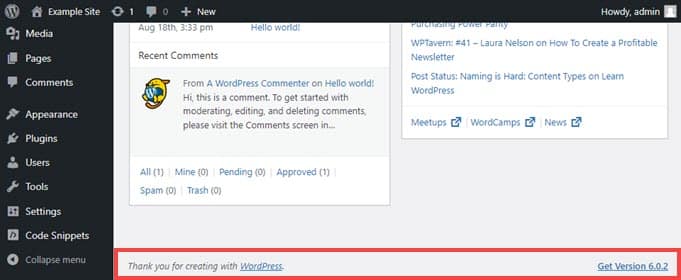
That’s it. However, you can change it to have links back to your own site, provide some helpful links for your users, or just remove it entirely since the space isn’t seen all that often anyway.
With that in mind, let’s dig in and see how to change the WordPress admin footer in two different ways. Simply click the link below for the method you prefer:
Method 1. Changing the Footer in the WordPress Admin with WPCode (Recommended)
To change the footer in the admin dashboard, we’re going to insert a code snippet into our theme’s functions.php file.
Normally, we only recommend pasting code snippets into your WordPress core files for advanced users because even a slight mistake can break your site. Plus, if you update your theme, any changes to the functions.php file will be erased.
That’s why we will be using the free WPCode plugin, which makes it safe for anyone to add code snippets to WordPress files.
First, you will need to install and activate WPCode. For detailed instructions, see our step-by-step guide on how to install a WordPress plugin.
Once that’s done, go to Code Snippets » Add Snippet in the admin dashboard’s left-hand menu.
Simply search for ‘footer’ and hover your mouse over the entry titled ‘Change Admin Panel Footer Text.’
Then, all you need to do is click the ‘Use snippet’ button.
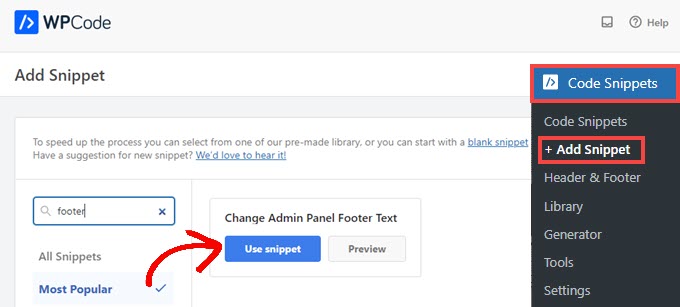
Next, you’ll be taken to the Edit Snippet screen. WPCode automatically configures settings for snippets that you add from the library.
Next, you just need to change the footer text on Line 5 to whatever you want the new content to say. You will need to use HTML if you intend to include links or anything other than plain text.
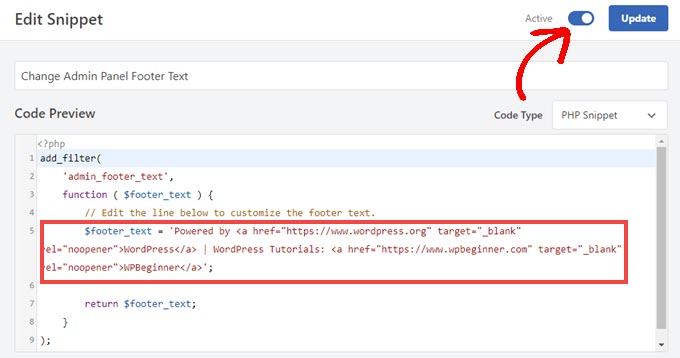
When you’ve changed the footer text to your liking, just toggle the switch to ‘Active’ and click the ‘Update’ button.
The new admin panel footer will now be live on your site. It will vary based on your specific changes, but if you enable to default snippet from WPCode, you will see this:
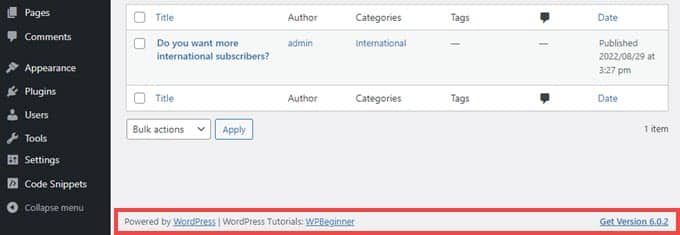
If you like how this code snippet works, you can take a look at the WPCode snippet library found at Code Snippets » Library.
This will show you everything that comes included for free with the plugin.
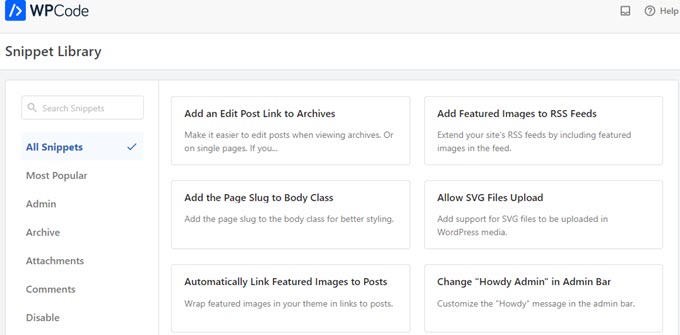
WPCode’s built-in library has dozens of pre-configured snippets. You can probably replace single-use plugins you have on your site. For example, WPCode can disable the WordPress REST API, WP Admin Bar, or media attachment pages.
Method 2. Changing the Footer in WordPress Admin Manually
Another method to change the footer in the WordPress admin is by adding code to your theme’s functions.php file. We recommend this for advanced users only, as even a small mistake can break your site.
For more information, see our detailed guide on how to paste code snippets from the web into WordPress.
First, you will need to connect to your site via FTP or through your WordPress hosting provider’s file manager. Then, head to your site’s /wp-content/themes/your_theme/ directory.
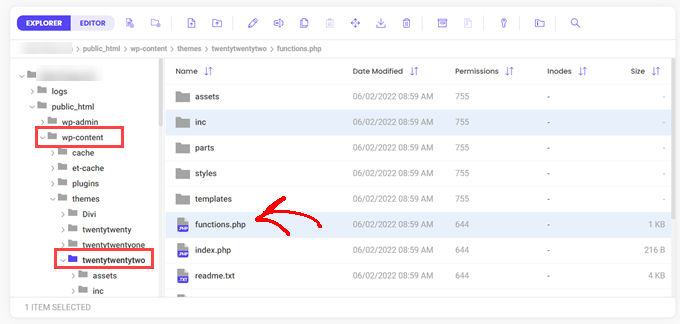
Simply copy and paste this code into the functions.php file.
add_filter(
	'admin_footer_text',
	function ( $footer_text ) {
		// Edit the line below to customize the footer text.
		$footer_text = 'Powered by <a href="https://www.wordpress.org" target="_blank" rel="noopener">WordPress</a> | WordPress Tutorials: <a href="https://www.wpbeginner.com" target="_blank" rel="noopener">WPBeginner</a>';

		return $footer_text;
	}
);
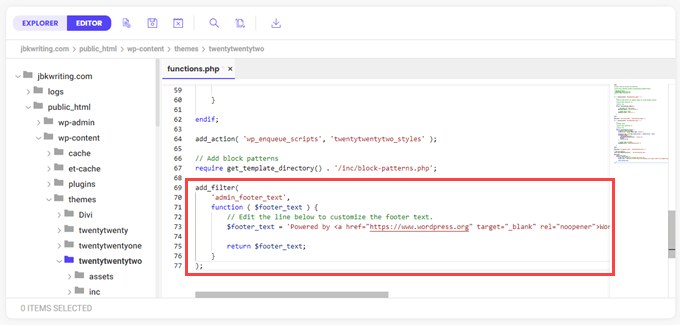
Be sure to change the HTML in the line that starts with $footer_text in the sample code to whatever you want as your new admin footer.
Finally, save your file. You should see the new footer in your admin right away.
We hope this article helped you change the footer in your WordPress admin area. You may also want to see our guide on how much does it cost to build a WordPress site, or our expert comparison of the best virtual business phone number apps for small business.
If you liked this article, then please subscribe to our YouTube Channel for WordPress video tutorials. You can also find us on Twitter and Facebook.


Syed Balkhi says
Hey WPBeginner readers,
Did you know you can win exciting prizes by commenting on WPBeginner?
Every month, our top blog commenters will win HUGE rewards, including premium WordPress plugin licenses and cash prizes.
You can get more details about the contest from here.
Start sharing your thoughts below to stand a chance to win!
Selam Mesfin says
In my visual Editor’s toolbar, there is no ‘Insert new tag’ button, how can this be fixed? I wanted to include ‘read more’ to my long paragraphs.
Thank You.
parul gupta says
i want to change footer credentials in quest theme.please help me out.
Schofield Bryant says
I just tried what was explained above and my website has crashed.
Showing the following error
Fatal error: Cannot redeclare remove_footer_admin() (previously declared in /home/cannabotanica/public_html/wp-content/themes/green-eye/functions.php:4) in /home/cannabotanica/public_html/wp-content/themes/green-eye/functions.php on line 208
Please I need assistance now in reviving the website and correcting the error. Even the admin panel wouldn’t load.
WPBeginner Support says
Hi Schofield,
You can remove the code using FTP or File Manager in cPanel.
Admin
Wayne says
How do I find the functions.php file in the Colormag theme?
Arun says
Hello How I can adjust the bottom of my wordpress made website ???
mohammad says
i want custom footer without plugin and admin change footer !
balbeer says
i am not able to edit the footer that is copyright @ in travelify theme please help to edit that
Tommy says
Try use plugin “Cliro – Custom Admin Role for Client” you will easy to edit footer in backend with more option. I used it and very happy
ansuman says
how to edit copyright footer
Samuel Dellicour says
The closing P tag should be removed, it is not necessary. The text will automatically be wrapped with a paragraph (with class and id).
Durrell Thomas says
What is the name of the plug-in “what next | Related Posts that is on your blog?
Editorial Staff says
It’s not custom coded (combination of YARRP and html/css codes)
Admin
Ash Blue says
This rocks my socks, I love being able to edit the WP admin screen. Will there be tutorials here soon for WP 3.0?
Konstantin says
Unfortunately you neglected to mention to hook it to the “admin_footer_text” filter. This is what’s missing:
add_filter('admin_footer_text', 'remove_footer_admin');Editorial Staff says
Thanks for notifying us. We are really sorry, this mistake was on our end.
Admin
Nina says
Great tutorial, will use