


One of the most common questions our readers ask us is: “Why can’t I add plugins in WordPress?”
This situation usually happens when the user is seeing an upgrade message or their admin area doesn’t have the Plugins menu. If you are dealing with this issue, then you are in the right place.
In this article, we will explain why you cannot add or install plugins in WordPress.
This guide has listed 5 of the main reasons why you can’t add or install plugins in WordPress. Feel free to use the quick links below to skip to the specific topic that applies to your situation:
1. You Are on WordPress.com
WordPress.com is a blog hosting service that offers a limited version of the popular self-hosted WordPress software. See our guide on the difference between WordPress.com vs. WordPress.org for more details.
WordPress.com users cannot install plugins unless they upgrade to the Business plan or higher, which starts from about $300 per year. If you are on a Free, Personal, or Premium plan, then you cannot install third-party plugins.
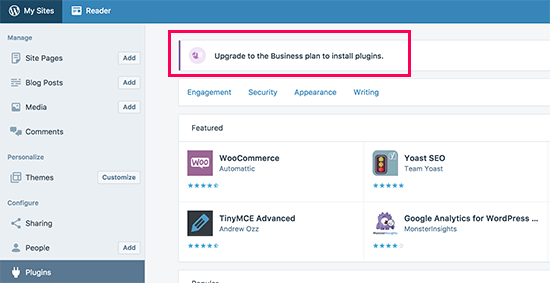
If you don’t want to pay for that amount, then you can move your blog from WordPress.com to WordPress.org.
If you need help doing that, then you can use our free WordPress blog setup service. Just make a note that you want us to transfer your site, and we will do it for free.
2. There Are User Role Restrictions
WordPress comes with a built-in user role management system. Sometimes, web developers don’t give Administrator access to their clients. Instead, they create an Editor account for them.
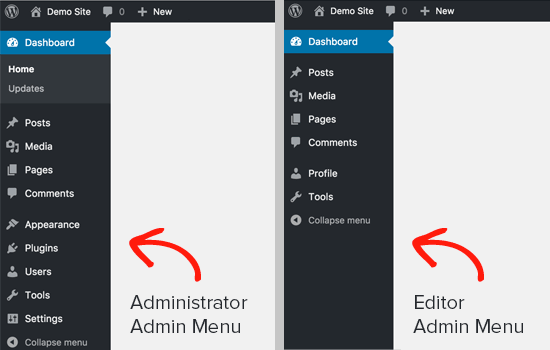
Only Administrators can install and activate plugins on a WordPress site. If you are the owner of the website, then you need to ask your developer to make sure that you have Administrator permissions.
3. You Are Facing the Memory Limit Issue
The second most common scenario is that you can see and access the Plugins page, but you can’t install plugins. When you try to install plugins, you will see an error message.
This error is usually caused by the PHP memory limit. WordPress is written using the PHP scripting language, and each PHP script uses a certain amount of memory.
There are settings in your WordPress hosting and inside the WordPress core that define the amount of memory a PHP script can use.
When a process reaches this limit, it either gets terminated or shows an error like this on your WordPress website:
Fatal error: Allowed memory size of 67108864 bytes exhausted
The quick fix to this problem is increasing your PHP memory limit. You can do that by adding this line to your wp-config.php file:
define('WP_MEMORY_LIMIT', '256M');
For more detailed instructions, see our guide on how to fix the WordPress memory exhausted error.
4. You Are on a Multisite Network
Another possible reason that you can’t see the Plugins menu in WordPress is if your site is part of a WordPress multisite network, and the network admin has disabled the Plugins menu item on the network’s sites.
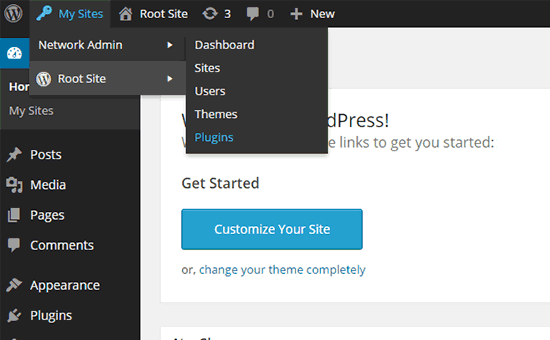
It is pretty much the same scenario as WordPress.com. The network admins must consider server stability, WordPress security, and load-balancing issues. To solve this problem, you can ask your network administrator to install plugins for you.
For more on this topic, see our guide on why you don’t see all plugins on WordPress multisite installs.
5. You Uploaded the Wrong Plugin File
Let’s say you want to upload a third-party plugin file, but WordPress keeps showing an error message like below:
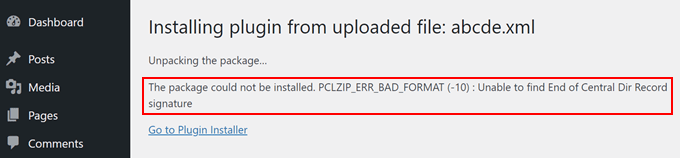
In this case, you may want to see if you are uploading the right file in the first place. Plugin files usually come in a .zip package, which means they’ll use the .zip format.
You may also want to check if the zip content files you’ve downloaded are compatible as well. Not all third-party plugins come from trusted sources, and this may be the reason why they’re not uploading properly.
For more information about installing plugins, check out our guides below:
- How to Install a WordPress Plugin (Step by Step)
- Beginner’s Guide: How to Choose the Best WordPress Plugin
- Should You Install Plugins Not Tested With Your WordPress Version?
We hope this article helped you learn why you can’t add or install plugins in WordPress. You may also want to see our list of the must-have WordPress plugins and our guide on common WordPress errors and how to fix them.
If you liked this article, then please subscribe to our YouTube Channel for WordPress video tutorials. You can also find us on Twitter and Facebook.





Syed Balkhi says
Hey WPBeginner readers,
Did you know you can win exciting prizes by commenting on WPBeginner?
Every month, our top blog commenters will win HUGE rewards, including premium WordPress plugin licenses and cash prizes.
You can get more details about the contest from here.
Start sharing your thoughts below to stand a chance to win!
Petya Ivanova says
Thank you so much!!
WPBeginner Support says
You’re welcome
Admin
hossein says
Hello
I can see the plugin menu and the plugin I have installed
But the add new plugin button is disabled
can you help me?
WPBeginner Support says
There is a good chance your site is a part of a multisite network. If it is not then we would recommend checking that you do not have any plugins that would prevent adding new plugins.
Admin
samaneh says
I can see plugin widget in my dashboard but when I clink on add plugin, there are no plugins. I just see an error:
“An unexpected error occurred. Something may be wrong with WordPress.org or this server’s configuration. If you continue to have problems, please try the support forums.”
If I search a plugin name in search bar, the page refreshes but finally this massage appears again.
what did happened?
WPBeginner Support says
For that error, we would recommend checking with your hosting provider to see if they have the specific error logged or if they may have a setting in their system that may have blocked the connection to WordPress.org.
Admin
DaninMCI says
How ridiculous. I have several websites and I was going to create a new WordPress-based site that needed to use a comparison chart but I’m not willing to pay $300 a year for plugins. I’ll go elsewhere I guess.
WPBeginner Support says
As we say in that section, if you do not want to pay $300 per year, we would recommend using WordPress.org which is a WordPress site on another hosting provider
Admin
Richard Ross says
I have inserted the plugin name but it still prompts me the same error.
Error: The plugin has no name. Add a Plugin Name: line to your main plugin file and upload the plugin again. For more information, please review our documentation on Plugin Headers.
WPBeginner Support says
If the plugin is one you’re downloading from an external site you would want to reach out to the plugin’s support with that error message. If it is a custom plugin then you would want to ensure your plugin name is set as a comment in the header.
Admin
Pascal Idhiarhi says
Hi, I tried to add new plugin, and theme. But I am currently getting 403 Forbidden error. What can I do?
Deborah says
I have a multisite and I installed several plugins but one isn’t showing. I can see it when I go to plugins and I have activated it but it is not showing up in my dashboard so I cant use it. Help. Why isn’t a particular installed and activated plugin showing up in m dashboard but other plugins are?
WPBeginner Support says
Not all plugins work with multisite installations, we would recommend checking with the support for that plugin and they would be able to help with any issues like this.
Admin
Akshay says
Hi,
Thank you for sharing knowledge. We have a wordpress website hosted on our company internal server. Now we would like to migrate it to our cloud platform.
I tried to click Add new plugin to install “All-in-One WP Migration”. However whenever I click on ‘Add new’ link server is returning 503 error. Rest all links on admin page works fine.
Any suggestions?
WPBeginner Support says
For specifically the 503 error, we have a guide on how to resolve that error below:
https://www.wpbeginner.com/wp-tutorials/how-to-fix-503-service-unavailable-error-in-wordpress/
Admin
Monisha says
Thanks this helped! : )
WPBeginner Support says
Glad our guide helped
Admin
Arif Ammar says
Thanks WP team. My problem is solved.
Thanks again for you precious support.
WPBeginner Support says
Glad our guide was helpful
Admin
Evan Cleary says
I set up a WordPress site in 2014 and was able to get plugins without going into a business plan. And I sent up another site a few years ago and it was also not any problem to add plugins. As far as I know, it was via WordPress.com and not WordPress.org – I downloaded a theme and editors that and used my own URL hosted by a hosting company. I’m quite confused now as no one seems to be saying that this policy of having to pay for a business plan is a new thing. Is it a new thing?
WPBeginner Support says
If your site is on a hosting provider and not the WordPress.com website then it is a WordPress.org site. Having to purchase the business plan on WordPress.com for access to plugins is not something new.
Admin
karan says
I had one site of mine that had the issue of no option for adding or updating plugins. For some reason define(‘DISALLOW_FILE_MODS’,true); was in my wp-config file.
Once I deleted that line, my plugin options were restored. It took me a while to find this solution. I hope this helps people find this solution.
WPBeginner Support says
Thanks for sharing your recommendation
Admin
Sophorn Chhum says
Thanks, man. You’re awesome
Amin says
Thank you very much!
naema says
Excellent.Great it’s working.Thank you!!!
Heide says
Thanks for the good article! I am bit confused, because I am super administrator and can’t install any new plugins. I can activate and deactivate plugins for sites or the whole network. But I don’t have the page for plugin installtion. Do you have any suggestions in this case? Thanks!
WPBeginner Support says
If you’re using a multisite like it sounds like you are, you would need to install the plugin in the network admin area rather than on the individual sites.
Admin
anis says
when i try to install a pluging it shows the following:
Installation failed: Abort class-pclzip.php : Missing zlib extensions
what should i do
WPBeginner Support says
For that error, you would want to first reach out to your hosting provider and they should be able to assist.
Admin
Amy Skea says
I can’t download I get this message. I have tried various plugins and get the same.
Thank you
Installation failed: Could not copy file. wp-fastest-cache/wpFastestCache.php
WPBeginner Support says
For that specific message, you may want to try the recommendations in our article below:
https://www.wpbeginner.com/beginners-guide/how-to-fix-file-and-folder-permissions-error-in-wordpress/
Admin
santosh says
hey i cant upload and install pluginsin my wordpress website.
its shows just the blank page.please help me
WPBeginner Support says
If you are only seeing a blank page, you would want to follow the recommendations in our article below:
https://www.wpbeginner.com/wp-tutorials/how-to-fix-the-wordpress-white-screen-of-death
Admin
Amarnath says
Hey, I am troubling to install wordpress.
“The MySQL Connection could not be established.”
It is written like this what should I do?
WPBeginner Support says
You would want to ensure your username and password in your wp-config file are the correct ones, you may also want to check with your hosting provider’s support if this is a new error and they should be able to assist.
Admin
May says
Hey.
How Can I transfer my blog from wordpress.com to wordpress.org to get the benefits of the second one ?
WPBeginner Support says
For how to do that, you would want to take a look at our article here:
https://www.wpbeginner.com/wp-tutorials/how-to-properly-move-your-blog-from-wordpress-com-to-wordpress-org/
Admin
Zeeshan says
hi!
i am install pulgin but faild.
and ERROR IS
Fatal error: Maximum execution time of 30 seconds exceeded in G:\xampp\htdocs\Ecommrace\wp-includes\Requests\Transport\cURL.php on line 462
WPBeginner Support says
For fixing that error you would want to follow the recommendation in our article here: https://www.wpbeginner.com/wp-tutorials/how-to-fix-fatal-error-maximum-execution-time-exceeded-in-wordpress/
Admin
Ale Sants says
Hello! Same problem here. Cannot ADD plugins.
More details of my site:
WordPress 5.2.2 running Bridge theme, so WordPress.org. no .com
Hostgator for hosting
I am an admin and no one else has ever done any work on the site, so I am the only admin for sure.
Please help and thanks in advance!
WPBeginner Support says
You may want to check with your hosting provider to ensure there are no errors on their end that could be part of the problem. You could try checking your folder permissions as well similar to the article here: https://www.wpbeginner.com/beginners-guide/how-to-fix-file-and-folder-permissions-error-in-wordpress/
Admin
Ale Sants says
Thanks so much. Will do that and will send any updates.
Rishabh Jain says
Hey!
I want to install WP super cache plugin but when I search it in plugin dialog box, on right top corner it shows ‘Not Available’ Why is it so? Is there any problem with my blog. Please help me out…
WPBeginner Support says
Is your site on WordPress.com or a managed hosting provider?
Admin
Mazie says
Don’t know what I’m doing wrong with new wordpress.com blog (true newbie). My menu doesn’t look like those above. All I see are the following 7 options, all are listed on the left: Site Identity, Colors & Backgrounds, Fonts, Header Image, Menus, CSS and Widgets. I guess my question is, is this as it should be for the free (.com) site? Is it from this menu that I will create and complete my free blog?
Sorry to be so ignorant about this. I think I’m missing something as I don’t imagine it’s supposed to seem so confusing.
Thank you!
Mazie
WPBeginner Support says
Sadly, our tutorials are for WordPress.org rather than WordPress.com which is what you’re using would be part of the confusion. If you go to the wp-admin area of your WordPress.com site the admin area will look similar but you will still have the WordPress.com limitations.
Admin
Sasha says
Deactivate WordPress Plugin: WP Editor and you will be able to see list of your hidden plugin. WP Editor not tested/comparable with new WP version and php 7.
WPBeginner Support says
Thanks for sharing what worked for you
Admin
chris says
I am trying to install a plug-in on a website that a company designed for me but I don’t have the plugin option in my administrator menu (made sure I was an admin not just a editor). My admin bar is also Red with “PRODUCTION SERVER” next to my name. Are these too related? How to I add plug-ins if I don’t have the the plug-in tab?
Nalin Puri says
I am using InstantWP Named automated wordpress local server.If i buy my hosting service can i shift my blog from instant vp to that hosting server of GoDaddy
WPBeginner Support says
Hi Nalin,
Yes it can be.
Admin
sajilesh kurup says
Hi,
on wordpress website i am able to see pulgin menu, however as i hover mouse pointer over it not displaying option menu of add new
anh tuan says
please help me! i’m a admin on my website but i can’t see any plugins on plugin dashboard, in my hostin, it still no problem??
WPBeginner Support says
Hello,
You may not have an admin account or someone you hired to work on your website has disabled your access to plugins area. Sometimes developers do this to make sure that their customers don’t accidentally break their websites.
Admin
kevin shiu says
How do I go about fixing this myself assuming the original developer is no longer around?
Judy Adams says
I tried adding the plug in contact form 7 add-on now I get a white a screen after activating or trying to activate. I cannot go to my dashboard or anything in word press now. When trying to FTP in to deactivate plugin I am not sure what login and password to use. Can you please help me? I don’t want to lose my whole website I created because I cant get in now.
Riazvic says
Hi,
I am having an e-commerce website, unfortunately, I am having a theme which came with a premium plugin which I have purchased. their plugin section is available but widget section is not available how can I put google translate code into that theme where should use that code in the theme files?
I hope to get an answer here.
thanks in advance for your support.
Kamal
David says
Hello.I have the same issue of can not add new plugin in wordpress plugin panel.
1. No “add new” plugin options
2.No “trash” plugin options
3.Other issue is I can not find the “editor” in appearance panel
Would you like to let me know how can i fix this?
Rizqi says
I have same issues, it also can’t update existing plugins, because the link is gone. Have got the solutions?
Jacqueline says
Hi. I purchased the Divi theme and plug in file. The theme uploaded fine but when I go to upload the plug in file it fails. Anything I can do? Thank you for your support on this matter.
WPBeginner Support says
Hi Jacqueline,
You can try installing plugin via FTP.
Admin
Aziz Nazarov says
Hello,
Thank you for sharing such a valuable info.
Maybe this’s a bit off topic question.
I’m having a small issue at the moment with adding a new submenu page.
So basically I got an Astra Theme (not a pro version) with Beaver Builder.
I add the page as usual then add to the menu under sub-item, all looks good.
But when I click on the sub menu page it doesn’t take me there. It basically takes me to a home page.
What could be an issue? Could you help me please?
Thank you
Sir Joe says
Thanks a lot! Your article helped me
candy says
I cannot activated and install my plugin.
Parse error: syntax error, unexpected T_FUNCTION, expecting ‘)’ in E:\AppServ\www\shopify\wp-content\plugins\ninja-fb-private-reply\src\Facebook\autoload.php on line 45
please help me fix this .
Mark says
Hi, I cant log on to my wordpress account. It says “ERROR: There is no user registered with that email address.” I know for a fact that that is the correct email address associated with the account.. Please help!!! I dont have any of the other information required to reset the account (such as transaction ID) HELP!!!!
mark says
should I switch to wix or weebly? this is stupid. I have to sit here for hours googling to not be able to do the stupidest simplest things. I don’t want to learn wordpress I just want a simple ecommerce site that wont be like a college course to get set up.
M
lokesh says
I’m getting this message while installing the plugins.
An unexpected error occurred. Something may be wrong with WordPress.org or this server’s configuration. If you continue to have problems, please try the support forums.
How to solve please help
Yeboah Martin says
I had this message when trying to upload a plugin:
POST Content-Length of 11688443 bytes exceeds the limit of 8388608 bytes in Unknown on line 0
WPBeginner Support says
Hi Yeboah,
You need to increase the maximum file upload size.
Admin
Tabish says
Hi! Wanted to ask you guyz two things: You guyz run this website on WordPress, right? Which theme do you use? And like YEBOAH MARTIN said, I was facing the same error when I tried to create a video streaming site and uploaded videos. I did increase the file size limit to 977 GB! And I am sure that it isn’t the storage, as my hosting provider has made unlimited disk storage available! (Cuz I created that hosting service!)
WPBeginner Support says
Hey Tabish,
We use a custom made WordPress theme. As for videos, please see our guide on why you should never upload videos to WordPress.
Jitendra Mahato says
Hi,
I have migrated my blog yesterday. All the things are good but the error in the plugin. I have deleted all the plugins. After then, while i am starting to install the plugin, then No, any plugin is adding..
While adding….
Messages lke this…
Could not create directory. /home/danfeh5/public_html/example.com/wp-content/plugins/boombox-theme-extensions
WPBeginner Support says
Hey Jitendra,
It seems like your WordPress directory permissions are incorrect. Please see our guide on how to fix file and folder permissions error in WordPress
Admin
Angelo says
Hi.Why is it my comment section is closed?Even if i downloaded comment plugin it seems nothing changed
WPBeginner Support says
Hi Angelo,
If comments are closed on all your articles, then go to Settings » Discussion page inside WordPress admin area and check the box next to ‘Allow people to post comments on new articles’ option. Any new article you now add will have comments enabled by default.
For your older article you will have to edit them and then on the post edit screen click on the Screen Options button at the top right corner of the screen. Check the box next to Discussion option. Now scroll down below the post editing area and you will see a Discussion meta box where you need to check the option ‘Allow Comment’ option.
Admin
Lisa says
Hi I got this when trying to install jetpack and its not on my list of plugins and I am not sure what to do Installing Plugin from uploaded file: jetpack.4.9.zip
Unpacking the package…
Installing the plugin…
Destination folder already exists. /home/content/p3pnexwpnas02_data01/46/2075146/html/wp-content/plugins/jetpack/
Plugin install failed.
Return to Plugin Installer
WPBeginner Support says
Hey Lisa,
Your website already has a folder called jetpack. You need to connect to your website using an FTP client or File manager in Cpanel and delete that folder to install the plugin from the zip file.
Admin
Omar says
Hi, I can see and add plugins in “my” installation (its not a multisite) of wordpress but suddenly there’s no option for activate/delete under the plugin name, but I still can do this trough the bulk actions option… did someone know why this happens?
Omprakash says
Hi Why none of WP Plugins are installing in my WP Dashboard please Help me
Rafael says
I was added as ‘admin’ in a multisite WordPress so I couldn’t see the Plugins. Asked for the ‘network admin’ to enable Plugins in ‘Network Configurations’ but looks like that just allows me to see the Plugins, still not able to install new plugins.
WPBeginner Support says
Hey Rafael,
The network admin or super admin can allow individual site admins to activate or deactivate plugins on their own.
Admin
Rafael says
Thank you for the reply, I got it now. It just wasn’t clear, I see now that only the network admin can install new plugins.
zork says
awesome man: define(‘WP_MEMORY_LIMIT’, ’64M’);
this solved my problem after a migration from local to production
thank you so much!
Ankur Sharma says
i have installed wordpress on pc with xampp. when i install ULTIMATE MEMBER plugin it shows an error and when i upload the plugin it shows the memory limit problem..
i have already added that line you mentioned i.e.
define(‘WP_MEMORY_LIMIT’, ’64M’);
and also i have changed a line in php.ini file in xampp
; Maximum allowed size for uploaded files.
upload_max_filesize=3000M
nothing is working .. please help me ..
Thanks!!
tom bukkots says
Can’t add or delete plugins in WordPress
Nicole says
I have wordpress.com/wp-admin.. I have admin rights and i still have no options for adding new plugins. Any suggestions?
WPBeginner Support says
Please see our guide on the difference between self hosted WordPress.org vs free WordPress.com blog.
Admin
Ali Shair says
if i Host my wordpress.com site on Hostgator or go daddy then it is possible to upload themes or plugins
WPBeginner Support says
Hi Ali,
No you cannot host your WordPress.com site anywhere else. You will need to use self hosted WordPress.org.
Admin
Betina says
Hi,
If I buy a domain from wordpress.COM will it let me download and install plugins like adsense?
Thanks!
WPBeginner Support says
No it will not. You will also be unable to use Adsense. Please see our guide on the difference between self hosted WordPress.org vs free WordPress.com blog.
Admin