


Are you looking for the best WordPress gallery plugin for your website?
There are so many WordPress photo gallery plugins available, but the problem is most will either slow down your website, or they’re very difficult to use.
In this article, we’ll compare the top WordPress gallery plugins based on their speed, ease of use, flexibility, and overall features.

Why use a WordPress Gallery Plugin?
A WordPress gallery plugin lets you create completely custom galleries for your WordPress website.
There are built-in WordPress features that let you create a simple gallery using the WordPress block editor. However, the features are limited, and you can only create very simple image galleries.
If you want access to even more features like lightboxes, image navigation, albums, and more, then you’ll need to use a WordPress gallery plugin.
The Contenders for the Best WordPress Gallery Plugin
For the sake of this comparison, we chose the top and most highly rated WordPress gallery plugins. The following image gallery plugins are the most widely used and recommended by users and experts.
In this comparison, we’ll look at the speed, ease of use, features, compatibility, and overall price of each plugin.
That being said, let’s look at how these WordPress image gallery plugins stack up against each other.
Speed: Which is the Fastest WordPress Gallery Plugin?
Speed is one of the most important factors when choosing a WordPress photo gallery plugin. Your website speed affects both your WordPress SEO and the user experience of your website.
If you’re using a gallery plugin to showcase your design or photography portfolio, then you simply can’t afford to compromise on speed.
We ran a speed test for each of these plugins using the same images without modifying any default settings.
Here are the results:
| Gallery Plugin | Page Load Time | Requests | Page Size |
| Envira Gallery | 340ms | 21 | 700 KB |
| NextGEN | 876ms | 35 | 850 KB |
| Modula | 494ms | 16 | 702 KB |
| FooGallery | 358ms | 27 | 705 KB |
As you can see from the scores above, Envira Gallery came out as the fastest loading WordPress image gallery plugin. FooGallery came as a very close second with just a few milliseconds difference and similar page size.
If website speed and performance is your main concern (which it should be), then Envira Gallery and FooGallery are both great options.
Ease of Use: Which WordPress Slider Plugin has the Best User Experience?
Creating image galleries is not as simple as uploading an image to your posts and pages. You also need to choose layouts, select columns, add thumbnail sizes, choose lightbox animations, and more.
Many beginners can find this process a little overwhelming. The best WordPress photo gallery plugin will offer a lot of features while still being easy to use.
Here’s how each plugin stacks up in this regard:
Envira Gallery
Envira Gallery is very beginner friendly and makes it easy to create photo and video galleries from your WordPress admin area.
After you’ve installed and activated the plugin, you can go to the plugin options panel to quickly create your first gallery.
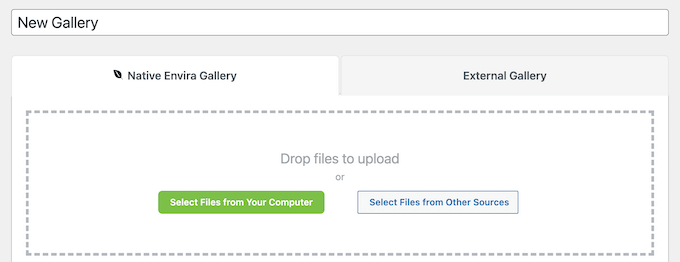
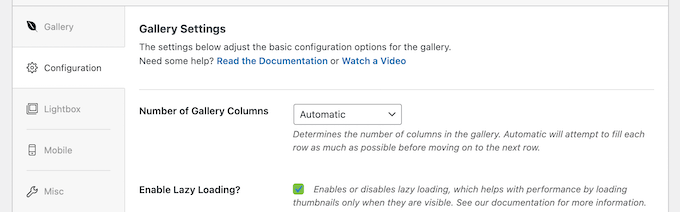
Then, you can customize how the gallery displays with the settings menu below the upload section.
You can enable lazy loading, set the margins, image size, lightbox, and more.
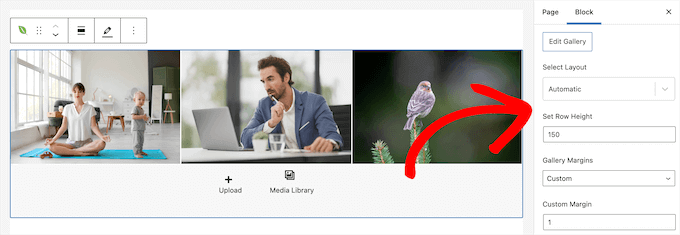
It also comes with a Gutenberg block you can use to add image galleries directly to your WordPress posts and pages.
After you add the block, you can customize the gallery settings from your page or post editor.
NextGEN Gallery
NextGEN Gallery offers a slightly different interface than the other gallery plugins, but it’s still easy for beginners. It includes a helpful gallery wizard to walk you through the process of creating your first gallery.
You can use the default ‘Add Gallery / Images’ page to upload images and add a new gallery.
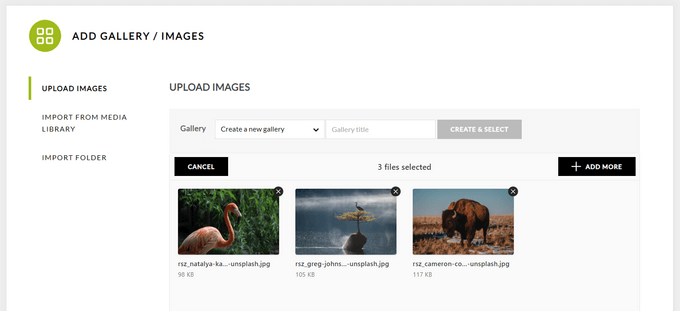
However, the easiest way to add a new image gallery is to open up a page or post where you want to add a gallery and then select the ‘NextGEN Gallery’ block.
This opens up a popup where you can choose a gallery template, upload your images, and customize how your gallery looks.
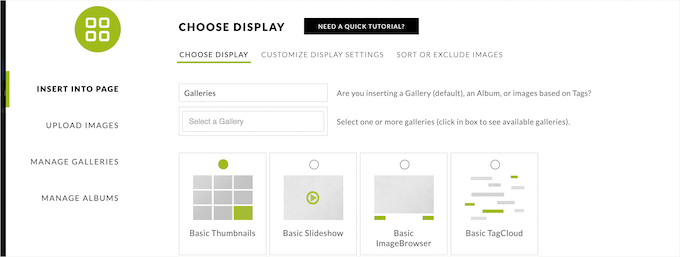
After you’ve finished customizing your gallery, it will automatically embed in your page or post.
Modula
Modula uses a similar approach to creating new galleries. Simply upload your files or select them from the media library to create a new gallery.
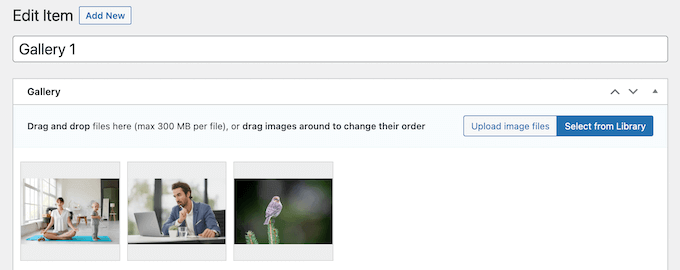
Below your gallery images, you’ll find the gallery settings in organized tabs.
Here you can change the gallery style, add image lightboxes, add captions, enable social sharing, and more.
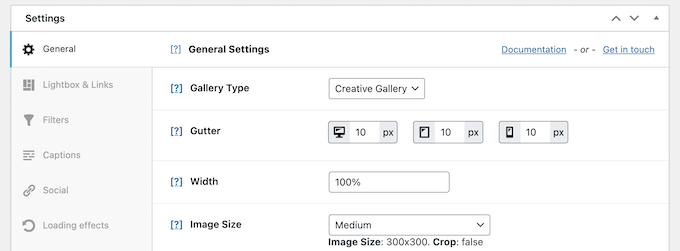
You can use the included Gutenberg block or gallery shortcode to embed your galleries in your posts and pages.
FooGallery
Like the other plugins, FooGallery has a similar process for creating a gallery. You need to upload the files or select them from your media library.
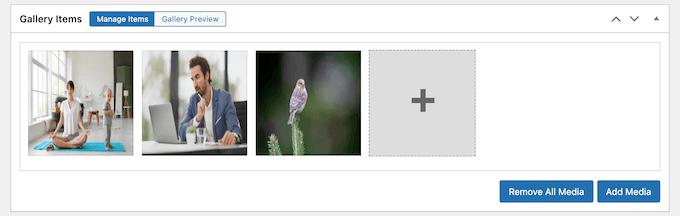
After that, you can control your gallery settings in the section below your gallery images.
You can control the appearance, lightbox effects, hover effects, captions, EXIF data, and more.

If you don’t have a gallery page yet, then you can simply click the ‘Create Gallery Page’ button, and the plugin will automatically create a new page and add your gallery to it.
Alternatively, you can use the included shortcode and Gutenberg block to embed your gallery into a post, page, or widget area.
Features: Which WordPress Gallery Plugin Offers More Choices?
To create a beautiful photo gallery, you need functionality like lightboxes, full-screen images, albums, pagination, navigation, effects, password protection, social media sharing, and more.
You want a plugin that has the features you need but doesn’t have so many features that it slows down your WordPress blog.
Let’s take a look at how each of the plugins handles the balance between features and functionality.
Envira Gallery
Envira Gallery is a mobile responsive plugin that’ll help you create galleries that look good on any screen size and device.
It comes with a template library you can use to create beautiful galleries easily. Plus, there are settings that let you choose thumbnail sizes, gallery layouts, animations, effects, and add image meta tags to improve organization.
Aside from the built-in features Envira has, there are additional features you can access by installing plugin addons.

These will give you features like social sharing on your gallery images, video galleries, slideshows, WooCommerce support, password protection, watermarking, EXIF data, image proofing, zoom functionality, syncing with Adobe Lightroom, and more.
NextGEN Gallery
NextGEN Gallery is a more advanced gallery plugin. It lets you easily create simple image galleries and has features to suit professional photographers, graphic designers, and visual artists.
There are multiple gallery styles to choose from, along with a set of customization options, including sizes, transitions, styles, and more.
Beyond the gallery building features, you’ll find a full gallery management solution that lets you batch upload photos, import metadata, group galleries into albums, delete and sort photos, and more.
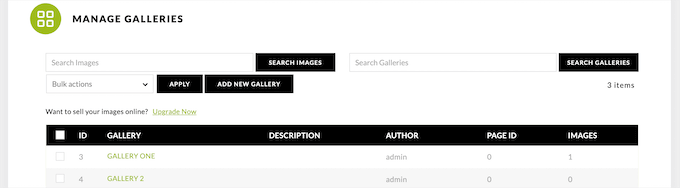
The pro version of the plugin gives you more gallery templates, image lightboxes, eCommerce support, image protection, and the ability to sell prints directly from your website.
Modula
Modula is another plugin built to help you create mobile responsive galleries. It comes with standard features like lightbox popups, custom layouts, hover effects, social sharing, and more.
There’s a unique custom grid feature that lets you drag and drop your images to create your own custom grid for galleries. This makes it easy to modify and adjust the size and layout of your images in real time.

You’ll also find some unique features that let you add a download button to your images, shuffle images on page refresh, let users filter your galleries, and more.
FooGallery
FooGallery shines in its ability to help you create stunning image galleries as fast as possible. It comes with a built-in template library you can use to form the foundation for your galleries.

The plugin is mobile responsive and supports lazy loading for faster website loading speeds.
It also comes with customization features so you can control the thumbnail size, change the borders, add loading icons, hover effects, and more.
Plus, it integrates with popular SEO plugins like AIOSEO, so you can improve your image SEO and get more traffic from the search engines.
Compatibility: Which WordPress Gallery Plugin is the Most Flexible?
WordPress gives you the freedom to change themes, plugins, switch WordPress hosts, and even move to another popular WordPress alternative.
Let’s look at how each plugin handles importing, exporting, and backing up your photo gallery data.
Envira Gallery
Envira stores all your photo galleries as custom post types in the WordPress database. It stores your media files using the default WordPress media location. This means if you backup your WordPress site, then you will have all Envira Gallery data backed up.
Envira also allows you to import/export your individual galleries with a couple clicks. This means that you can move a single gallery from one WordPress site to another.

When you move your WordPress site, Envira will automatically detect it and show you an option to fix the migration. These features make Envira Gallery the most reliable photo gallery plugin for WordPress.
NextGEN Gallery
NextGEN Gallery does not come with an import/export feature. Since it stores your data in separate database tables, this means you will need to configure your WordPress backup plugin to include those tables.
NextGEN Gallery also stores your images in a separate folder. If you want to create a backup for them, then you will need to download the folder separately to your computer.
Modula
Similar to Envira, Modula also uses a custom WordPress content type to store your photo galleries. This means you can save your photo galleries with your WordPress backup and restore them from backup when you restore your WordPress site.
However, Modula doesn’t allow you to import/export individual galleries.
FooGallery
FooGallery also stores your galleries as custom post types in the WordPress database. If you backup your WordPress site, then you will have a FooGallery data backup as well.
If you just want to export individual galleries, then there is no option for that. However, there is an extension that lets you import other galleries.
Pricing: How Much Does Each WordPress Gallery Plugin Cost?
Cost is another important factor in choosing the best WordPress gallery plugin for your needs.
All four gallery plugins highlighted above have free versions you can use to create simple image galleries. To access even more features, you’ll need to pay for a premium version.
Here’s the price of a single site license of the cheapest plan for each plugin.
| Gallery Plugin | Single Site License |
| Envira Gallery | $39.50 |
| NextGEN | $69.50 |
| Modula | $31 |
| FooGallery | $33.99 |
For every plugin, the price will increase based on the features you require.
Both Envira Gallery and FooGallery will cost $99 for access to nearly all of the premium features. While, Modula has the cheapest plugin at $81 with comparable features.
NextGEN has the most expensive premium plan at $139.50. However, this includes advanced features like built-in eCommerce, Stripe and PayPal integrations, automated print fulfillment, and more.
What’s the Best WordPress Gallery Plugin for Your WordPress Website?
After comparing these plugins, we can confidently say that Envira Gallery is the best all around WordPress slider plugin.
It’s very fast, easy to use, can be completely customized, and has a large extension library to add virtually any feature you need.
If you’re looking for more advanced gallery management features and the ability to sell photos like a pro, then NextGEN Gallery can also be a great choice.
Modula is another solid option if you’re looking for an easy to use image gallery plugin with a custom drag and drop gallery creator.
We hope this article helped you pick the best WordPress gallery plugin for your website. You may also want to see our guide on how to choose the best web design software and our expert picks of the best email marketing software for small business.
If you liked this article, then please subscribe to our YouTube Channel for WordPress video tutorials. You can also find us on Twitter and Facebook.

Jiří Vaněk
I initially used the NextGen gallery for many years and was satisfied with it. However, when I switched to Elementor, I got used to its internal gallery. But it lacks many effects I miss, like the zoom effect, etc. After reading several reviews on WPBeginner, I am now considering Envira for its complexity and the variety of interesting effects, which are particularly useful for a WooCommerce store. So far, it seems to be the best gallery option. Unfortunately, it’s one of the more expensive ones.
Yash Khaire
Hey! wpbeginners you are always helpful to me, even sometimes your post is in third or fourth rank on Google but I always look forward to visiting you. Now This Envira worked for me. Thank you!
WPBeginner Support
Glad to hear our guides are helpful!
Admin
Wayne Haston
Do any of these allow for site users to upload and manage their own galleries?
WPBeginner Support
You would want to reach out to their support to see if they have added that functionality to their plugin.
Admin
Ranu
I would like to know if there is a gallery plugin that supports AMP. I have been trying to search the answer but I haven’t found anything. I’m using NextGEN Gallery and it’s decent for the non AMP site. But when I opened it on the AMP version it looked messy..
WPBeginner Support
You would want to reach out to gallery plugins for their current AMP support options.
Admin
Deb Marvin
Is it wise to use more than one gallery plug-in on a WordPress site?
WPBeginner Support
We would recommend using only one plugin for customizing your gallery’s display at a time
Admin
Peter Nicholson
Is there a gallery that allows the filename to be displayed below the image instead of the caption. My filenames are descriptive and not in the exif data and are used to describe and select images. There are 1700 images so copy paste the filename to the caption is not an option
WPBeginner Support
You would want to reach out to the gallery plugin’s support for the options available.
Admin
Patrick Neal
im looking for a video gallery plugin that allows me to share a link directly to each video.
WPBeginner Support
The gallery plugins we recommend should be able to handle that but if you’re looking for specific features, you would want to reach out to the support for the plugins directly.
Admin
Marshall
1/13/19 In its current state of disarray and +20 hour learning curve I would not give NGG a one star rating and would give it a -3 star rating. All you have to do is look at the support page on the plugin page at wordpress.org
WPBeginner Support
Thank you for your feedback on the plugin, we’ll be sure to take a look and to take that into account.
Admin
M Yeashin Kamal
Thanks for sharing.Really a very great list of WordPress related resource. I know certain of them, but some new ones I never heard of. Thanks again. Hope that you will continue to share such the informative articles.
WPBeginner Support
Glad you found our article helpful, we’ll certainly do our best to make sure our articles are informative
Admin