


Are you looking to engage new users by redirecting them to a different page after they first leave a comment?
Comments are a great way to keep your users engaged and build a strong community around your content. Tiny hacks like automatically redirecting first-time commenters to a thank you page will help you improve the user experience and stand out.
In this article, we will show you how to easily redirect your users’ attention with comment redirects in WordPress.

Why Redirect First-Time Commenters on Your WordPress Blog?
When your WordPress blog has an active and interesting comments section, users will feel more engaged. This can create a sense of community that encourages visitors to stay longer.
Since WordPress comments are so important, you should do everything you can to get more comments on your blog posts.
Using a comment redirect is an excellent way to recognize first-time commenters and thank them for their interest in your website. For example, you can redirect users to a Thank You page after they leave their first comment. Then, they are more likely to keep interacting with your content and leave more comments.
With that being said, let’s look at how to redirect your users’ attention with a comment redirect. You can use the links below to quickly navigate through the article:
Method 1: Redirecting Your User’s Attention With Thrive Comments (Recommended)
Thrive Comments is the best WordPress comments plugin that allows you to take total control over your blog’s comments, including redirecting new commenters to a page of your choice.
You can learn more about the plugin in our detailed Thrive Comments review. Or if you prefer to use a free plugin, then please see Method 2 below.
First, you need to visit the Thrive Themes website and sign up for an account.

After you’ve done that, you’ll see the account dashboard.
Next, you need to click the ‘Download and install the Thrive Product Manager plugin’ link. This will give your WordPress website access to your Thrive products.
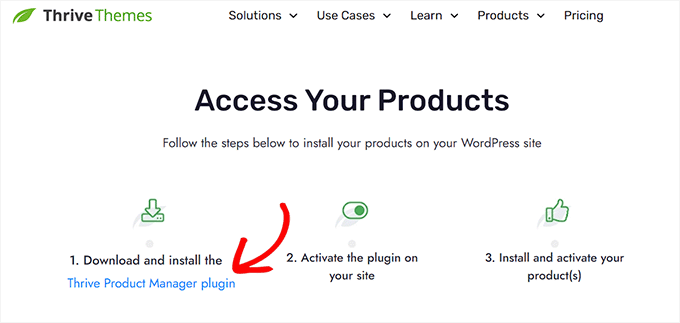
Now, you can install and activate the Thrive Product Manager plugin you downloaded. For detailed instructions, see our guide on how to install a WordPress plugin.
Upon activation, you can navigate to Product Manager in your admin sidebar. You need to click the ‘Log into my account’ button.
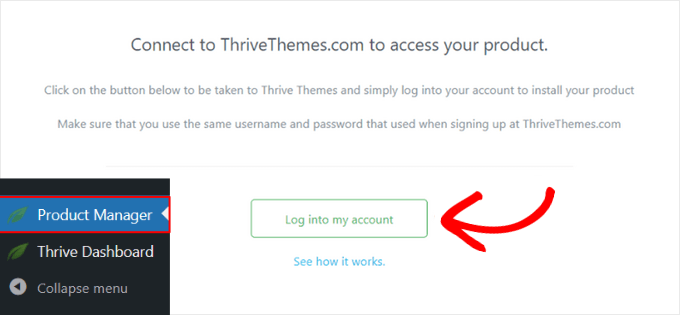
Once you have logged in to your account, you’ll see the Thrive Product Manager dashboard.
You need to select ‘Thrive Comments’, then click the ‘Install selected products’ button.
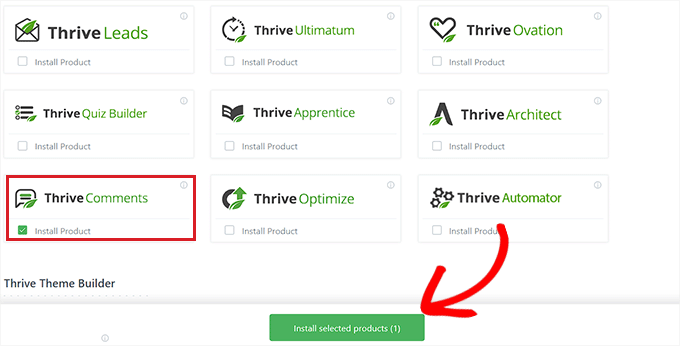
Once the plugin is installed, you will see a success message saying, ‘Ready to use’. Thrive Comments has been successfully activated on your site and is ready for you to configure it.
You can now navigate to the Thrive Dashboard » Thrive Comments page.
This page displays the Thrive Comments menu. You’ll need to expand the ‘Comment Conversion’ section by clicking the arrow on the right.
These settings allow you to choose what happens after a visitor leaves a comment for the first time. There are options to send them a message, share on social media, show them related posts, redirect them to a new page, or display an opt-in form.
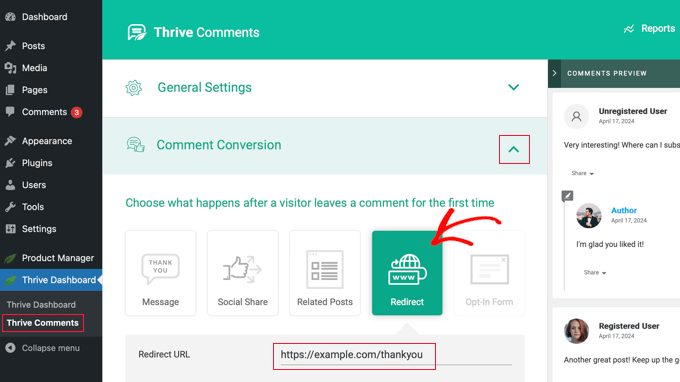
Simply click the ‘Redirect’ option, and then enter the URL of the page you wish to send commenters to. The new settings will be automatically saved.
You could redirect users to a simple thank you page with an email signup form, social media links, and your most popular posts. Or you could paste the URL of a landing page, special offer, or a specific lead magnet page.
We include a section at the end of this article with helpful tips on creating a powerful comment redirect page.
To see the comment redirect in action, you first need to log out of your WordPress website. After that, you can go to any post and leave a comment using a random name and email address.
You will be automatically redirected to your selected page when you submit the comment.
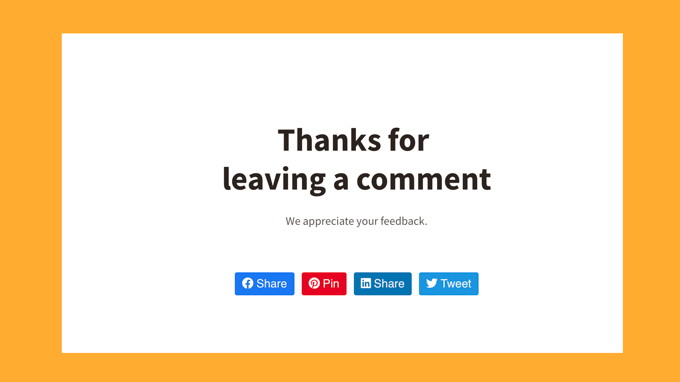
Redirecting new commenters to a specific page is just the start of what you can do with Thrive Comments.
You can also use this plugin to allow users to like or dislike comments, feature or bury comments, notify users only on replies to their comments, and much more.
Method 2: Redirecting Your User’s Attention With Comment Hacks (Free)
If you are looking for a free plugin option, then this method is for you.
The first thing you need to do is install and activate the Comment Hacks plugin. For more details, see our step-by-step guide on how to install a WordPress plugin.
Upon activation, you need to visit the Settings » Comment Hacks page to configure the plugin.
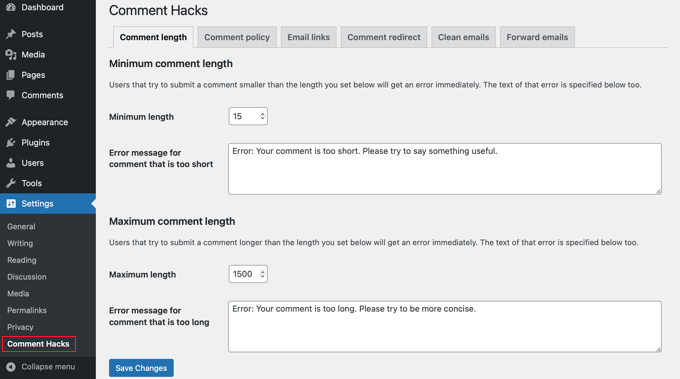
The Comment Hacks plugin combines many useful hacks that can improve the default WordPress comment system. You can learn about them in our guide on how to install and set up Comment Hacks for WordPress.
But right now, we will focus on the comment redirect feature in the plugin. Go ahead and click on the ‘Comment redirect’ tab on the settings page.
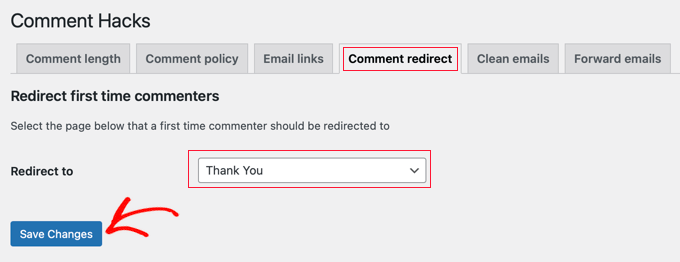
Here, you need to select a page where you want to redirect commenters after leaving their first comment.
After selecting your page, simply click on the ‘Save Changes’ button to store your settings.
Creating a Powerful Comment Redirect Page
The Thrive Comments and Comment Hacks plugins only redirect first-time commenters. This means you only get one shot at leaving a meaningful impression and converting those users into customers or loyal readers.
That’s why we recommend carefully choosing and designing the page that you will redirect commenters to.
First, you will want to set a goal for your comment direct page. This goal could be any task you would like the user to perform.
For example, you might encourage new commenters to buy a product, sign up for your email list, follow you on social media, and more.
Then, we recommend spending some time creating a powerful comment redirect page.
You can design a beautiful custom page using a drag-and-drop page builder plugin. We recommend using SeedProd because it has several ready-to-use page templates that will work perfectly for this purpose.
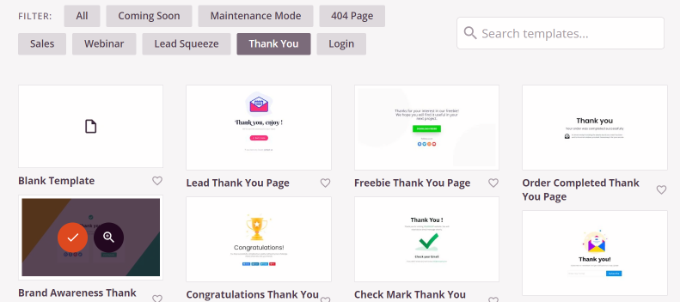
SeedProd allows you to add blocks for contact forms, social profiles, videos, text, and more.
For more details, you can see our guide on how to create a thank you page in WordPress.
Expert Guides on Improving WordPress Comments
Now that you know how to use comment redirects, you may like to see some other articles related to increasing user engagement with comments in WordPress:
- Ways to Get More Comments on Your WordPress Blog Posts
- How to Allow Users to Like or Dislike Comments in WordPress
- How to Allow Your Users to Subscribe to Comments in WordPress
- How to Notify Users Only on Replies to Their WordPress Comments
- How to Feature or Bury Comments in WordPress (Easy Ways)
- How to Display the Most Recent Comments First in WordPress
- How to Make Blog Post Comments Searchable in WordPress
We hope this article helped you learn how to redirect your user’s attention with a comment redirect in WordPress. You may also want to see these actionable tips to drive traffic to your WordPress site and our expert pick of the best plugins to improve WordPress comments.
If you liked this article, then please subscribe to our YouTube Channel for WordPress video tutorials. You can also find us on Twitter and Facebook.




Syed Balkhi says
Hey WPBeginner readers,
Did you know you can win exciting prizes by commenting on WPBeginner?
Every month, our top blog commenters will win HUGE rewards, including premium WordPress plugin licenses and cash prizes.
You can get more details about the contest from here.
Start sharing your thoughts below to stand a chance to win!
hadil says
thank you very nice website article
WPBeginner Support says
You’re welcome, glad you like our site
Admin
Julien Guiard says
Hello. Si there’s a way to redirect just for the first comment with a snippets?
Thank you