


If you have been blogging for a few years, then the list of your published posts might be too long to fit in your WordPress sidebar. A cluttered sidebar might not make the best impression on readers, either.
Compact archives are an excellent way to streamline your site’s navigation and improve the user experience. By presenting your archives in a cleaner, more concise format, you can make it easier for visitors to explore your content without feeling overwhelmed.
In this article, we will show you how to easily create compact archives on your WordPress website, step by step.
Why Do You Need Compact Archives in WordPress?
Adding an archive on your WordPress site allows you to easily display your previously published content, increasing engagement and time spent on your website.
By default, WordPress offers an Archives block that can be added to the sidebar of your WordPress blog.
However, this block only allows you to display your archives as a long list or a dropdown menu.
A list will make your site look cluttered, while a dropdown menu can be easily overlooked by users as it is not noticeable.
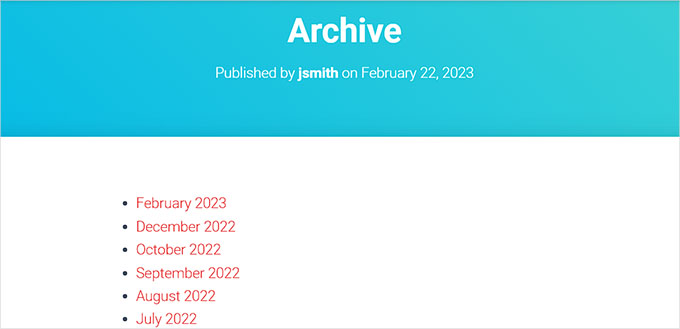
By creating compact archives, you can easily display your archives in the WordPress sidebar without taking up much space. You can also show them on your About page or even create a dedicated archives section.
Compact archives will make it easier for users to navigate through your site and find relevant content, enhancing the user experience.
That being said, let’s take a look at how to easily add compact archives in WordPress, step by step:
How to Add Compact Archives in WordPress
First, you need to install and activate the Compact Archives plugin. For detailed instructions, see our beginner’s guide on how to install a WordPress plugin.
Now, the plugin offers three styles to display compact archives on your website.
Style 1: Relaxed Three-Letter Month Initials

Style 2: Compact Monthly Initials

Style 3. Numeric Block

There are multiple ways to easily display compact archives.
In this tutorial, we will be showing you all four methods, and you can choose the one that you like the most.
Method 1: Add Compact Archives in WordPress Posts or Pages
If you want to add compact archives to your WordPress posts or pages, then this method is for you.
It is super easy to add compact archives because the plugin comes with an easy-to-use block that you can add to your post or page.
First, you need to open an existing or new post/page in the block editor from the WordPress admin sidebar.
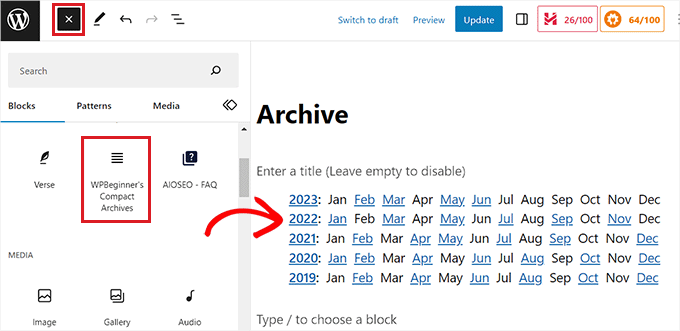
Once you are there, click the ‘Add Block’ (+) button at the top left corner of the screen to open up the block menu.
From here, find and add the WPBeginner’s Compact Archives block to your WordPress post or page.
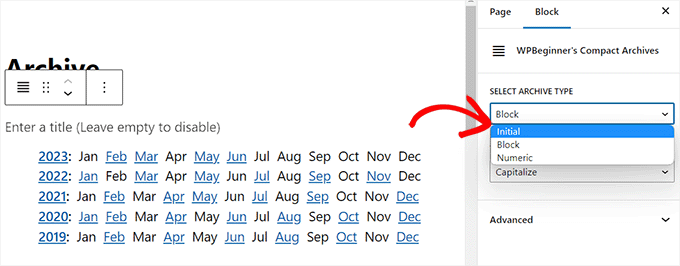
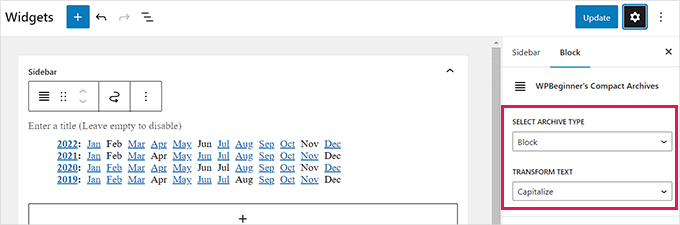
After that, you can choose a style for your archives from the block panel in the right corner of the screen.
Simply choose a style of your liking from the dropdown menu under the ‘Select Archive Type’ option.
You can also select if you want your archive text to be capitalized or uppercase.
To do this, open the dropdown menu under the ‘Transform Text’ option and select a text style.
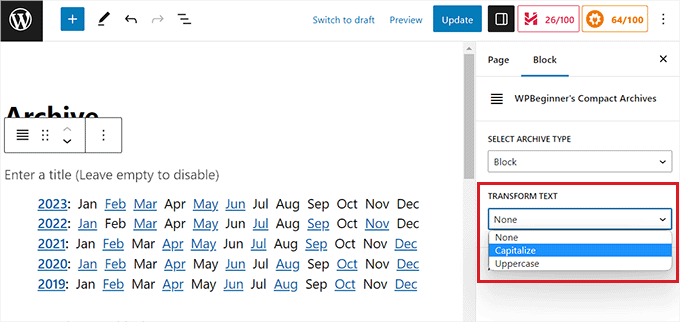
Once you are satisfied with your choices, simply click the ‘Publish’ or ‘Update’ button to store your settings.
Now, you can visit your WordPress site to view your archives page.
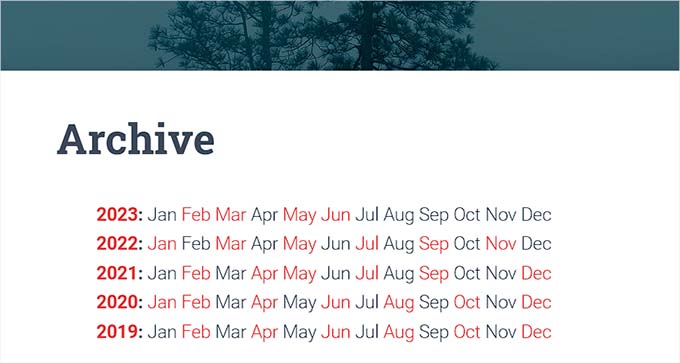
Method 2: Add Compact Archives as a Widget
If you want to add compact archives as a widget, then this method is for you.
Adding the Compact Archives Block in Full Site Editor
If you are using a block-based theme on your website, then you will have to add the WPBeginners’ Compact Archives block using the full site editor.
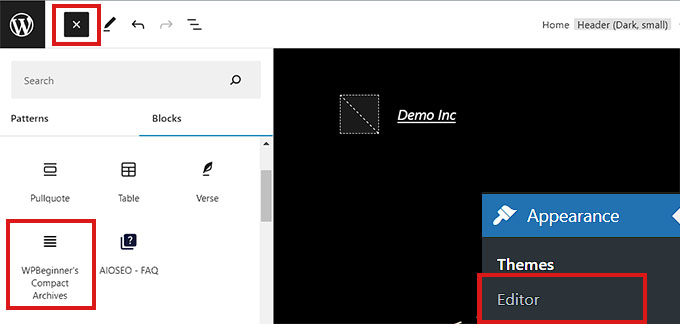
First, you need to visit the Appearance » Editor page from the WordPress admin sidebar to launch the full site editor.
From here, click the ‘Add Block’ (+) button at the top-left corner of the screen to open up the block menu.
Next, simply locate and add the WPBeginner’s Compact Archives block to your preferred place on the website.
Once you have added the block, you can configure its style and text settings from the block panel on the right.
Finally, don’t forget to click on the ‘Save’ button at the top to store your settings.
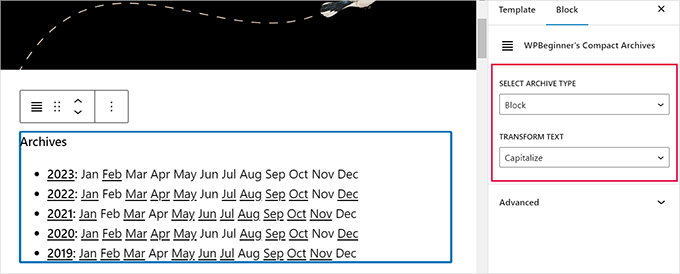
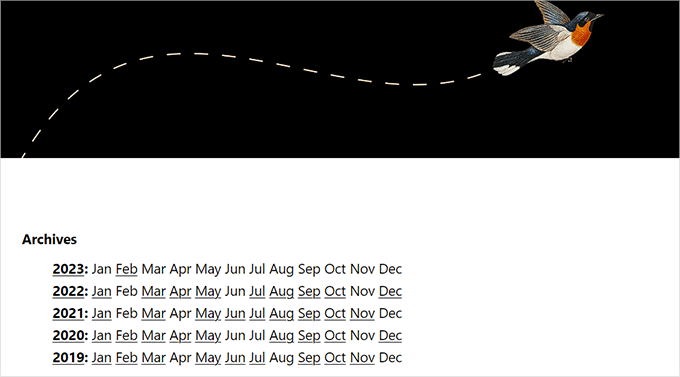
Now, visit your website to view your compact archives.
This is how it looked like on our demo site.
Adding the Compact Archives Block Using Widgets
If you are using a classic WordPress theme, then this method is for you.
First, you have to visit the Appearance » Widgets page from the WordPress dashboard.
Once you are there, click the ‘Add Block’ (+) button at the top left corner to open up the block menu.
From here, locate and add the WPBeginner’s Compact Archives block to the sidebar tab.
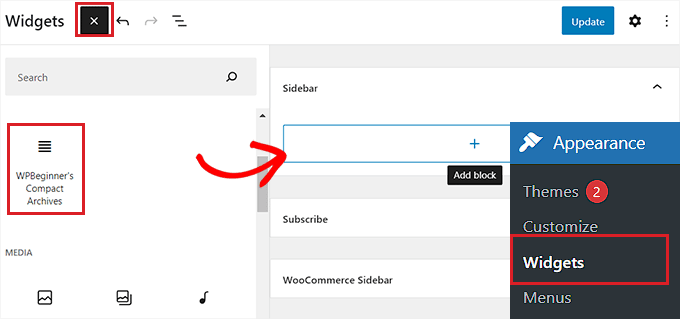
Once the Compact Archives block has been added, you can change the style and text of your archive by configuring the block settings in the panel on the right.
Finally, don’t forget to click the ‘Update’ button at the top to save your changes.
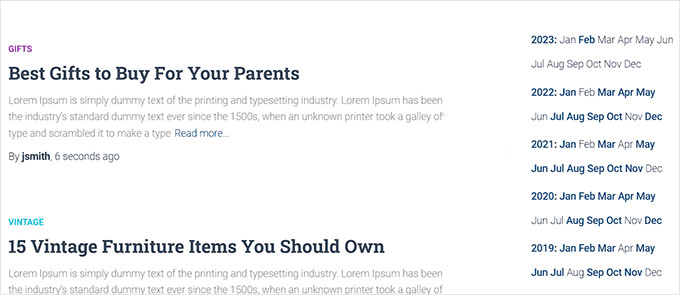
You can then visit your website to see the compact archives in your sidebar.
It looked like this on our demo site.
Method 3: Displaying Compact Archives in Template Files
If you are making a custom WordPress theme or want to display archives in a theme template file, Compact Archives comes with handy template tags that you can use.
Simply add the following template tag to your code:
<ul> <?php compact_archive(); ?> </ul>
After adding the tag, compact archives will be added to your WordPress page.
However, if you want to add a style to your archive, you can do so by adding the following template tag in your code:
<ul>
<?php compact_archive($style='initial', $before='<li>', $after='</li>'); ?>
</ul>
For example, $style == 'initial' will display only month name initials and should fit right inside a sidebar. Using$style == 'block' will fit the main column of a page. Using $style == 'numeric' will display numeric months.
Method 4: Add Compact Archives to Your HTML Sitemap
If you want to create an HTML sitemap page in WordPress and display your compact archives with it, then this method is for you.
All in One SEO is the best WordPress SEO plugin on the market that allows you to easily optimize your website for search engines and boost your rankings.
It even lets you easily add an HTML sitemap to your WordPress site.

First, you will need to install and activate the All in One SEO for WordPress plugin. For more details, see our tutorial on how to install a WordPress plugin.
Note: AIOSEO also has a free version that you can use to create an HTML sitemap. However, we will be using the premium plan for more features.
Upon activation, the plugin will launch the setup wizard. Simply follow the on-screen instructions to set up the plugin or see our guide on how to properly set up All in One SEO for WordPress.
Once you have done that, head over to the All in One SEO » Sitemaps page from the WordPress admin sidebar.
From here, switch to the ‘HTML Sitemap’ tab from the top and make sure that the ‘Enable Sitemap’ toggle is turned on.
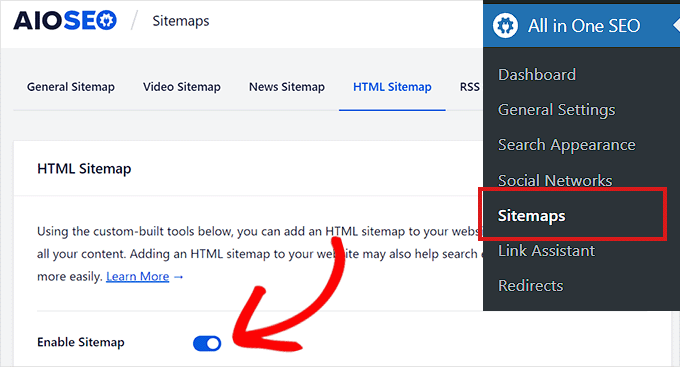
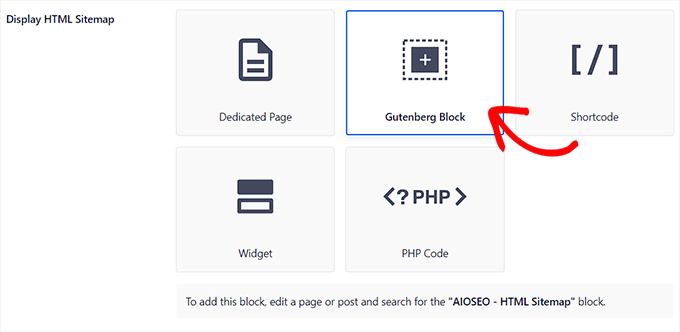
Next, you need to choose how you want to display your HTML sitemap. You can display your sitemap using a shortcode, PHP code, a block, or as a widget.
For this tutorial, we will be choosing the ‘Gutenberg Block’ option.
If you choose this method, then you will have to add the AIOSEO – HTML Sitemap block to the page where you wish to display the sitemap.
For more detailed instructions, you may want to see our tutorial on how to add an HTML sitemap page in WordPress.
Next, you need to scroll down to the ‘Compact Archives’ option in the ‘HTML Sitemap Settings’ section.
From here, toggle the ‘Compact Archives’ switch to ‘Enabled’.
Keep in mind that you don’t need to install the Compact Archives plugin for this feature to work.
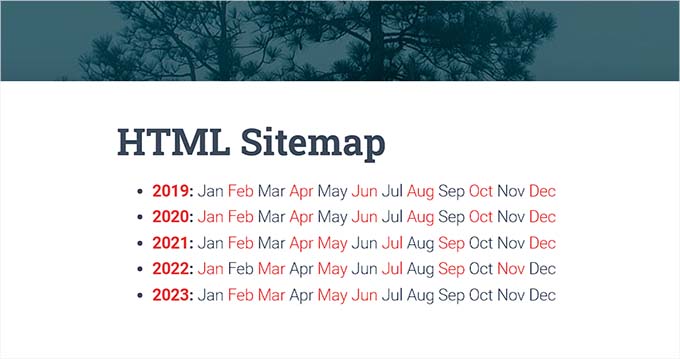
Now, your HTML sitemap will be displayed in a compact date archive format.
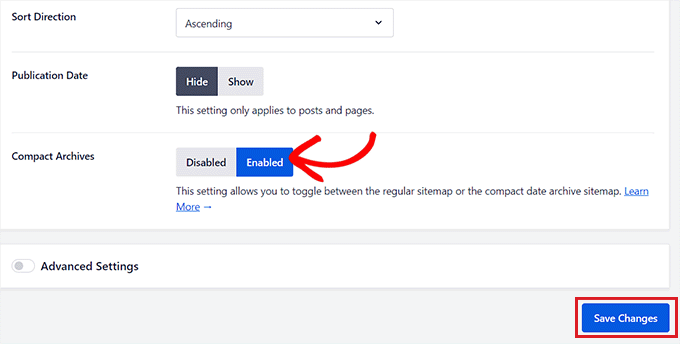
Finally, don’t forget to click on the ‘Save Changes’ button to store your settings.
Next, open an existing or new page on which you want to display the sitemap from the admin sidebar.
From here, simply click on the ‘Add Block’ (+) button at the top and add the AIOSEO-HTML Sitemap block to your page.
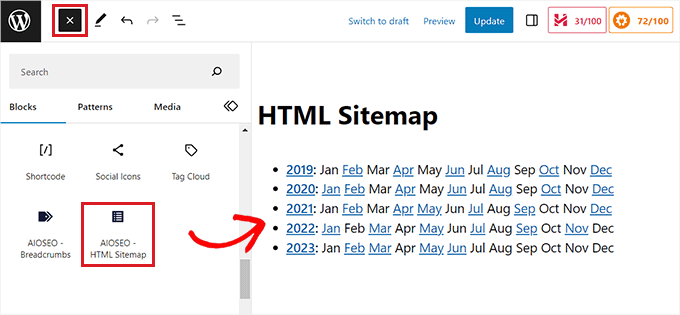
Finally, don’t forget to click the ‘Publish’ or ‘Update’ button to save your changes.
Your compact archives HTML Sitemap will look like this.
Bonus: Create a Custom Archives Page in WordPress
Apart from adding an archives block to an existing page, you can also create a custom archives page on your WordPress site with SeedProd.
It is the best WordPress page builder on the market that comes with a drag-and-drop builder, premade templates, and a ‘Posts’ block that allows you to display your blog posts attractively.
First, you need to install and activate SeedProd. For detailed instructions, see our beginner’s guide on how to install a WordPress plugin.
Upon activation, visit the SeedProd » Landing Pages section from the WordPress dashboard and click the ‘Add New Landing Page’ button.
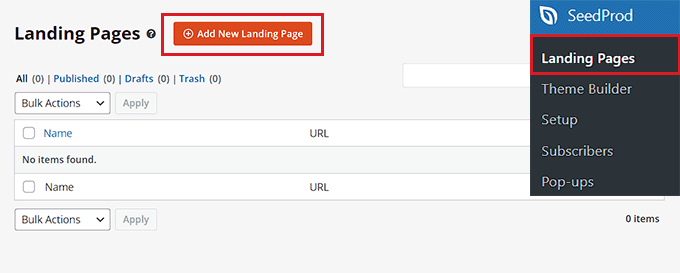
This will take you to the ‘Choose a New Page Template’ screen, where you will notice numerous premade templates offered by SeedProd that you can use on your site.
Once you choose a template, it will be launched in SeedProd’s drag-and-drop builder, where you can customize it using blocks from the left column.
For details, see our tutorial on how to create a landing page in WordPress.
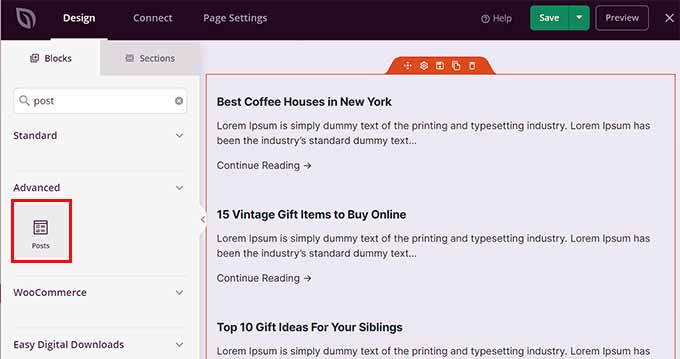
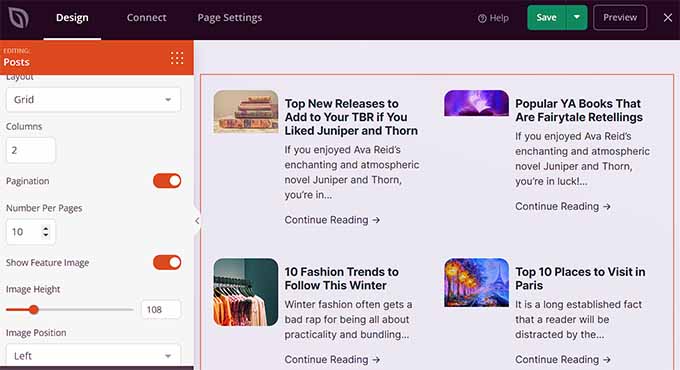
Now, to display your posts on the Archives page, simply locate and add the ‘Posts’ block from the left column.
After that, you can choose the block’s layout, select the order, configure pagination, use columns, and more.
Once you are satisfied, don’t forget to click the ‘Save’ and ‘Publish’ button at the top to store your settings.
For more information, you may want to see our tutorial on how to create a custom archives page in WordPress.
We hope this article helped you learn how to easily create compact archives in WordPress. You may also want to see our step-by-step tutorial on how to create custom taxonomies in WordPress and our guide on categories vs tags – SEO best strategies for sorting your content.
If you liked this article, then please subscribe to our YouTube Channel for WordPress video tutorials. You can also find us on Twitter and Facebook.





Janice Daniels
I would like to organize articles written by name categories, not dates. Is there a way to how a page with titles such as Elections or Songs and have a brief commentary of what the post says with a link to the full post?
WPBeginner Support
For what it sounds like you’re wanting, you would want to add a link to the category in your menu to use WordPress’ default display for the category pages. We show how to do that in our article here: https://www.wpbeginner.com/beginners-guide/how-to-add-navigation-menu-in-wordpress-beginners-guide/
Admin
Amy Sue
The “By Date” portion of Compact Archives isn’t working on my blog. I’m wondering if that’s because I had to move my blog to a new web host, or did I mess something up in it? I know enough html/css to be dangerous but usually code via the “trial and error and error and error” method so I probably messed something up…
Hariharakumar
This one works best for default posts. My blog has custom posts I want to display them as well in compact archives. What should I do now?
WPBeginner Support
We tested the plugin with WordPress 4.3. It is working fine on our end.
Admin
Dan
Please update this plugin. It seems to cause numerous update issues for other plugins now because it hasn’t been updated in over two years.
Vince
This plug-in hasn’t been updated in two+ years, and in particular hasn’t been updated to get rid of the deprecated-as-of-4.3 old constructor calling. Nor have you responded to any of the support requests in the last year.
Are you still supporting this plugin?
WPBeginner Support
Yes. The plugin is now updated and tested with the latest version of WordPress.
Admin
Ameya
Hi,
I’d like to know if there is anything special in this plugin? I use SRG Clean Archives. Do you know anything about this plugin? Is it better or I should use the one you suggested?
Ameya
Editorial Staff
Never used the plugin you are suggesting, so cannot tell you which one is better. This is the one that we use. It is up to you to make the final decision.
Admin