


Do you want to limit comment length in WordPress?
WordPress comments encourage discussions around your blog post content. However, you may find that comments that are very brief or overly long are not very helpful.
In this article, we will show you how to easily limit comment length in WordPress.
Why Limit Comment Length in WordPress?
An active comment area is a great way to build a community around your WordPress blog. Visitors can give feedback, ask questions, and offer their own points of view on the topic.
However, not all comments are helpful.
We’ve been moderating WordPress comments for well over a decade. In our experience, we’ve found that the most helpful comments are above 60 characters and below 5000 characters in length.
One-word comments are usually not very helpful. In most cases, they are spam comments where the author just wants a backlink from your site.
On the other hand, long comments above 5,000 characters are often rants or complaints. Sometimes, they are not even relevant to the article.
Setting comment length limits in WordPress can improve the overall quality of your comments and discourage spam comments. However, there is no built-in way of doing this in WordPress.
That being said, let’s take a look at how to control comment length in WordPress by setting minimum and maximum limits.
How to Limit Comment Length in WordPress
You can limit comment length in WordPress by adding code to your functions.php file. However, keep in mind that the smallest error while entering the code can break your site and make it inaccessible.
That’s why we recommend always using WPCode to insert code snippets into your WordPress site. It is the best WordPress code snippets plugin on the market that makes it safe and easy to add custom code.
First, you need to install and activate the WPCode plugin. For detailed instructions, see our step-by-step guide on how to install a WordPress plugin.
Note: WPCode also has a free version that you can use for this tutorial. However, upgrading to the paid plan will give you access to more features like a larger code snippets library, conditional logic, and more.
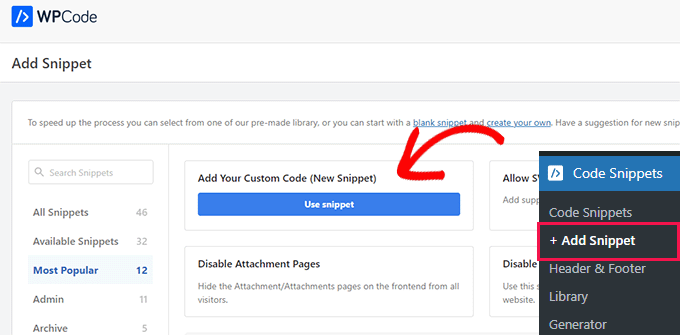
Upon activation, visit the Code Snippets » + Add Snippet page from the WordPress admin sidebar.
Here, click the ‘Use Snippet’ button under the ‘Add Your Custom Code (New Snippet)’ option.
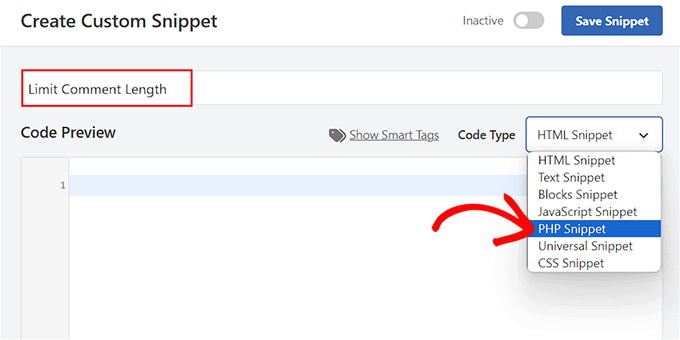
This will take you to the ‘Create Custom Snippet’ page, where you can start by adding a title for your code snippet. This name won’t be displayed on the website front end and can be anything you like.
Next, choose the ‘PHP Snippet’ option as the Code Type from the dropdown menu in the right corner of the screen.
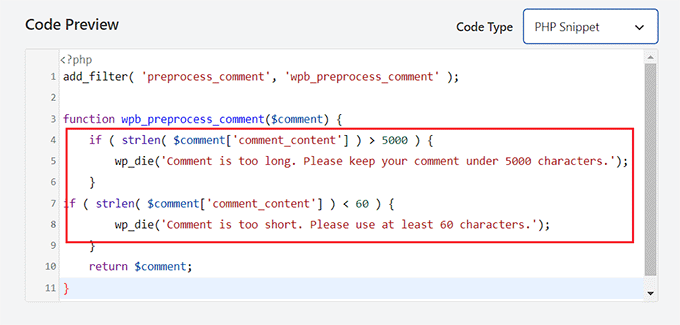
Once you have done that, simply copy and paste the following code snippet into the ‘Code Preview’ box:
add_filter( 'preprocess_comment', 'wpb_preprocess_comment' );

function wpb_preprocess_comment($comment) {
    if ( strlen( $comment['comment_content'] ) > 5000 ) {
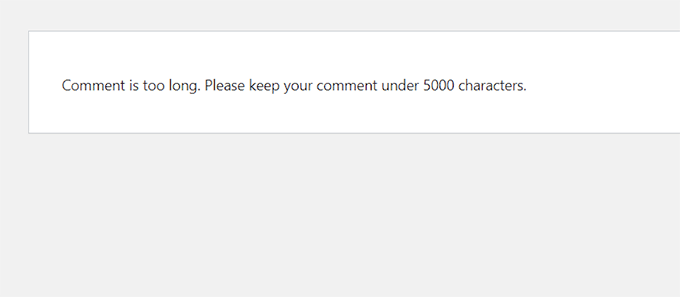
        wp_die('Comment is too long. Please keep your comment under 5000 characters.');
    }
if ( strlen( $comment['comment_content'] ) < 60 ) {
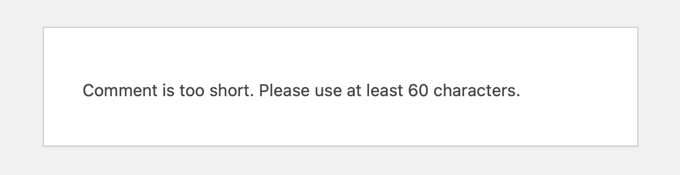
        wp_die('Comment is too short. Please use at least 60 characters.');
    }
    return $comment;
}
This code snippet works by adding a filter hook to preprocess_comment. This filter is run before WordPress saves any comments to the database or performs any pre-processing on submitted comments.
It checks the comment length and displays an error message if it is too short or too long. By default, the comment limit is set to a minimum of 60 characters and a maximum of 5,000 characters in this snippet.
However, to set your own comment limit, just replace the number 5,000 in the code with your maximum limit number.
Similarly, you can replace the number 60 in the code to set a different minimum comment limit on your WordPress website.
You can also change the message that will be displayed on your website when a user exceeds or falls short of the comment limit. Simply type the sentence you want to display after the wp_die lines in the code.
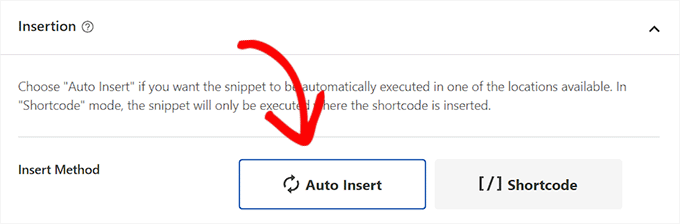
After that, scroll down to the ‘Insertion’ section and choose the ‘Auto Insert’ mode.
The custom code will be automatically executed on your website upon activation.
If you only want to limit comment length on specific website pages, then you can also do that.
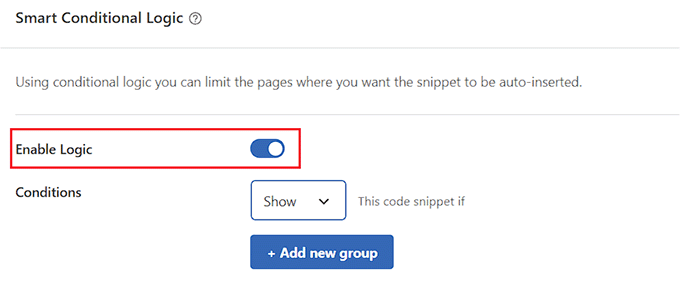
Simply scroll down to the ‘Conditional Logic’ section and toggle the ‘Enable Logic’ switch.
After that, choose the ‘Show’ option from the ‘Conditions’ dropdown menu and click the ‘+ Add new group’ button.
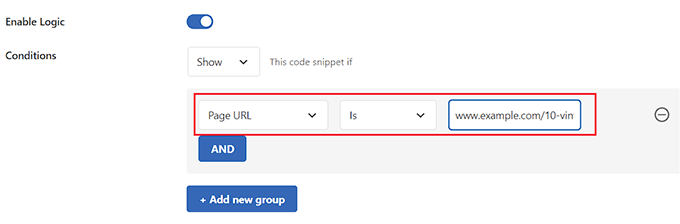
This will open a new tab where you must select the ‘Page URL’ option from the dropdown menu on the left.
Next, type the URL of the page where you want to limit the comment length in the field on the right.
Now, the code snippet will only be activated on the page with the URL you have just entered.
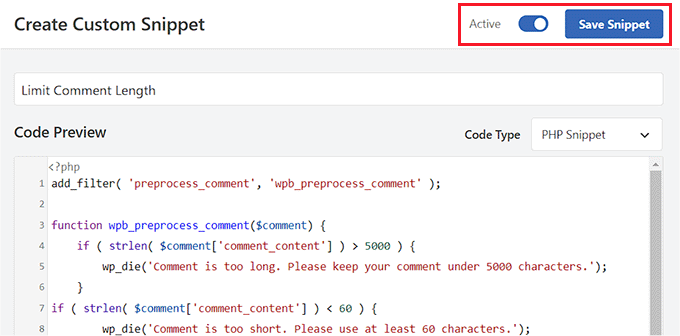
Scroll back to the top of the page and toggle the ‘Inactive’ switch to ‘Active’.
Finally, click the ‘Save Snippet’ button to store your settings.
Now, when a user types a comment that falls short of your minimum comment length, this message will be displayed on their screens.
Users won’t be able to post a comment until it is at least the minimum length you chose.
Similarly, when a user types a comment that exceeds your maximum limit, this message will be show on their screens.
This will help reduce rants and spam comments on your website.
Bonus: Improve Comment Engagement on Your WordPress Site
Controlling comment length is just one way to increase engagement in your WordPress comments section. This is great for keeping visitors on your site for longer and can even benefit your site’s SEO when users’ comments contain relevant keywords and add context to your content.
You can also easily further improve the comments section on your website using Thrive Comments.

It is the best WordPress comments plugin that comes with a dedicated moderation board, lets you lazy load comments, allows users to leave comments with their social media profiles, and more.
Plus, the tool enables you to add an upvote/downvote functionality to reduce spam and encourage interesting comments on your website.
Thrive Comments even lets you feature encouraging comments at the top and bury offensive or irrelevant comments at the bottom of the discussion section.
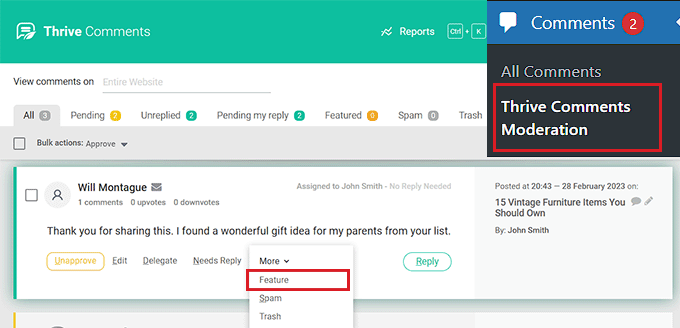
This allows you to reward users who are adding the most value to the discussion while politely discouraging other users from leaving unhelpful comments.
For detailed instructions, you may want to see our tutorial on how to feature or bury comments in WordPress.
We hope this tutorial helped you learn how to limit comment length in WordPress. You may also want to learn how to increase your blog traffic or check out our list of the best WordPress plugins to grow your site.
If you liked this article, then please subscribe to our YouTube Channel for WordPress video tutorials. You can also find us on Twitter and Facebook.





Syed Balkhi says
Hey WPBeginner readers,
Did you know you can win exciting prizes by commenting on WPBeginner?
Every month, our top blog commenters will win HUGE rewards, including premium WordPress plugin licenses and cash prizes.
You can get more details about the contest from here.
Start sharing your thoughts below to stand a chance to win!
Harsh Lahre says
Thank you for this code, I was tired deleting comments, each one is more than 20 thousand characters. This helps me a lot.
WPBeginner Support says
Glad we could help protect your site from those comments.
Admin
connie mergel says
The control comment length plugin is no longer available> Do you have any suggestions about another plugin that will do the same thing.
Thanks
WPBeginner Support says
While we don’t have a recommendation at the moment, we will be sure to update this article when we find a plugin we would recommend.
Admin
Binh Pham says
Awsome! Thank you so much for the tip.
WPBeginner Support says
You’re welcome, glad you found our guide helpful
Admin
Efe Obasuyi says
For your information, the “Control Comment Length” is no longer on WordPress directory. Thanks
WPBeginner Support says
Thank you for letting us know, we’ll be sure to keep an eye out for an alternative plugin
Admin
Stephen says
The plugin is no longer available. Update your article!
WPBeginner Support says
Thanks for letting us know, we’ll be sure to look for an alternative
Admin
ghost says
hi,
first thanks for your code
and how can i stay in my page and open a popup message showing the message error ?
thanks
Charlie Lynburg says
I am thrilled to have found this! It’s life-changing in a site like mine!
Can you give me a code to add that EXEMPTS this limit for myself (admins)? Thanks
MGK says
is there any way to add read more tag on comment?
Bharat Sharma says
Hi,
The plugin is no longer in WordPress directory, but the code works very well. However, I want to know is there a way we can “gray out” or “disable” the submit button if the comment length conditions are not met. Right now, what this code do is it allow the user to submit comment and they get an error message if their comment length is not as per code criteria. By greying out the button we will be able to stop users from getting irritated and their will be no need to hit the back button.
stanley says
hi where can i download the wordpress application?
can you give the link?or send it thru my gmail? thanks
Abdul Halim says
Can I do comment length limit 50 to 500 instead of 5000? What will be code for that?
WPBeginner Support says
You can use the same code to set set the character limit to whatever you want.
Admin
paunkumar says
add_filter( ‘preprocess_comment’, ‘wpb_preprocess_comment’ );
function wpb_preprocess_comment($comment) {
if ( strlen( $comment[‘comment_content’] ) > 5000 ) {
wp_die(‘Comment is too long. Please keep your comment under 5000 characters.’);
}
if ( strlen( $comment[‘comment_content’] ) < 60 ) {
wp_die('Comment is too short. Please use at least 60 characters.');
}
return $comment;
}
Tom says
Is there any way to limit comments, and if the limit is exceeded a new page will be created and the rest of the comment is on a new page?