


Do you want to stop users from using specific usernames in WordPress?
If you allow people to register for your website, then there’s always a risk that people might register usernames that contain foul language, trademark words, official-sounding names, or have other issues.
In this article, we will show you how to restrict usernames in WordPress, step by step.
When to Restrict Usernames in WordPress
When you are running a WordPress membership website or a community website, you’ll need to allow WordPress user registrations. When you do, new users can pick any username and email when they sign up.
That means that users can pick a username similar to the admins, moderators, and support staff. They could even pretend to be a member of your team, leading to a WordPress security risk.
Not to mention, they could also use offensive words or trademark words when registering a user account on your WordPress website.
That’s why it’s best to restrict subscribers from using certain words in usernames and email addresses. It prevents the use of foul language and helps maintain high standards on your forums and communities.
Let’s see how you can limit usernames in WordPress.
The Easiest Way to Restrict Usernames in WordPress
The best way to prevent the use of certain words and phrases in usernames is by using the Restrict Usernames Emails Characters plugin.
It’s a free WordPress plugin that allows you to restrict certain usernames, email addresses, symbols, domain names, and more. The plugin even offers an option to allow the use of a certain language, like Latin, Arabic, Cyrillic, or any language.
First, you’ll need to install and activate the Restrict Usernames Emails Characters plugin. If you need help, then please see our guide on how to install a WordPress plugin.
Upon activation, you can head over to Settings » Restrict Usernames Emails Characters from your WordPress dashboard. Open the ‘General Settings’ tab to ensure that the plugin is enabled.
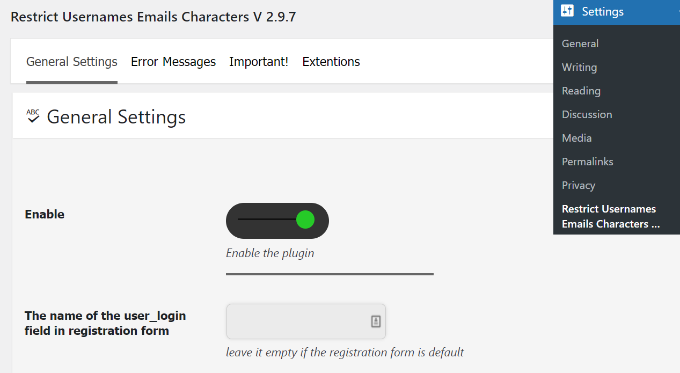
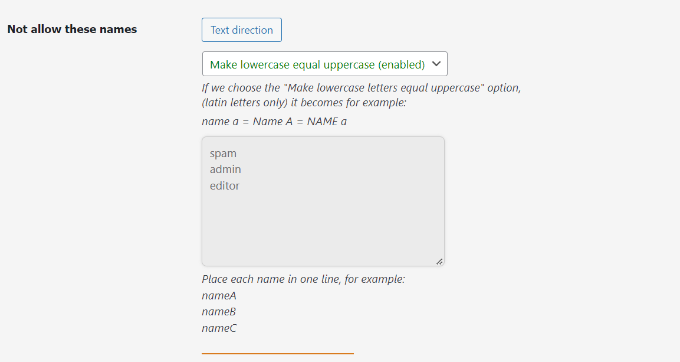
After that, you can scroll down to the ‘Not allow these names’ section in the plugin and enter words or phrases to restrict their use in usernames.
There’s also an option to ‘make lowercase equal uppercase’ in the plugin. By default, it will be enabled, but you can disable it from the dropdown menu.
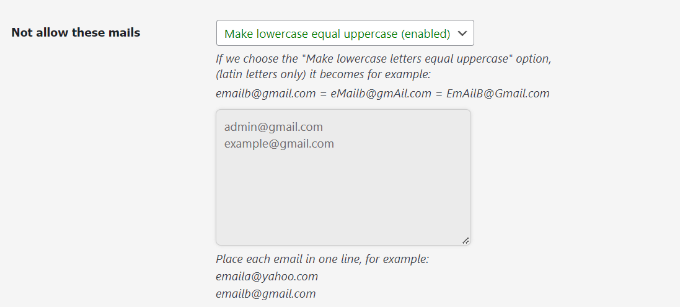
Similarly, you can also prevent the use of specific email addresses.
Under the ‘Not allow these emails’ section, simply enter the email addresses that users can’t use when registering. This will help filter out spam emails, and users will have to use their actual email addresses.
Besides that, there are optional plugin settings to customize the restrictions on usernames and email addresses.
For instance, you can prevent the use of certain email domains, restrict usernames containing certain words, avoid the use of characters and symbols that WordPress permits, and allow special characters.
There are even options to limit the use of spaces in usernames, not allow users only to use numbers in the username, stop uppercase usernames, and more.
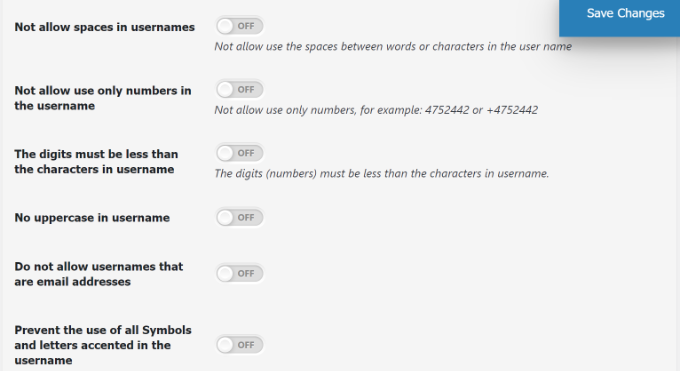
Don’t forget to click the ‘Save Changes’ button when you are done.
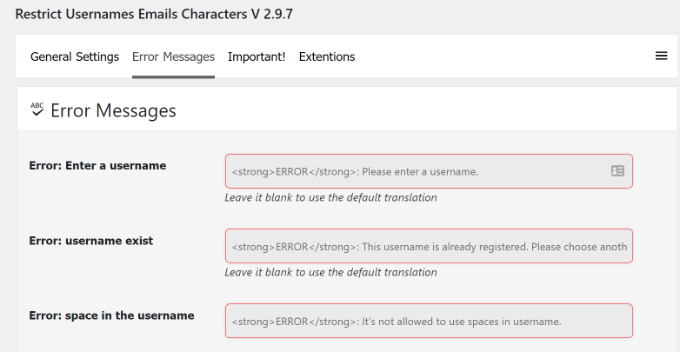
Next, you can go to the ‘Error Message’ tab in the plugin.
The plugin will already have pre-written error notifications for different situations by default. However, you can customize any error message in this section.
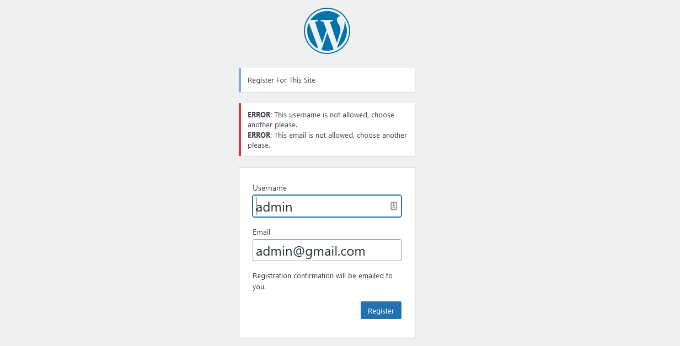
Now, if someone tries to enter a restricted username and email address when registering for your WordPress site, they’ll see an error message and will have to pick another username and email.
Here’s what it looked like on our demo website when we tried to register for a user profile using a restricted user email and username.
Learn More Ways to Secure Your WordPress Site
Besides restricting usernames and emails in WordPress, there is a lot more you can do to keep your website secure. For example, you can block users who register an account using temporary email addresses.
Many users have abused temporary email addresses by creating fake accounts, exploiting free trials, or tricking online systems for harmful purposes.
You may also want to block certain IP addresses from accessing your website. It’s an effective way to deal with comment spam, email spam, hackers, and other security threats.
Here are other guides you may want to check out to secure your website:
- How to Restrict WordPress Pages by User Role
- How to Restrict Content to Registered Users in WordPress
- How and Why You Should Limit Login Attempts in WordPress
- How to Stop Spam in Registration Forms on Your WordPress Site
- How to Add CAPTCHA to WordPress Login and Registration Form
- Best WordPress Security Plugins to Protect Your Site (Compared)
We hope this article helped you learn how to restrict usernames in WordPress. You may also want to look at our tutorials on how to improve WordPress SEO and the best AI chatbot software for your website.
If you liked this article, then please subscribe to our YouTube Channel for WordPress video tutorials. You can also find us on Twitter and Facebook.




Syed Balkhi says
Hey WPBeginner readers,
Did you know you can win exciting prizes by commenting on WPBeginner?
Every month, our top blog commenters will win HUGE rewards, including premium WordPress plugin licenses and cash prizes.
You can get more details about the contest from here.
Start sharing your thoughts below to stand a chance to win!
David says
too but it isnt working anymore
David says
Sorry, just to update, it does work, unfortunately I tested with a front-end login/administration plugin and this is why I didnt see it working.
How can I implement it to a custom front-end login/registration plugin?