


When I first started blogging, I linked to everything. Helpful tools, cool articles, and products I loved. I didn’t realize that sharing too many links without the right settings could actually confuse search engines.
Google gets picky when you link to sponsored content or affiliate products without telling them first. If you don’t handle these links correctly, you might be missing out on optimizing your site’s SEO score.
The fix is adding a ‘nofollow’ attribute, which tells Google to ignore specific links for ranking purposes. At WPBeginner, we use this to keep our link profile clean while still sharing great resources.
I will show you how to automatically nofollow external links in WordPress using a free plugin and a simple code snippet.
Here’s a quick overview of what you’ll learn in this article:
What Is a Nofollow Link and Why Use It?
A nofollow link is a normal hyperlink with an extra piece of code: rel="nofollow". This tells search engines like Google that you don’t want to pass SEO authority to the page you’re linking to.
Search engines like Google use links to understand what your content is about and how it relates to other pages on the web.
While linking to high-quality external sites is a good practice, you need a way to tell search engines about specific types of links. This is especially important for affiliate links, sponsored content, or links in user-submitted content like comments.
Here is what a link with the nofollow attribute looks like in the code:
<a href="http://example.com" rel="nofollow">Example Website</a>Now, you could go through every single link on your site and add this manually, but it’s very tedious.
That’s why automating the process is the smartest approach. The methods I’ll show you below will handle it for you automatically, ensuring every external link is treated correctly across your entire site.
Method 1: Use a Free Plugin to Nofollow All External Links
If you’re just starting out or want a simple, set-it-and-forget-it solution, then this is the method I recommend. It uses a free, dedicated plugin that allows you to apply settings globally while still letting you exclude specific domains if needed.
First, you need to install and activate the External Links plugin. If you’ve never installed a plugin before, don’t worry. I’ve got a detailed guide on how to install a WordPress plugin that walks you through every step.
Upon activation, go to the ‘WP External Links’ page in your WordPress admin dashboard. Here, you’ll find all the settings for the plugin.
You’ll want to navigate to the ‘External Links’ tab. Simply find the ‘Set follow or nofollow’ option and select the ‘nofollow’ option from the dropdown menu.
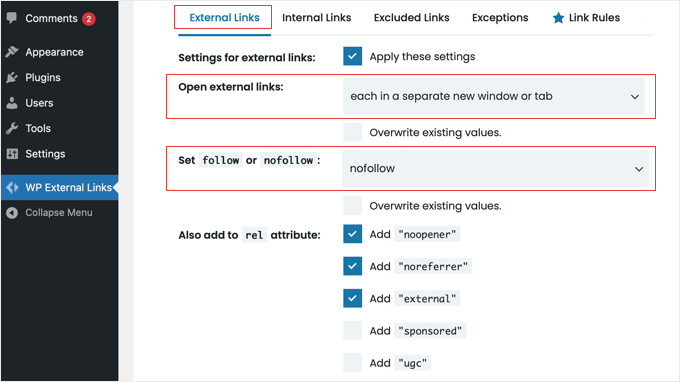
I also recommend setting the ‘Open external links’ option to ‘each in a separate window or tab’. This is a great user experience practice that keeps visitors on your website.
Once you’re done, make sure to click the ‘Save Changes’ button at the bottom of the page.
The plugin will now automatically add the nofollow attribute to all external links across your entire WordPress site.
Method 2: Automatically Nofollow Links with a Code Snippet
This method is for people who are comfortable adding code to their WordPress site. It’s a lightweight solution, but keep in mind that unlike the plugin method above, this snippet only adds the nofollow attribute. It does not force links to open in a new tab.
I strongly recommend against editing your theme’s functions.php file directly, as small errors can break your site. The safest and easiest way is to use the free WPCode plugin.
Expert Insight: We use WPCode across all our websites to manage essential code snippets. It allows us to add custom functionality without touching our theme files, which is critical for site stability. For more details, see our full WPCode review.
First, install and activate the free WPCode plugin. If you need help, then follow our guide on how to install a WordPress plugin.
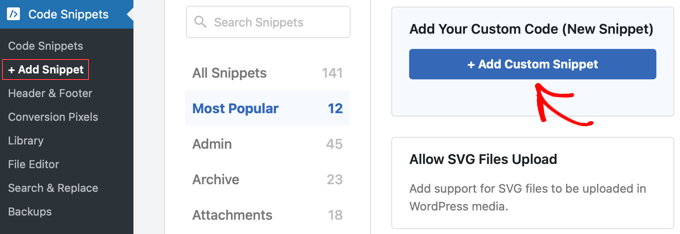
Once activated, go to Code Snippets » + Add Snippet and click ‘Add Your Custom Code (New Snippet)’.
Start by giving your snippet a title, like ‘Nofollow All External Links’.
Then, paste the following code into the ‘Code Preview’ box:
add_filter( 'the_content', 'wpb_nofollow_external_links' );
function wpb_nofollow_external_links( $content ) {
    return preg_replace_callback(
        '/[<]a[^>]+/',
        function( $matches ) {
            $link = $matches[0];
            $site_link = get_bloginfo( 'url' );
            if ( strpos( $link, 'rel' ) === false ) {
                $link = preg_replace( '%(href="https?://(?!' . preg_quote( $site_link, '/' ) . ')[^"]+)"%', '$1 rel="nofollow"', $link );
            } elseif ( preg_match( '%rel="([^"]+)"%', $link, $rel_matches ) ) {
                $rel = $rel_matches[1];
                if ( ! preg_match( '/\bnofollow\b/i', $rel ) ) {
                    $link = str_replace( 'rel="' . $rel . '"', 'rel="' . $rel . ' nofollow"', $link );
                }
            }
            return $link;
        },
        $content
    );
}
Please note: This code only adds the nofollow attribute to links inside the content of your WordPress posts and pages. It will not affect links in your navigation menus, sidebar, footer, or other widget areas.
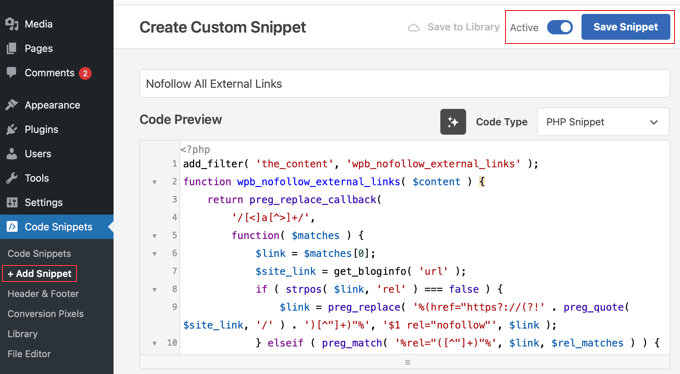
Make sure the ‘Code Type’ is set to ‘PHP Snippet’.
Below the code, set the ‘Insertion’ method to ‘Auto Insert’ and the ‘Location’ to ‘Run Everywhere’.
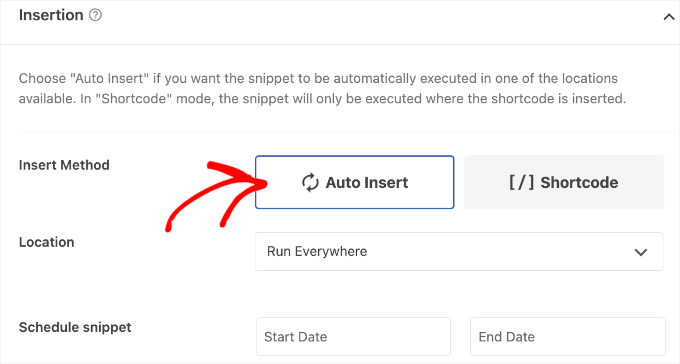
Finally, toggle the switch at the top to ‘Active’ and click the ‘Save Snippet’ button.
This code will now automatically run on your site and add the nofollow attribute to all of your external links.
Frequently Asked Questions (FAQ)
Many beginners often have questions about when and why they should use the nofollow attribute on their website. Here are some of the most frequently asked questions we receive about managing external links in WordPress.
1. What is the difference between nofollow, sponsored, and ugc?
These are all values for the rel attribute that tell Google more about a link. nofollow is a general hint that you don’t fully endorse the linked page. However, if you are adding affiliate links, Google prefers the sponsored attribute, though nofollow is still acceptable.
2. Will nofollowing all external links hurt my SEO?
While it won’t trigger a penalty, strictly nofollowing every external link isn’t always the best strategy for growth. Linking out to high-quality, authoritative sources (like major news sites or Wikipedia) helps Google understand your niche. A better approach is to use the plugin method to ‘allow’ links to trusted sites while nofollowing the rest.
3. Is it better to use a plugin or the code method?
It depends on what you’re most comfortable with. For most users, I recommend using the External Links plugin. It’s simple, dedicated, and easy to set up. If you prefer not to add another plugin and are comfortable adding code, then the WPCode method is a great lightweight alternative.
4. How can I check if my external links have the nofollow attribute?
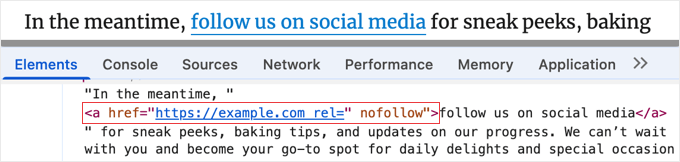
You can easily check right from your web browser. Just visit a page on your site, right-click an external link, and choose ‘Inspect.’ This will open a developer panel showing the HTML, where you can see if rel="nofollow" has been added to the link’s <a> tag.
Additional Resources and Guides for WordPress SEO
I hope this guide helped you learn how to nofollow all external links in WordPress.
You may also want to see our other guides to help you manage links and improve your website’s SEO:
- How to Add Affiliate Links in WordPress (The Right Way)
- Ultimate WordPress SEO Guide for Beginners (Step by Step)
- How to Track Outbound Links in WordPress
- Best Affiliate Marketing Tools and Plugins for WordPress
If you liked this article, then please subscribe to our YouTube Channel for WordPress video tutorials. You can also find us on Twitter and Facebook.



Jiří Vaněk
What concerns ‘nofollow,’ is it good to always use it, or make an exception for pages with very high authorit
WPBeginner Support
You could skip nofollow for high value sites for your articles but it is a question of testing and personal preference for which sites you don’t include nofollow for.
Admin
Christen Costa
Note: This plugin broke a number of our category pages as of June 2019. I’d be very careful. And by break, I mean the category pages were appearing blank.
WPBeginner Support
Thank you for letting us know, we’ll certainly take a look at the plugin and update the article once we find an alternative should it not be working.
Admin
Paul
Hi there,
Thanks for the help. I installed the External Links plugin. Quick question though. A lot of the links on my website are in the form of buttons, would the External Links plugin you suggested also work on these and make them nofollow? I assume it would as from my understanding it makes all outbound links no follow correct?
Thanks
Paul
Natasha
I thought you only had to make links no follow that would be earning a profit? Like affiliate links?
So, your saying ALL external links need to be no follow?
WPBeginner Support
Yes, unless those external links are to websites that you own and want them to benefit from a dofollow link.
Admin
Sagar Patil
Thank you very much, i used External links plugin.
Amit Singh
Hello,
Good Article. I have an issue regarding my wp site. inbound Link on posts or pages (only for posts / page. In sidebars, footer it works fine.) not working on small devices like mobile but working fine in computer. How to fix this issue. I am using WP External Link plugin but no result. I also used open external link wp plugin as i read in your site but not worked. Please help me to fix this issue.
Thanks
Dheeraj Tiwari
Thank you very much. It really helps me out!
Sandeep
I recently loss my ranking in google. I have a job alert website, i do everything correct but i use all externel links without no follow and next window..my website has approx 1000 externel links. Any idea to get back ranking in google? Please reply wpbeginner you are only hope for me…
WPBeginner Support
Hey Sandeep,
Please follow the instructions described in the article. With the help of ‘External Links’ plugin you will be able to add nofollow to all external links.
Admin
sean
I am using a plugin to no follow all external links. But sometimes I need to make a link do follow and for that I use rel= “do follow”. When I check, It showed both no follow and do follow.
What Should I do?
WPBeginner Support
You should see the documentation of the plugin you are using to nofollow all links. Plugin author may have described how to make some links do follow. If they haven’t, then you should ask them how to do that.
Admin
Usman
Thanks for help us by providing step to step guide.
Sheryl
I recently received a disturbing e-mail from Google saying:
Google has detected a pattern of links from your site to other sites that is either unnatural or irrelevant. This pattern attempts to artificially boost other sites’ ranking in Google Search results. Such unnatural ranking would cause search results to show preference for results not relevant to the user’s actual query. It also violates Google Webmaster Guidelines. Therefore, we are discounting the trust in links on your site.
I use Affiliate links in almost every post and I now have over 450 posts — If I have to manually code each link it will take forever to do…. Can I somehow get an explanation from Google on exactly what caused this action?
Thanks
Sheryl
Rodrigo
Any further feedback on the pros & cons of non-folliwing al-links? I haven’t made my mind yet. I just installed this plugin, but now, reading the comments, I wonder whether it was the right thing to do.
WPBeginner Support
Not all links. You should only apply no follow to external links. External links are those that take users away from your website to another website.
Admin
Rodrigo
Thank you!
Arize
Well, Thanks you should have said that earlier
Ted
I wish you had given us a real solution to do this. Adding, yet again, another plugin to fix the problem is not the right way to go.
Peter griffiths
I think it’s important to note that in almost all circumstances it’s not a good idea to no follow ALL external links as that completely defeats the purpose – it’s clear that Google thinks this too
A while ago I thought about using a plugin to do this but a website looks much more natural if you don’t do this. If you think about it it says to Google that all external links on the site are paid links, and if all links can be bought, how useful would they be for the visitor and a different site that doesn’t nofollow everything should be ranked higher as a result – correct me if I’m wrong though.
Gaurav Khurana
Good to know such kind of plugins exists which can help in such a nice way
Mickey
The idea of using nofollow to preserve link juice died in 2009. At this point, it costs you the link juice whether you nofollow it or not. Here’s some details from WooRank:
If you trust the link, let it be followed. Give them their credit back, because it’s the same to you either way. If you don’t trust the link, why do you have it on your blog at all?
Nofollow ads, of course, or anything user-generated (comments, etc), but anything else in your blog should be left open and followed.
Gaurang Thakor
Totally agree with you, sir!
Mark Corder
In SEO / NoFollow discussions, I’ve heard that having links to external sites that supplement your content is good, and that they should be allowed to “follow”. My photoblog has many external links, and most lead to official information associated with the photo I’m presenting – like State Park / Forest Service websites and Wikipedia articles.
Should I be marking these as NoFollow?
muncy
Opening links in a new window is not a good accessible practice.
Diamsy
Why do you say that it is not a good accessible practice?