


Putting banner ads on your site is one of the best ways to make money from your blog.
Many bloggers use ad management software like AdRotate to maximize their earnings without ruining the user experience.
We’ve thoroughly tested it on a real website to see how it performs in a live environment. This allowed us to evaluate its features, track ad placements, and measure its impact on revenue.
In this article, we will show you how to easily manage ads in WordPress with the AdRotate plugin.
Why Use a WordPress Ad Management Plugin?
Advertising programs like Google AdSense and others require publishers to add a code snippet to their website to display ads.
As a WordPress publisher, you can do this by either editing the code in your theme files or by using an ad management plugin.
If you are a beginner who just started your blog, then adding code into theme files is not an ideal solution. That’s because, with this approach, you increase the chances of messing up and causing unexpected WordPress errors. Plus, you can’t properly manage different ad sizes or their placements.
On the other hand, using an ad management plugin allows you to easily insert ads anywhere on your website. You can save multiple ad codes, rotate them, and show/hide ads on different pages.
Having said that, let’s take a look at how to manage ads in WordPress like a pro using the AdRotate plugin.
Manage Ads in WordPress with AdRotate
First, you need to install and activate the AdRotate plugin. For more details, see our step-by-step guide on how to install a WordPress plugin.
Upon activation, visit the AdRotate » Manage Adverts page from the WordPress dashboard. Then click the ‘New Advert’ link to create your first ad.
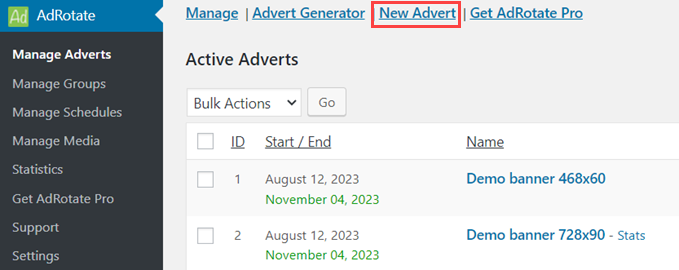
This will bring you to the ‘New Advert’ page. Here, you need to provide a title for your ad because it will help you identify it inside the WordPress admin area.
After that, you can paste the ad code generated by your advertising network. Alternatively, you can also generate your ad code if you are running self-hosted ads.
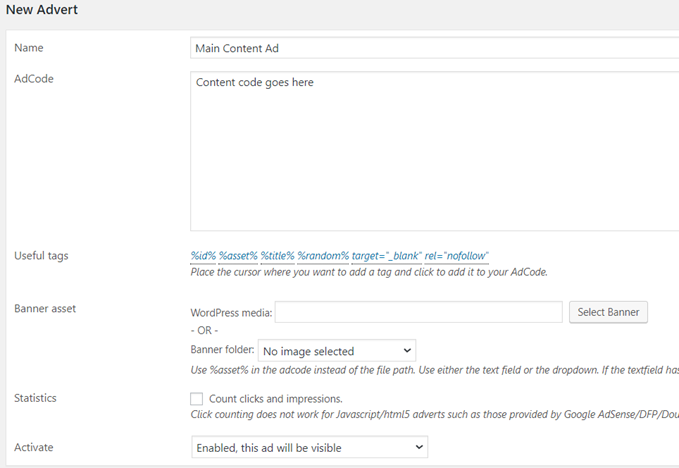
For hosted ads, you can upload banner images and enable click tracking.
You also need to select an appropriate ‘Activate’ option to make this ad available on your WordPress site.
Next, scroll down on the page to the usage and schedule section. Here, you can schedule your ad and get the shortcode, which you can add to your posts, pages, or sidebar widgets.
Don’t forget to click on the ‘Save Advert’ button to store your settings.
You can repeat this process to create as many ads as you want and then decide which ads you want to be displayed on your site.
Grouping Your Ads Together
Many WordPress bloggers join multiple advertising networks and partner programs. You may also have advertising spaces in different locations and in different sizes.
Grouping allows you to easily sort your ads into different categories for easier management.
To create a new group, head over to the AdRotate » Manage Groups page and click on the ‘Add New’ link.
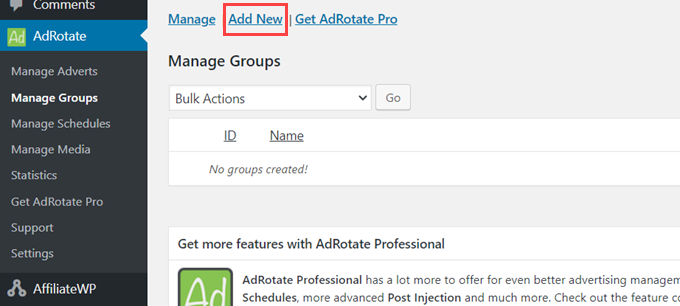
This will bring you to the ‘New Group’ page.
First, you need to provide a ‘Name’ for your group. This will allow you to easily identify the group in your WordPress admin area.
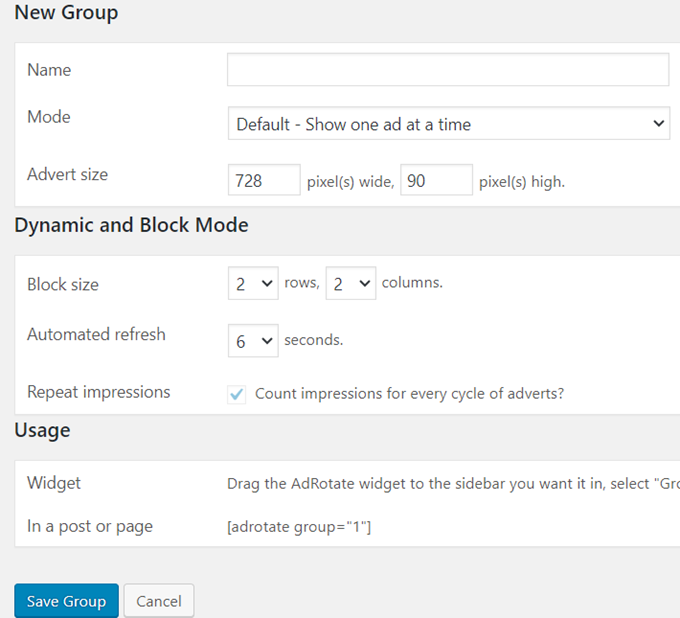
Next, you must choose a display mode. AdRotate allows you to customize how you display ads from a specific group.
For example, you can display one ad from the group at a time, a block of ads, or use the dynamic mode, which changes the ad after a few seconds.
Next, you can select the group auto display options. AdRotate allows you to automatically insert ads from a group into posts, pages, and sidebar widgets.
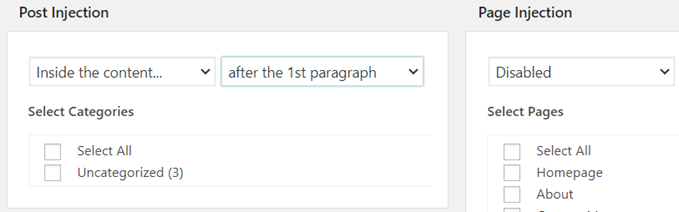
At the bottom of the page, you will see all the ads that you can associate with that group. Simply select the ads you want to include and then click on the ‘Save Group’ button.
Manually Inserting Ads in WordPress
You can associate your ads with groups and automatically insert them into posts, pages, categories, and widgets. That said, some publishers may want to have more granular control over which ads to display in which locations.
AdRotate makes it super easy to insert ads anywhere on your WordPress site.
Each ad you create on your site has its own shortcode that you can copy and paste into your WordPress posts or pages and even custom post types.
To get this code, visit the AdRotate » Manage Adverts page and click on any ad to edit it. On the ‘Edit Ad’ page, scroll down to the usage section to copy the shortcode.
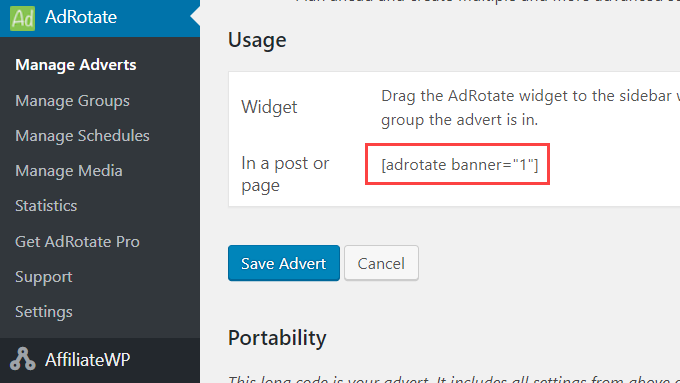
Similarly, you can also edit a group to get the shortcode and then use it anywhere on your website.
If you want to display ads in your WordPress sidebar, then go to the Appearance » Widgets page and add the AdRotate widget to your sidebar.
Bonus: Use AdSanity to Manage Ads in WordPress
Apart from AdRotate, you can also use AdSanity to manage advertisements in WordPress.
It is an advanced ad management plugin that lets you show ads anywhere on your website using ready-made blocks, widgets, and shortcodes. You can even use AdSanity to show a random ad to visitors without writing a single line of code.
First, you will need to install and activate AdSanity. For detailed instructions, see our step-by-step guide on how to install a WordPress plugin.
Upon activation, head to the AdSanity » Create Ad page and type a title for the ad that you are going to create. Next, you can choose a banner size and add code for the self-hosted or external ad.
You can also add a tracking URL and image according to your liking.
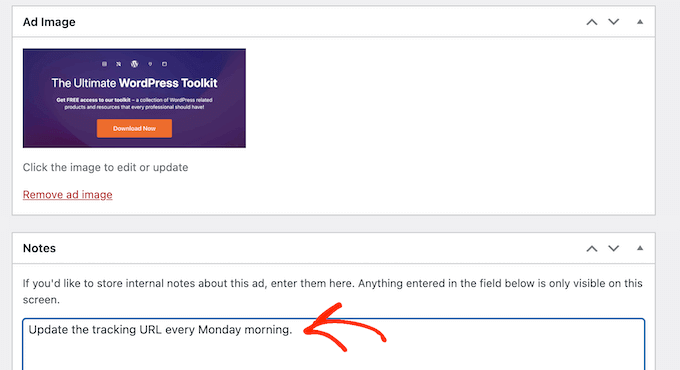
After that, you can also use categories and sub-categories for different advertisement groups on your website. Once you are done, don’t forget to click the ‘Publish’ button to store your changes.
Next, open the WordPress block editor and add the AdSanity block to your page. Then, you can choose the ad you want to display from the dropdown menu within the block itself.
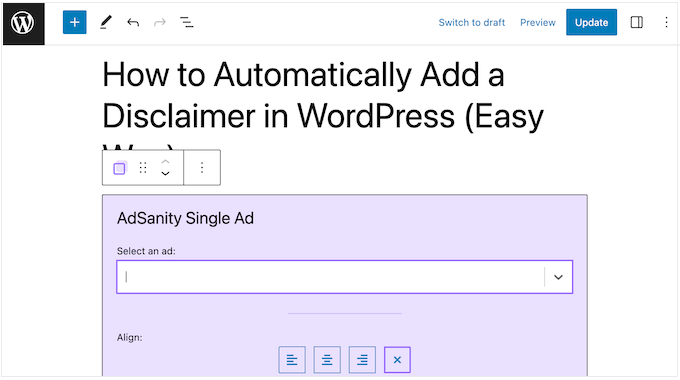
Finally, click the ‘Update’ or ‘Publish’ button at the top. You have now successfully embedded an ad on your website.
For detailed instructions, see our tutorial on how to manage ads in WordPress with AdSanity.
We hope this article helped you learn how to manage ads in WordPress with the AdRotate plugin. You may also want to see our tutorial on how to optimize AdSense revenue in WordPress and our handpicked list of the best WordPress ad management plugins and solutions.
If you liked this article, then please subscribe to our YouTube Channel for WordPress video tutorials. You can also find us on Twitter and Facebook.


Sondra
Once I have the ads set up, do you have any suggestions for how to track which ads I have where and when? I’m trying to keep up with my inventory of ads, but I’m not sure of the best way to do so. Any advice?
WPBeginner Support
The plugin does include tracking for your ads so you can track this information
Admin
Jiří Vaněk
I started blogging about a year and a half ago, and I’m still waiting to reach a certain level of traffic. Currently, I’m at very few people, around 130 visitors per day, so I don’t want to burden the blog with ads yet. I’ve set an internal threshold in my mind around 300 daily visitors, and then I’ll try to tastefully integrate AdSense. I already have the account and the codes. It’s good to gradually prepare thanks to guides like these.
May I ask, from what number of users do you think it makes sense to actually consider having ads on a website?
WPBeginner Support
There is no answer that is right for every person it all depends on what you feels works best for your site and how your visitors respond to ads on your site.
Admin
Jiří Vaněk
Thank you for the response. I eventually came to the same conclusion. On one website, ads work very well even with about 150 visitors a day, while on another, they don’t work at all even with 500 visitors. Both websites have different audiences and different content. So it probably depends on many factors and it really is necessary to test it out. As you mentioned, there is likely no exact number or correct answer for this.
Ralph
I have google adsense ads on my website for 2 months now and just set them to automatic. Only change is I blocked them on some particular urls and disable spaces like sidebar. It is quite ok but could be better, especially in longer content where google puts 5 ads and then I have 4-5 full screens of content without any ad. And often all ads are just 1 ad, which look like a spam to me.
Maybe this plugin is a better way to earn money with ads and will make my site look better.
WPBeginner Support
The plugin should at least help give more control over ads on your site
Admin
MIke Dunn
I assume Ad Rotate will rotate a preset list of ads in the same spot on my website so all the advertisers get the same number of views? What is the CDN issue?
WPBeginner Support
For issues with the plugin, you would want to reach out to the plugin’s support and they should be able to assist.
Admin
EMMANULE OWINO
Have created a wordpress website. how can i allow the advertisers to post ads to my website through their front end panal. ” am meaning the best plugin for that”
WPBeginner Support
Hi Emmanule,
Currently, there is no good way to automate the process. We would recommend using a form builder plugin to accept submissions and then manually apply them to your website.
Admin
Deepa
hi,
we would like to know that how the adrotate will work based on payment. and how it calculates cpc, cpm amd ctr. can we know about the buyable version of adrotate plugin with payment.
Peter
Is it not possible to configure on which pages an ad is visible in the widgets?
Steve Williams
The concept behind of this plugin is good. However, if you throw a CDN in the picture, ads will no longer rotate. This is why I stopped using it.
My 2 cents.
Steve Williams