


Do you want to force users to use a strong password on your WordPress site?
A great way to improve your WordPress website security is to make your users create a strong password when signing up with a new account.
In this article, we will show you how to force a strong password on users in WordPress and improve website security.
Why Enforce Strong Passwords for Your WordPress Users?
Strong passwords make it more difficult for hackers to use brute force attacks to access your site. If you’ve spent time optimizing your WordPress website security, then you’ll also want to protect your login pages by using a strong password.
However, if you have an online store, membership site, or multi-author blog, there’s a risk that your customers or other site users will make your website vulnerable to hackers by using weak passwords that are easily guessed with brute force attacks.
Having users with weak passwords can present a security risk, especially those with high-level user roles like admins and editors.
WordPress has built-in settings that will show users how strong the password is when creating an account, but it doesn’t enforce its strength.
Luckily, you can use a WordPress plugin to force your users to create a strong password when creating an account on your WordPress website.
With that said, let’s take a look at how to force a strong password on your WordPress users. Simply use the quick links below to jump to the method you want to use:
Method 1. Forcing Strong Passwords With iThemes Security
The easiest way to force strong passwords is with a WordPress security plugin. We recommend Solid Security (formerly iThemes Security) since it lets you force strong passwords with a couple of clicks.
There is a premium version that offers security hardening, file integrity checks, 404 detections, and more, but we will use the free version for this tutorial since it has password protection features. For more details, see our complete Solid Security review.
The first thing you need to do is install and activate the plugin. For more details, see our guide on how to install a WordPress plugin.
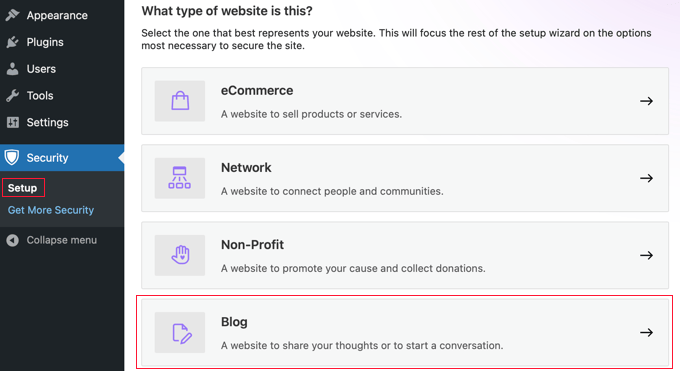
Upon activation, go to Security » Setup to choose your security settings. There’s a setup wizard that will walk you through configuring the security plugin for your needs.
First, click on the option for the type of website you have. We will select the ‘Blog’ option.
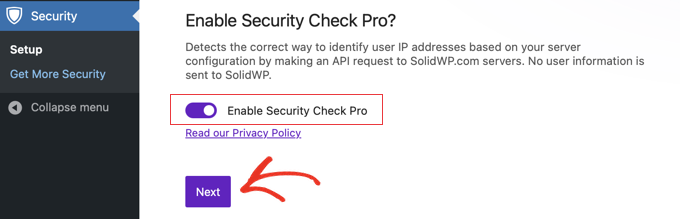
Now you will see a toggle to enable ‘Security Check Pro’. This will automatically configure your security settings to redirect HTTP requests to HTTPS and protect you from IP spoofing.
You should toggle this setting to the ‘On’ position.
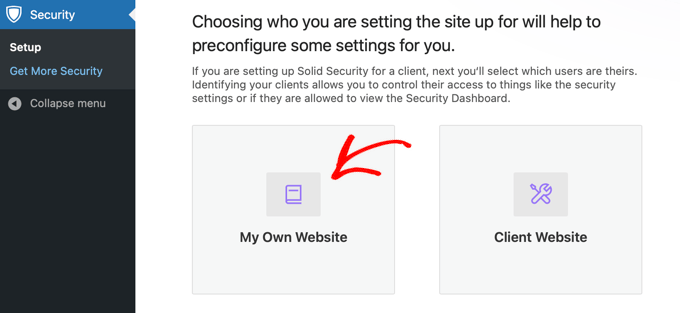
After that, you need to choose whether it’s a personal or client site.
We are selecting ‘Self’ for this tutorial.
Next, there’s a toggle to turn on a strong password policy for your users.
You need to click the toggle to enforce a strong password for your users and click ‘Next’.
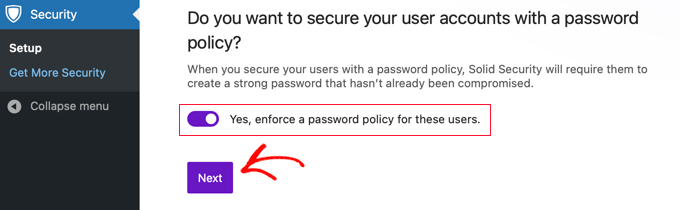
Now, you’ve successfully forced users to have a strong password. There are a variety of other settings you can enable to make your login even more secure.
If you like, you can add a list of IP addresses to a white list to prevent them from being locked out of your website. You need to list the IP address of each user. You can quickly add your own IP address by clicking the ‘Authorize my IP address’ button.
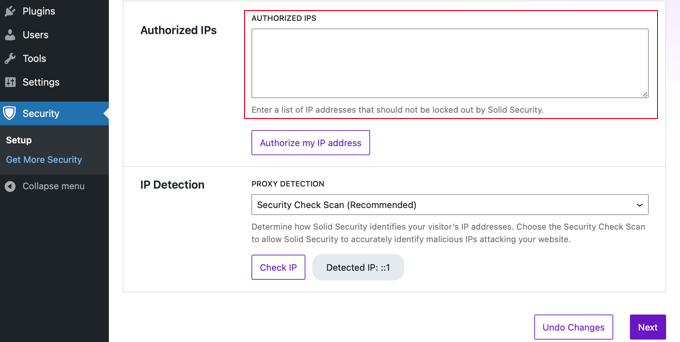
You should leave the IP Detection setting on ‘Security Check Scan (Recommended)’ and then click the ‘Next’ button.
If you want to enable two-factor authentication, then click the toggle to the On position and then click the ‘Next’ button.
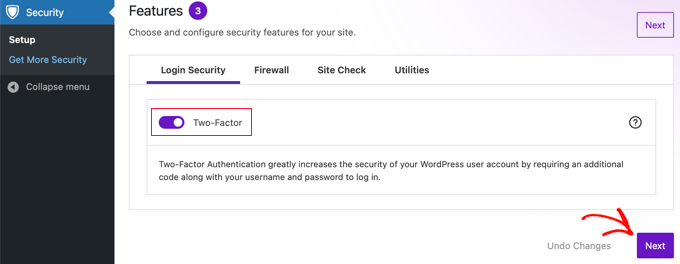
After that, you’ll be asked if you want to enable a few more security settings for different groups of users. You can simply click ‘Default User Groups’.
This will bring you to a screen where you can force strong passwords and change other settings by user role.
The first screen will be your security settings for admin users.
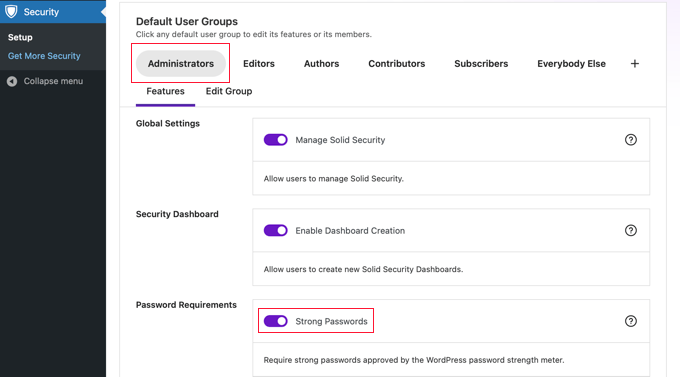
You can turn on strong passwords and refuse to let users register with a compromised password that’s been previously used on other sites.
To change the security settings for other users, simply click a different role at the top of the screen. Once you are finished, click the ‘Next’ button at the top or bottom of the screen.
This will walk you through the rest of the setup wizard to enable additional security settings for your website.
If you want to change your password settings in the future, then go to Security » Settings, click on ‘User Groups,’ and select the group you want to change.
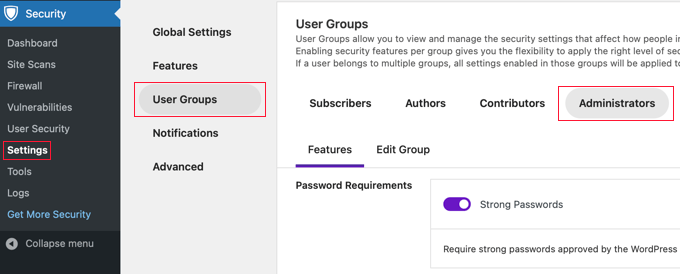
After you are done, make sure to click the ‘Save’ button at the bottom of the screen to save your settings.
Method 2: Forcing Strong Passwords With Password Policy Manager
Another way to force strong passwords on your WordPress blog is by using the Password Policy Manager plugin. It lets you easily create strong password rules your users must follow but doesn’t have other security features to protect your site as iThemes Security does.
The first thing you need to do is install and activate the plugin. For more details, see our beginner’s guide on how to install a WordPress plugin.
After activation, you’ll have a new menu option called ‘miniOrange Password Policy’ in your WordPress admin panel. You need to click this to set up your password rules.
Then, click on the ‘Password Policy Settings’ toggle to turn on your strong password settings.
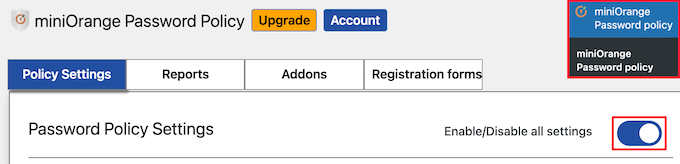
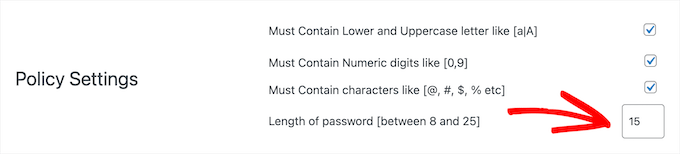
After that, you can set your strong password settings. Simply check the boxes for the password requirements you want to set.
Next, set the required password length.
After that, you can choose to have passwords expire after a set time period.
If you wish to enable this, then you should click the ‘Enable expiration time’ toggle and then enter the expiration time in weeks.
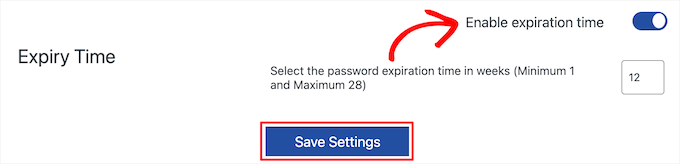
Once you are finished, make sure to click the ‘Save Settings’ button.
You can also reset all of your user’s passwords at any time. Simply click the ‘Reset Password’ button, and all of your users will be prompted to create new strong passwords.

Our Best Guides for Protecting WordPress Passwords
Enforcing strong passwords is a great way to start improving the security of your WordPress website. Here are some other guides you may want to see about protecting WordPress passwords.
- How to Change Your Password in WordPress (Beginner’s Guide)
- How to Easily and Securely Manage Passwords (Beginner’s Guide)
- How and Why You Should Limit Login Attempts in WordPress
- How to Add a Simple User Password Generator in WordPress
- How to Allow Users to Hide/Show Passwords on WordPress Login Screen
- How to Reset Passwords for All Users in WordPress
We hope this article helped you learn how to force strong passwords on users in WordPress. You may also want to see our guide on how to create a free business email address and our expert picks of the best virtual business phone number apps.
If you liked this article, then please subscribe to our YouTube Channel for WordPress video tutorials. You can also find us on Twitter and Facebook.





Syed Balkhi says
Hey WPBeginner readers,
Did you know you can win exciting prizes by commenting on WPBeginner?
Every month, our top blog commenters will win HUGE rewards, including premium WordPress plugin licenses and cash prizes.
You can get more details about the contest from here.
Start sharing your thoughts below to stand a chance to win!
Mrteesurez says
Good job here.
but my question is, why there is a risk when my site users use weak passwords when they are not actually the admins ??
Also, thanks for that plugin Password Policy Manager, I love how it works.
My websites are becoming more professional by implementing your guides. I appreciate.
WPBeginner Support says
The chances are very low but if there is a plugin or theme with a vulnerability that only requires a user on the site then hackers could target your users instead of your admins.
Admin
salvador aguilar says
This plugin is now closed on WP repo
WPBeginner Support says
Thank you for the update, we will keep an eye out for a plugin we would recommend for an alternative
Admin
lionel says
this plugin hasn’t been updated in over a year.
WPBeginner Support says
Thank you for letting us know, from taking a look the plugin should still be working but for understanding the lack of updates you would want to take a look at our article here: https://www.wpbeginner.com/opinion/should-you-install-plugins-not-tested-with-your-wordpress-version/
Admin
Bobby says
Is there any function in this plugin to change the password level? I was looking for this issue over a month.
WPBeginner Staff says
This plugin does not send password emails. It also does not advertises to encrypt emails. That’s not the purpose of this plugin.
CST says
It does not sound like the, “Force Strong Passwords” plugin is as safe as it is touted to be if it does not block emailing the password in unencrypted form.
dwf says
Not to mention that the “Force Strong Passwords” plugin does nothing to prevent emailing of strong password during User setup…
Chris says
Any ideas on how to implement this same approach but for all users; even ‘subscribers’?
Editorial Staff says
Yes you would have to use
slt_fsp_weak_rolesfilter. Haven’t tried the code below, but something like this should work:add_filter( 'slt_fsp_weak_roles', 'wpb_weak_roles' ); function wpb_weak_roles( $roles ) { $roles[] = ''; return $roles; }1-click Use in WordPress
Admin
Chris Miller says
Thank you! I’m surprised WordPress hasn’t implemented a simple ‘tick box’ option to increase security password requirements with all the brute force attacks lately. I’ll give this a go.
Sara says
Great concept. Looking at the “support” page at wordpress’s plugins site, the developers haven’t responded to support messages and don’t appear to have any reputation in the security world.
I want to stress, I love the idea. But I am not wowed by what I’m seeing of the “company” or developers behind the software, and for something like security, that makes me nervous. I’m gonna pass for now.
Editorial Staff says
Often developers build their plugins out of their free time. Having built several ourselves, we know how hard it is to support them specially when you are not getting anything in return. This plugin’s author has updated his github page for the plugin. That seems to be running version 1.1 which has a lot of upgrades and fixes.
Admin
Damien says
If they have (simply) converted the WordPress strength test to PHP then they don’t need to have a reputation in the security world. It is not really “new” code, just ported code.