


Do you want to learn how to fix the missed schedule post error in WordPress?
WordPress comes with a built-in feature that allows you to easily schedule posts to be automatically published at a later time. However, sometimes, you may notice that scheduled posts don’t get published at all.
In this article, we will show you how to easily fix the missed schedule post error in WordPress. This will ensure that your scheduled posts are published on time.
What Causes WordPress to Miss Scheduled Posts?
Your web hosting environment or plugin conflicts may cause WordPress to miss scheduled posts.
Normally, when you schedule a WordPress post to be published later, WordPress uses a technology called ‘Cron’ or ‘WordPress Cron‘ to automatically publish your post on time.
However, if your WordPress hosting provider’s server or a plugin is affecting the WordPress cron jobs, then WordPress will miss the scheduled tasks, such as publishing scheduled posts.
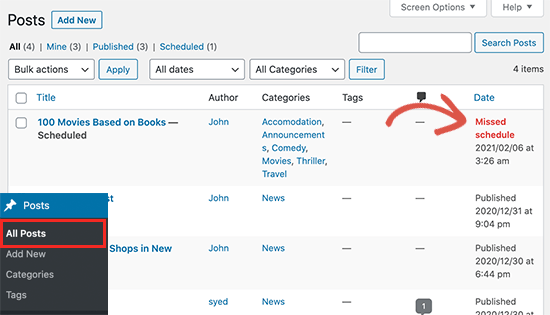
Your other cron jobs may still work occasionally, like checking for updates or deleting auto-saved drafts. That is because once the publishing time is missed, WordPress will not publish the blog post at a different time.
For most users, it does not happen very often. However, for some bloggers, the missed schedule error can become a common WordPress issue.
This can be frustrating when you are running a WordPress blog. After all, you don’t want to waste time on repetitive tasks or fixing WordPress errors instead of creating content.
That being said, let’s take a look at how to easily fix the missed schedule post error in WordPress.
How to Fix WordPress Missed Schedule Post Error
The first thing you need to do is install and activate the Missed Scheduled Post Publisher plugin. For more details, see our step-by-step guide on how to install a WordPress plugin.
The plugin works out of the box, and there are no settings for you to configure.
How Does the Missed Scheduled Post Publisher Plugin Work?
The plugin simply checks your website every 15 minutes to see if a scheduled WordPress post has missed its schedule.
If it finds any missed scheduled items, then it changes the status from scheduled to published. By doing so, it acts as a scheduled post trigger on your WordPress website.
It works for posts, pages, products, and any other custom post types that you may have on your WordPress website.
We built this plugin to ensure it doesn’t impact your WordPress site speed because we know speed is important for SEO. This is the plugin we are using on our own WordPress websites.
Troubleshooting the Missed Scheduled Posts Error in WordPress
If installing the scheduled post trigger plugin does not immediately fix the scheduled posts error on your website, then the following are a few tips that you can try.
1. Check Your WordPress Timezone Settings
Setting the correct time zone is one of the first things to do after installing WordPress. However, sometimes users miss it, and their WordPress timezone doesn’t match the timezone they want to use for publishing and managing their website.
Simply go to Settings » General from your WordPress dashboard and scroll down to the ‘Timezone’ section to view the settings. From here, you need to select your timezone or the timezone you want to use for your WordPress website.
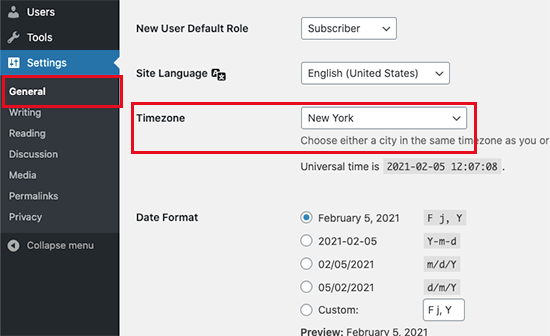
Don’t forget to click on the ‘Save Changes’ button to store your settings.
2. Clear the WordPress Cache
If your WordPress posts are still missing schedule, then it is likely due to a poorly configured caching plugin.
Try clearing the WordPress cache and make sure that your WordPress caching plugin is properly configured to automatically clear the cache at regular intervals.
3. Increase the WordPress Memory Limit
Your WordPress website may be struggling with a low memory limit issue. You can fix that by allowing WordPress to use more server memory, which lets WordPress run better.
You will first need to access your wp-config.php file using an FTP client like FileZilla or the File Manager app within cPanel in your WordPress hosting dashboard. You can find it within your root folder.
For more details, you can read our guide on how to use FTP to upload files to WordPress.
We then recommend making a backup of your wp-config.php file in case you make any mistakes. You can read our guide on how to back up your site.
Then, simply add the following code to your wp-config.php file just before the line of code that says, ‘That’s all, stop editing! Happy publishing.’
define('WP_MEMORY_LIMIT', '500M');
For more information, you can see our guide on how to increase the PHP memory limit in WordPress.
4. Disable wp-cron and Set Up a New Cron Job
As we mentioned before, WordPress cron (also known as wp-cron) may be missing scheduled tasks like publishing your scheduled WordPress posts.
You can disable wp-cron and create your own cron job that will run on your web hosting provider’s operating system. It will tell WordPress to run scheduled tasks like publishing your scheduled posts.
For more information, please see our guide on how to disable wp-cron in WordPress and set up proper cron jobs.
We hope this WordPress tutorial helped you learn how to easily fix the missed schedule post error in WordPress. You may also want to see our guide for beginners on how to easily troubleshoot WordPress errors on your own or our picks for the best WordPress plugins for business sites.
If you liked this article, then please subscribe to our YouTube Channel for WordPress video tutorials. You can also find us on Twitter and Facebook.





Syed Balkhi says
Hey WPBeginner readers,
Did you know you can win exciting prizes by commenting on WPBeginner?
Every month, our top blog commenters will win HUGE rewards, including premium WordPress plugin licenses and cash prizes.
You can get more details about the contest from here.
Start sharing your thoughts below to stand a chance to win!
Jiří Vaněk says
I finally solved a similar problem by deactivating CRON in WordPress using wp-config.php and setting the classic cron on the server to the url wp-cron.php?doing_wp_cron. Cron starts every 5 minutes and the problem is over.
Jakub says
Thank you very much for great and simple article, that helped to solve the problem very quickly. I used plug-in option. If it starts to make some trouble, I will try to increase the memory limit. Wish you joyful day and thank you again for your work.
WPBeginner Support says
You’re welcome, glad our guide was helpful!
Admin
Rohit says
I fas facing this in my wordpress website, but solved after increasing PHP memory to 1Gb
WPBeginner Support says
Thanks for sharing what worked for you
Admin
Ian says
Great plugin and the instructions simple to follow and guess what it worked. Thank you.
WPBeginner Support says
Glad our article was able to assist!
Admin
Harry says
Good day
I’ve installed your plugin (Missed Scheduled Post Publisher ), and my problem was solved immediately. Thank you very much….
WPBeginner Support says
Glad the plugin was able to help!
Admin
Yaxye Daacad says
Thanks, The first method solved my problem. I updated my time zone and its working.
Sjors says
Thanks a lot for this post! The plugin works great and fixes the error
Natalie says
Hi, why is it that this error occurs? I was republishing a post and scheduled for a few minutes ahead – every time, it did not publish. I downloaded the plugin and it worked right away. Also… I will only need this once a week or so, should I just deactivate the plugin when I’m not using it? Thanks
WPBeginner Support says
Hi Natalie,
Yes, you can deactivate the plugin when not using it.
Admin
Himal Ghale says
Learn much more from article, thank you
Nancy Meyer says
I have also having a post scheduling issue. I have a weekly program. My 89th show missed its schedule date. I have had scheduling issues since going ‘live’ in January of 2016! I have tried many things. I use the Advanced Cron Manager plugin. Today I need help again. Any thoughts?
Andrew Dawson says
Does anyone know how to get the WP Missed Schedule plugin from Github up into WordPress. I’m a beginner user but need to use this plugin and for the life of me, I can’t figure out where the file is on Github. When I got to this person GitHub site, and download the “zip”, it downloads a folder to my computer with a bunch of files in the folder, but none of them are a Zip file. There is two .php files and I”m not sure if I’m supposed to use them somehow. Please help! Thanks! And also, if someone knows of a better alternative to dealing with Missed Schedule let me know. I use GoDaddy Managed WordPress which has a caching issue that can’t be fixed and I don’t have access to create a cron job, so I have to find a workaround. Any help would be appreciated on either getting the WP Missed Schedule zip file and have directions how to do that and get it installed or another plugin suggestion. Thanks!
Sincerely,
Andrew
WPBeginner Support says
Hi Andrew,
If you are using Windows, then you can right click on the folder and then select Send to > Compressed zip folder. If you are on Mac then right click and select Compress “wp-missed-schedule-master”. This will create a zip file for you and then you can install the plugin from WordPress admin area by visiting Plugins > Add New page and clicking on the Upload button.
Admin
Andrew Dawson says
I use a Mac and Is this a safe plugin to use? I just didn’t understand why they took it off of WordPress and put in in github?
Lotus says
Php file blocked by htaccess, it always blocks wp-cron.php too, So It should not run the cron job, It will be fixed after you add wp-cron.php again. (I had this issue and now it was be fixed)
Mary Ann Aschenbrenner says
This worked like a charm. Installed WP Missed Schedule and the missed post was posted immediately. Thank you!
AEHageman says
WordPress 4.5.3 running
missed schedule
Is it me or is WordPress become more difficult to operate and less trust worthy?
WPBeginner Support says
We have updated the article with updated link for the plugin which is now available on GitHub only.
Admin
Mark says
Has anyone found a more recent solution for this problem. The “WP Missed Schedule” plugin no longer exists, unfortunately, and I’ve tried every suggested fix I can find without any luck.
Dave says
July 3 2016 – Having the same problem. Scheduled posts NEVER post on time. I always must force the post manually. Some have suggested shutting off all plugins but this seems like a drastic action. Apparently the plugin “WP Missed Schedule” is no longer available.
Dale Reardon says
Hi,
I am using WordPress V4.5.2 and still having this problem with scheduled posts not getting published – this morning it published 3 of the 6 scheduled posts only.
The plugin you recommend is no longer in the repository it seems.
Do you have another recommendation?
Thanks,
Dale.
Nouman Younas says
Yes, I am also facing this issue in Version 4.5.2
and above mentioned plugin is no more
Ach says
Hi,
Is there a way to fix WITHOUT using any wordpress plugin???
Thx
Your Real Name says
Having this issue with the latest version of WordPress Free. Scheduled posts don’t actually post until I go onto the site. Comes up with a missed schedule message.
Rachael says
Worked for me, great! Thanks.
JAcob says
Is it possible to change the time between running the cron??
Pradeep Rajadas says
We have this problem even on WordPress 4.1. Our site is on AWS Beanstalk – maybe that is causing the Cron to stop working. Or maybe it is W3TC.
K. S. Brooks says
I hear you. We’re having this problem with 4.1.1. It’s such a nuisance. I guess we’ll have to give the plugin a try.
Rafael says
I think the issue may be W3TC. Scheduling on my website worked perfectly until I recently installed W3TC. Upon disabling the plugin, scheduling works perfectly again!
Rafael says
So it’s been a few days now and I have been monitoring the scheduling on my website without W3TC and everything continues to be running smoothly.
W3TC was definitely the culprit for my “missed schedule” errors. Now I just have to figure out why!!!!!
Eben says
I found having object cache enabled was the culprit of me, disabling that and switching to database cache fixed it for me
Chris Howard says
We had this happen last week on WP 4.0. Why the heck can’t WP fix it? If they can identify a missed schedule, why can’t they include a mechanism to try again?
The scheduling task obviously runs regularly, so all it has to do is not only look for scheduled posts due, but missed ones, and post them all. QED?
Jakob says
Hey Syed, we are having the same problem on our news blog
Anyways I do not like to install the plugin to fix the issue. I think it is like building an other house while one is burning. I have not found the solution yet but I try to firefight the burning house and make in being comfortable and nice again rather than building up a small side-hut, for which i will not know if it is compatible with future wordpress releases.
WPBeginner Support says
In most cases it is usually a server configuration issue, if your web servers configuration does not play nice ith cron jobs then it is hard to fix without using the plugin.
Admin
Yazmin says
Can you give an example of this… the “web servers configuration does not play nice ith cron jobs” line? It’s hard to truly understand what is going on to see if it can even be addressed.
Thanks!
Holly Jahangiri says
Just noticed that if I schedule a post, then edit it, it appears as having “missed schedule” even if the scheduled date is a month in the future.
I don’t know if this will fix it, but I made that error go away by doing a quick edit and changing the time (even by a minute) on the schedule. Those posts now show as “Scheduled.”
We’ll see if they post on schedule or not – but the first one’s not due to kick off until April 1. (I have not installed this, or any other “fix” – just noticed this under All Posts.)
Huram says
Thanks, will use it and see.
Sinan İŞLER says
WP Missed Schedule making huge errorlog I dont recommend using this plugin. Some times it is getting loop and messing your vps
I say fix your server problem or get a stronger server-vps. This is my way. And I fix this problem with new vps.
Paul says
Thanks so much for this, it was really frustrating to see that 3 posts were not published on time! Many thanks!
Paul
Tash says
Thanks so much for this post! Really helped. Hopefully this gets fixed soon. I’m on 3.5.1 and am still having this issue.
Anthony R. says
I used this plugin and it definitely helped publish posts that missed schedule, but now I am experiencing an issue where a post that missed and got published still shows up as a “Missed Schedule” post in the WordPress admin.
sanel says
I have a problem that my scheduled gif image posts dont have thumbnails when I use this plugin.
Editorial Staff says
That’s weird. We haven’t encountered this problem.
Admin
Jose says
My 3.5 and 3.5 has missed both scheduled posts and it also fails to run scheduled tasks like the automatic google drive backup that was working well before, or even other backups like ones to dropbox.
Also, certain scheduled tasks like security scans fail to initiate automatically.
Do you think this is all related? Nothing changed with 3.5.1. Would you consider doing a wordpress re-install? Thank you.
Editorial Staff says
It could be related. We recommend asking your web hosting provider regarding this.
Admin
dee mcgee says
I can’t seem to find the Plugin even using the link above.
Zimbrul says
Great stuff. Yesterday this occurred to me and I was thinking was a isolated bug… Thanks for the tip
Dick Foster says
I’ve been using the scheduled post capability for well over a year now and never had a problem until 3 weeks ago, about the time I upgraded to 3.5. However, today the scheduling worked just fine. I’d don’t use scheduling for a lot of posts, so I think I’ll just wait for the 3.5.1 fix. But it’s good to know about the WP Missed Schedule plugin.
Thanks!
Editorial Staff says
This problem has existed far before 3.5, but only on certain server configurations. This plugin is also a fix for all those users who have been having this WordPress missed schedule problem prior to 3.5
Admin
dee mcgee says
Thank you for this article. I actually didn’t realize I had a problem with WordPress post scheduling. My post didn’t go out as scheduled but being a newbie to WordPress I just thought it was an error on my part.
The Frosty says
Sweet, hopefully there is a setting to change the cron not to run every 5, but something else. Five is too much for a blog that may only have one or two posts a day.