


Do you want to import and export WordPress users from one website to another?
This could be really helpful if you are merging multiple sites and want to quickly move all your users to the new site. It’s also an easy way to add customer information to a new tool or mailing list.
In this article, we will show you how to easily import and export users in WordPress. If you run an online store, then we will also show you how to import and export WooCommerce customers.
Why Import and Export WordPress Users?
There are many reasons why you may want to import and export WordPress users. You might want to merge the user base from two websites, such as a new WordPress website you just bought.
Being able to import and export users can also save you a ton of time when you want to move information into a new email list or CRM.
If you run a membership website or WooCommerce store, then you may want to encourage users to check out your new website. In this case, you can import their information into the new website and offer a seamless login experience.
With that being said, let’s see how you can easily import and export WordPress users and move WooCommerce customers from one store to another.
How to Export Users in WordPress
The best way to import and export WordPress users is with the Import and Export Users and Customers plugin.
The first thing you need to do is install and activate the Import and Export Users and Customers plugin. For more details, see our step-by-step guide on how to install a WordPress plugin.
Upon activation, you need to go to Tools » Import and export users and customers in the WordPress admin area and switch to the ‘Export’ tab.
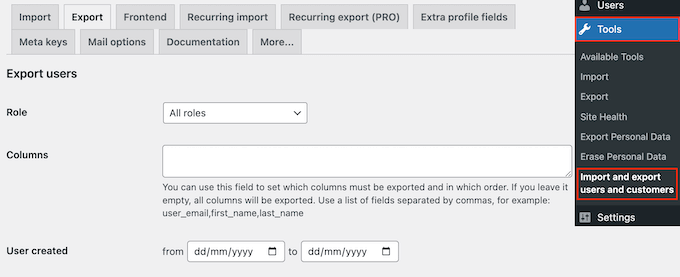
From here, you can choose which users you want to export. For example, you can open the ‘Role’ dropdown and select the user role you want to export, such as customers from your membership plugin, subscribers, commenters, or any other user role.
To filter users by date, simply type into the ‘User created’ fields.
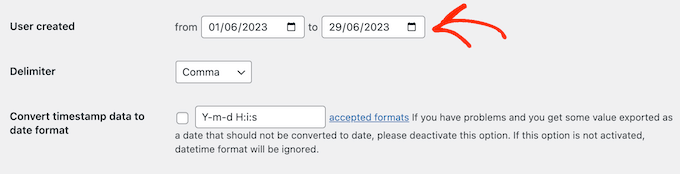
When you are ready to export users from your WordPress website, go ahead and click on ‘Download.’ The WordPress plugin will now create and download a CSV file containing all the user information.
You can open this file in any spreadsheet software like Google Spreadsheets or Microsoft Excel, and also import it into WordPress.
How to Import WordPress Users and WooCommerce Customers
Once you have created a CSV file, you can import these users into any WordPress website.
To start, make sure you’ve installed the Import and Export plugin on the new website. After that, simply go to Tools » Import and export users and customers in the new website and select the ‘Import’ tab.
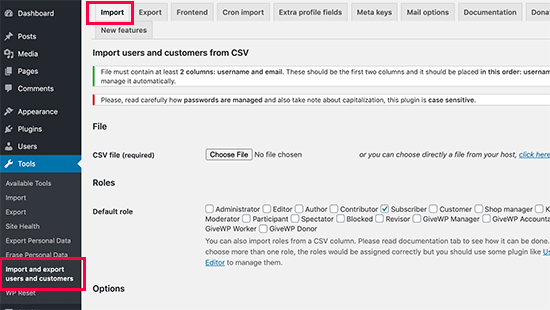
Here, click on the ‘Choose file’ button and select the CSV file you downloaded earlier.
Once the import is complete, you may want to send your users an email with a login link and their credentials. To do this, simply check the box next to ‘Send Email’. This can improve the user experience and encourage them to log in to their new account.
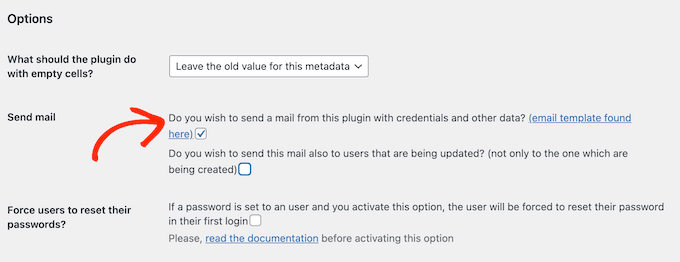
The plugin has a default email template, but we will show you how to customize it in the next step.
You may also want to force users to reset their password the first time they log into their new account. This can help keep your website safe and is particularly important if your user accounts contain sensitive information, such as the customer’s credit card details.
To add this security feature, check the box next to ‘Force users to reset their password’.
There are some more settings you may want to configure, but this is all you need to import users into a new WordPress blog or website.
When you are happy with how the import is set up, simply click on the ‘Start importing’ button.
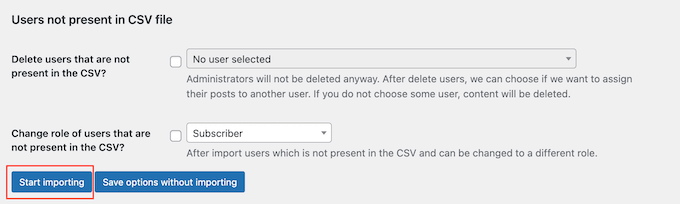
The plugin will now perform the import and display a list of all the new users.
Sending Emails to Imported Users and Customers
When moving users to a new website or online marketplace, you may want to send them an email about the change.
If you enabled the ‘Send email’ setting in the previous step, then you can customize the message by going to Tools » Import and export users and customers. Here, select the ‘Mail options’ tab.
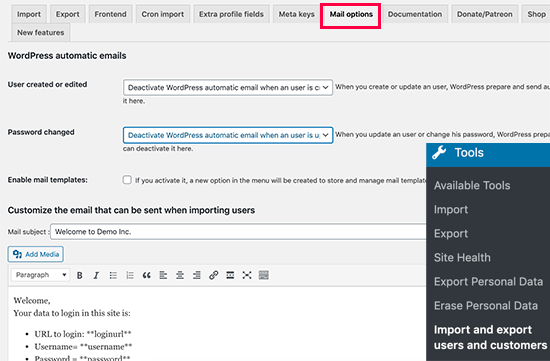
By default, the message includes the user’s login details and a link to the site’s login page. To change this message, simply type into the text editor.
You can also use all the standard text formatting options. For example, you can add links, use bold and italic formatting, create lists, and more.
After creating these emails, you will want to make sure they arrive safely in the user’s inbox and not in the spam folder. The best way to do this is by using an SMTP service provider to improve email deliverability.
For more details, see our guide on how to fix the WordPress not sending email issue.
We hope this article helped you easily import and export WordPress users and WooCommerce customers. You may also want to see our guide on how to create an email newsletter or see our expert picks for the best live chat software.
If you liked this article, then please subscribe to our YouTube Channel for WordPress video tutorials. You can also find us on Twitter and Facebook.




Syed Balkhi says
Hey WPBeginner readers,
Did you know you can win exciting prizes by commenting on WPBeginner?
Every month, our top blog commenters will win HUGE rewards, including premium WordPress plugin licenses and cash prizes.
You can get more details about the contest from here.
Start sharing your thoughts below to stand a chance to win!
Shyam says
How to change this default import user role – subscriber to admin etc.
WPBeginner Support says
It would keep the same user role as they were when imported. You can change user roles in the user section of your wp-admin area.
Admin
Souhila says
Hello
Thank you for the valuable content, I would like to know if there is a possibility to export users from another end not WordPress dashboard, like generating a link that allows to export users with a specific role to a CSV file
Thank you
Enzo Williams says
Im having some issues as i have 81,000 users trying to export to a csv. Which by my guess is several MB it keeps coming up with an error before task can complete.
WPBeginner Support says
More than likely it is taking too long, you may want to try the recommendation in our article below:
https://www.wpbeginner.com/wp-tutorials/how-to-fix-fatal-error-maximum-execution-time-exceeded-in-wordpress/
Admin
Lourenço says
If some users already exist – what will happen?
Does it overwrite them?
Regards.
WPBeginner Support says
You would want to reach out to the plugin’s support for the specifics on how that would be handled
Admin
Lourenço says
Thanks I will.
Regards.
Sarah Webster says
Hi there
If I export all users to a new site, will their passwords remain the same?
Thanks!
WPBeginner Support says
Unless I hear otherwise, the passwords should remain the same
Admin
michael says
hello I am lost. I made a website for our club some years ago. the members have passwords to see the content of the page.
now I updated the site and moved the web host (same URL) . Now I want
a) to move / migrate the database including the passwords our members have assigned themselves some years ago (and forgot about them).
b) have them active right away, so there is no problems for the members top go in their page.
Does this work?
Michael
WPBeginner Support says
For moving hosts you could take a look at our guide here: https://www.wpbeginner.com/wp-tutorials/how-to-move-wordpress-to-a-new-host-or-server-with-no-downtime/
When you move the site and users over, they can use the reset password option to get their passwords back or you could use the plugin in our article here: https://www.wpbeginner.com/plugins/how-to-reset-passwords-for-all-users-in-wordpress/
Admin
Sarah says
Can i use this on a multisite? I tried to export users in a subsite of a multisite, and the export button takes me to the dashboard without downloading the export file.
WPBeginner Support says
You would want to reach out to the plugin’s support for the specifics of how to use it on multisite.
Admin
Chad says
Thank you so much! This plugin was awesome for moving users from a main site to a subdomain prior to transfer.
WPBeginner Support says
You’re welcome
Admin
beth jansen says
Will the plug in create new users, assign passwords, and email them?
Ando says
Yes, it’s doing all those options.
Marin L says
How can I import absolute new users. So they don’t exist yet. Is the email and first and last name enough?
So I have a page made on WordPress and no WooCommerce. It’s just a page.
Stephen says
Does you plugin enable you to IMPORT Gmail and Yahoo contact lists into a WordPress site ?
Many thanks
Stephen
WPBeginner Support says
Hi Stephen,
It can do that. First you will need to export your contacts list in CSV format. Now install the plugin and export your current users, the plugin will generate a CSV file. You need to open this file in a spreadsheet program like Google Sheets or Excel. Notice the arrangement of columns. Now open your contacts list CSV file and arrange the columns in the same way using spreadsheet software. Now save this CSV file and try importing this file using the plugin.
Admin
Lenawa says
Hello
Same problem as Alan , getting this error
keep getting cant insert user without email
Alan says
Doesn’t work! keep getting cant insert user without email
Paul J says
Hello, I was wondering if this plug-in also exports/imports usermeta data
WPBeginner Support says
Hi Paul,
The pro version will be able to do that, please plugin website for details.
Admin