


Do you want to display your most commented posts in WordPress?
Highlighting your most commented posts helps your visitors find your best content, increase pageviews, and boost website engagement.
In this article, we will show you how to easily display the most commented posts in WordPress, step by step.

Why Display the Most Commented Posts in WordPress?
Your most commented posts have very high levels of user engagement. By displaying your popular posts, you encourage new readers to join the discussion and spend more time on your WordPress website.
All of this together is a big boost of social proof for your site.
When your visitors stay on your site longer, you can convince them to read another post, join your email list, or make a purchase.
Plus, when new visitors leave a comment, they become part of the community. This can help you build trust with your readers over the long term.
That being said, let’s take a look at how to easily display your most commented posts in WordPress using 2 methods. You can click the links below to move to the section of your choice:
Method 1: Display Most Commented Posts With a Plugin in WordPress (Recommended)
There are many different WordPress popular post plugins that you can use to display your popular articles, but the simplest to use is MonsterInsights.
It’s the best analytics solution for WordPress, used by over 3 million websites. With this plugin, you can easily display your most commented posts anywhere on your website.
First, you need to install, activate, and set up MonsterInsights. For more details, see our beginner’s guide on how to install Google Analytics in WordPress.
Note: there is a free version of MonsterInsights, but we’re using the pro version for this tutorial since it includes the popular posts feature.
Upon activation, navigate to the Insights » Popular Posts page and then click the ‘Popular Posts Widget’ tab in the menu.
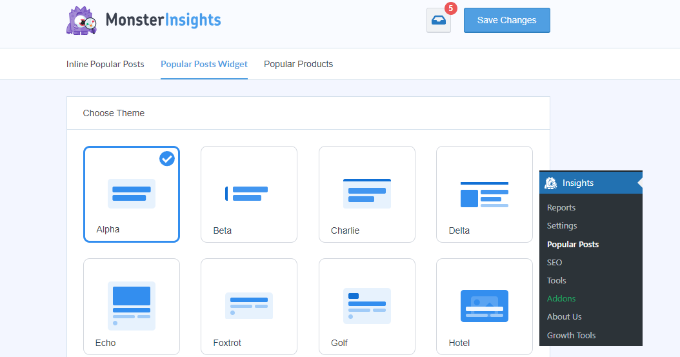
On this screen, you will control the appearance of your most commented posts.
Simply select the ‘Theme’ that you want to use for your posts. The theme operates similarly to your WordPress theme and will control the overall design of the most commented posts widget.
There are a ton of other customization options on this screen as well.
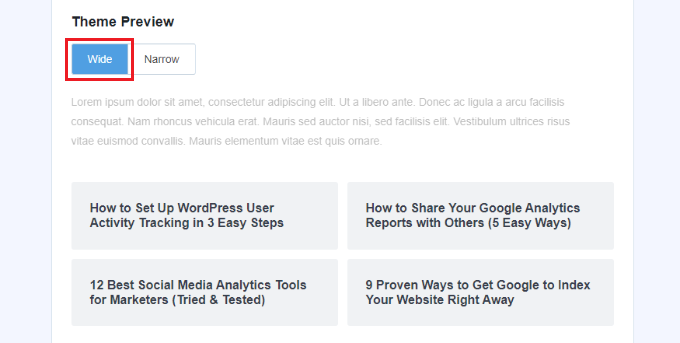
For example, in the ‘Theme Preview’ meta box, you can display your most commented posts in a ‘Wide’ format below your content or a ‘Narrow’ format to the right of your content.
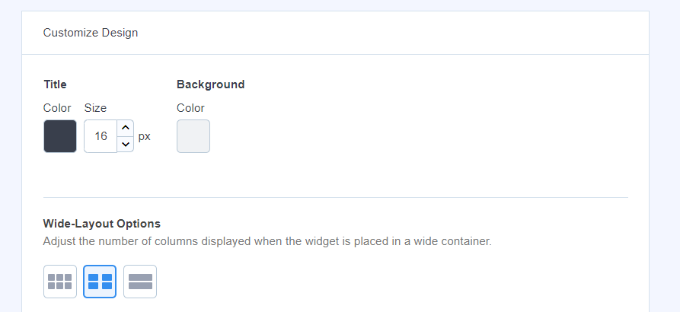
After that, you have more options for customizing the design.
For example, you can change the size and color of the title, icon, and background.
MonsterInsights will automatically save any changes you make to your most commented posts display settings.
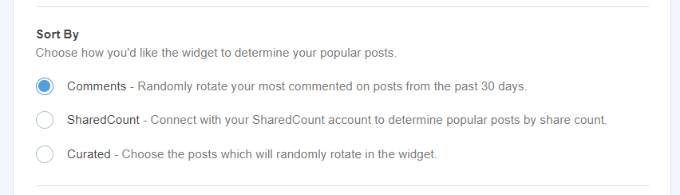
Once you’ve finished customizing the appearance of your commented posts, it’s time to display your popular posts by comments.
In the ‘Sort By’ meta box, simply select the ‘Comments’ option.
Next, you can scroll down and view more options to include and exclude posts.
There is also an option to include posts from specific categories in the popular post widget.
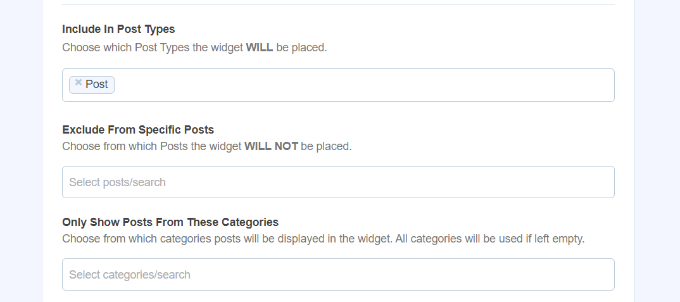
MonsterInsights will automatically display your most commented posts.
You have a few different options for adding your popular posts to WordPress. You can choose manual or automatic placement.
If you choose ‘Automatic’ placement, then the plugin will add your most commented WordPress posts directly after the last paragraph of your blog posts.
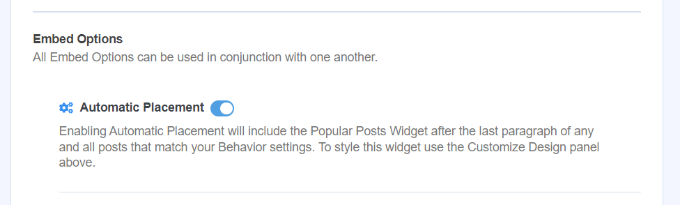
The other option is to display your most commented posts manually. If you select the ‘Manual’ option, then you can add the popular posts widget with a Gutenberg block or a shortcode.
To do this, open up a page or post where you want to display your most commented posts.
Once inside the content editor, just click the ‘+’ icon and select the ‘Popular Posts’ block.
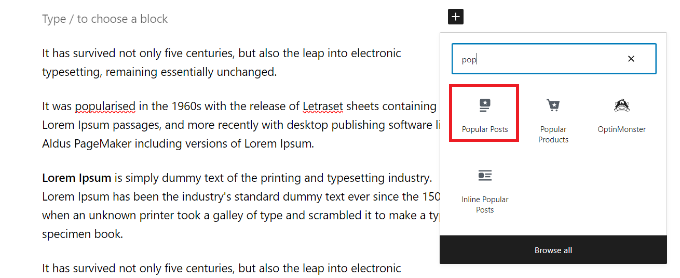
This will automatically add your most commented posts to your page.
Make sure you click the ‘Update’ or ‘Publish’ button to make your changes live.
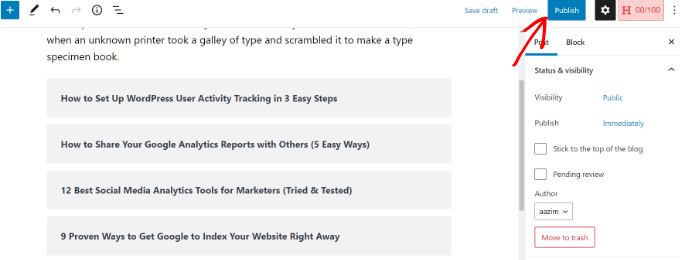
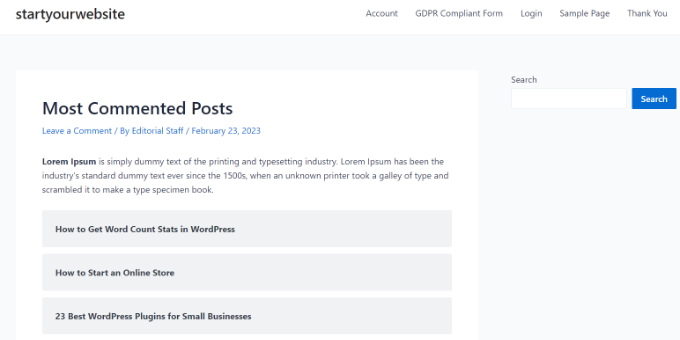
Now when your users visit the page, they will see your most commented posts displayed.
You can visit the website to see the most popular posts with comments in action.
Method 2: Display Most Commented Posts Using Code
The second method involves adding code to your WordPress files.
However, there are some downsides to using this method. First, it involves adding code to WordPress, so it’s not beginner-friendly. It can cause serious problems with even a small error, so we recommend editing WordPress core files for advanced users.
Second, the code isn’t as optimized for performance as the MonterInsights plugin. That means it will increase the server load, and it can slow down your website.
That being said, let’s take a look at how you can display the most commented posts in WordPress without a plugin.
Adding Code Snippet to functions.php File
You’ll want to add the code provided below to your functions.php file. We recommend doing this by using the WPCode plugin. It’s the safest and best way to add custom code to your WordPress blog.
First, you will need to install and activate the WPCode plugin. For more details, please see our guide on how to install a WordPress plugin.
Note: You can also use the free WPCode plugin as it has all the features you need to add this code.
Once activated, you can head to the Code Snippets » + Add Snippet page from your WordPress dashboard and select the ‘Add Your Custom Code (New Snippet)’ option.
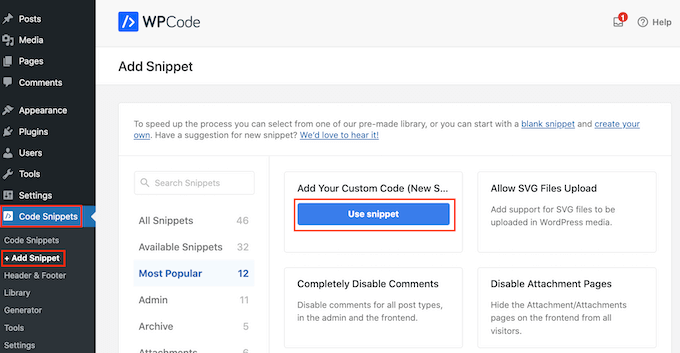
Next, you can add a name for your code snippet at the top of the page. After that, select ‘PHP Snippet’ as the code type from the dropdown menu on the right.
Now, just copy and paste this code into the ‘Code Preview’ box:
function wpb_most_commented_posts() {
// start output buffering
ob_start();
?>
<ul class="most-commented">
<?php
// Run WP_Query
// change posts_per_page value to limit the number of posts
$query = new WP_Query('orderby=comment_count&posts_per_page=10');

//begin loop
while ($query->have_posts()) : $query->the_post(); ?>

<li><a href="<?php the_permalink(); ?>" title="<?php the_title(); ?>"><?php the_title(); ?></a> <span class="wpb-comment-count"><?php comments_popup_link('No Comments;', '1 Comment', '% Comments'); ?></span></li>
<?php endwhile;
// end loop
?>
</ul>
<?php

// Turn off output buffering
 $output = ob_get_clean();

//Return output
return $output;
}
// Create shortcode
add_shortcode('wpb_most_commented', 'wpb_most_commented_posts');

//Enable shortcode execution in text widgets
add_filter('widget_text', 'do_shortcode');
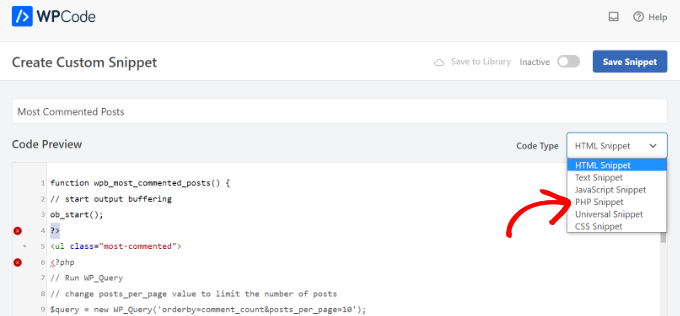
Once that’s done, simply click the toggle to make the code ‘Active’ and then press the ‘Save Snippet’ button at the top.
For more details, please check out our beginner’s guide to pasting snippets from the web into WordPress.
The code will run a database query and fetch 10 posts ordered by the highest comment count. Then, it uses output buffering to create a shortcode you can use to display the posts.
The last line of the code creates a shortcode that you can use in your posts, pages, and widget areas.
To display your popular posts, all you need to do is add the following shortcode to your WordPress site.
[wpb_most_commented]
For more details, see our beginner’s guide on how to add a shortcode in WordPress.
If you want to add thumbnails next to your post titles, then add the following line of code right after <li> tag in the code above.
<?php the_post_thumbnail(array(40,40)); ?>
This code will define the custom size for the post thumbnail images. You can adjust the size to meet your needs.
Style Your Most Commented Posts using CSS
Once you’ve done that, you can style how your most commented posts will be displayed.
To do this, you can modify the .most-commented and .wpb-comment-count CSS classes in your WordPress theme’s stylesheet.
You can use the following CSS to get started:
.most-commented li {
border-bottom:1px solid #eee;
padding-bottom:3px;
}
.most-commented li :after {
clear:both;
}
.most-commented img {
padding:3px;
margin:3px;
float:left;
}
.wpb_comment_count a, .wpb_comment_count a:active, .wpb_comment_count a:visited, .wpb_comment_count a:hover {
color:#FFF;
}
To add CSS to your website theme’s stylesheet, you can use WPCode.
Simply go to Code Snippets » + Add Snippet from your WordPress dashboard and select the ‘Add Your Custom Code (New Snippet)’ option.
Next, enter the CSS code under the Code Preview area and add a title for your snippet.
Then, make sure that you click the Code Type dropdown menu and select the ‘CSS Snippet’ option.
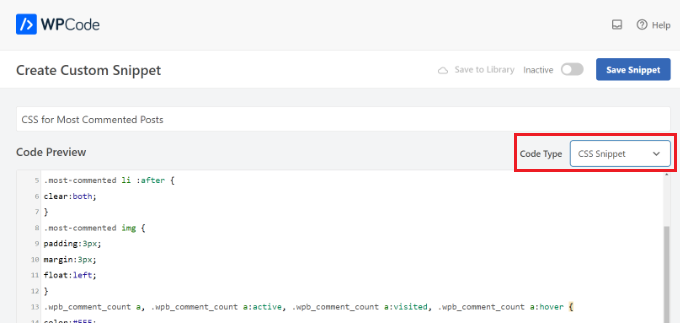
When you’re done, don’t forget to switch the toggle to ‘Active’ and then click the ‘Save Snippet’ button at the top.
For more details, see our guide on how to easily add custom CSS to your WordPress site.
We hope this article helped you display the most commented posts in WordPress. You may also want to see our ultimate WordPress SEO guide to get more traffic, and our expert pick of the best WordPress plugins for businesses.
If you liked this article, then please subscribe to our YouTube Channel for WordPress video tutorials. You can also find us on Twitter and Facebook.





Syed Balkhi says
Hey WPBeginner readers,
Did you know you can win exciting prizes by commenting on WPBeginner?
Every month, our top blog commenters will win HUGE rewards, including premium WordPress plugin licenses and cash prizes.
You can get more details about the contest from here.
Start sharing your thoughts below to stand a chance to win!
Ralph says
This article is a gem for bloggers seeking to enhance their website engagement! Displaying the most commented posts is a brilliant strategy to boost overall pageviews.
I used to display 5 most popular posts by views, but that didn’t do the trick.
Most popular is not as interesting as post with comment counter that shows 100+ comments.
Most popular can be meh, but the most commented? People are curious what others have to say.
Thanks for 2 ways of doing this. I tried code, but that didn’t work so I will try plugin. I see it has much more things to offer.
Jiří Vaněk says
Thank you for the snippet. I’d like similar functionality on my friend website as well, but I didn’t want to go down the path of adding another plugin that would consume memory. I use WPCode for snippets, so this snippet will come in very handy.
Nishant Nanda says
Loved this post and one question that do we have to add CSS code after the commented code in functions.php
WPBeginner Support says
You wouldn’t add the CSS in your functions.php, you would want to follow our guide for adding CSS below:
https://www.wpbeginner.com/plugins/how-to-easily-add-custom-css-to-your-wordpress-site/
Admin
Rohit Palit says
Great post. It was much needed. Love your simplistic style of explanation.