


Have you ever been asked to add some code snippets to the <header> or <footer> section of your WordPress website?
Often you are asked to add header and footer code in WordPress when trying to integrate with web services like Google Analytics, Google Search Console, Facebook Pixel, and more.
You may also come across WordPress tutorials that might ask you to add some custom CSS or JavaScript code to your WordPress header or footer.
By default, WordPress doesn’t provide an option to insert code in your website’s header and footer. Luckily, there is an easy solution for beginners.
In this article, we will show you how to easily add header and footer code in WordPress. The goal is to safely add the code without directly editing your WordPress theme files.
The Best Way to Add WordPress Header and Footer Code
If you want to add WordPress header and footer code, there are three possible solutions:
- Manually, by editing your theme’s header.php and footer.php files
- With your theme’s built-in header and footer code feature
- Using a WordPress plugin
The first option is not beginner friendly because it requires you to add header and footer code by directly editing the header.php and footer.php files manually.
Another disadvantage of using this method is that your code will be removed if you install an update to your theme.
The second option is using your theme’s built-in feature. Some WordPress themes like Elegant Themes and Genesis Framework by StudioPress offer a built-in option for quickly adding code and scripts to your WordPress header and footer.
If you are using a theme with a built-in feature, then it seems like a safe and simple solution. However, if you change your theme, then all the code snippets added to your website will be gone. This includes site verification in Google Search Console, website analytics via Google Analytics, and so on.
This is why we always recommend users to use the third option, a headers and footers plugin. This option is by far the easiest and safest method to add header and footer code in WordPress.
After a lot of requests from readers, our team has built the WPCode plugin.

WPCode (formerly Insert Headers and Footers) is a 100% free code snippet plugin. You can use it to easily add code to the header and footer in WordPress.
Here are some benefits of using the WPCode plugin:
1. Easy, Fast, and Organized: It lets you add codes to your site’s header and footer easily and quickly. Plus, it keeps you organized by allowing you to store all your footer and header codes in one place.
2. Prevents Errors: The smart code snippet validation helps prevent errors that may occur if you edit your theme files manually.
3. Upgrade or Change Your Theme Without Worry: The plugin will save your header and footer code in a separate place, so you can update or change your theme without worrying about the code being erased.
Aside from header and footer scripts, you can also use WPCode to easily insert custom PHP, JavaScript, CSS, HTML, and text code snippets without editing your theme files.
Plus, WPCode has a built-in snippets library where you can find all of the most useful WordPress code snippets. This allows you to quickly remove WordPress features that you don’t want like automatic updates, REST API, XML-RPC, comments, and more.
Note: If you want advanced features like a private cloud snippet library, conversion pixels, scheduled snippets, code revisions, and more, you can upgrade to WPCode Pro.
For more details, read our guide on how to easily add custom code in WordPress.
With that said, let’s see how to easily add header and footer code in WordPress using the WPCode plugin.
Video Tutorial
If you don’t want to watch the video tutorial, then you can continue reading the text version below:
Adding Code to Header and Footer in WordPress
The first thing you need to do is install and activate the free WPCode plugin. For more details, see our step by step guide on how to install a WordPress plugin.
Once the plugin is activated, go to Code Snippets » Header & Footer from your WordPress admin panel. After that, you will see a ‘Header’ box where you can add your code.
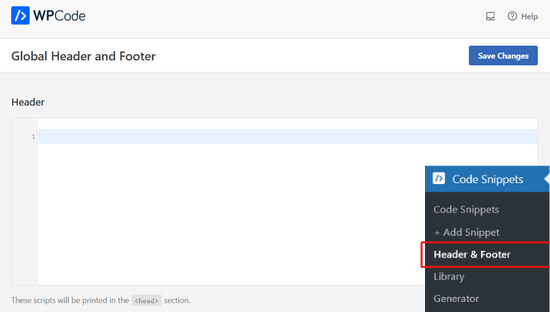
If you scroll down, you’ll also see a ‘Body’ and a ‘Footer’ box.
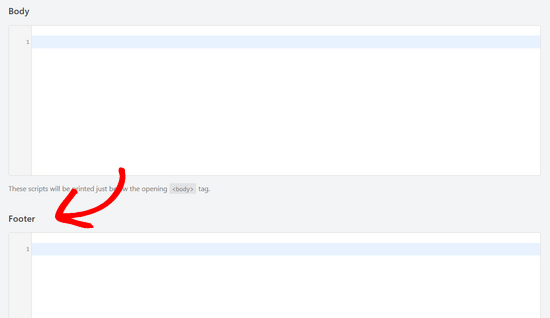
Simply paste the code into one of the three boxes. Once you’re done, don’t forget to click the ‘Save Changes’ button to store your settings.
The plugin will now automatically load the code in the respective locations on your WordPress site.
You can always edit and remove any code that you don’t want to keep.
You’ll need to keep the plugin installed and activated at all times. Deactivating the plugin will stop adding all custom code to your site.
If you accidentally deactivate the plugin, the code will still be safely stored in your WordPress database. You can simply reinstall or reactivate the plugin, and the code will start appearing again.
Note: You may have to clear your WordPress cache after saving changes, so the code properly appears on the front-end of your website.
We have found the biggest reason why a lot of beginners use the WPCode plugin is to add Google Analytics to their website. For that, we actually recommend using the free MonsterInsights plugin.
MonsterInsights is the best Google analytics plugin for WordPress. It helps you properly set up Google Analytics tracking with just a few clicks, and it shows you helpful stats right inside your WordPress dashboard.
For step by step instructions, see this tutorial on how to install Google Analytics in WordPress.
We hope this article helped you to learn how to add header and footer code in WordPress easily. You may also want to see our comparison of the best email marketing services and the best business phone services.
If you liked this article, then please subscribe to our YouTube Channel for WordPress video tutorials. You can also find us on Twitter and Facebook.




Syed Balkhi says
Hey WPBeginner readers,
Did you know you can win exciting prizes by commenting on WPBeginner?
Every month, our top blog commenters will win HUGE rewards, including premium WordPress plugin licenses and cash prizes.
You can get more details about the contest from here.
Start sharing your thoughts below to stand a chance to win!
Rattanak says
Adsense give me copy code in to my site (between head) , where I can put code into my site?? I use premium plan!
WPBeginner Support says
Hi Rattanak,
You cannot use Adsense on WordPress.com premium plan, you will need at least their business plan for that. Please see our guide on the difference between self hosted WordPress.org vs free WordPress.com blog.
Admin
MADHUSUDAN says
Hi,
Your team member has tried to resolve my issue and they are on time .. but i just saw this place where we can leave a reply..
I am trying to add a meta tag to my front page as required by my affiliate programm company to get to promote their product. I used add header and footer plug in as suggested by your team member and after adding and saving changes I do not see the changes .. how would the site look after adding the meta tag by the way the meta tag is as below
OR the other option is to add a new page with their code which is .html . i tried to copy paste as but it remains as such. IS IT BECAUSE MY SITE IS PHP SUPPORT AND THE CODE IS HTML OR HOW?
Hope to recieve your advice and feedback.
WPBeginner Support says
Hi Madhusudan,
The meta tags are located in your website’s HTML code. They are added in the header section or at the end. Meta tags are not visible on your website and do not make any change to your website’s appearance. You can still view the meta tag by viewing the source or using the inspect tool.
Admin
Angela says
I have added the header/footer plug in. I added my facebook pixel code and hit saved. But how to I install this code to specific pages of my website so I can track certain conversions?
Jen says
I use this plug-in all the time with no issues. Today, I installed it and added my code needed into the correct area. Every page is showing the code except the home page. Any idea why every page would have the code except the home page?
John says
This post doesn’t teach what script to put in the footer though. What simple script can I use to get started? I just want a simple footer.
Sarthak says
I am having an issue her. It would be very helpful of you to resolve my issue.
I have to add the code of google adsense in the header of my website, but earlier i had added the instant article code in the header, now what shold i do to keep both of them?
(As i am the beginner, so i don’ know much about it. Help me please.)
George Beasley Jr says
I tried installing the “Insert Headers and Footers” into my website. When I go to “Settings/Insert Headers and Footers”, I get this error: (Fatal error: Call to undefined function wp_unslash() in /home/afvetrep/public_html/wp-content/plugins/insert-headers-and-footers/ihaf.php on line 169)
What do I do?
WPBeginner Support says
Hey George,
wp_unslash() is a standard WordPress core function since WordPress 3.6. If you are using an older version of WordPress, then you need to update WordPress.
If you are using the latest version of WordPress and still seeing this error, then let us know and we will help you troubleshoot.
Admin
Frank says
Hi. I am inserting a MailChimp popup script into the footer and this breaks my WP main navigation menu. Any idea why or how to fix it ? I just upgraded to your latest plugin version but the problem persists. Thanks.
Frank says
Anyone have any idea why I have this problem ?
Thanks !
Riju says
Please help me
I can’t see any editor on appearance..
I need to put webmaster tool verify meta code in how can I edit the header?
Need help
Bamz says
Thank you very much. Please where can I paste Google AdSense code in this plugin, header or footer?
Riju says
Hi, I can’t see any
I’m trying to connect my WB with Adsense
Can i add Adsense ad code on WordPress after using mobile???
Please help
echenze says
Hi, can this still be used to insert the code that one is given for verification of a Google Adsense account?
WPBeginner Support says
Yes it can be used for that.
Admin
Samuel says
This is one of my best plugins and i use em frequently to add codes to the header and footer, but something happen after i update the plugins few hours ago, it gave an error [Fatal error: Can’t use function return value in write context in /home/campmmcg/public_html/wp-content/plugins/insert-headers-and-footers/ihaf.php on line 102]
Please resolve this
WPBeginner Support says
Hi Samuel,
This issue has been fixed in version 1.4.1, please update the plugin.
Admin
Meaghan Nutt says
This was really easy but it changed my header on the website and it is huge! It has pushed down my slider and my content for a huge white box. Help!
raunak says
hey thanks for this amazing plugin
but could it work if i paste google verification code on the header
massive says
Thank you for this greate article, my question can I use this plugin to insert ad codes like ad codes of affiliates programs?
Rizwan Amjad says
Hellow.. i am using this plugin, I have a question that can i use this plugin to insert multiple codes in this way..
Code 1
Code 2
Code 3
Simply Code 1 and then Enter Button and code 2 and enter button.
I want to insert codes likes google authorship, analytics, webmaster, etc.
WPBeginner Support says
Hey Rizwan,
Yes you can multiple code snippets on new lines by pressing enter button after pasting each snippet.
Admin
Isabella says
Hi, This is probably a silly question, but if I already installed a facebook script in the header and now want to install another one from Hotjar, I am deleting the prior Facebook script so it is not re- installed, correct? Sorry I am not well versed in code.
Thanks
WPBeginner Support says
Hi Isabella,
Yes it is ok to do that. If you are unsure, then you can just copy the old code and save it as a text file on your computer.
Paul says
Excellent video. Very clear and helpful. I am now subscribing to your channel.
dominion says
good day. without installing any wp theme,is there any way I can use my own theme. or template
gajendra says
Superb Plugin….
Vladimír says
This is grat plugin, I see it is more than one year without updates. Could you please update it?
Vladimir
Lauren says
Thanks so much for the video. I tried to figure this out through other websites, and with my own brain, but I was still unsure. Your video was short and sweet, and finally gave me the visuals I needed to get the job done. Thanks again!
WPBeginner Support says
You are welcome
Admin
nazanin says
hi ,
i want to add my logo from wp(dynamic logo)
where is this plugins >?
khalid says
hey amazing people, i installed and added FB instant article code but FB still says that the code is not in the website.
I have added it to head section part.
Suzanne Ball says
I get “403 Forbidden
A potentially unsafe operation has been detected in your request to this site.”
when I insert the google script
Rene Hedges says
Thank you! Being very new to site building, and with no experience with working with coding, this was easy to follow!
WPBeginner Support says
Glad you found it helpful.
Admin
haris says
hi i am new in wp…….how to make database in wp and create table insertion etc….
Marcelo Guimaraes says
Hello! I am using Insert Headers and Footers to add the Google Analytics code to my WP site. Do I need to worry about each page on my site separately or am I covering the entire site simply by following the instructions on this video and adding the code to the Headers box (Insert Headers and Footers > Settings)?
WPBeginner Support says
You are covering the entire site.
Admin
Luciferbui says
Do you have html code or something, i need it to make my site faster
No more plugin
Thanks
Patrick Saad says
Hello !
This would be my first time using your plugin. I am hoping to render my web site more secure by adding these following scripts in the header :
X-Content-Type-Options: nosniff
X-Frame-Options: SAMEORIGIN
X-XSS-Protection: 1; mode=block
My questions are : Can I use your plugin to do this and if so do I make the header addition scripts one at a time or as I have typed them here.
Thanks for your help !
WPBeginner Support says
The more appropriate way to set HTTP headers in WordPress is by using the send_headers hook. Here is an example, it goes in functions.php file.
add_action( 'send_headers', 'add_header_xua' ); function add_header_xua() { header( 'X-UA-Compatible: IE=edge,chrome=1' ); }1-click Use in WordPress
Admin
Conrad Hall says
Hi,
I’m new to WPBeginner.com, and this is the first tutorial I have viewed. To be blunt, I’m stunned that a tutorial says “Here you see two text boxes where you can add your code. Simply copy and paste any meta information, scripts, Google Analytics, etc. and click “save settings”. This code will now be output to either your header or you footer.”
Regrettably, there are no links to information that helps a beginner understand how to get, or use, any of the code indicated. This renders the plugin useless to me.
My use for this plugin is to use it for connecting to pages such as privacy policy and publisher disclaimer. Is there a tutorial somewhere that shows this? if so, please link to it from this page.
WPBeginner Support says
If your theme has a navigation menu in the footer area, then please see our guide how to add navigation menu in WordPress.
Admin
Richard Bauer says
Can Headers be static menus that include text, graphics, and links to pages? Same for Footers.
is my site and is developed using FrontPage. We want to simply convert the entire site to Word Press as simple as possible. All links are to other site pages, site PDF and Word files, and a few external links. No Forms, No dynamic database, NO searches.
any help would be appreciated
marke says
Same result from inserting in wp_head Hook in Genesis Simple Hooks? Worked for me.
WPBeginner Staff says
Yes it is.
Mary says
There have been big changes in WP – Is this plugin still compatible?
Thanks
WPBeginner Staff says
It seems like your WordPress theme does not uses the standard wp_header and wp_footer functions. Please try switching temporarily to a default theme like twenty thirteen and see if the problem persists.
Mufidah Kassalias says
I’ve been using this plugin happily until the other day when we upgraded to the latest theme version (a major upgrade). The plugin broke our menu (it took quite a bit of investigation to narrow it down and be sure it was this plugin causing the conflict), so I’ve had to deactivate it. As you can imagine this is not a great solution, since our Google site verification, publisher info, analytics tracking and so on no longer exist in the head of our site. Do you have any suggestions regarding additional code I could include that would resolve the problem? Thank you.
WPBeginner Staff says
Are you sure its this plugin? We tested this and we were able to upload images just fine.
Andrea says
Hi there. I’ve noticed that I have to deactivate the plugin in order to see my images to insert them into a post. Is there way to fix this? I love the plugin otherwise!
Cha says
How long does it take before the code starts publishing data for Google Analytics?
Henrietta says
Hello there,
You have helped me so much with so many issues – best site ever! thanks!
Krista says
Hi there,
I am trying to update my one line of code in google analytics to get demographic info. I am sure I have pasted it correctly into the header(and footer, which I have always had there, but just read in a previous comment is unnecessary.) When I clcik the button in google analytics to validate code, it does not recognize the change. Have tried several times. Could you help me figure out how to solve this, please? Thanks!
WPBeginner Support says
You can try adding you analytics code in the header.
Admin
corlie says
Brilliant! super easy to use
Julie says
Can I use this plugin to add javascript code? Such as a redirection script?
Thanks!
WPBeginner Support says
you can add javascript code
Admin
Pedro says
Hi, I just installed your plugin, and I understand it allows to insert website-wide code in the header, do you have some version/recommendation for a plugin that works separately for each page in the site?
Thank you very much!
Bob says
I’m using Genesis and am looking for a footer which is much more plug and play such as a widget where typical footer fields can be entered by a business user (non-coder). Even the available widget-based footers I see in the marketplace only go as far as saying ok, here’s your space, now add a random widget with some code snippets (way beyond my skills).
If that magic doesn’t exist, can I just copy the footer code you are using on wpbeginner.com, edit the info and paste it into a Text widget into my Footer 1 position?
Editorial Staff says
Theoretically yes you can copy the code and paste it in the footer area. However it may cause some styling issues.
Admin
april whitlow says
If I am using this for google analytics, do i insert it into the header and footer or just the footer. sorry for the simple question. I am at the very beginning of learning.
Editorial Staff says
Header
Admin
Vince says
How do you add header scripts in just “one specific” page? This plugin is only applicable if you are adding a script for all the pages, but is not applicable if you will add it in a specific page.
Rya says
for “How do you add header scripts in just “one specific” page? This plugin is only applicable if you are adding a script for all the pages, but is not applicable if you will add it in a specific page.”
You can use php w/ the following info:
http://codex.wordpress.org/Conditional_Tags
in conjunction with your scripts.
Fayola says
I did this and I see that the script appears in the footer of my page. However, Google Analytics still says that the tracking is not installed. Please help!
Editorial Staff says
Are you using a caching plugin? If so, can you please empty your cache?
Admin
Stan Peters says
I get Notice: wp_register_style was called incorrectly. Scripts and styles should not be registered or enqueued until the wp_enqueue_scripts, admin_enqueue_scripts, or init hooks. Please see Debugging in WordPress for more information. (This message was added in version 3.3.) in C:\tools\xampp\htdocs\wpfrontier\wp-includes\functions.php on line 2758
when I use it to insert google font code in header
Editorial Staff says
This plugin is mainly created for analytics script, or meta information. This is not meant to be used for inserting jQuery or other design elements like those. The purpose was to allow users to easily add tags in their head or footer without editing theme files.
Admin
Ed says
I get the same problem. Is there a solution to this?
Mladen says
I have tried to add FB meta tags in header with this plugin, but it didn’t work. The idea is good, though.
Editorial Staff says
If you are trying to add dynamic PHP code in this plugin, then it would not work. This plugin does not execute PHP. It is mainly for inserting static meta tags.
Admin
Mladen says
Well, I don’t know if those tags are dynamic or static I tried the standard Facebook tags such as this:
<meta property="og:url" content="”/>
<meta property="og:title" content="” />
<meta property="og:description" content="ID)); ?>” />
<meta property="og:image" content="ID ) ) ?>” />
Can you tell me if this plugin is good for this purpose? Thanks
Editorial Staff says
No it is not good for that. Because the URL, the Title, and Description all have the PHP tag which is dynamic.
Gautam Doddamani says
a great plugin but my custom theme already has this option! will bookmark this post in case i change my themes.
Editorial Staff says
Yeah it’s main purpose is to keep you from being theme dependent. Often people place their Analytics codes etc in their theme’s footer scripts area like this. Then they forgot about it when they switch themes. This causes them to lose analytics data for number of days.
Admin