


Do you want to add custom fonts in WordPress? Custom fonts allow you to use a beautiful combination of different fonts on your website to improve typography and user experience.
Apart from looking good, custom fonts can also help you improve readability, create a brand image, and increase the time users spend on your WordPress website.
In this article, we will show you how to add custom fonts in WordPress using Google Fonts, TypeKit, and the CSS3 @Font-Face method.
Note: Loading too many fonts can slow down your website. We recommend choosing two fonts and using them across your website. We’ll also show you how to properly load them without slowing down your website.
Before we look at how to add custom fonts in WordPress, let’s take a look at finding custom fonts that you can use.
How to Find Custom Fonts to Use in WordPress
Fonts used to be expensive, but not anymore. There are many places to find great free web fonts such as Google Fonts, Adobe Fonts (formerly Typekit), FontSquirrel, and fonts.com.
If you don’t know how to mix and match fonts, then try Font Pair. It helps designers pair beautiful Google fonts together.
As you are picking your fonts, remember that using too many custom fonts will slow down your website. This is why you should select two fonts and use them throughout your design. This will also bring consistency to your design.
With that being said, let’s take a look at how to add custom fonts in WordPress. This is what we will cover in this tutorial:
Adding Custom Fonts in WordPress from Google Fonts
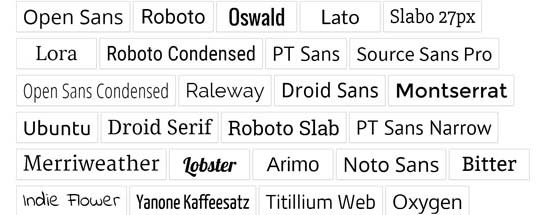
Google Fonts is the largest, free, and most commonly used font library among website developers. There are multiple ways you can add and use Google Fonts in WordPress.
Method 1: Adding Google Fonts Using a WordPress Plugin
If you want to add and use Google Fonts on your website, then this method is by far the easiest and recommended for beginners.
The first thing you need to do is install and activate the Google Fonts Typography plugin. For more details, see our step by step guide on how to install a WordPress plugin.
Deal: If you want to get the premium version of the plugin, then make sure to use our Google Fonts for WordPress coupon for a 20% discount. This will let you change the font color and size in your WordPress theme and more.
Upon activation, you will be given the opportunity to enter your email address to receive the official quickstart guide.
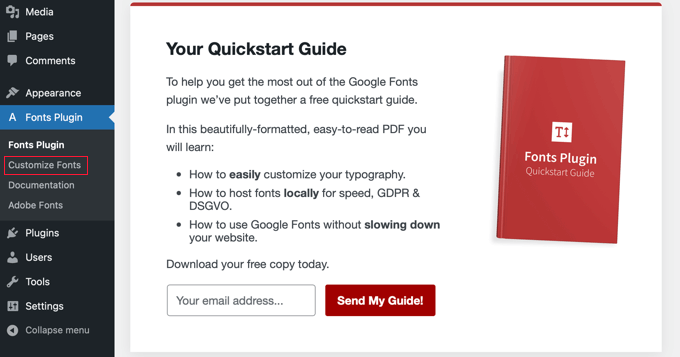
Next, you’ll need to click on Fonts Plugin » Customize Fonts in the admin sidebar.
This will automatically take you to the WordPress theme customer, and automatically open the new ‘Fonts Plugin’ section.
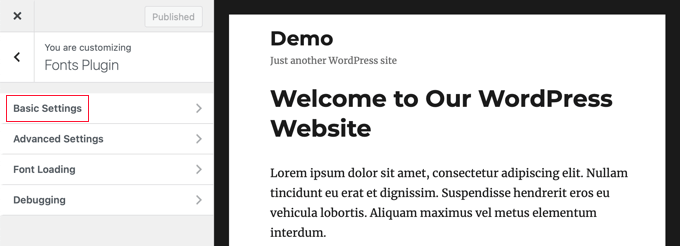
Here you can choose the default fonts for your website in the ‘Basic Settings’ section, and fonts for the specific parts of your website under ‘Advanced Settings’.
Let’s start by clicking on ‘Basic Settings’. Here you can select the fonts for your content, headings, and buttons and fields.
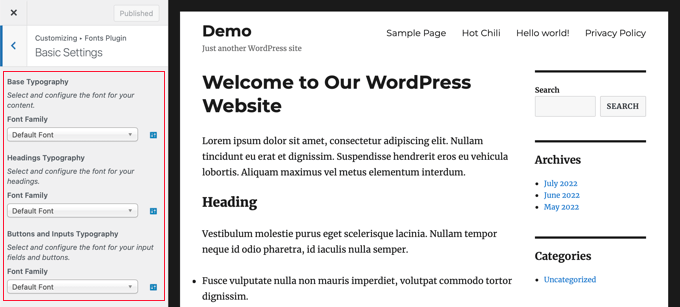
The ‘Font Family’ drop-down menus let you choose a new font. You will find the default font at the top, then the system fonts, and finally a huge list of over 1400 Google fonts.
When you choose a new font, the preview will automatically change to show you how it looks.
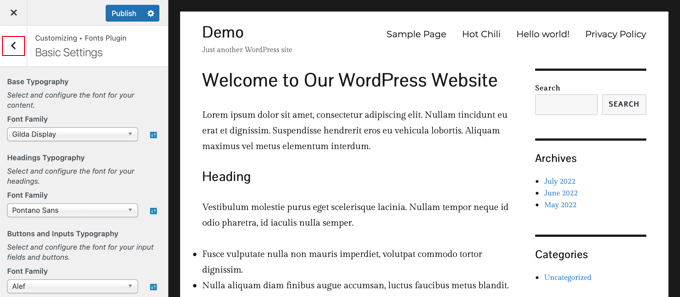
Now you can use the plugin’s advanced settings to fine-tune your font selections.
You will need to click the ‘<‘ back arrow button at the top left of the page and then click on the ‘Advanced Settings’ section.
Here you will find settings for the different sections of your website, such as the site title, navigation menu, content area, sidebar, and footer.
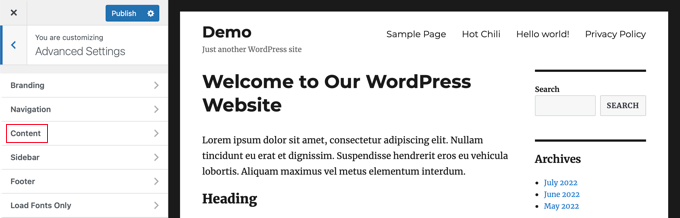
For example, the ‘Content’ section will give you options to change the font of your different heading levels and quotations.
You can select the custom fonts you’d like to use from the drop down menus.
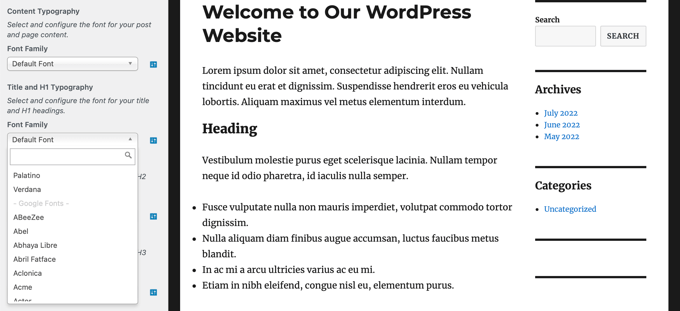
You can choose custom fonts for your sidebar area in a similar way.
Simply click the back button and enter the ‘Sidebar’ settings. There you will find drop-down menus to select fonts for your sidebar headings and content.
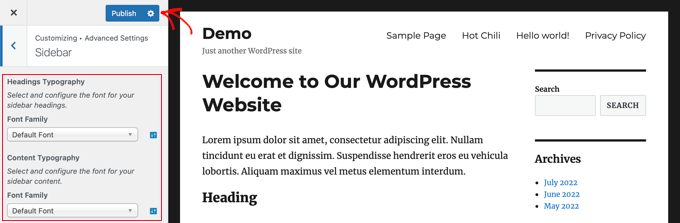
When you are happy with your custom font selections, don’t forget to click on the ‘Publish’ button to store your changes.
Method 2: Adding Google Fonts Manually in WordPress
This method requires you to add code to your WordPress theme files. If you haven’t done this before, then see our guide on how to copy and paste code in WordPress.
First, visit the Google Fonts library and select a font that you want to use. On the font page, you’ll see the styles available for that font.
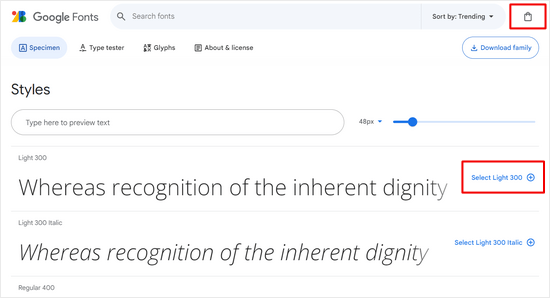
Select the styles that you want to use in your project and then click on the ‘View selected families’ button at the top.
This will open a sidebar where you can copy the embed code.
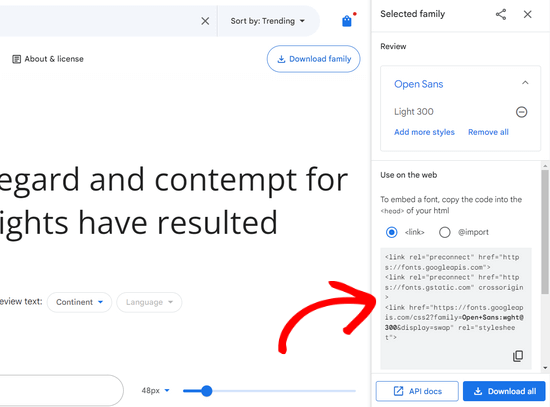
There are two ways you can add this code to your WordPress site.
First, you can edit your theme’s header.php file and paste the code before the <body> tag.
However, if you are unfamiliar with code editing in WordPress, then you can use a plugin to add this code.
Simply install and activate the WPCode plugin. For more details, see our step by step guide on how to install a WordPress plugin.
Upon activation, go to Code Snippets » Header & Footer page and paste the embed code in the ‘Header’ box.
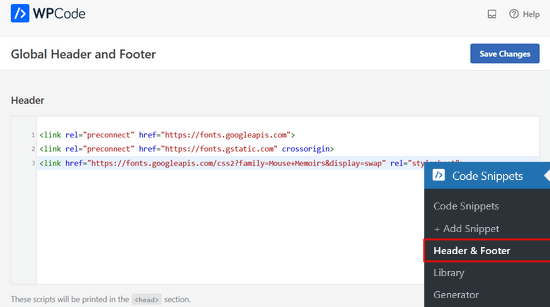
Don’t forget to click the ‘Save Changes’ button to store your changes. The plugin will now start loading the Google Font embed code on all pages of your website.
You can use this font in your theme’s stylesheet like this:
.h1 site-title {
font-family: 'Open Sans', Arial, sans-serif;
}
To learn more, see our guide on how to add Google Fonts in WordPress themes.
Adding Custom Fonts in WordPress Using Adobe Fonts
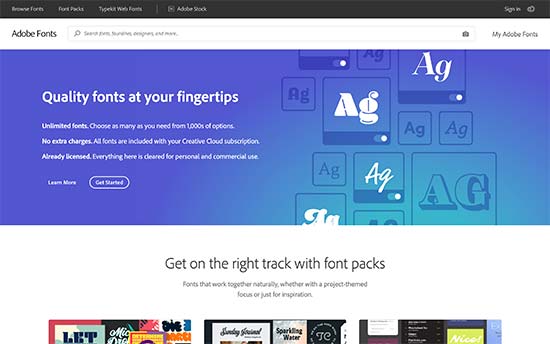
Adobe Fonts, formerly known as Typekit, is another free and premium resource for awesome fonts that you can use in your design projects. They have a paid subscription as well as a limited free plan that you can use.
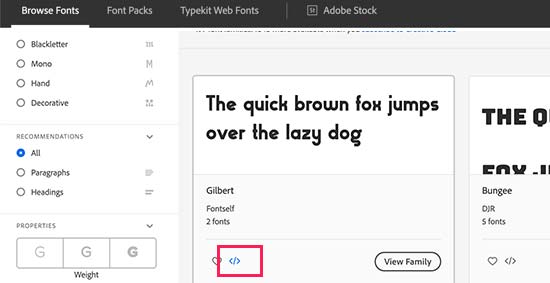
Simply signup for an Adobe Fonts account and visit the ‘Browse Fonts’ section. From here you need to click on the </> button to select a font and create a project.
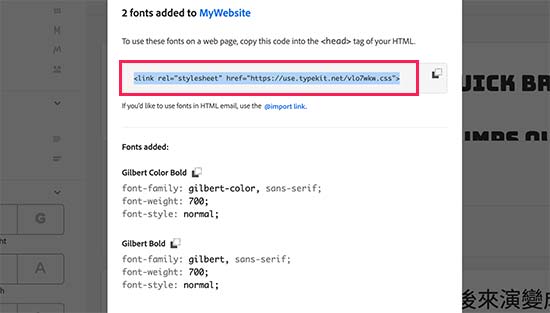
Next, you’ll see the embed code with your project ID. It will also show you how to use the font in your theme’s CSS.
You need to copy this code and paste it inside the <head> section of your website.
There are two ways you can add this code to your WordPress site.
First, you can edit your theme’s header.php file and paste the code before the <body> tag.
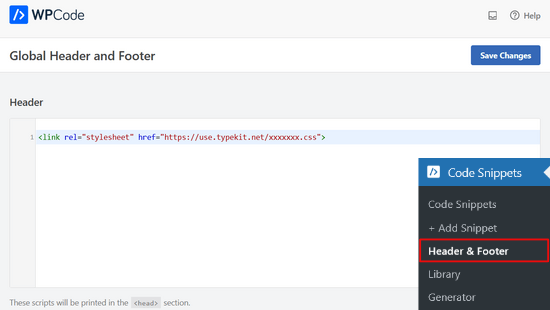
However, if you are unfamiliar with code editing in WordPress, then you can use a plugin to add this code. Simply install and activate the WPCode plugin.
Upon activation, go to Code Snippets » Header & Footer page and paste the embed code in the ‘Header’ box. Then, click the ‘Save Changes’ button.
That’s it. You can now use the Typekit font you selected in your WordPress theme’s stylesheet like this:
h1 .site-title {
font-family: gilbert, sans-serif;
}
For more detailed instructions, check out our tutorial on how to add awesome typography in WordPress using Adobe Font (Typekit).
Adding Custom Fonts in WordPress Using CSS3 @font-face
The most direct way of adding custom fonts in WordPress is by adding the fonts using CSS3 @font-face method. This method allows you to use any font that you like on your website.
First, you need to download the font that you like in a web format. If you do not have the web format for your font, then you can convert it using the FontSquirrel Webfont generator.
Once you have the web font files, you would need to upload them to your WordPress hosting server. The best place to upload the fonts is inside a new “fonts” folder in your theme or child theme‘s directory.
You can use FTP or File Manager of your cPanel to upload the font.
Once you have uploaded the font, you need to load the font in your theme’s stylesheet using CSS3 @font-face rule like this:
@font-face {
    font-family: Arvo;
    src: url(http://www.example.com/wp-content/themes/your-theme/fonts/Arvo-Regular.ttf);
    font-weight: normal;
}
Don’t forget to replace the font family and URL with your own.
After that you can use that font anywhere in your theme’s stylesheet like this:
.h1 site-title {
font-family: "Arvo", Arial, sans-serif;
}
Loading fonts directly using CSS3 @font-face is not always the best solution. For example, if you are using a font from Google Fonts or Typekit, then it is best to serve the font directly from their server for optimal performance.
We hope this tutorial helped you learn how to add custom fonts in WordPress. You may also want to learn how to embed a Facebook video, or check out our list of the best Instagram plugins for WordPress.
If you liked this article, then please subscribe to our YouTube Channel for WordPress video tutorials. You can also find us on Twitter and Facebook.




Syed Balkhi says
Hey WPBeginner readers,
Did you know you can win exciting prizes by commenting on WPBeginner?
Every month, our top blog commenters will win HUGE rewards, including premium WordPress plugin licenses and cash prizes.
You can get more details about the contest from here.
Start sharing your thoughts below to stand a chance to win!
Kushal Phalak says
I cannot do without custom fonts. It is as if something feels incomplete if I do not use custom font. As a designer and developer, I want my brands to be meticulously crafted as it is the most important step, and if I use any font, it does not feel good. I know that some default fonts are good, but I do not find enough variety in them. In wordpress, I guess this feature should be inbuilt, as it will save the extra hassle to add custom fonts.
WPBeginner Support says
It would depend on the theme but maybe in the future there will be an easier way
Admin
Jiří Vaněk says
Thanks for the useful article. Our language has certain specificities and features. The Czech language uses letters like ěščřž. Sometimes it is very problematic to find a font that takes these characters into account and does not display them differently. That’s why I thank you for this guide, which will finally help me solve the eternal problem of writing in the Czech language.
Jozef Fekete says
As a Slovak I know exactly what you are talking about In cases like this, it is advisable to use a filter to make searching for a suitable font easier. For example, look for fonts in the “Latin extended” category that support Czech and Slovak language.
Jiří Vaněk says
That’s good advice. Thank you for it. I have already tracked some of the letters. However, some customers are not satisfied with them and want a decorative one. I will try your search advice.
Moinuddin Waheed says
There are many Google fonts which are very good and are used by many top developers.
I have been fan of poppins and robot for a while and have used on my static sites and also on WordPress sites.
I have seen people saying that use Google fonts from local library,
I don’t know what does it mean?
They argue that fetching from server may slow down the speed of the website.
if it is so, how can we add these fonts from our own local library given the fact that these are Google fonts?
WPBeginner Support says
The plugin from our guide has an option to host the font file locally. When you do not host the file locally it means that your users would need to wait for the font to be pulled in from Google to see that font on your site.
Admin
Moinuddin Waheed says
Thanks for the guide for keeping the fonts locally.
Having to fetch from Google isn’t that good idea for speed purposes. I will keep in mind while using Google fonts to keep it locally.
Jiří Vaněk says
If a font is used locally, it means it is stored on the web. That is, on FTP just like WordPress. This is because otherwise wordpress has to go to Google servers for fonts and this slows down the site’s response. In addition, it may happen that Google’s servers are currently slow and this will affect the speed. If you put your website on some measuring tool like pagespeed insight or gtmetrix, you will see how much time it can take to load fonts from google servers. Therefore, it is a common practice to upload fonts locally to the site, improving both site responsiveness and metrics. I have it done that way too.
Ahmed Omar says
Thank you once again for a useful article.
Would you know why my font is displaying correctly on laptop but not on mobile phone?
WPBeginner Support says
The most likely reason would be if your theme overrides styling for mobile devices. If you check with your theme’s support they should be able to assist.
Admin
Brayden Fraser says
You should’ve said you needed to be a business WordPress member to do this. Misleading.
WPBeginner Support says
All of our content is for WordPress.org sites, you are on WordPress.com, you can see our comparison between the two in our article below:
https://www.wpbeginner.com/beginners-guide/self-hosted-wordpress-org-vs-free-wordpress-com-infograph/
Admin
Tarun Kashyap says
Which font are you using on this site ? It looks very attractive
WPBeginner Support says
We’re currently using Proxima Nova
Admin
Joshua says
Can you pleaseee tell me how do you make such beautiful animated photos for you blog? Which software do you use?
WPBeginner Support says
There are multiple tools, for the moment you may want to take a look at Recordit for an option for creating a GIF
Admin
Manuel says
Thanks a lot, I was trying @font-face on WordPress but the font was not displaying, so I followed the recommendations to place the fonts inside the theme directory and voila!
WPBeginner Support says
Glad our recommendation could help
Admin
Roshni Kanchan says
Thank you once again for a useful article.
Would you know why my font is displaying correctly on laptop but not on mobile phone?
WPBeginner Support says
Your specific theme may have device-specific CSS that is overwriting the font you added. If you check with your theme’s support they should be able to let you know.
Admin
Vlad says
Thank you very much!
WPBeginner Support says
You’re welcome
Admin
Katherine says
Thank you for making this simple video. Fixed my font in minutes with the second method. You saved me a lot of time messing with my theme code. Much appreciated!
WPBeginner Support says
Hey Katherine,
You are welcome. We are glad you found it helpful.
Admin
Or says
Hey, my font is not a Google font. I uploaded it using font face, but I don’t see it on my theme’s customizer. Any advice?
giri says
Hi, i absolutely got tons of value from your post. Please i have 2 quick questions.
1. What is the number of plugins every blogger shouldn’t exceed? I currently have about 18 installed, would you consider that number outrageous. Please could you also check out my site and offer me a
2. Your font is really beautiful. would you suggest plugins that would give me beautiful fonts just like yours?
Finally, would you spare a few seco
WPBeginner Support says
Hi Giri,
1. Please see our article on how many WordPress plugins should you install on your site.
2. For fonts, pleasesee best typography plugins for WordPress.
Admin
Roshani says
I have uploaded custom fonts url in font-face but its showing error of 404 on developer tools. Prior of loading the web page it shows normal fonts.
Please help me with this
Chamnan says
I’m having issue with for Khmer font while using Google Font. The problem is that some of the texts are showing symbol.
ahmed aboubakr says
thanks for your tutorials , really it helps , and thanks for your kind effort
Fadl says
Okay, never mind… I could figure it out by removing the @font-face code from the custom css field
Amy says
This is truly the best guide to adding fonts that I’ve found. All methods are in one place and each method is easy to follow. I’ve spent the past couple of days searching the internet trying to figure out how to add a custom font that was not from Google or Typekit, and finally I found a guide that was easy to follow. Thank you!
Amber says
Okay, so I used Font Squirrel and got the @font-face kits. I uploaded to my theme in Siteground. Then I made sure to change the URL in WP Editor -> Fonts. Here’s an example of what I did:
@font-face {
font-family: ‘walpurgis_nightregular’;
src: url(‘www.example.com/public_html/wp-content/themes/pique/fonts/walpurgisnight-regular-webfont.woff2’) format(‘woff2’),
url(‘www.wanderlustconqueror.com/public_html/wp-content/themes/pique/fonts/walpurgisnight-regular-webfont.woff’) format(‘woff’);
font-weight: normal;
font-style: normal;
}
Despite doing this, the font will not come up in the “Typography” section of the customization options. I thought perhaps I was also supposed to add it to the “Additional CSS Editor” so I put it there too. That didn’t seem to work either.
I just want to be able to use my font for my Headers. What am I doing wrong here? For this tutorial to be for beginners, it’s making me feel really stupid. Am I missing a step? Is there a better, more in-depth tutorial on just using the Font Face option? Help!
WPBeginner Support says
Hi Amber,
We are not sure. Please try following the steps mentioned above once again.
Admin
Dan says
I am having a similar problem as Amber. Despite following the step by step instructions, my fonts still are not loading.
I am using a custom theme based off of the twenty seventeen theme. My css file is located at wp-content/themes/twentyseventeen-child. This is also where I have placed my fonts. In the css file I have the following:
However, my site is still not showing this font! What am I doing wrong?
Syed Abbas Ali Shah says
I have a question too. I have uploaded the .ttf files in my
publichtml/folder-name-of-web/wp-content/theme/font
and I have added the name of the font in stylesheet css of theme in wordpress editor. But it is not picking the font.
Kindly give me the solution
Raghava says
Thanks for the valuable information. I tried and it’s working good. I used two fonts from google, when using google fonts website performance is bit slow.
if you can post in detailed how to upload fonts directly into the word press it would be appreciated.
Thanks,
Raghava
Allix says
If I am viewing a “glyph” through Photoshop that is a special character in a font I had purchased – how can I transfer this glyph into Photoshop?
Thank you!
dsb says
silly questions im sure! But, in the url- where it reads ‘your theme’ this is to be replaced with the title of our theme, correct? Or do we leave that part as is?
Also, for fonts that have long names, do you just need to leave spaces in between or add + signs or anything?
for example:
@font-face { font-family: Arvo example one; src: url(http://www.example.com/wp-content/themes/your-theme/fonts/Arvo example one-Regular.ttf); font-weight: normal; }1-click Use in WordPress
Thank you so much
WPBeginner Support says
Hi dsb,
Yes you will need to replace your-theme with the actual name of your theme folder. If you uploaded your font to your current theme’s fonts directory, then you can see what the font file is called. or Copy the file name and just paste it in CSS.
Admin
Vincent says
“The best place to upload the fonts is inside a new “fonts” folder in your theme or child theme‘s directory.”
Why is this the best place, exactly? Creating a child theme for a single font is a little annoying, but uploading it inside the theme itself means it could disappear when the theme has an update, right? Or will it still be safe from that as it’s technically an unrelated file?
Andrew says
I would probably say it’s silly to not have a child theme in general, regardless of what you’re using it for.
And no, it wouldn’t be safe if your theme gets an update. It would be overwritten by the update.
DaVince says
> I would probably say it’s silly to not have a child theme in general, regardless of what you’re using it for.
Why do you think so? Consider the case where someone is not changing the theme in any way, shape or form whatsoever. It would be entirely pointless to run a child theme, and adds just another layer of code on top of everything in this case.
> And no, it wouldn’t be safe if your theme gets an update. It would be overwritten by the update.
I kinda figured. I feel like this should be highlighted in the article or it’s going to make some people unhappy.
Shah says
Hi,
I don’t have any problem with adding custom fonts anywhere in m theme, just when I was going to change the font in wp-embed-template.php my custom fonts don’t work. I mean it’s like they are not @font-faced at all.
Would you please help me to change the fonts in the wordpress embed part? Should I add @font-face again in the php? It is already added though!
Many thanks in advance,
Robin says
Thank you for your help!
Once I’ve upload the font to my fonts folder, do I add this to my CSS? Do I leave the font family that is there? Because I’m using that mostly. This is a specialized font only used for specific occasions.
I’m so confused.
Alice says
Really great! Been struggling a while (I’m quite new to all this) but now it works Thanks a lot!
Nicole says
Hi. Thanks for this. How do I find the licensing information for a font? Some fonts are all over the web, and I want to use one but it’s hard to find the EULA info
Vincent says
It’s usually included in the font’s own metadata. In Windows, you can right-click and view the properties of a font. If that’s not enough, you might want to download a full-featured font viewer that supports showing font metadata.
Andrea says
Hello, which extension should has the font to be installed on wordpress?
Cause i am having issue to install mine
Mike says
Hi guys I used the last technique (@fontface), it has added the font to wordpress but it has made it the default font. I only wanted it to be an option on my fonts list. Can you help?
ep says
Used CSS @font-face method. Works like a charm. Thanks.
Abdul Manan Abbasi says
Assalam o Alaikum!
I am a beginner in wordpress. I want to add Noori Nastaleeq font to my website. How could i done so. I need your help.
Ildiko says
Can you provide performance comparison between these methods?
Asiyah says
Hi,
I’m completely new to wordpress so I hope you can help me. I have just literally bought a custom domain from bluehost, then installed wordpress and lastly installed and activated the so simple theme. So what I want to know is will my font changes be lost if I update my theme in the future, if so how do I prevent that?
It’s just I’ve noticed a lot of other sites advise adding a custom css plugin first and I have no idea how to do that.
Kind regards
WPBeginner Support says
Please take a look at our guide on how to easily add custom CSS to your WordPress site.
Admin
Vikram says
Thanks a lot.It helped
Hashim Naushahi says
This was truly helpful! Thank you very much!!!
Just a quick question…
How would I adjust the code if I have a font with different weights?
I’ve got a regular and bold version of the font I’d like to use installed on my laptop. I used FontSquirrel to convert those in webfonts. And I uploaded those webfonts to a folder in my child theme like you explained. I just don’t know how to use @font-face to use both weights.
I’m really looking forward to your reply. The way you explained this is great!
Thank you in advance!
Sincerely,
Hashim
WPBeginner Support says
You will use font-weight in CSS. Like this:
h1 { font-family: 'Open Sans', Arial, serif; font-weight: 400; }1-click Use in WordPress
Admin
Christina says
I don’t see the “editor” button in my wordpress under appearance. I used font squirrel to upload my font but when I went to add it in the theme editor that wasn’t an option. Maybe I have a different version of wordpress. Please help. Thank you.
Michelle says
Can you give a sample of the URL source for the @fontface example? I’m doing g something wrong and feel like pulling all my hair out :/
Mr.T says
Isn’t the correct way of adding custom google fonts is by using enqueue_script function?
WPBeginner Support says
It is ideal but not necessary. This method is correct too, and easier for beginners.
Admin
James says
Hi guys
I always read your posts and love the site, great work you always help me out. I’ve been stuck on moving a site for a customer and needed to change the font. I thought I had done everything , copies the css files etc, but it was reading this that made me realise I hadn’t changed the code in the header.
Been stuck on this for a week!
Anyway just wanted to say thanks