


Are you looking to create an image gallery in WordPress?
An image gallery lets you add photos in rows and columns. This allows you to display more photos in less space while also making it easier for users to browse them.
In this article, we will show you how to easily create an image gallery in WordPress that makes your photos look even better.

Why Create an Image Gallery in WordPress?
WordPress makes it super easy to add an image to your blog posts and pages. You just need to add the Image block and upload your image.
However, if you are adding multiple images to your WordPress website, then all those images will appear one after another. It doesn’t look great, and your users will have to scroll a lot to view them all.

By creating a gallery, you can display images in a grid layout with columns and rows. You can show thumbnails for your pictures, and users can click on them to see the full image.
This way, you will be able to show more photos in less space, and it will look a lot more professional.
For example, if you are creating a photography website to display your images, then adding a photo gallery allows you to display your work in an aesthetically pleasing way.

With WordPress, you can easily create an image gallery using the Gallery block in the Gutenberg block editor.
You can also use WordPress gallery plugins to create even better galleries with more features.
Having said that, let’s see how to easily create an image gallery in WordPress.
For this tutorial, we will be showing two methods to create a gallery, and you can use the links below to jump to the method of your choice:
Method 1: Create an Image Gallery With WordPress Block Editor
If you want to create an image gallery using the WordPress block editor, then this method is for you. However, keep in mind that this feature is very basic and does not have many options.
First, you need to open an existing or new post/page where you want to create the gallery from the WordPress admin sidebar.
Once you are there, just click the ‘+’ button in the top left corner of the screen. From here, find and add the Gallery block to the page or post.
Once you have done that, click the ‘Upload’ button to upload new image files from your computer.
However, if you want to upload images from the media library, then you must click the ‘Media Library’ button instead.
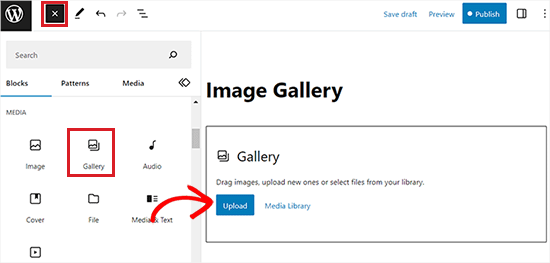
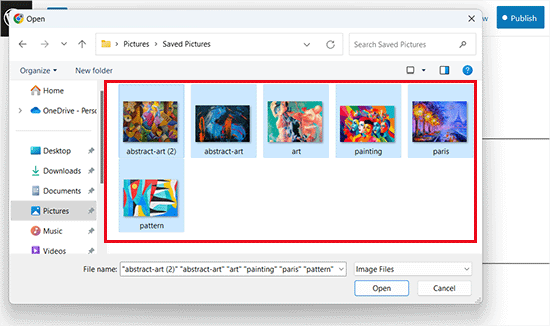
If you click on the ‘Upload’ button, then you can generally upload one photo from the computer at a time.
However, you can select and open multiple images with the Ctrl key held down on your keyboard.
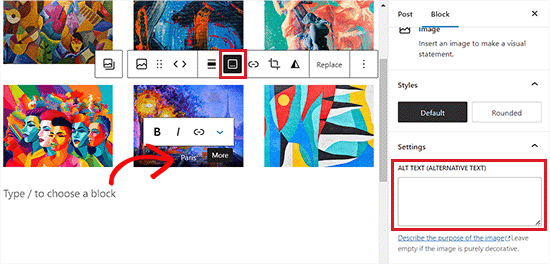
After you have uploaded all the images, you can add captions to them by clicking on the ‘Add Caption’ icon in the block toolbar at the top of individual images.
You can also add alt text to the images from the block panel on the right.
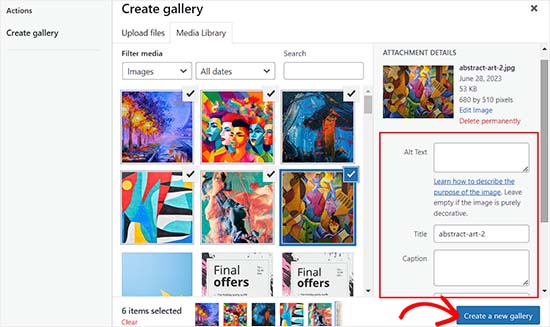
If you select the ‘Media Library’ button, then you will be able to choose multiple images for your gallery all at once.
As you select images, you can also enter the image alt text, title, and caption from the attachment details panel on the right side.
Once you have added all the images, simply click the ‘Create a new gallery’ button.
This will direct you to the ‘Edit Gallery’ page in the media library prompt.
From here, you can select individual images and add a caption, title, description, or alt text to them.
Once you are done, simply click the ‘Insert Gallery’ button at the bottom right corner.
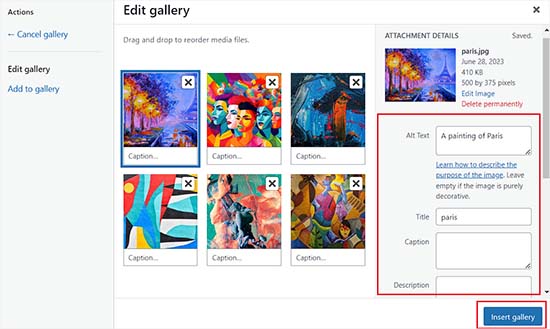
The image gallery you created will now be added to the WordPress editor.
You can also further customize it by selecting the Gallery block and configuring its settings from the block panel on the right.
For example, you can use the ‘Columns’ slider to decide the number of columns and rows for your galleries.
You can even toggle the ‘Crop Image’ switch to crop the thumbnails for better alignment.
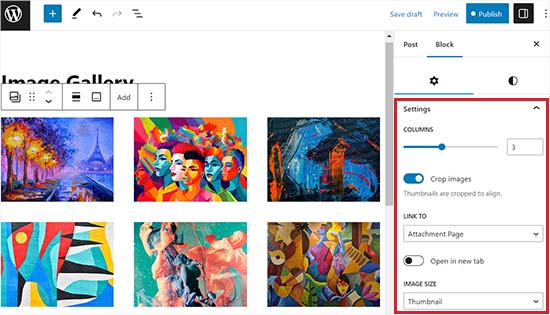
From the ‘Link to’ options, you can choose None if you want your users to only view your photo. This option disables the clicking feature for your images.
However, if you select the ‘Media File’ option, then the images will be clickable, and the image file will open when clicked. Similarly, the attachment page will open if you select the ‘Attachment Page’ option.
Once you are happy with the settings, click the ‘Publish’ or ‘Update’ button at the top to store your settings.
Finally, you can visit your WordPress blog to see the image gallery in action.

You have now easily created an image gallery for your website. However, you will soon notice that it lacks some essential features.
For example, your images will either be not clickable or open on a new page. If you link your gallery images to the media file or attachment page, then the users will have to click on the back button to view the gallery again.
This is not user-friendly and can discourage users from further exploring your website.
Similarly, the gallery’s appearance also depends on the WordPress theme that you are using.
Plus, you can’t organize your galleries into albums, topics, tags, and more. Your gallery is not stored anywhere, and if you need to add the same gallery again, then you will have to recreate it.
If you want to add more professional-looking image galleries to your site, then you should use the next method.
Method 2: Create an Image Gallery Using Envira Gallery (Recommended)
If you want to create a more functional and aesthetically pleasing image gallery for your WordPress site, then this method is for you.
We will be using the Envira Gallery plugin as it is the best WordPress image gallery plugin on the market.
Envira allows you to easily create fully responsive, beautiful, and modern image galleries in WordPress. It is super fast and comes with many features like a lightbox popup, easy image navigation, a drag-and-drop builder, and professional gallery templates.
First, you need to install and activate the Envira Gallery plugin. For more details, see our step-by-step guide on how to install a WordPress plugin.
Upon activation, head over to the Envira Gallery » Settings page from the WordPress dashboard to enter your license key.
You can get this key from your account on the Envira Gallery website.
Note: Envira Gallery also has a free plugin that you can use. However, we will be using the pro version for this tutorial to unlock more features.
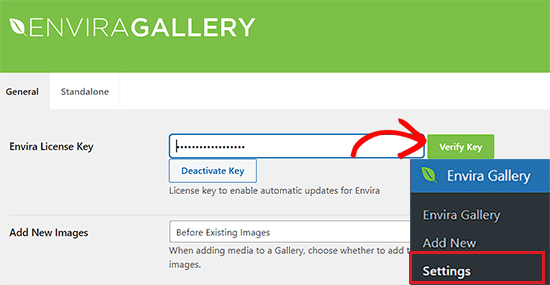
After verifying your license key, you can head over to the Envira Gallery » Add New page from the WordPress sidebar to start creating your first gallery.
Once you are there, provide a title for your gallery and then click on the ‘Select files from computer’ button to upload your images.
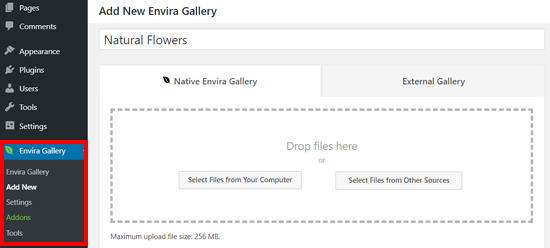
You can also upload images from your WordPress media library by clicking on the ‘Select files from other sources’ button.
Keep in mind that if you use this option, then you can only upload a single image at a time from the media library.
Upon uploading the images, scroll down to the ‘Gallery’ section, where all your photos will now appear.
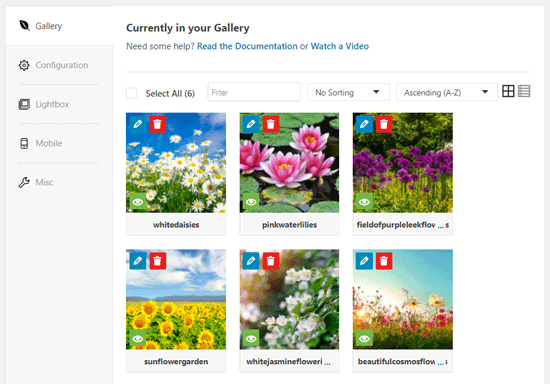
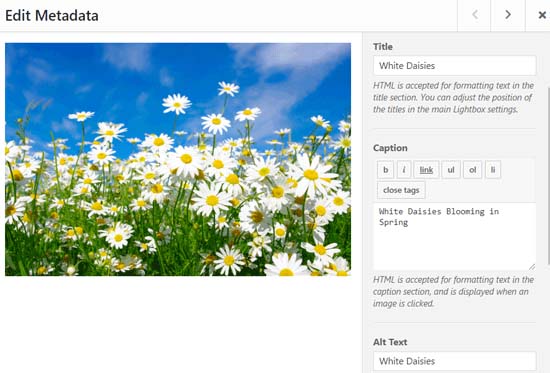
Next, you can click on the pencil icon at the top of each image to open the ‘Edit Metadata’ prompt on the screen.
From here, you will be able to add the caption, status, title, and alternative text for individual images.
Once you are done, don’t forget to click the ‘Save Metadata’ button to save your image captions.
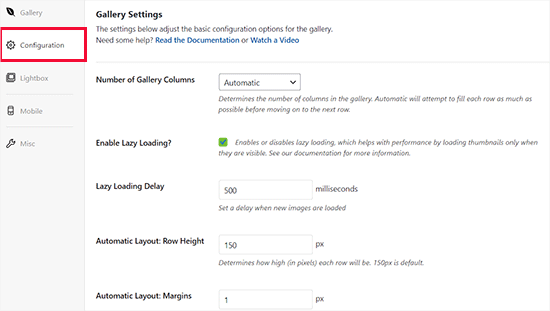
Next, you need to click on the ‘Configuration’ tab from the sidebar on the left.
From here, you can change your gallery layout, including the number of columns, image lazy loading, image size, title and caption positioning, margins, heights, thumbnail sizes, image dimensions, and more.
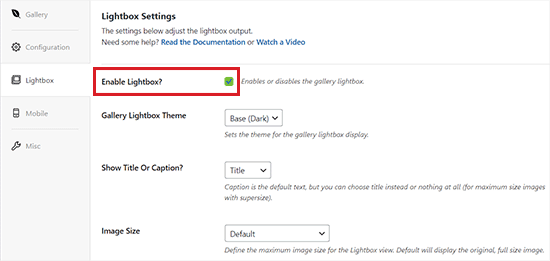
After that, switch to the ‘Lightbox’ tab from the left sidebar and check the ‘Enable Lightbox’ option.
This option will now allow users to enlarge images and browse them without ever leaving the page.
You can leave the other default settings as they are because they work very well for most websites, but you can review the options and change them if you like.
Next, click on the ‘Mobile’ tab to configure your gallery settings for mobile devices.
From here, you can choose image dimensions for mobile devices, enable or disable Lightbox, enable/disable image captions, and more.
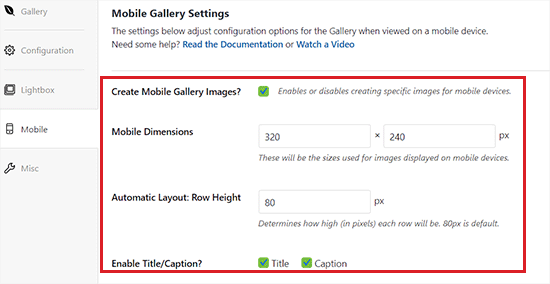
After that, you can review more options like gallery slug and adding custom CSS from the ‘Misc’ section.
Once you are happy with your settings, just click the ‘Publish’ button at the top to store your changes.
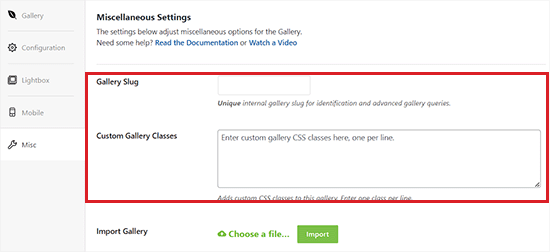
Next, you need to open up a post or page where you want to embed your gallery.
Once you are there, click the ‘+’ button in the top left corner of the screen to open the block menu.
Next, simply find and add the Envira Gallery block to the page or post.
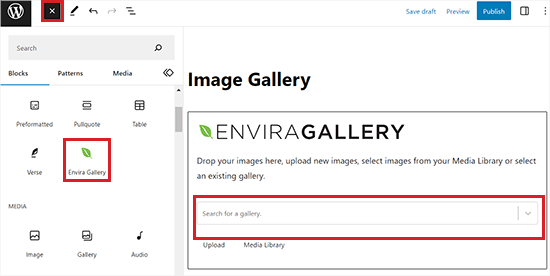
Once you have done that, you need to add your image gallery from the dropdown menu in the Envira Gallery block.
Finally, click the ‘Update’ or’ Publish’ button at the top to save your changes.
Now, you can view your image gallery on your WordPress website.

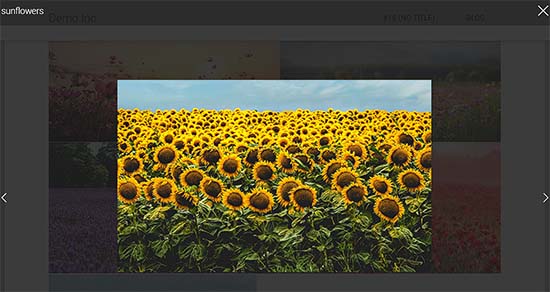
Here, you will notice that clicking on any image in the gallery will open it in full size with the lightbox effect.
You can also browse images in this popup by pressing the left and right arrow keys on the screen or your keyboard.
Bonus: Optimize Gallery Images For Search Engines
It is important to optimize all your gallery images without losing web quality so that search engines can index them for the right keywords.
This can help boost your page loading speed, improve user experience, enhance social media shares, and bring organic traffic to your website.
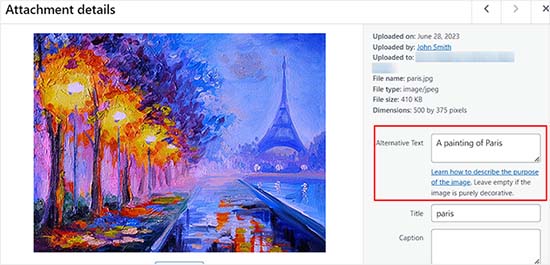
You can easily optimize your gallery images by always adding alt text for them in the attachment details page. This description is shown to the search engine crawlers and helps your image galleries rank higher.
Additionally, you can also use All in One SEO, which is the best WordPress SEO plugin on the market.
It comes with an Image SEO addon that will automatically set your alt text, image titles, captions, and more. It will also add a proper image sitemap and other SEO features to improve your SEO ranking.
For more information, see our AIOSEO review.

Other than that, you should also use descriptive file names for your images, use relevant keywords, and share your galleries on social media. For more tips, see our beginner’s guide on how to optimize images for search engines.
We hope this article helped you learn how to create an image gallery in WordPress. You may also want to see our comparison between WebP vs. PNG vs. JPEG: the best image format for WordPress and our expert picks of the best WordPress plugins for managing images.
If you liked this article, then please subscribe to our YouTube Channel for WordPress video tutorials. You can also find us on Twitter and Facebook.




Syed Balkhi says
Hey WPBeginner readers,
Did you know you can win exciting prizes by commenting on WPBeginner?
Every month, our top blog commenters will win HUGE rewards, including premium WordPress plugin licenses and cash prizes.
You can get more details about the contest from here.
Start sharing your thoughts below to stand a chance to win!
Chris says
I just started using standard wordpress image galleries. When I add images to the gallery, if I do not have enough images to fill an entire row, the last row’s image is displayed at a size that allows the image to fill the full width of the container. So the default of 3 images per row applies until the row runs out of images, then I get a final row with a giant image. Is there a way to force every image to the same size so that the gallery just has all images the same size, regardless of whether the row it appears in is full?
WPBeginner Support says
For that, you would want all of your images uploaded to be the same size and then you would uncheck the crop images checkbox that forces your images to align.
Admin
Roger Novak says
Can separate clickable links be attached/embedded to each picture in a gallery that will take the viewer to another web site?
Irene says
Thanks. Great tute. But what’s an attachment page? I have never heard of this.
WPBeginner Support says
It is a page that specifically shows your media item with your theme’s styling to include the header and footer of your site.
Admin
To the Aisle Australia says
Hi! Great info here – we are still having no luck centreing our gallery – despite clicking centre in both wordpress and elementor post editor… any suggestions would be greatly appreciated!
WPBeginner Support says
If you are using Elementor and the settings are being ignored, you would want to reach out to Elementor’s support and they would be able to assist.
Admin
Matthew Busse says
I found this very difficult to follow, my WordPress is set up very different. The date at the top says Jan 2020, but there are comments from 2016? When was this created? Since the date at the top said January 2020 *(and it’s now June 2020), I thought this would still represent the current WordPress, but it doesn’t. So this is just very confusing…
WPBeginner Support says
This guide was updated for it to work with the block editor. If your admin area looks different, you may be using WordPress.com.
Admin
Nilla says
Great tutorial. However, you don’t advise worpress.com users that you need to be on a Business Plan to install plugins, which is extremely annoying.
WPBeginner Support says
Our tutorials are for WordPress.org sites and not WordPress.com sites. For a better understanding, you would want to take a look at our guide below:
https://www.wpbeginner.com/beginners-guide/self-hosted-wordpress-org-vs-free-wordpress-com-infograph/
Admin
Brent says
Hello, thank you for the post. I have a gallery I built in Elementor. How can I allow my client access to upload and delete photos from the gallery page?
WPBeginner Support says
You would want to reach out to Elementor’s support with what you are wanting to do for them to be able to assist you.
Admin
Tegah says
Please How can i create featured image gallery in new wordpress.
i.e i what my featured image post to be made up of multiple images like a gallery
WPBeginner Support says
If your theme does not offer that ability by default, you would need to use a plugin like the one we recommend in this article
Admin
Stacey Barrett says
Is there an easy way to make all photos in the gallery the same size so it looks uniform? I’m creating the gallery for a non-profit newsletter.
Thank you, stacey
WPBeginner Support says
With the default gallery as long as you enabled the crop images they should be uniform in size.
Admin
Rahul gupta says
This post is so nice as you publish.Thank’s a lot
WPBeginner Support says
Glad you like our content
Admin
Jaco says
Hi I understood all that and thank you very much. so can you give me an idea how I can make a gallery appear by clicking on a photo.?
I want when some one click on a photo and then the gallery will appear.
with worpress
Help me please
WPBeginner Support says
For what it sounds like you’re wanting, you may want to take a look at Envira Gallery and the album feature
Admin
Robert says
Thanks for putting this amazing piece of content together! I ended up using the a gallery plugin because it was super easy to set up
WPBeginner Support says
Glad you were able to get your image gallery set up
Admin
Wendy says
Hi, I have been managing a gallery on my site for years, but am only realizing now that it seems as though WP will only allow me to share 100 photos at a time. Is there a way to display more? I have a Premium plan.
Thanks!
Alison says
Thank you for this helpful article. I make galleries all the time on my desktop computer, but I am hoping to blog from the trail this summer while backpacking the Colorado Trail and will be using my phone to do so. Is there any way to create galleries using the WordPress mobile app? I have been experimenting with that and can’t seem to figure out how to do so.
Thank you!
Dave Maynard says
I’m using th wordpress gallery creator. When I create a gallery with 3 columns in 2 rows of pictures, it looks good. But when I click on Preview, it shows me what my webpage will look like but it has the pictures all on top of one another and not in the 3 columns & 2 rows like I wanted.
How can I repair this?
Hanna says
Could you use this to display for sale items with the buy now button that I get from paypal?
Editorial Staff says
It would depend on how well the gallery plugin is coded, if there is lazy loading then it could speed up that specific page but overall you would want to take a look at how plugins affect your site speed here: https://www.wpbeginner.com/wp-tutorials/how-wordpress-plugins-affect-your-sites-load-time/
Admin
Craig Langburne says
How can I display a single image and link it to a slide show in a new window?
– I don’t want 12 thumbnails on the page – just one image the says ‘See the gallery’
Steven says
Yes!! Great tutorial! This saves me from having to revert to site origin builder when I have already used the reular wordpress editor. Works really well. I wish I would have realized this a long time ago but never reseached it. Thanks for this info.
Steven
Kyle says
Can I great a photo gallery that automatically transitions between 5-10 images automatically once my page has been loaded? I was also hoping to embed this on my homepage. Any help would be great. Thanks.
Erin says
Hi!
I am trying to add an image gallery that has links to various external pages (i.e. you click on an image and it brings you to that website.) I have determined that this is difficult to do with the WP gallery because they want all the images to go to the same linked page, but I want each of my images to go to a different page. It seems envira is not free. I downloaded gridplus and gridable but am still struggling with how to do this. ideas??
WPBeginner Support says
Hi Erin,
You can do this using a WordPress photo gallery plugin.
Admin
Sarah says
Hi there! I’m trying to figure out my gallery in WordPress, but when I publish it shows in one single column, but the backend looks normal and how I want. Do you know how to fix this?
Robin Pacific says
HI — I’m trying to update my site and have created a new gallery, but I can’t figure out if I did it in WP or NextGen. I can’t see how to insert it into the project.
I have inserted a video successfully. Can I have a video (on Vimeo) and also a gallery?
thanks,
Robin
loretta says
great tutorial thanks!
My blogs show as individual thimble images on the front blog page. If you hover over image you see the title. My issue is when you click on my blog page it looks like I have nil blogs as it takes up to 20 seconds for all images to show. Can you have the blogs list as titles rather images? If i hide featured image the boxed appear blank which is worse.
Many Thanks
Loretta
Ali says
I have a website I want to add gallery to my website.. This gallery will hold GBs of data more than 100GB. Is there any limitation in wordpress for that?
WPBeginner Support says
Hi Ali,
You will need to use Envira Gallery’s Pagination add on to display a reasonable number of photos per page.
Admin
Vicki Bentley says
If I create a gallery, can I then add more photos to the same gallery and somehow update the gallery post page? (I’m posting recipes of food dishes, and as I complete more of them, will want to update the post.)
WPBeginner Support says
Hi Vicki,
Yes, you can always edit the Gallery to add or remove images from the gallery.
Admin
Vicki Bentley says
If I create a gallery using the default WP functionality, but decide later that I’d like to upgrade to more functionality with something you’ve mentioned, can I simply add the plug-in and have it all convert, or will I have to rebuild the gallery from scratch?
WPBeginner Support says
Hi Vicki,
Unfortunately this will not be possible. You’ll have to manually recreate those galleries.
Admin
Howard Mkongo says
Loved the tutorial. Was a stepping stone to creating a custom plugin. After a few tweaks…problem solved
Sayan Das says
Thank you Wpbeginner,
I am a regular visitor of your site for my new blog.
Whenever I facing any problem for my new blog, I directly open your blog.
Thanks again and keep sharing.
Komal Kim Kevin says
You guys are the bomb! Thank you so much for this easy “WP for Dummies” sort of post! Keep it up!!!
mayank says
actually i want to know that can i a my website made on wp and export it as a new theme
Sandy Little says
I have been playing with an image gallery. Once I make the gallery, can I somehow make each image clickable in order to direct people to my posts?
Anita says
Thanks! I look forward to trying out this plugin.
Can you recommend a plugin that will let me create a gallery of featured images from my posts, by post category? I want users to be able to click the image to view the related post. Thanks!
Tamara Groom says
Your plugin is a life-saver. I am unable to connect to Jetpack because of a issue with the client’s host and the other lightbox plugins I tried weren’t great. WPBeginner always has an answer, thanks for all you do!
WPBeginner Support says
Hey Tamara,
Glad you found it helpful Don’t forget to follow us on Facebook for more WordPress tips and tutorials.
Admin
Martha says
The gallery seems to default to three images across in my posts, is there any way I could have 4 or 5 images running across in each line?
Martha says
Never mind…found it!!
William Fitch says
Thanks for an on-the-button explanation of the gallery. I must’ve tried a dozen other posts, which were all over the place, before I found this one.
I have a question. Is it possible to bunch the images in a gallery closer together. I’ve tried all sorts and my images remain far apart
Avinesh Shakya says
How can i display the the images of the gallery along with caption.
I want caption of each image in gallery to be stored in variable
Jacques says
Why are there no spaces between the images on my page and in the beginning of your tutorial you mention a lightbox but you never get to explaining how to make it as you only cover the carousel part.
Where can I find this and how can I get the spaced grid option??
Gennie says
So does things like social media activity now count for SEO?
I was told they help because of the Panda Google algorithm refresh
Added to Digg, someone will like it
dimitris says
Thanks, i have used this method several times…
Arabella says
How do you delete images from a gallery? I have tried every single thing I can possibly think of and followed all the advice given on the internet, but the images are still there on my home page, even though I have deleted them multiple times from the actual gallery. There are no problems with the Media Library, just the gallery that appears on my home page. If anyone can tell me how to get rid of these pictures, that would be greatly appreciated.
Alan Rubenstein says
How do I separate paragraphs in the galleries?
Shawn Johnson says
What gallery are you using for the images posted on this page? Love it
WPBeginner Support says
See How to add gallery carousel in WordPress without JetPack
Admin
Craig Swank says
I have created several image galleries which are initially uploaded in alphabetical order – I need to add large groups of additional images from time to time (this is in Word Press dot Com) – Is there anyway to re-alphabetize the entire gallery without being required to “drag and drop” – When adding 100’s of new images that is not an option.
Thanks
WPBeginner Support says
Please see our guide on the difference between self hosted WordPress.org vs free WordPress.com blog.
Admin
John Byrne Barry says
I just discovered this after trying some plug-ins, but the problem I’m trying to address is the same, with this and with the various plugins. Which is how to add a link to the image, so when you click on the image, it takes you to a specific page. Not the media file. Any suggestions? Thanks.
WPBeginner Support says
You can link your images to any URL you want. Please see our tutorial on how to add custom links to gallery images in WordPress.
Admin
R. Bambang Widiatmoko says
Hi, thanks for the tutorial. But how to make gallery from external images?
WPBeginner Support says
You will have to import those images into WordPress first.
Admin
Freddie says
I feel really stupid but just created a gallery page….updated with photos and text….simple enough. Why does “image gallery”, “slide show” and all this other stuff show up at the bottom of the page? I cannot figure out how to delete it. newby at web design.
Mauricio says
Absolutely well explained, it’s so helpful, I love it. Thank you so much for this video, great work.
melanie bund says
HI, Would be helpful to alot of people if you also suggested a free gallery plugin, rather than advertise a paid plugin
Melanie
Collin says
You should have kept reading. They do offer a pretty cool free plugin to add to the existing WP gallery. A nice looking carousel. Did you see?
Miguel Garcia says
Thank you very much for the tutorial.
I have just one question.
I created the gallery and published it, but when i put the mouse over the picture, it show a red square with two small silver squares that says: “view attachment page’ and “view in full size”
How can i remove it? I wanna make it like in facebook, that you just put the mouse over, click and see the carousel.
Is that possible?
Jeff Brown says
I did what you suggest above to create a simple gallery on a webpage. It shows up beautifully. However whenever I click on one of the thumb nail images it says : “image cannot be loaded. Make sure path is correct and image exist”.
Jeff Brown says
Just to clarify, I mean when I click on ANY of the thumbnails in that gallery I get that same error message.