


Do you want to customize your RSS feed’s footer in WordPress?
This allows you to add custom text, links, or even advertisements below your post content in your RSS feed.
In this article, we will show you how to easily control your RSS feed’s footer in WordPress so that you can display the content you want.
Why Add Content to RSS Feeds Footer in WordPress?
RSS feeds offer an easier way for users to read your blog posts in their favorite feed reader apps like Feedly. However, RSS feeds can also be used by content scrapers to automatically steal your blog posts as soon as they are published.
Sometimes, these content scrapers end up ranking higher than your original post in search engines. To learn more, see our step-by-step beginner’s guide to preventing blog content scraping in WordPress.
Adding additional content to the footer of your RSS feed allows you to add backlinks to your main site and the original post at the end of each article. This can help you rank higher for your posts, even if they are copied by content scrapers.
By manipulating your RSS feed footer, you can also give your readers a way to visit your WordPress blog directly from your RSS feed.
Having said that, let’s take a look at how to easily control your RSS feed footer in WordPress. We will cover two methods:
Method 1: Add Content to RSS Feed’s Footer Using All in One SEO
This method is easier and recommended for all WordPress users. It uses the All in One SEO plugin, which is the best WordPress SEO plugin used by over 3 million websites.
First, you need to install and activate the All in One SEO plugin. For more details, see our step-by-step guide on how to install a WordPress plugin.
Upon activation, you need to visit the All in One SEO » General Settings page and click on the ‘RSS Content’ tab.
This gives you an overview of your WordPress RSS feed settings and your WordPress RSS feed URL.
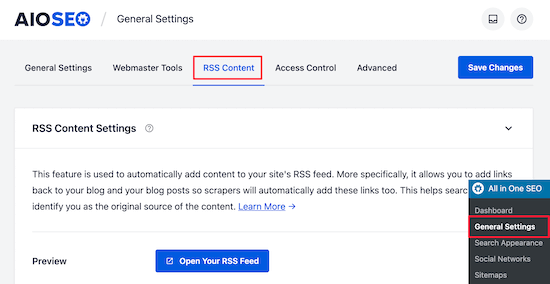
Under the ‘RSS Content Settings’, the first box allows you to add content before each post. The second box allows you to add content to the post footer.
Next, scroll down to the ‘RSS After Content’ section to edit your RSS feed footer.
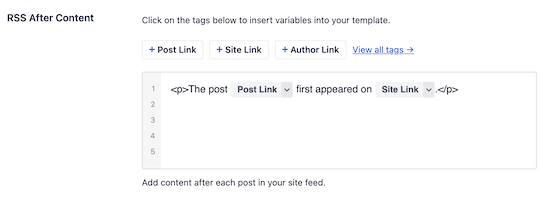
Right away, you will notice that AIOSEO automatically adds credit text with backlinks to your WordPress website in the RSS feed footer.
You can either use the text as-is or you can add your own content and tags.
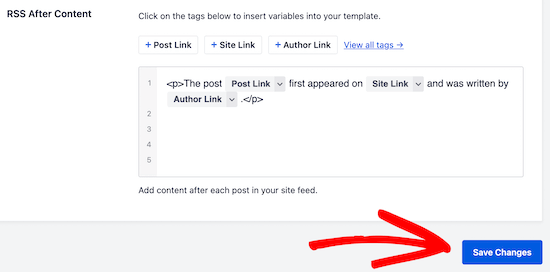
Don’t forget to click ‘Save Changes’ before you exit the screen.
You can now view your RSS feed to see the changes. At the end of each article, you will be able to see the content you added to your RSS feed footer.
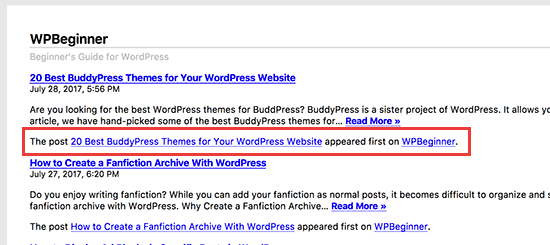
Method 2: Manually Add Content to RSS Feed’s Footer in WordPress
This method requires you to add code to your WordPress files. If you haven’t done this before, then check out our guide on how to copy and paste code in WordPress.
You will need to copy and paste the following code in your theme’s functions.php file or add the code snippet using the WPCode plugin (recommended).
function wpb_feed_filter($query) {
if ($query->is_feed) {
add_filter('the_content','wpb_feed_content_filter');
add_filter('the_excerpt_rss','wpb_feed_content_filter');
}
return $query;
}
add_filter('pre_get_posts','wpb_feed_filter');

function wpb_feed_content_filter($content) {
// Content you want to show goes here
$content .= '<p>Thanks for reading, check out <a href="'. get_bloginfo('url') .'">'. get_bloginfo('name') .'</a> for more awesome stuff.</p>';
return $content;
}
This code simply checks if the page requested is an RSS feed and then filters the content to display your message in the RSS feed footer.
For more details, please see our guide on how to add custom code in WordPress without breaking your website.
Expert Guides on RSS in WordPress
Now that you know how to control your RSS feed footer, you may like to see some other guides related to RSS in WordPress:
- Tips to Optimize Your WordPress RSS Feed (Quick & Easy)
- How to Create Custom RSS Feeds in WordPress
- How to Completely Customize Your WordPress RSS Feeds
- How to Add Post Thumbnails to Your WordPress RSS Feeds
- How to Limit the Number of Posts in WordPress RSS Feed
- How to Make Separate RSS Feeds for Each Category in WordPress
- How to Disable RSS Feeds in WordPress
- How to Fix WordPress RSS Feed Errors (Step-by-Step Tutorial)
We hope this article helped you learn how to control your RSS feed footer in WordPress. You may also want to see our ultimate guide on how to set up All in One SEO for WordPress and our expert picks for the best WordPress RSS feed plugins.
If you liked this article, then please subscribe to our YouTube Channel for WordPress video tutorials. You can also find us on Twitter and Facebook.





Syed Balkhi says
Hey WPBeginner readers,
Did you know you can win exciting prizes by commenting on WPBeginner?
Every month, our top blog commenters will win HUGE rewards, including premium WordPress plugin licenses and cash prizes.
You can get more details about the contest from here.
Start sharing your thoughts below to stand a chance to win!
Rohit says
Hello sir, how do I find out if this code given by you has been applied on my website or not. I put this code in function.php
WPBeginner Support says
You would need to check your RSS, we have a guide on using RSS that you can take a look at below:
https://www.wpbeginner.com/beginners-guide/what-is-rss-how-to-use-rss-in-wordpress/
Admin
tom g says
how can we disable the rss feed copyright warning! It is causing problems bc it has an email in it that is being obfusated an THAT is making rss invalid so it won show. I dont want to install yoast seo fo rjust that reason plus i use aloseo for seo.
Thanks That rss footer plugin might have worked if it was not joined with yoast…smdh…lol
Please lmk asap if you can . I have to figure this out soon to finish a project.
ty
George says
Nice tut. Is there a reason why you don’t internationalise the code of the code snippet?
JohanFalendo says
Sorry for out of topic. Can you tell me what plugin that wpbeginner used to create “I need help with” widget? I want to create widget lije that
WPBeginner Support says
Hey Johan,
It is a custom plugin we wrote specifically to use on our own websites.
Admin