


Do you want to add MP3 audio files in WordPress?
By adding MP3s files to your website, you can share music, podcasts, interviews, and other audio with your visitors and customers. This can make your site more engaging and get people to stay for longer.
In this article, we will show you how you can add MP3 audio files in WordPress.
Why Add MP3 Audio Files in WordPress
Sharing audio files on your website can be a great way to keep people engaged and spending more time on your website. This mean they’re more likely to remember your brand and take actions like making a purchase or signing up for your email newsletter.
When your visitors spend more time on your website, this can also be a positive signal for search engines which can help boost your SEO rankings and get you even more traffic.
You might want to share MP3 audio versions of your blog posts, podcast episodes, webinar recordings, or songs. You can even offer these audio files for sale on your site.
That being said, let’s see how you can add MP3 audio files in WordPress. Simply use the quick links below to jump straight to the method you want to use.
- Method 1. How to add MP3 files using the built-in Audio block (easy)
- Method 2. How to add MP3 audio files using a WordPress plugin (more customizable)
- Method 3. How to add MP3 files using Easy Digital Downloads (and make money)
Method 1. How to Add MP3 Files Using the Built-in Audio Block (Supports Streaming Platforms)
The easiest way to embed MP3 audio files is by using the built-in WordPress Audio block.
This simple block has all the important playback controls, including a play/pause button, volume controls, and a button to change the playback speed. This makes the Audio block a good choice if you don’t need any more advanced features.
You can use the audio block to play any MP3 file from your WordPress media library, or you can embed MP3s from popular third-party audio platforms.
Note: For most users, we don’t recommend uploading MP3s to play on your WordPress site. That’s because uploading large audio or video files can take up a lot of space and slow down your website. You can learn more in our guide on why you should never upload videos to WordPress.
If you want to stream content from a site such as Spotify, then you’ll need to use the built-in Audio block. Just be aware that some platforms only allow you to embed a clip of the full audio. They may also encourage people to leave your site so they can listen to the full MP3, as you can see in the following image.

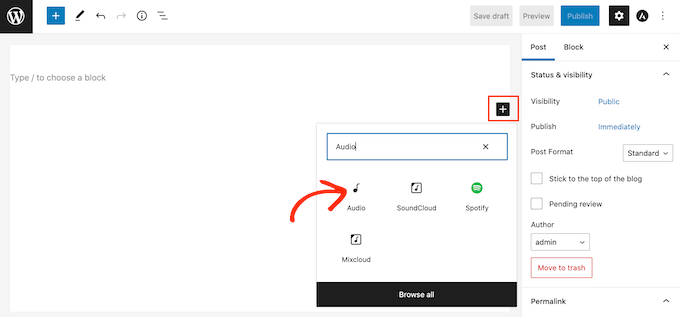
To add an MP3 audio file to your WordPress website, open any page or post. Then, click on the + icon.
In the popup that appears, type ‘Audio’ to find the right block. You can then simply click on the Audio block to add it to your page.
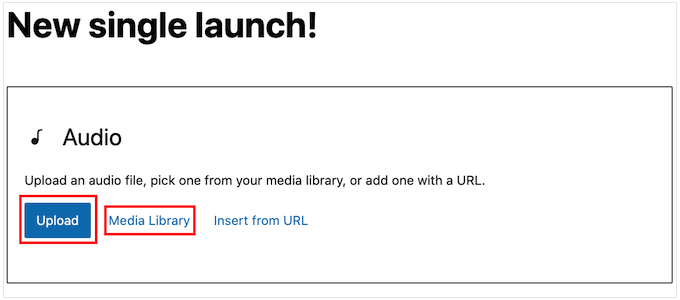
If you want to add an MP3 from the media library, simply click on ‘Upload’ and then choose the audio file that you want to use.
Another option is to click on ‘Media Library’ and then choose an MP3 from the WordPress media library.
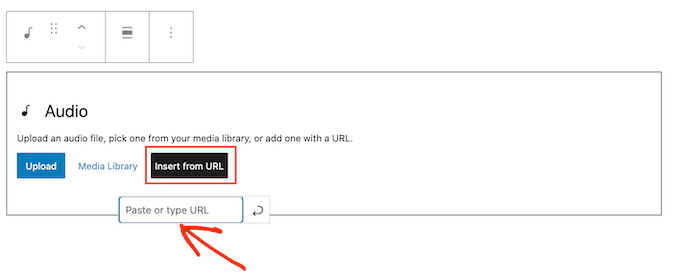
If you want to embed an MP3 from an external site, then you’ll need to click on ‘Insert from URL’ instead.
You can then paste the URL where this file is located.
Once you’ve done that, it’s a good idea to click on the Audio block to see the different settings that you can configure.
The settings you see may vary depending on whether you’re adding an MP3 from the media library or embedding audio from a third-party site. For example, you can often make the audio play automatically by clicking on the ‘Autoplay’ switch.
Audio that starts playing as soon as the page loads can be annoying, particularly if the visitor has the volume turned up loud. With that being said, you should only enable the ‘Autoplay’ switch if it improves the visitor experience in some way.
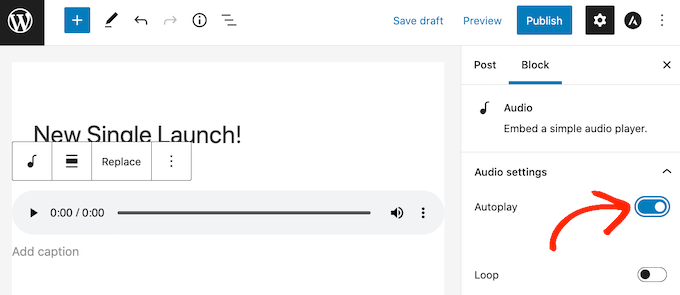
You can also often play the audio file on an endless loop by clicking on the ‘Loop’ switch. This tends to work the best for audio that’s not too distracting, for example an instrumental track that’s providing background noise or setting the atmosphere.
You may also want to enable looping for longer audio that visitors may want to listen to over and over, such as an entire album.
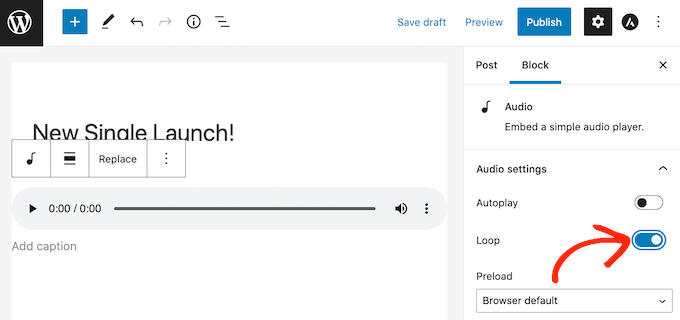
When you’re happy with how the page or post is set up, you can go ahead and publish or update it.
If you visit the page on your site, then you’ll see the MP3 live. Now anyone can listen to the audio for free using the block’s playback control buttons.
Method 2. How to Add MP3 Audio Files Using a WordPress Plugin (More Customizable)
The built-in Audio block is an easy way to add MP3 audio to your website, including embedding content from platforms such as SoundCloud. However, it is very limited especially when it comes to customizing how the audio player looks and acts.
If you want to add an audio file from the WordPress media library, then Html5 Audio Player is much more customizable. It is one of the best audio player plugins for WordPress and supports a few different audio formats including MP3s. Just be aware that you can’t use this plugin to embed content from third-party streaming services.
First, you’ll need to install and activate the plugin. If you need help, then please see our guide on how to install a WordPress plugin.
Upon activation, you’ll need to create an audio player and then add the MP3 to that player.
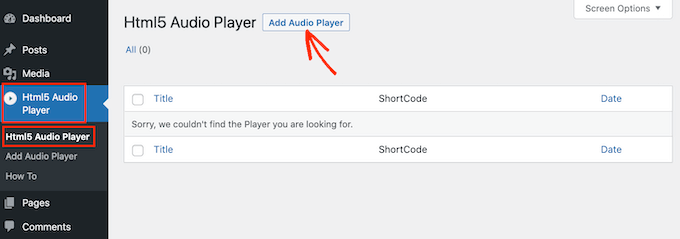
To get started, head over to Html5 Audio Player » Html5 Audio Player. Here, click on the ‘Add Audio Player’ button.
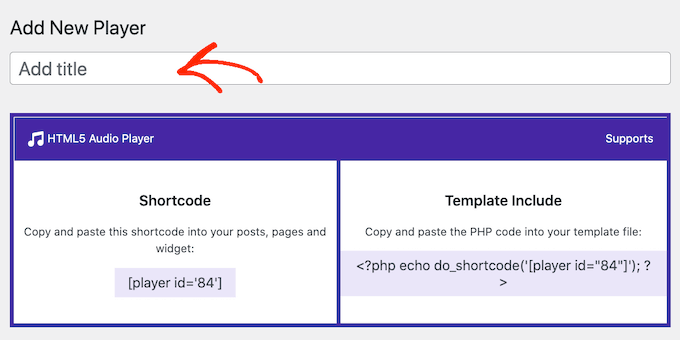
Once you’ve done that, type a name for the audio player into the ‘Add title’ field.
This is just for your reference, so you can use any title that you want.
After that, scroll to the ‘Player Configuration’ section.
Here, you can click on the ‘Add Audio’ button to launch the WordPress media library, and then choose the MP3 file that you want to use.
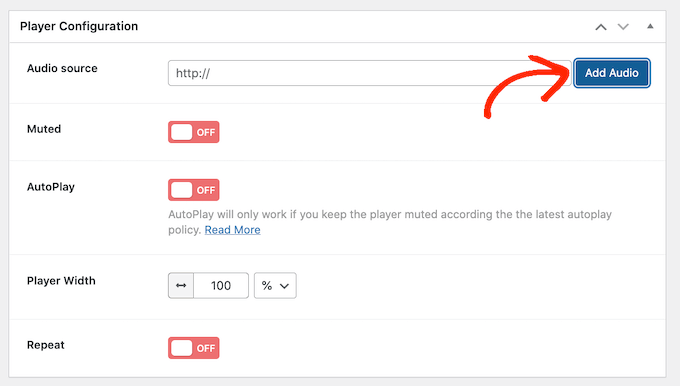
After choosing an MP3, you’re ready to customize the audio player. By default, the visitor just needs to click on the Play button and the audio will start playing with the volume already turned up.
This is how most visitors expect an audio player to act, so you’ll typically want to use these default settings. However, there are options to mute the audio by default, autoplay, repeat, and more.
When you’re happy with how the audio player is set up, simply click on the ‘Save’ button.
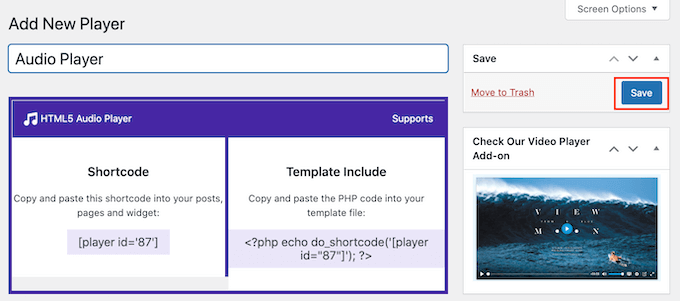
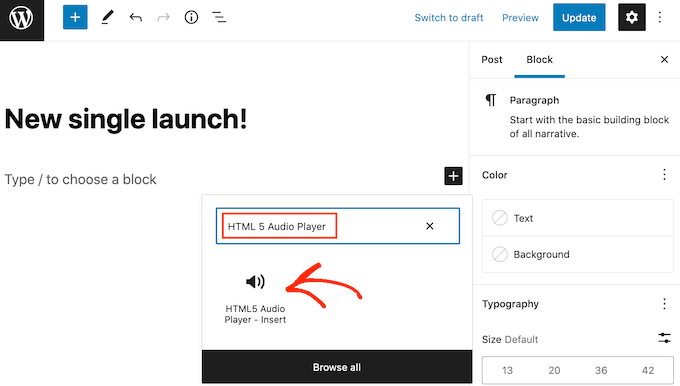
To add the MP3 file and audio player to your site, simply open any page or post. Then, click on the + button.
In the popup that appears, type ‘HTML5 Audio Player’ to find the right block. After that go ahead and click on ‘HTML5 Audio Player – Insert’ to add the block to your page.
Once you’ve done that, open the ‘Select a Player’ dropdown and choose the audio player that we just created.
The WordPress page editor doesn’t show the audio file, so you won’t be able to play the MP3 or see the player.

If you do want to see the player in action, then you can click on the ‘Preview’ link.
When you’re ready to post the MP3, either update or publish the page. Now if you visit this page on your WordPress website, you’ll be able to play the MP3 file.
Method 3. How to Add MP3 Files Using Easy Digital Downloads (And Make Money)
Both the built-in WordPress Audio block and Html5 Audio Player allow visitors to play your MP3 files for free. However, selling audio files is a popular way to make money online blogging with WordPress.
By default WordPress doesn’t have any eCommerce features, so you’ll need to use a plugin if you want to sell your MP3 files.
That’s where Easy Digital Downloads comes in. It is one of the best WordPress eCommerce plugins and lets you easily sell ebooks, PDF files, videos, MP3 audio files, and any other type of digital product.

Even better, if you’re using SiteGround as your hosting provider then Easy Digital Downloads comes pre-installed so you can start selling MP3s and other digital products straight away.
For more information on how to get started with Easy Digital Downloads, please see our beginners guide on how to sell digital downloads on WordPress.
Once you have Easy Digital Downloads set up, you can add each MP3 as a new product simply by clicking on ‘Downloads’ in the left-hand menu.
You can then go ahead and click on the ‘Add New’ button.
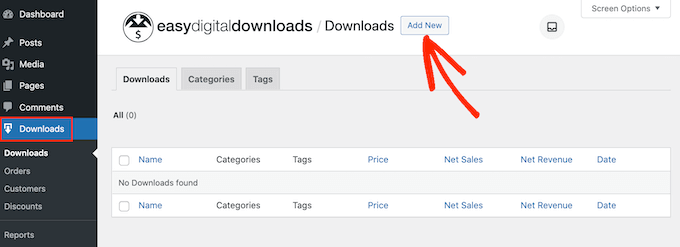
This opens a screen where you can create a product page for the digital download.
Here, you can add all the information about your audio file including its price, description, and any product categories and tags that you want to use.
Once you’ve done that, scroll to the ‘Download Files’ section and click on the icon that looks like a link.
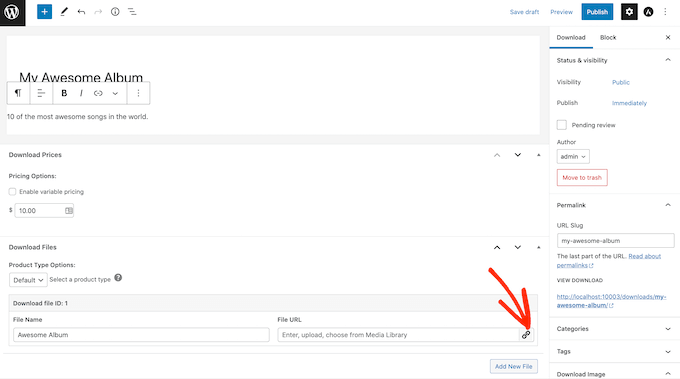
This will launch the WordPress media library where you can choose the MP3 that you want to sell on your site.
When you’re happy with how the product page is set up, simply click on ‘Publish.’
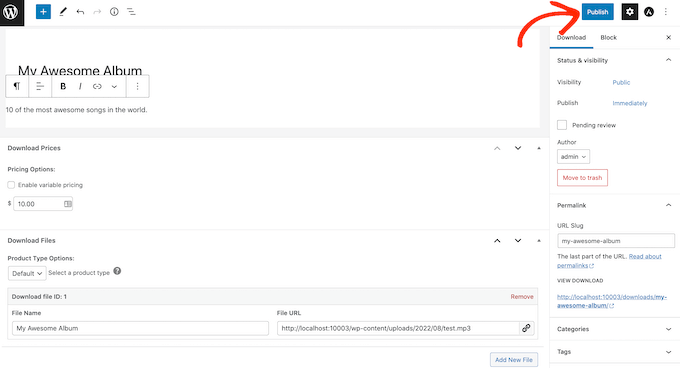
Now people will be able to buy your MP3 audio file simply by visiting your site.
We hope this article helped you learn how to add MP3 audio files in WordPress. You can also go through our guide on the best social media plugins and how to add web push notification to your WordPress site.
If you liked this article, then please subscribe to our YouTube Channel for WordPress video tutorials. You can also find us on Twitter and Facebook.




Syed Balkhi says
Hey WPBeginner readers,
Did you know you can win exciting prizes by commenting on WPBeginner?
Every month, our top blog commenters will win HUGE rewards, including premium WordPress plugin licenses and cash prizes.
You can get more details about the contest from here.
Start sharing your thoughts below to stand a chance to win!
christopher baxley says
Thanks for the help. My blog is 6 months old, I was having issues with uploading audio into a post. You gave a clear and understanding example on how to upload them. You’ve saved me a lot of heartache and frustration. thank you. Have a great day.
WPBeginner Support says
You’re welcome, glad our article could help
Admin
Glen Donohue says
How to get the MP3 in to blubrry press with out having to do it myself all the time should be a way for it to read rss and add it each time there is a new podcast?
Monique Stam says
This only works if you can afford WordPress Premium or better, as fas as I can tell.
Mike P. says
You might want to edit this post. Since 3.6 (we are on 4.X) WP can support native audio embedding. The plugin is not needed.
Michele says
Worked great, thanks!!
Carla says
This plugin is old, but the newest one, PB oEmbed HTML5 Audio – with Cache Support, is awesome!!! It is ridiculously easy to use. Just be sure to remove the extra code around the link that WordPress creates when you insert an MP3 file into a post or page.
By the way, for those who do not know how to insert an audio file into a post or page, add it just as you would a photo, using the Media button.
Alan Thompson says
Hello
I’m sure the solution above works very well for individual posts. Does anyone have any ideas how to integrate a music player which continues playing as the user browses to other pages /posts – like the bar across the bottom of the screen when you play a track at http://www.jamendo.com?
Regards
Alan
khuram khan says
thanku for sharing such a great idea …
roni says
How to play auto mp3 on website
Erin Dougherty says
There’s a media file mb limit of 10mb and my audio file is 11mb. How can you add a media file larger than 10mb or how can I reduce the size of my mp3 file in order to upload it to my wordpress site?
Duckworth says
Try uploading the file from inside a post or reduce the file size with any mp3 editors. There are billions of free tools out there. Neat,huh
kainer says
People, get rid of all plugins that not support their service on browsers like ie, chrome, firefox and mobile phones/pads. Why somebody still developing this shit?
You can not use plugins which only serve 50% of all internet users!
…..and if you see one of this half baked plugins: DON’T PROMOTE IT! It is useless.
THX for the article btw….
Editorial Staff says
I think you are misunderstood about the plugin’s compatability. It works with all browsers and have a backup Flash based player for MP3.
For other file formats OGG and WAV, it is not supported on IE 8, 9, and Safari. But again, we wrote this article for MP3 files, and this plugin supports that on all browsers. The wording on the plugins detail page might be confusing, but if you look carefully, there is a semi colon there that separates OGG, WAV – not supported.
Admin
Warren Horak says
Thanks for this post.
Just one problem, when I update it URL link appears in the post with no player ? How can I fix this?
Thanks
Warren
Osagie 'OsaGz' Alonge says
Has any noticed this plugin doesn’t work on mobile? Is there any audio player that can stream music on mobile platform?
Tim Hyde says
I recently discovered the oEmebed HTML5 Audio plugin which is really simple. I wanted a way to avoid using SoundCloud and their fees!
This plugin will embed the HTML audio player, with a flash backup for any mp3 url it finds in your post.
http://wordpress.org/extend/plugins/oembed-html5-audio/
This way you can store your audio anywhere. A public DropBox folder works pretty well and couldn’t be simpler.
Noumaan Yaqoob says
Tim actually this is the same plugin discussed in the article above. No doubt its a great plugin. The public dropbox idea is cool.
So basically you can just upload an audio file mp3 or ogg in Dropbox public folder. Get the link of the file from drop box and just paste it in posts.
Greg Davis says
It hasn’t been updated in a while but another good option has been the WordPress “Audio Player” plugin: http://wordpress.org/extend/plugins/audio-player/
Liam says
Thanks for sharing!
Jake says
Does this work well on mobile? I can imagine that it would be hard to click the buttons on an iPhone.
Andrew Ledwith says
I’ve been using Blubrry PowerPress to embed audio on several WP websites. I’ve been very pleased with its performance and robust set of options.