


Are you looking for a way to add excerpts to your pages in WordPress?
Excerpts are short extracts from your content that can add a description, summary, or small details about a post or page. By default, excerpts are only available for posts in WordPress.
In this article, we will show you how to easily add excerpts to your pages in WordPress, step-by-step.
Why Add Excerpts to Pages in WordPress?
WordPress comes with posts and pages as two default content types. Posts are displayed in reverse chronological order (latest to oldest) on your blog or homepage.
Pages, on the other hand, are stand-alone content not published in a time-specific order. They are typically used for one-off content like your about us or contact page.
Sometimes, you may need to display excerpts for your pages. For example, this can be handy if you have built a WordPress website using only pages.
Excerpts can provide a better overall user experience by making it easier for visitors to browse through your content and see a summary of your pages.
Having said that, let’s take a look at how to add excerpts to your pages in WordPress and display them on your website. You can use the quick links below to jump between different methods:
How to Add Excerpts to Pages in WordPress
You can enable page excerpts in WordPress by adding custom code to your theme’s functions.php file.
However, the smallest error while typing the code can break your website, and if you switch to a different theme or update it, then you will have to add the code all over again.
That is where WPCode comes in. It is the best WordPress code snippets plugin on the market that makes it safe and easy to add custom code to your website.
First, you must install and activate the WPCode plugin. For detailed instructions, see our step-by-step guide on how to install a WordPress plugin.
Note: WPCode has a free plan that you can use for this tutorial. However, upgrading to the pro version will give you access to a cloud library of code snippets, smart conditional logic, and the CSS snippet option.
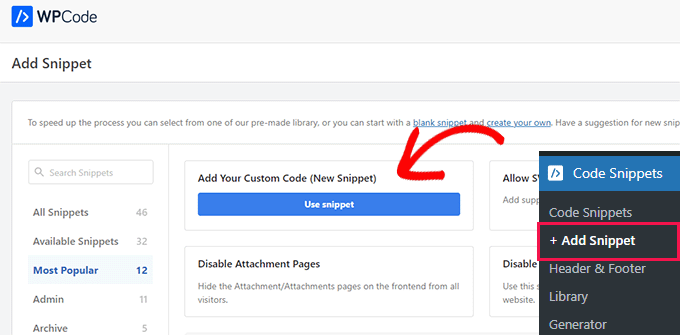
Upon activation, visit the Code Snippets » + Add Snippet page from the WordPress dashboard. Here, click the ‘Use Snippet’ button under the ‘Add Your Custom Code (New Snippet)’ option.
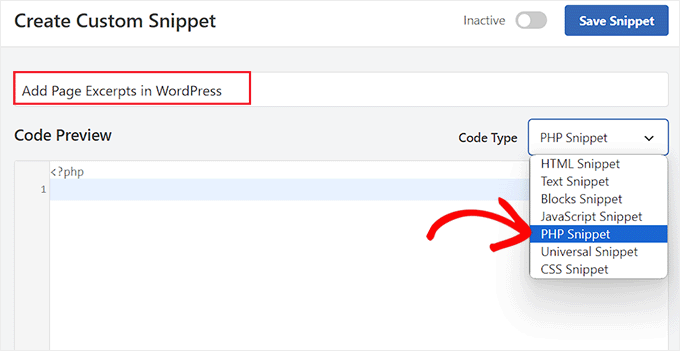
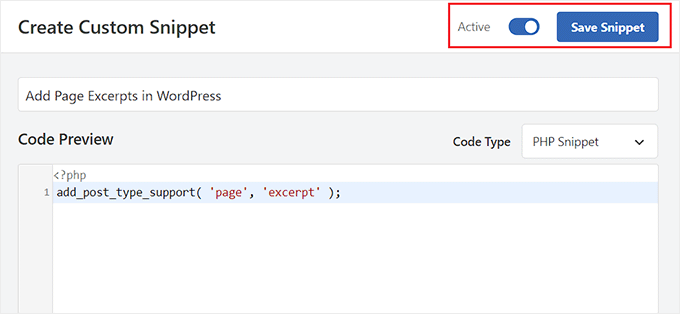
This will take you to the ‘Create Custom Snippet’ page, where you can start by adding a name for the snippet. This name is only for your identification and won’t be displayed on your website’s front end.
Next, select the ‘PHP Snippet’ option from the dropdown menu on the right.
Now, you must add the following custom code into the ‘Code Preview’ box:
add_post_type_support( 'page', 'excerpt' );
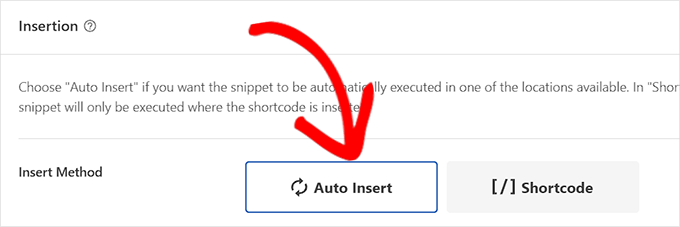
Once you do that, scroll down to the ‘Insertion’ section and choose the ‘Auto Insert’ mode.
The custom code will be automatically executed on your website once you activate the snippet.
After that, scroll back to the top of the page and toggle the ‘Inactive’ switch to ‘Active’.
Finally, click the ‘Save Snippet’ button to store your settings.
Now open the page where you want to add an excerpt in the WordPress block editor.
Once you do that, you will notice an ‘Excerpt’ tab in the block panel on the right side of the screen.
Here, you can easily expand the tab and add an excerpt for your WordPress page.
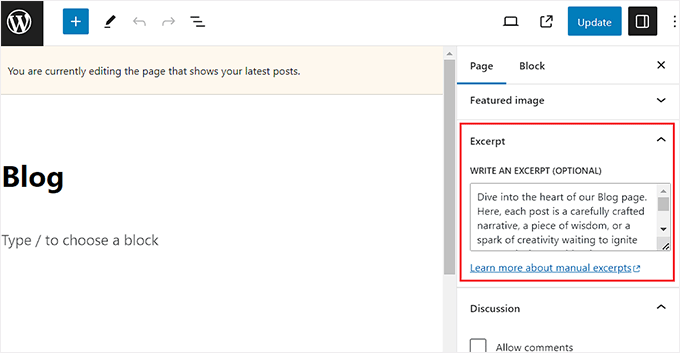
Once you do that, don’t forget to click the ‘Update’ or ‘Publish’ button to store your changes.
Now, simply repeat the process for all the WordPress pages where you want to add excerpts.
How to Display Page Excerpts in WordPress
Now that you have added the excerpt functionality to your pages, it is time to actually display these excerpts on your WordPress site.
To do this, you will need to add a shortcode to your widget area or page.
First, you must install and activate the Display Posts plugin. For more details, see our beginner’s guide on how to install a WordPress plugin.
This plugin will enable a shortcode that displays 10 recent pages with their title, excerpt, and a continue reading link.
If you didn’t enter a custom excerpt for a page, then the plugin will automatically generate an excerpt for the page with the default length of 55 words.
Method 1: Display Page Excerpts on a WordPress Page
Upon activation, you must create a new page where you want to display a list of your pages and their excerpts.
Once you are there, click the add block ‘+’ button to open the block menu and add the Shortcode block. Next, paste the following shortcode into the block itself:
[display-posts post_type="page" include_excerpt="true" excerpt_more="Continue Reading" excerpt_more_link="true"]
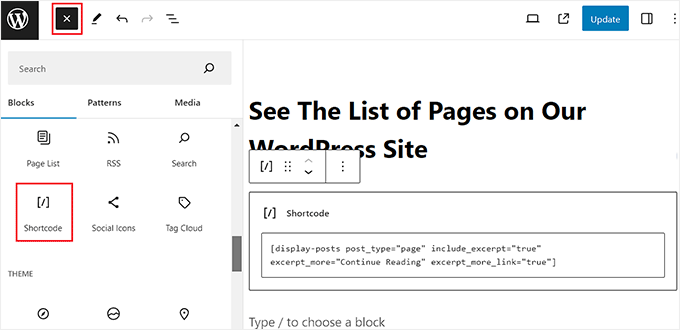
Finally, click the ‘Update’ or ‘Publish’ button to store your settings.
Now, just visit your WordPress site to view the list of page excerpts.
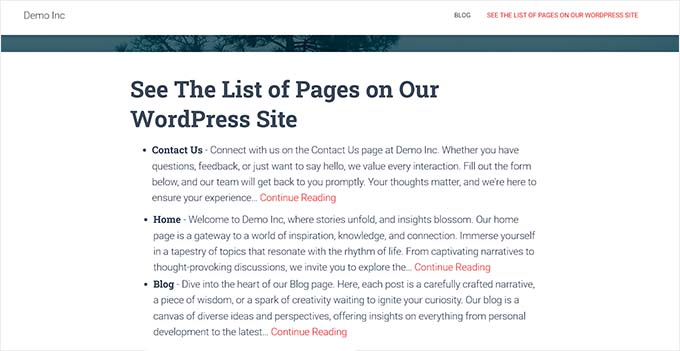
Method 2: Display Page Excerpts in the WordPress Sidebar
If you want to display page excerpts in the WordPress sidebar, then you must visit the Appearance » Widgets page from the WordPress dashboard.
Note: If you don’t see the ‘Widgets’ menu tab on your dashboard, then it means you are using a block theme. In that case, you can skip to the next method.
Here, click the add block ‘+’ button to expand the block menu on the left. Then, add the Shortcode block to the sidebar area.
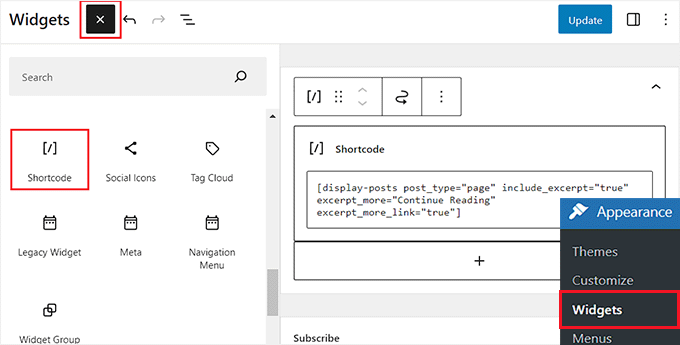
After that, copy and paste the following shortcode into the block:
[display-posts post_type="page" include_excerpt="true" excerpt_more="Continue Reading" excerpt_more_link="true"]
Finally, click the ‘Update’ button to store your settings.
Now, you can visit your WordPress blog to view the page excerpts.

Method 3: Display Page Excerpts in the Full Site Editor
If you are using a block theme, then you must visit the Appearance » Editor page from the WordPress admin sidebar.
This will open the full site editor, where you must choose the page where you want to display a list of page excerpts.
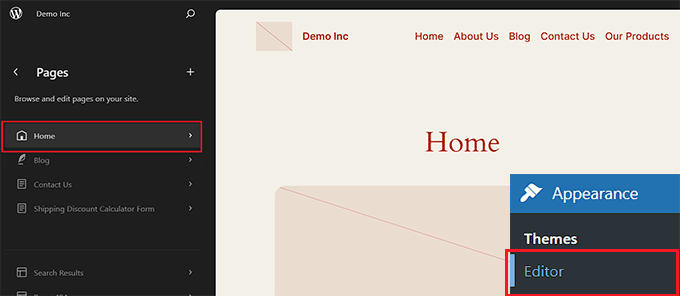
Next, click the add block ‘+’ button on the screen to add the Shortcode block.
Then, copy and paste the following shortcode into it:
[display-posts post_type="page" include_excerpt="true" excerpt_more="Continue Reading" excerpt_more_link="true"]
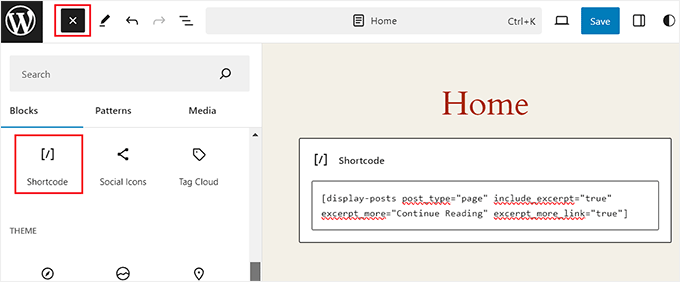
Finally, click the ‘Save’ button to store your settings.
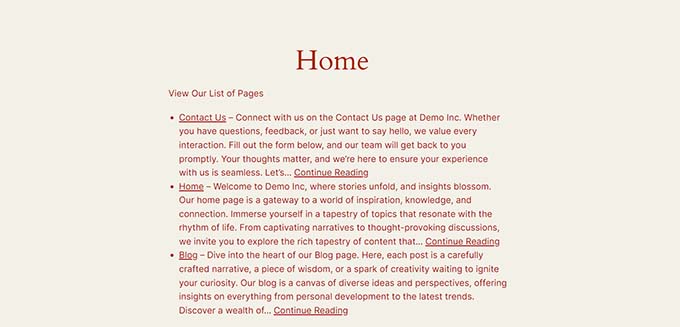
Now, go ahead and visit your website to view the list of page excerpts.
Bonus: Display Post Excerpts in WordPress
Other than pages, it is also a good idea to show post excerpts on your WordPress blog.
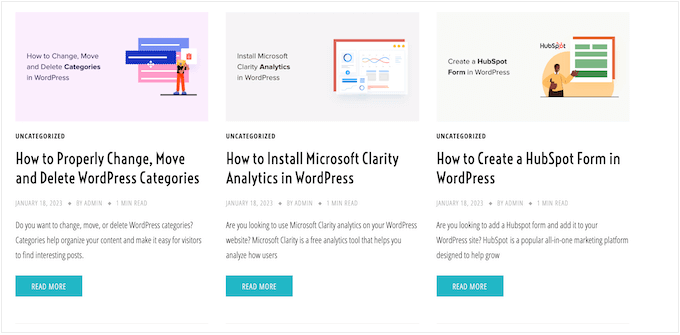
By default, WordPress shows your full-length posts on the homepage, archives page, or blog page. This means a lot of scrolling, which can provide a negative user experience to visitors who want to browse through your website quickly.
As your blog grows, the list of your older posts will also be pushed to other pages and get fewer views. That is why you should consider showing post excerpts on your blog or archives page.
If you are using a classic theme, then you can add post excerpts by visiting the Appearance » Customize page from the WordPress admin sidebar.
Once the customizer opens up, expand the ‘Blog’ tab in the left column of the screen. This will open some new settings where you can scroll down to the ‘Post Content’ section and click on the ‘Excerpt’ option.
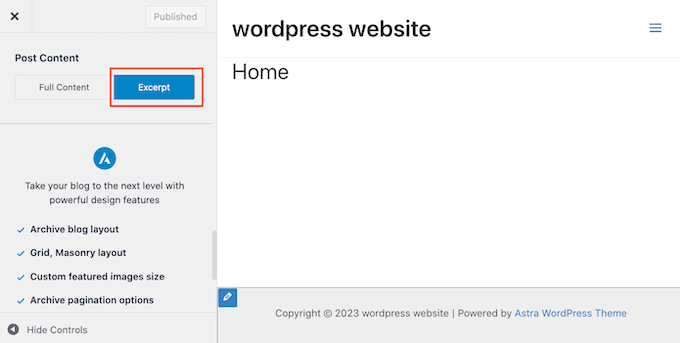
However, keep in mind that these settings can differ based on the theme that you are using.
If your theme does not support excerpts, then you can use custom code or page builders like SeedProd to add post excerpts to your blog.
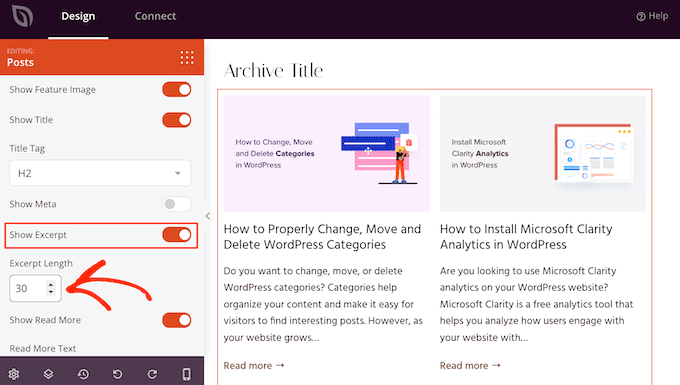
For detailed instructions, see our tutorial on how to display post excerpts in WordPress themes.
We hope this article helped you learn how to add excerpts to your pages in WordPress. You may also want to see our guide on how to choose the best website builder or our expert pick of the best live chat software.
If you liked this article, then please subscribe to our YouTube Channel for WordPress video tutorials. You can also find us on Twitter and Facebook.





Syed Balkhi says
Hey WPBeginner readers,
Did you know you can win exciting prizes by commenting on WPBeginner?
Every month, our top blog commenters will win HUGE rewards, including premium WordPress plugin licenses and cash prizes.
You can get more details about the contest from here.
Start sharing your thoughts below to stand a chance to win!
Moinuddin Waheed says
easy to follow tutorial for making excerpts for the blog posts.
I have used excerpts for most of my blog posts but didn’t know the exact length of the excerpts to use.
is there any minimum or maximum length for post excerpts?
and does the length of the excerpts make any difference advantage or disadvantage of seo?
WPBeginner Support says
For these questions we would recommend taking a look at our article below
https://wpbeginner.com/plugins/how-to-customize-wordpress-excerpts-no-coding-required/
Admin
Moinuddin Waheed says
Thanks wpbeginner for the reply and recommendation of the concerned article.
I have gone through this post and all my queries regarding experts and its usage stands resolved.
marcelo araujo says
Hi, great tip. Tks a lot! Its possible to use same param to get “tags” in pages?
add_post_type_support( ‘page’, ‘excerpt’ );
like:
add_post_type_support( ‘page’, ‘tags’ );
its correct? it works?
Tks!
WPBeginner Support says
To add tags and categories to pages, we would recommend taking a look at our article below!
https://www.wpbeginner.com/plugins/how-to-add-categories-and-tags-for-wordpress-pages/
Admin
Jim Kernicky says
Easy as pie – thanks a lot for that!
WPBeginner Support says
You’re welcome
Admin
Jean-Louis says
It’s very helpful… Thank you so much!
WPBeginner Support says
Glad our article was helpful
Admin
Adam says
So, I can’t find the “excerpt” option under “screen options” on the post/page editing page. I added the code to my functions.php file and the option to include the ‘excerpts’ is still not showing up. It’s as if the excerpts function doesn’t even exist on my install of wordpress. I added the following code and nothing changed:
add_post_type_support( ‘page’, ‘excerpt’ );
Please help
Juan Manuel Linares says
Thanks so much, it also worked for me, just when I needed it!
It would also be advisable that you suggest ppl to check Screen Options (as CTGIRL said), ’cause in my case it was hidden there
Thanks anyway!
Steve says
Is there a way to add an excerpt to an archive category page like with the code for pages? The following code worked great for pages. Wanting to add it to the category archive too.
add_post_type_support( ‘page’, ‘excerpt’ );
Ruth Billheimer says
Thank you so much! This is excellent and just what I was looking for.
Atilla says
Thank you for the code!
Djong Timoer says
I works !!
Thank you
Do you have idea how to use in post types?
Manoj says
Thanks for the code .But if i don’t write content in excerpt section , Excerpt is not retrieving from editior .
Amit kumar says
how to separate post excerpt in box
Sreehari P Raju says
You have to use CSS for that
Toure says
How can it be added to a page template?
nad ray says
You should wrap the code in :
…for it to work and not make your site break/display a blank page.
Reza says
How can I add excerpts to the events? Can anyone please help?
nad ray says
I would use the same code, but change page to events (line 3). If that does not work you need to find your events custom post type name and enter it instead of pages.
ctgirl says
The code worked for me. Added it to functions.php, and the Excerpt field became available in Screen options. Thanks so much!
kapil says
around 15 days ago, same above code work perfectly for me, but now it is not working, what may be the problem, can anyone help me ? above code doesn’t show excerpt place in admin panel for new website that I am developing right now.
Firda says
It’s working for me. Maybe the exceprt was hide by screen options?
João G. says
That’s amazing! I got a job to change the layout of a website which is running on WP and I would have to search for a function to get the content with “strip_tags” and reduce characters, but after “googling”, found your post. Great !!
Real name says
Tank’s
codex.wordpress.org/Function_Reference/add_post_type_support#Example
Julio says
Thanks! worked perfectly
Dave Andrew says
Worked a treat. Thanks for the post.
Owen says
Thanks your sharing
Lins says
Thanks, super-handy & works easily.
syndrael says
Thanks it works..
Alastair Barnett says
Hello,
I posted the above code to my functions php. I now cannot access my website. Here is the message I receive:Parse error: syntax error, unexpected T_FUNCTION in /home/content/94/8738594/html/wp-content/themes/associate/functions.php on line 82
Please tell me how I can access my website in order to delete this code. Thanks if you can help. I’ve just lost my website and in a bit of a panic. Website address: http://www.thewritingbutler.com
AB
Editorial Staff says
You pasted the code in a wrong place. Here is an article that you should consider before pasting any code from any website:
https://www.wpbeginner.com/beginners-guide/beginners-guide-to-pasting-snippets-from-the-web-into-wordpress/
You will have to use FTP to fix it.
Admin
WK says
Added the code to my functions.php to enable excerpts on my pages.
Worked perfectly, first time – thanks.
W.
mebhuwan says
Thank you for posting. Great Code.
mattrock says
A very handy function. Thanks for posting!
DanS says
Brilliant, thank you
softboxkid says
no need any plugins… just place this
add_post_type_support( 'page', 'excerpt' );
to your functions.phpEditorial Staff says
Thanks for adding this code. We will update the post soon.
Admin
ghimeray says
How to get this excerpt into the page?
Tne Excerpt function is working well, but i’m not able to get the excerpt into the front page.
adam says
This didn’t work for me. Still no excerpts option. Using default 2015 theme.