


Because WordPress is a publishing platform, there are options for content visibility that most beginners overlook. Have you ever thought about creating a blog post that you don’t want everyone to read? Maybe just for family members or close friends? Or maybe just very special group of your users? Well, in this post we will show you how you can protect your posts by requiring password, or even user registration.
When writing your post, there is an option called Visibility that is set to Public by default. If you click Edit, you will see options such as Password Protected and Private.
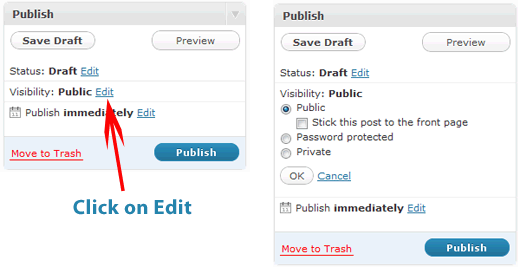
The easiest way to protect your post is by adding a password to it. You will simply select the password protected button, and add the password that you want. Then only the people (family/friends) who know the password will be able to see your post. This method works great for personal blogs, but what if you only want to share a post with your editors?
Then there is an option called private which will only show the post to users with Administrator and Editor user level. This method is often used to test out all errors within the post on a corporate level. But that may still not work for what you want.
There are other ways to protect your content that uses advanced mechanisms such as membership sites that we will cover soon.





Syed Balkhi says
Hey WPBeginner readers,
Did you know you can win exciting prizes by commenting on WPBeginner?
Every month, our top blog commenters will win HUGE rewards, including premium WordPress plugin licenses and cash prizes.
You can get more details about the contest from here.
Start sharing your thoughts below to stand a chance to win!
Zimbrul says
Incidentally I came across a lot of articles about WordPress membership recently and I was wondering if you can put together a series regarding the membership and the way to deal with content display and authorship on a multi-user WordPress site.
I know there are plugins that also hide a part of the article and only reveal the rest of the article only if you sign up for newsletter or Like or share the post…
Geertje says
Very curious about the promise you made in the last sentence: when will you be covering membership features/plugins?
Eileen says
I have password protect on a blog post, but then it will not allow comments on that post. The allow comments setting on the page is checked, any advice on how I can password protect and allow comments both on one post would be greatly appreciated!
Editorial Staff says
Not sure what could be the issue with that.
Admin
Allan Douglas says
I found the Private setting when I needed to take a page down but not delete it. I missed the pasword protect; that could come in very handy later on if I have a paid subscriber area. Thanks!
Anita York says
I set up a WordPress site for my high school class with password protection on certain pages with personal info. I got lots of complaints that the password would not work in IE.